Learn Cybersecurity With AI Tools on a Student Budget
Accuracy Warning — ChatGPT
AI may hallucinate outdated ports, commands, and non-existent tools; verify against official Security+ objectives and vendor documentation before saving.
- Accuracy:
- Moderate
- Tested:
- Security+ objective explanations and one-question-at-a-time quiz practice
- Last tested:
- 2026-08-25
If you are a student trying to learn cybersecurity with AI tools, the starting point is not a chatbot, a bootcamp ad, or a list of “top AI security platforms.” Start with the official exam blueprint. For a first certification path, that usually means the current CompTIA Security+ page and its published exam objectives; those objectives are the contract for what your study system must cover, and AI does not get to rewrite that contract. CompTIA’s Security+ page is the source to check for the current exam version, domains, and official materials before you build a plan around any assistant’s answer. [1]
The useful role for AI is narrower and more practical: explain an objective in student language, quiz you one question at a time, diagnose the domain you missed, help create mnemonics, and turn verified material into review. IT Dojo’s certification-study workflow is the cleanest version of this because it begins with the exam objectives, uses AI for active recall and gap diagnosis, and still warns that AI cannot replace hands-on skill. [2]

That is the whole rule for this stack: AI is allowed in as a study partner anchored to official objectives. It is not a source of truth. It is not proof that you can configure anything. It is not a substitute for a lab terminal.
The student-budget stack, last reviewed in Q3 2026
Most students do not need to buy everything at once. In Q3 2026, the sensible stack is mostly free: official objectives, one general AI assistant, NotebookLM when source-grounded notes matter, Anki or RemNote for spaced repetition, and TryHackMe for browser labs. Paid AI can wait unless you are hitting usage limits or need stronger technical explanations often enough to justify the bill.
| Tool | Best job in the system | Student-budget verdict |
|---|---|---|
| Official Security+ objectives | Define the scope; decide what counts as relevant | Non-negotiable. Check the current CompTIA page before trusting any plan. |
| ChatGPT | Everyday explanations, one-question-at-a-time quizzes, mnemonics, quick review prompts | Start free. StationX’s 2026 snapshot lists ChatGPT Free, Go at about $8/month, Plus at about $20/month, and Pro at about $200/month, but pricing changes frequently. [3] |
| Claude | Technical explanations, code walkthroughs, and clearer breakdowns of dense material | Useful when the free chatbot answer is too shallow. Do not make it the only quiz engine. |
| Gemini | Multi-document research and synthesis | Good research layer when you are comparing notes, docs, and study materials. |
| NotebookLM | Source-grounded summaries, study guides, and answers with citations from uploaded material | High-value for verification because it works from sources you provide and returns citations, as described in RemNote’s 2026 study-tool guide. [4] |
| RemNote or Anki | Spaced repetition after material has been checked | Retention layer. Use after verification, not before. |
| TryHackMe | Hands-on cybersecurity labs in the browser | Use the free guided material first. Lab work is where verbal understanding has to survive contact with a terminal. [5] |
The paid decision is usually simpler than students make it. If you are early in Security+, spend first on the exam voucher when you are near readiness, not on a pile of subscriptions. Voucher pricing varies by region and timing, and the Q3 2026 snapshot found Security+ voucher prices in roughly the $392–$439 USD range, so check the official purchase page before budgeting around a number. AI subscriptions are easier to start and cancel; exam fees are not casual money for most students.
There is also no need to pretend students are not already doing this. RemNote’s 2026 guide cites a Lumina Foundation-Gallup figure that 57% of U.S. college students were using AI weekly. [4] That number does not prove AI makes anyone better at cybersecurity. It does prove that “just don’t use AI” is not a study strategy.
A weekly workflow that does not let AI drift
A cybersecurity study week needs a loop, not a chat history. The loop below assumes Security+ because it gives beginners a clean objective list, but the same pattern works for networking, Linux basics, cloud security, or another first certification.
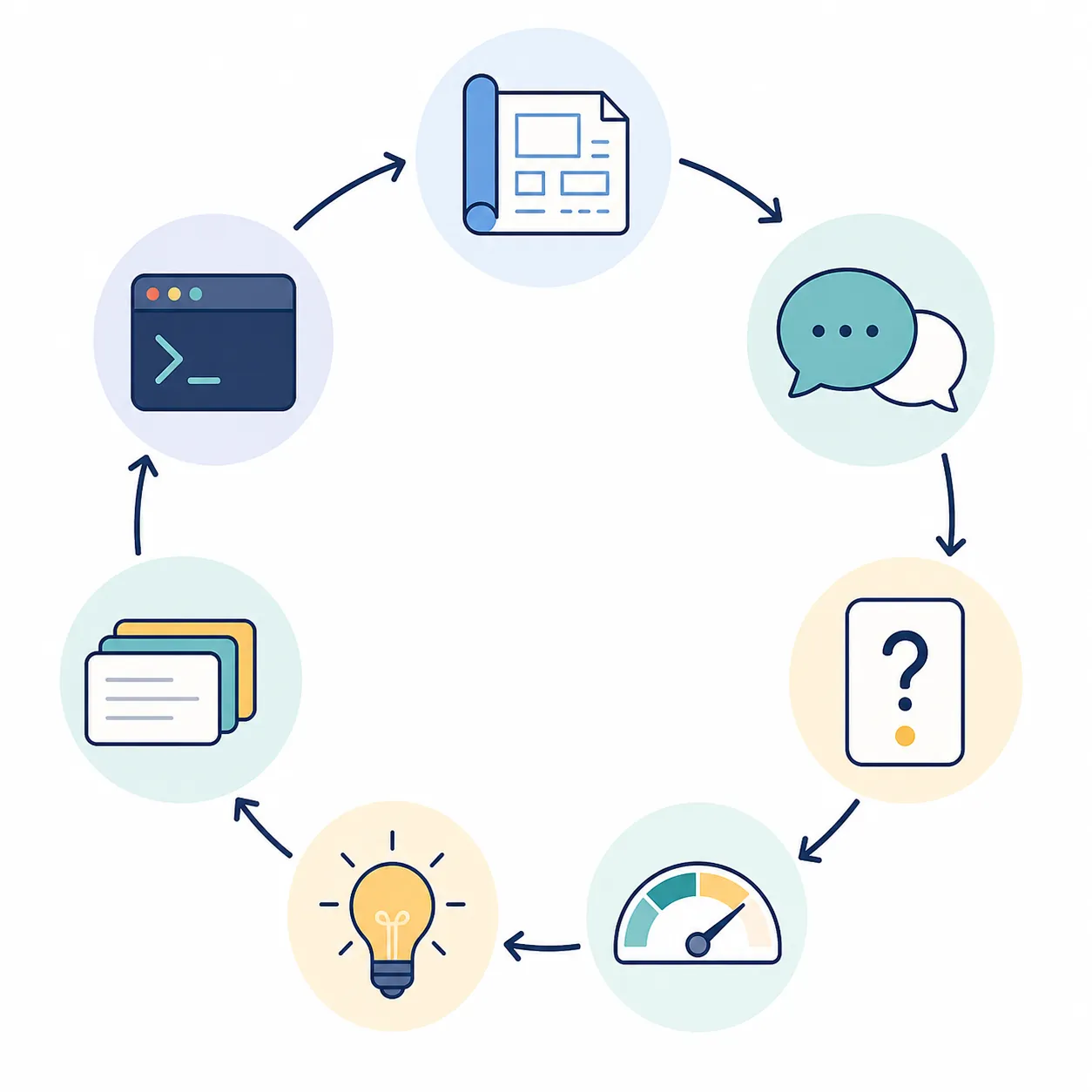
- Pick one official objective or a small cluster of related objectives from the CompTIA blueprint.
- Ask an AI assistant to explain only that objective, using plain language and beginner examples.
- Ask for one practice question at a time, answer before seeing the explanation, and do not batch-read questions like a worksheet.
- Log every miss by objective domain, not by vague topic labels like “networking stuff.”
- Verify any explanation, command, port, protocol claim, or definition before it becomes a note or flashcard.
- Turn only verified material into Anki or RemNote cards.
- Do a lab that forces the concept into practice, then record what still felt uncertain.
The one-question-at-a-time part matters. It is the difference between retrieval practice and scrolling through AI-generated content. If you ask for 25 questions and read the answers immediately, you may feel productive while doing very little recall. If you answer one question, commit, check, and then log the missed domain, the system has something to improve.
A useful starter prompt looks like this:
I am studying for CompTIA Security+. Use only this objective as the scope: [paste one official objective].

First, explain it in beginner-friendly language.
Then ask me one multiple-choice question at a time.
Do not show the answer until I respond.
After I answer, tell me:
1. whether I was correct,
2. why the right answer is right,
3. why my answer was wrong if I missed it,
4. which Security+ domain or objective I should review,
5. one short memory cue.

If you are unsure about a factual detail, say so instead of guessing.
That prompt will not magically make the assistant accurate. It does make the job narrow enough that you can check it. A chatbot asked to “teach me cybersecurity” can wander into tool trivia, stale commands, and confident filler. A chatbot asked to quiz one objective at a time has less room to perform.
What the study log should record
Do not make the log fancy. You need enough structure to see where the week went wrong.
| Date | Objective | AI task | Result | Verification source | Next action |
|---|---|---|---|---|---|
| Example | Security architecture objective cluster | One-question quiz | Missed concept: control type | Official objective list + vendor documentation | Create two flashcards; do related lab |
| Example | Threats and vulnerabilities objective cluster | Plain-language explanation | Still confused by difference between two attack categories | Source-grounded notes in NotebookLM | Ask for contrast examples, then quiz again |
The “verification source” column is the guardrail. If that column is blank, the material is not ready for a permanent note. It can sit in a scratchpad, but it should not become a flashcard you will rehearse for three weeks.
What each AI tool is allowed to do
The easiest way to waste money is to treat all AI tools as interchangeable tutors. They are not. Give each one a job and move on.
ChatGPT: the everyday explainer and quiz partner
ChatGPT earns the most daily use because it is quick enough for small study moves: explain this objective, give me one analogy, ask one question, rewrite this confusing paragraph, make a mnemonic, quiz me again tomorrow. StationX’s 2026 overview lists ChatGPT tiers from Free through Go, Plus, and Pro, with Plus shown at about $20/month in that snapshot. [3] If you are still building consistency, the free tier is usually enough to prove whether you will actually use the workflow.
The trap is passive friendliness. A pleasant AI explanation can make weak understanding feel finished. If that has been a pattern for you, use ChatGPT mainly for retrieval practice, not long lectures. The same warning shows up in broader student-AI habits: when AI carries too much of the thinking, you can mistake fluent output for your own memory. For a deeper look at that risk, see this site’s piece on cognitive offloading and student AI use.
Claude: use it when the explanation needs more technical patience
Claude deserves a place when a concept involves code, logs, command output, or a dense technical passage. StationX describes Claude as especially strong for technical and code explanation in its 2026 cybersecurity AI guide. [3] That does not make it a certification oracle. It makes it a good second explainer when a first answer leaves you nodding without being able to solve anything.
There is a useful cautionary case here. In a first-hand account, pjordan used Claude to generate CISM practice quizzes from a PDF of wrong-answer notes. The approach was practical: turn misses into targeted review. The snag was also practical: conversation-length limits and quiz rotation problems made the setup less smooth than the idea sounded. [6] That is the right lesson to take from AI quiz generation. It can be useful, but the quiz file is disposable, not sacred curriculum.
If Claude is unavailable or hitting limits, do not stop studying. Have a fallback. This site’s Claude study-alternative guide is useful for building that backup habit before a deadline week.
Gemini: the research and synthesis layer
Gemini fits best when you are comparing several documents or trying to make a study map from multiple sources. StationX positions Gemini as a research-synthesis tool in its 2026 cybersecurity AI overview. [3] That makes it useful for questions like, “Compare these two explanations of access control models,” or, “Turn these official objectives and my notes into a two-week review outline.”
Do not use synthesis as an excuse to avoid the objective list. The clean pattern is to upload or paste the relevant source material, ask Gemini to organize it, and then check whether the output still maps back to the official domains. For more detail on using it as an exam-prep layer, see the site’s Gemini AI exam prep guide and Gemini studying-features review.
NotebookLM: the safest place for source-grounded study notes
NotebookLM is the tool I would give special attention to if your main fear is hallucination. RemNote’s 2026 study-tool guide describes NotebookLM as answering from uploaded sources and returning citations, and it highlights that source-grounded pattern as a lower-hallucination setup. [4] For cybersecurity study, that matters more than polish.
A good NotebookLM session is not “teach me Security+.” It is more specific: upload official objectives, your class notes, a vendor documentation page you are allowed to use, or a verified PDF; then ask for a summary with citations. If the answer cannot point back to a source, treat it as unverified. Source-grounded tools are safer than open-ended chat, but they are still not automatically authoritative. A bad source uploaded into a source-grounded tool is still a bad source.
RemNote or Anki: only after the fact is checked
Flashcards are powerful precisely because they repeat. That is also why bad flashcards are expensive. If an AI invents a command or gives you a stale default-port claim and you turn it into a card, you are now scheduling the mistake into your future.
RemNote’s guide places RemNote and Anki in the spaced-repetition study-tool category. [4] Either can work. The decision is less important than the rule: cards come after verification. For a weekly rhythm, pair your cyber study with a spacing-and-retrieval plan like this site’s back-to-school study routine, then keep the card format simple.
- Good card: “Which Security+ objective domain covers this concept?”
- Good card: “What is the difference between these two verified terms?”
- Good card: “In this lab scenario, which control would reduce the risk?”
- Bad card: a copied AI paragraph you never checked.
- Bad card: a command you have not run in a lab or checked against documentation.
TryHackMe: the lab layer is not optional
TryHackMe belongs in the stack because it gives students guided, browser-based cybersecurity practice, including free training paths described in its own free-training guide. [5] Use it when a concept needs to become an action: reading output, recognizing a service, following a guided exploitation explanation, hardening a setting, or understanding why a control matters.
AI can prepare you for a lab. It can explain what you are seeing afterward. It should not be the only place where the concept lives. If you can define a term but cannot recognize it in a guided exercise, the system has found a weakness worth logging.
The verification routine that keeps AI useful
Cybersecurity is a bad place to memorize hallucinations. StationX’s 2026 guide names exactly the kinds of failures that matter here: outdated ports, invented commands, and non-existent tools. [3] Those are not harmless wording issues. A student can rehearse them, miss exam concepts because of them, or carry them into a lab and waste an hour debugging fiction.
Use this rule at every save point: official exam objectives and official or vendor documentation outrank AI output; source-grounded tools are safer but still need source quality; AI-generated practice questions are disposable until checked; lab results matter more than fluent explanations.
The save point is the important moment. It is fine to let ChatGPT draft a quick explanation in a scratchpad. It is not fine to paste that explanation into permanent notes without checking the claim it makes. It is fine to ask Claude for a practice question. It is not fine to assume the answer key is correct because the explanation sounds confident. It is fine to ask Gemini for a study map. It is not fine to let that map replace the official domain list.
For cybersecurity study, the verification routine can be short:
- Does this claim map to a current official objective?
- Can I confirm the definition, command, protocol behavior, or tool claim in official documentation or a trusted source?
- If this is a practice question, is the correct answer defensible from the objective and source material?
- If this is a hands-on concept, have I seen it in a lab or command output?
- Is this now safe to turn into a flashcard, or should it stay in scratch notes?
If you want a broader checklist for checking AI study output, use this site’s AI verification case study. The cybersecurity version is stricter because the downside of memorizing fake tooling is higher than the downside of a clumsy essay outline.
A realistic week for a student with limited money
Here is a workable rhythm if you have classes, work, or a commute and cannot turn certification prep into a full-time project. Adjust the days, but keep the order: objective, explanation, recall, verification, cards, lab.
| Day | Main action | Tool role |
|---|---|---|
| Day 1 | Choose one Security+ objective cluster and read the official wording carefully. | CompTIA page defines scope; no AI needed yet. |
| Day 2 | Ask ChatGPT or Claude for a beginner explanation and two examples. Rewrite the explanation in your own words. | AI explains; you still produce the final wording. |
| Day 3 | Run one-question-at-a-time recall for 15–25 minutes. Log misses by objective. | ChatGPT or Claude quizzes; your log decides the review target. |
| Day 4 | Upload verified notes or source material into NotebookLM and ask for a cited summary of the weak area. | NotebookLM grounds review in sources. |
| Day 5 | Create a small batch of flashcards only from checked material. | RemNote or Anki handles spacing. |
| Day 6 | Do a related TryHackMe room or guided lab. Write down what the lab made clearer or exposed. | TryHackMe tests practical understanding. |
| Day 7 | Review cards, retake a short quiz, and pick next week’s objective cluster based on misses. | AI helps generate review; the objective log sets direction. |
This is also how you decide whether to pay for anything. If the free chatbot, NotebookLM, Anki, and free labs are enough to keep the loop moving, postpone upgrades. If you are consistently hitting limits during real retrieval practice, not during procrastination, then a paid AI tier may be reasonable for a month. If your bottleneck is lab access or exam registration, the AI subscription may be the wrong place to spend first.
The same fallback logic applies when tools go down or change. Keep your flashcards, objective log, and source folder outside any single chatbot. For a backup stack that still lets you quiz and review when one assistant is unavailable, see ChatGPT study alternatives.
What not to overbuild
A little labor-market context can motivate a student, but it should not run the study plan. Broad job-growth projections, workforce-gap headlines, Reddit pass stories, and vendor-heavy AI-security trend pieces are not a weekly workflow. They also tend to blur different questions: whether cybersecurity jobs are growing, whether a specific certification helps, whether a student passed, and whether an AI tool improved learning.
Be especially careful with pass-rate claims. CompTIA does not publish official Security+ pass rates in the sources checked here, and third-party estimates should not be treated as official. A Reddit post about passing with free resources can be encouraging, but it is still a self-reported anecdote unless independently verified. Use stories for morale if they help; do not build your evidence standard around them.
Forward-looking certifications and “AI is changing cybersecurity” articles can wait until your foundations are stable. If you cannot explain access control, risk, identity, common attacks, basic network behavior, and security operations at the level your chosen exam expects, a shiny AI-security headline is a detour.
When AI is worth using
AI is worth using for cybersecurity study when every session can point back to the official blueprint, every saved note has been checked, every flashcard comes from verified material, and labs remain part of the week. That setup can make a no-bootcamp path much less chaotic.
If a tool starts replacing the objectives, the sources, the retrieval practice, or the hands-on work, it has stopped being a study partner and has become a liability.
References
- CompTIA Security+ — CompTIA
- How to Use AI to Study for and Pass Any IT Certification Exam — IT Dojo
- How To Use ChatGPT and AI for Cyber Security (2026) — StationX
- 7 Best AI Study Tools for Students in 2026 — RemNote
- TryHackMe’s Free Cyber Security Training: The Ultimate Guide — TryHackMe
- AI Hits: Claude and Prep for a Cybersecurity Exam — pjordan.substack.com
Authoritative source
No specific exam hub matched
Browse the exam hubs directory for the authoritative plan on any of the five exams.
Report an error in this tool's output
Found something this tool got wrong beyond what's documented above? Report it so the accuracy log stays current.
Comments
Join the discussion with an anonymous comment.