

Which Spaced Repetition Flashcard App Should You Use in 2026? A Buyer’s Guide Based on Your Study Bottleneck
Not all spaced repetition apps are equal. This guide helps high school, college, and professional students choose the right flashcard app by identifying their biggest study bottleneck — whether it’s card creation speed, algorithm precision, mobile access, or cost — and comparing the top tools on retention, daily time, and pricing.
Updated:
No Single App Fits Every Student — Here’s How to Find Yours
If you’ve read anything about study techniques in the last few years, you’ve heard the pitch: spaced repetition is the closest thing to a memory superpower. It’s true — the method is backed by decades of cognitive science. But here’s the problem that most buying guides gloss over: the app that works for a medical student cramming for Step 1 is not the same app that works for a high school sophomore trying to remember Spanish vocabulary. And the app that works for a self-learner with a desktop setup is not the same app that works for someone who only studies on a phone during a commute.
In 2026, the spaced repetition flashcard app market has split into two distinct camps. On one side, you have algorithm-first tools like Anki that give you surgical control over when you see each card. On the other, you have AI-first tools that prioritize speed of card creation — generating a deck from a PDF in under two minutes — but often use simpler scheduling logic. The gap between them is not just about features; it’s about what you’re willing to trade off.
This guide is built around a single question: what is your biggest study bottleneck? Is it the time it takes to make cards? The precision of the algorithm that schedules them? The fact that you need to study on a phone without internet? Or the cost of yet another subscription? Once you identify that bottleneck, the right app becomes obvious.
If you are entirely new to spaced repetition, start with our complete spaced repetition study method guide to understand the science. This article assumes you already know why it works and are ready to choose a tool.
The 5 Criteria That Actually Matter When Choosing a Flashcard App
Before we get into specific apps, let’s establish the framework. Every spaced repetition app can be evaluated on five dimensions. If you understand these, you can evaluate any new app that launches next year without needing another guide.
1. SRS Algorithm Quality
This is the engine. The algorithm determines when a card comes back for review. A good algorithm shows you a card right before you are about to forget it — maximizing retention while minimizing time spent. A bad algorithm either shows cards too often (wasting time) or too late (causing forgetting). In 2026, the gold standard is FSRS, which uses a 21-parameter model trained on roughly 700 million reviews from about 10,000 Anki users. The older SM-2 algorithm, created in 1987, uses a single ease factor per card and is significantly less precise. Some apps use confidence-based repetition (CBR), which lets you rate cards on a 1–5 scale and schedules them accordingly.
2. Card Creation Speed
This is the bottleneck that kills most students’ spaced repetition habits. Manually creating 50 well-structured flashcards takes about 2.5 hours. AI-powered tools can generate the same 50 cards from a PDF, a photo of notes, or an audio recording in under two minutes. If you have a heavy course load and need to generate hundreds of cards per week, card creation speed may be your most important criterion. If you are studying a small set of material and enjoy the process of making cards, manual creation may be fine.
3. Platform and Offline Access
Some apps are web-only. Some have native mobile apps. Some support full offline review. If you study on a subway, in a library basement, or anywhere without reliable internet, offline access is non-negotiable. If you primarily study at a desk on a laptop, web-only may be fine. Also consider whether the app syncs across devices — starting a session on your phone during a break and finishing on your laptop at home.
4. Pre-Made Content Library
For standardized exams like the MCAT, GRE, or USMLE, a pre-made deck can save dozens of hours. Anki has the largest shared deck library (AnkiWeb), with thousands of community-created decks. Quizlet also has a massive library of user-created sets, though the quality varies widely. Some AI-first tools have smaller or no shared libraries, meaning you must generate all your own content.
5. Pricing Transparency
Pricing in this space is volatile. Anki is free on desktop and Android, but the iOS app costs a one-time $25. Laxu AI charges $4.99 per month. Brainscape Pro costs $10 per month. StudyFetch charges $19 per month. RemNote Pro costs $8 per month. Some apps have free tiers with significant limitations. Always check the current pricing before committing — and look for apps that let you export your data so you are not locked in.
The Algorithm Divide: FSRS vs. SM-2 vs. Confidence-Based Repetition
The algorithm is the single most important technical differentiator between spaced repetition apps. If you choose an app with a weak algorithm, you will either study more than necessary or retain less. Here is what you need to know at the decision-making level.
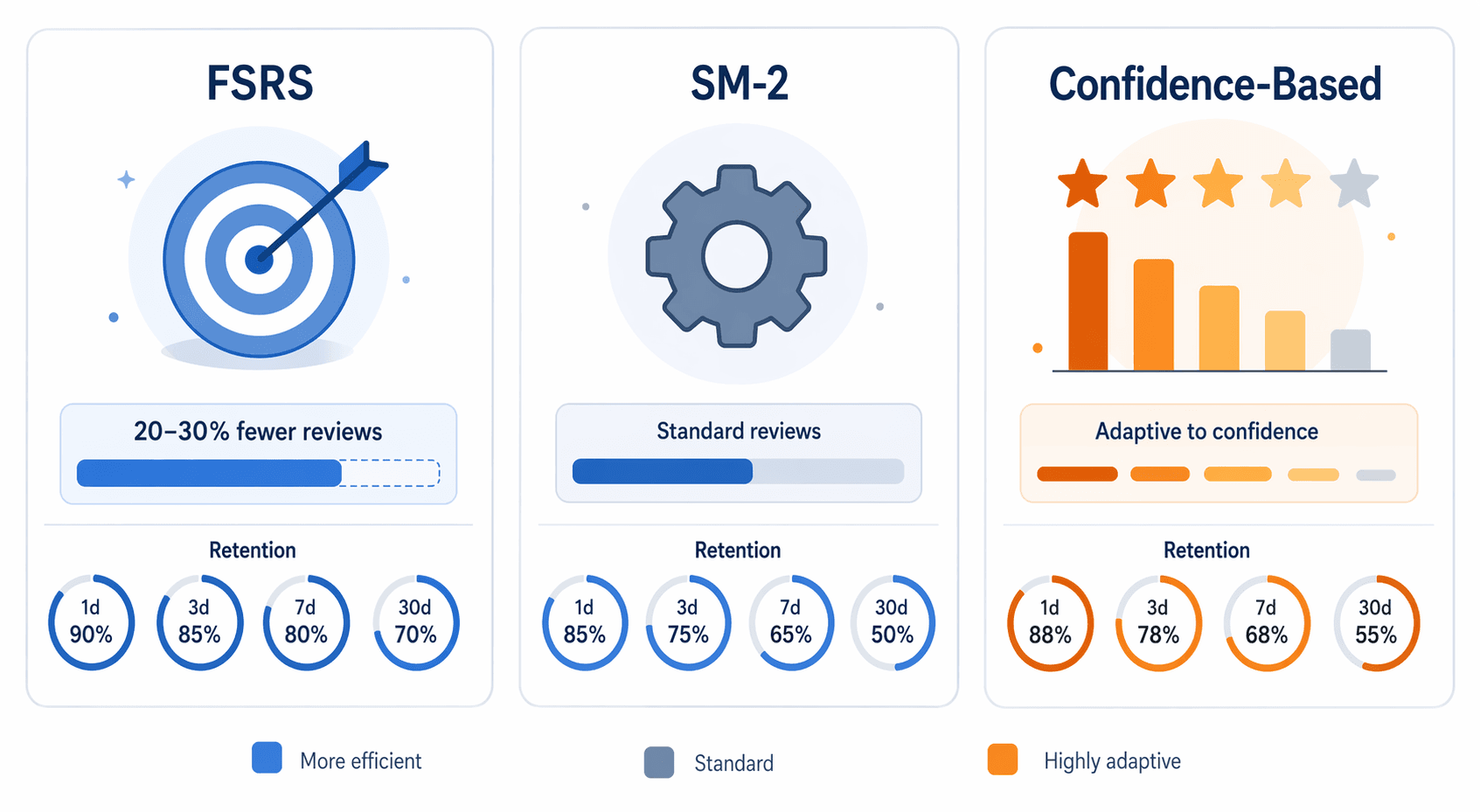
| Algorithm | How It Works | Key Advantage | Key Limitation |
|---|---|---|---|
| FSRS (2022) | Tracks three variables per card: Difficulty (1–10), Stability (days until recall drops to 90%), and Retrievability (current recall probability). Uses a 21-parameter model. | 20–30% fewer reviews than SM-2 for the same retention rate. Eliminates 'ease hell' through mean reversion of difficulty. | Requires ~1,000 reviews for meaningful personalization. Not available in all apps. |
| SM-2 (1987) | Uses a single ease factor per card (starting at 2.5). Four response buttons (Again, Hard, Good, Easy) adjust intervals. | Simple, well-understood, and available in many apps. Works adequately for small decks. | Prone to 'ease hell' — repeated failures drive the ease factor to the minimum, causing cards to appear every few days with no escape. Not designed for probability prediction. |
| Confidence-Based Repetition (CBR) | Users rate each card on a 1–5 confidence scale. Cards rated 1 appear frequently; cards rated 5 appear rarely. A 'fresh' algorithm runs each time a new card is selected. | Allows cramming — you can study cards rated 5 even if they are not technically 'due'. Intuitive for beginners. | Less precise than FSRS for long-term retention. The relative system means scheduling depends on user self-assessment, which can be unreliable. |
The open-spaced-repetition benchmark — the largest public comparison of SRS algorithms, using roughly 350 million filtered reviews from 10,000 Anki users — shows that FSRS-6 achieves a mean log loss of 0.344, while SM-2’s log loss is significantly higher. FSRS-6 has lower log loss for 99.6% of users. In practical terms, this means FSRS can maintain the same retention rate as SM-2 with 20–30% fewer daily reviews.
Brainscape’s Confidence-Based Repetition is a different beast. It is a relative system — it does not specify an exact due date for each card. Instead, it dynamically chooses a confidence bucket every time you select a new card. This makes it more flexible for cramming but less precise for long-term, optimized retention. For students who need to pass an exam in two weeks, CBR may be fine. For students who need to remember material for a board exam six months from now, FSRS is the better choice.
App-by-App Breakdown: Algorithm, Retention, Daily Time, and Pricing
The following table summarizes the top spaced repetition flashcard apps based on the five criteria above. The retention and daily time data come from a single test (Laxu AI’s 50-card pharmacology deck over 14 days with default settings) and should be treated as directional, not definitive.
| App | Algorithm | Day-14 Retention | Daily Study Time (50 cards) | Pricing (as of Q2 2026) | Best For |
|---|---|---|---|---|---|
| Anki | FSRS (default) or SM-2 | ~89% | ~15 min | Free (desktop/Android); $25 one-time (iOS) | Students who want maximum control and algorithm precision |
| Laxu AI | Adapted SM-2 (mastery-based) | ~87% | ~12 min | $4.99/mo | Students who need fast AI card generation from PDFs, photos, or audio |
| Brainscape | Confidence-Based Repetition | ~82% | ~14 min | $10/mo (Pro) | Students who prefer intuitive confidence ratings and cramming flexibility |
| RemNote | SM-2 (with FSRS in beta) | ~83% | ~18 min | Free tier; $8/mo (Pro) | Students who want integrated note-taking and flashcards |
| Quizlet | Basic adaptive (not true SRS) | ~74% | ~12 min | Free tier; ~$2.99/mo (Plus, annual) | Casual learners and quick vocabulary review |
| StudyFetch | Proprietary | ~71% | ~15 min | $19/mo | Students who want AI-generated study materials from course content |
| Knowt | Proprietary | ~72% | ~10 min | Free tier; paid tier available | Students looking for a free Quizlet alternative with AI features |
Anki
Anki remains the gold standard for algorithm precision. With FSRS enabled, it delivers the highest retention rate in the test (~89%) and requires fewer reviews than SM-2-based apps to maintain that retention. The trade-off is card creation speed: manually creating 50 cards took 2.5 hours in the Laxu AI test. Anki also has the largest library of pre-made decks, making it the go-to choice for standardized exam prep (MCAT, GRE, USMLE). The iOS app costs $25, but the desktop and Android versions are free. For a full review, see our Anki Flashcard App Review. For setup guidance, see our Anki settings guide for beginners (FSRS edition).
Laxu AI
Laxu AI closes the card creation gap. It generates 50 cards from a PDF, photo of notes, or audio recording in under 2 minutes, achieving 87% retention — close to Anki’s 89%. Its adapted SM-2 algorithm uses mastery level as the ease factor, with intervals growing exponentially (1 day, 3 days, scaled by 1.3x to 3.3x). At $4.99 per month, it is one of the most affordable AI-powered options. It also supports export to Anki format (.apkg files), enabling a hybrid workflow: generate cards with AI, then schedule them with Anki’s FSRS algorithm. This is the strongest recommendation for students who need both speed and precision.
Brainscape
Brainscape’s Confidence-Based Repetition is intuitive — you rate each card on a 1–5 scale, and the app adjusts frequency accordingly. It achieved 82% retention in the test, which is respectable but below FSRS-based apps. Its key advantage is flexibility: you can study cards rated 5 even if they are not technically due, making it suitable for cramming. The Pro tier costs $10 per month. Brainscape is best for students who find Anki’s interface intimidating and prefer a more guided, confidence-based approach.
RemNote
RemNote combines note-taking with spaced repetition flashcards. It uses SM-2 by default, with FSRS in beta. It achieved 83% retention in the test, with the highest daily study time (18 minutes) for 50 cards. RemNote Pro costs $8 per month. It is best for students who want to take notes and create flashcards in the same workflow, but the higher daily time cost suggests its current algorithm may be less efficient than FSRS-based alternatives.
Quizlet
Quizlet’s Learn mode is not true spaced repetition. It uses basic adaptive showing of missed cards without interval-based scheduling. It achieved 74% retention — the lowest among the major apps tested. The 15-point gap between Quizlet (74%) and Anki (89%) on a 200-question exam could mean remembering 148 answers versus 178 answers, potentially a difference of two letter grades. Quizlet is fine for casual vocabulary review but should not be your primary tool for high-stakes exam preparation.
StudyFetch and Knowt
StudyFetch ($19/month, web-only) and Knowt (free tier available) are AI-first tools that achieved 71% and 72% retention respectively. Both are significantly below the FSRS-based apps. StudyFetch’s lack of a native mobile app is a major limitation. Knowt is a reasonable free alternative to Quizlet, but neither should be your first choice if retention is your priority. For a detailed comparison of AI flashcard generators, see our head-to-head AI flashcard generator comparison.
Decision Framework: Choose X If You Need Y
Here is the core actionable output of this guide. Identify your biggest bottleneck below, and the recommendation will follow.

| Your Biggest Bottleneck | Best App(s) | Why |
|---|---|---|
| Fast card creation (you need to generate hundreds of cards per week from PDFs, lectures, or notes) | Laxu AI (generate) + Anki with FSRS (schedule) | Laxu AI generates 50 cards in under 2 minutes and exports to Anki format. Anki’s FSRS algorithm then schedules them with maximum precision. This hybrid workflow gives you both speed and retention. |
| Maximum retention (you are preparing for a high-stakes exam months away) | Anki with FSRS | Anki achieved the highest retention (89%) in the test. FSRS reduces reviews by 20–30% compared to SM-2, meaning you retain more with less daily time. The pre-made deck library is unmatched for standardized exams. |
| Mobile-first access (you study primarily on a phone, often without internet) | Anki (Android free, iOS $25) or Brainscape | Anki has full offline support on both platforms. Brainscape also supports offline review. Web-only apps like StudyFetch are not suitable for this use case. |
| Budget limit (you need a free or very cheap option) | Anki (free on desktop/Android) or Knowt (free tier) | Anki’s desktop and Android versions are free. The iOS app is a one-time $25. Knowt has a free tier with AI features, but retention is lower (72%). Avoid paid subscriptions if budget is the primary constraint. |
| Pre-made content (you want to use existing decks for MCAT, GRE, or USMLE) | Anki | AnkiWeb has the largest library of community-created decks for standardized exams. No other app comes close in terms of volume and variety. |
| Ease of use and intuitive interface (you find Anki overwhelming) | Brainscape or Laxu AI | Brainscape’s 1–5 confidence rating is intuitive. Laxu AI’s AI generation workflow is straightforward. Both have cleaner interfaces than Anki’s default setup. |
Practical Tips for Stacking Tools and Building a Sustainable Routine
The best setup for many students is not a single app but a combination of tools. Here is how to build a workflow that lasts.
- Generate cards with an AI tool, schedule with Anki. Laxu AI supports export to Anki format (.apkg files). Use it to generate cards from your course materials, then import them into Anki with FSRS enabled. This gives you the best of both worlds: fast creation and precise scheduling. For more on AI generation workflows, see our AI flashcard generator guide.
- Start small. The biggest reason students abandon spaced repetition is that they create too many cards too quickly and get overwhelmed. Start with 10–20 new cards per day. Review takes 5–10 minutes. After two weeks, increase to 30–50 cards per day if the habit feels solid.
- Integrate with active recall and retrieval practice. Spaced repetition is most effective when combined with active recall — the act of pulling information from memory rather than re-reading it. For a weekly schedule that combines these techniques, see our retrieval practice weekly schedule guide.
- Do not skip days. Consistency matters more than session length. A 5-minute review every day is more effective than a 30-minute review once a week. The algorithm depends on regular feedback to optimize intervals.
- Review your retention stats. Anki and FSRS-based apps show your retention rate. If it drops below 85%, you may be adding too many new cards or your intervals are too long. Adjust your settings or reduce your daily new card limit.
Frequently Asked Questions
Is Quizlet really spaced repetition?
No. Quizlet’s Learn mode uses basic adaptive showing of missed cards — it does not implement true interval-based scheduling. In the Laxu AI test, Quizlet achieved 74% retention compared to Anki’s 89%. For high-stakes exam preparation, Quizlet is not a substitute for a proper spaced repetition app. It is fine for casual vocabulary review or quick practice.
How many reviews do I need to optimize FSRS?
FSRS requires at least ~1,000 reviews for meaningful personalization. Before that, it uses default parameters that are still better than SM-2 for most users. After you have accumulated enough reviews, run the optimizer in Anki to calibrate the algorithm to your specific memory patterns.
Can I export cards between apps?
Yes, but the ease depends on the apps. Anki uses the .apkg format, which is widely supported. Laxu AI exports to .apkg, enabling a generate-in-AI, schedule-in-Anki workflow. Quizlet allows export to CSV or text files, which can be imported into Anki with some formatting work. Brainscape and RemNote have more limited export options. Always check export capabilities before committing to a paid subscription.
What if I cannot afford a paid app?
Anki is free on desktop and Android. The iOS app costs a one-time $25, which is cheaper than a few months of most subscriptions. Knowt has a free tier with AI features, though retention is lower. If you are a student on a tight budget, start with Anki on desktop or Android. You can always upgrade later if you need AI generation features.
Which app is best for medical school or MCAT prep?
Anki with FSRS is the standard recommendation for medical students. It has the largest library of pre-made decks (e.g., AnKing, Lightyear, JackSparrow for MCAT and USMLE), the most precise algorithm, and full offline support. The trade-off is manual card creation time, which can be mitigated by using an AI tool like Laxu AI to generate cards and then importing them into Anki. For more on this, see our AI flashcard generator guide.
Comments
Join the discussion with an anonymous comment.