
AI Flashcard Generator Guide: How They Work and How to Use Them Effectively
Accuracy Warning
This tool's exam-prep accuracy has not been fully characterized.
What Is an AI Flashcard Generator?
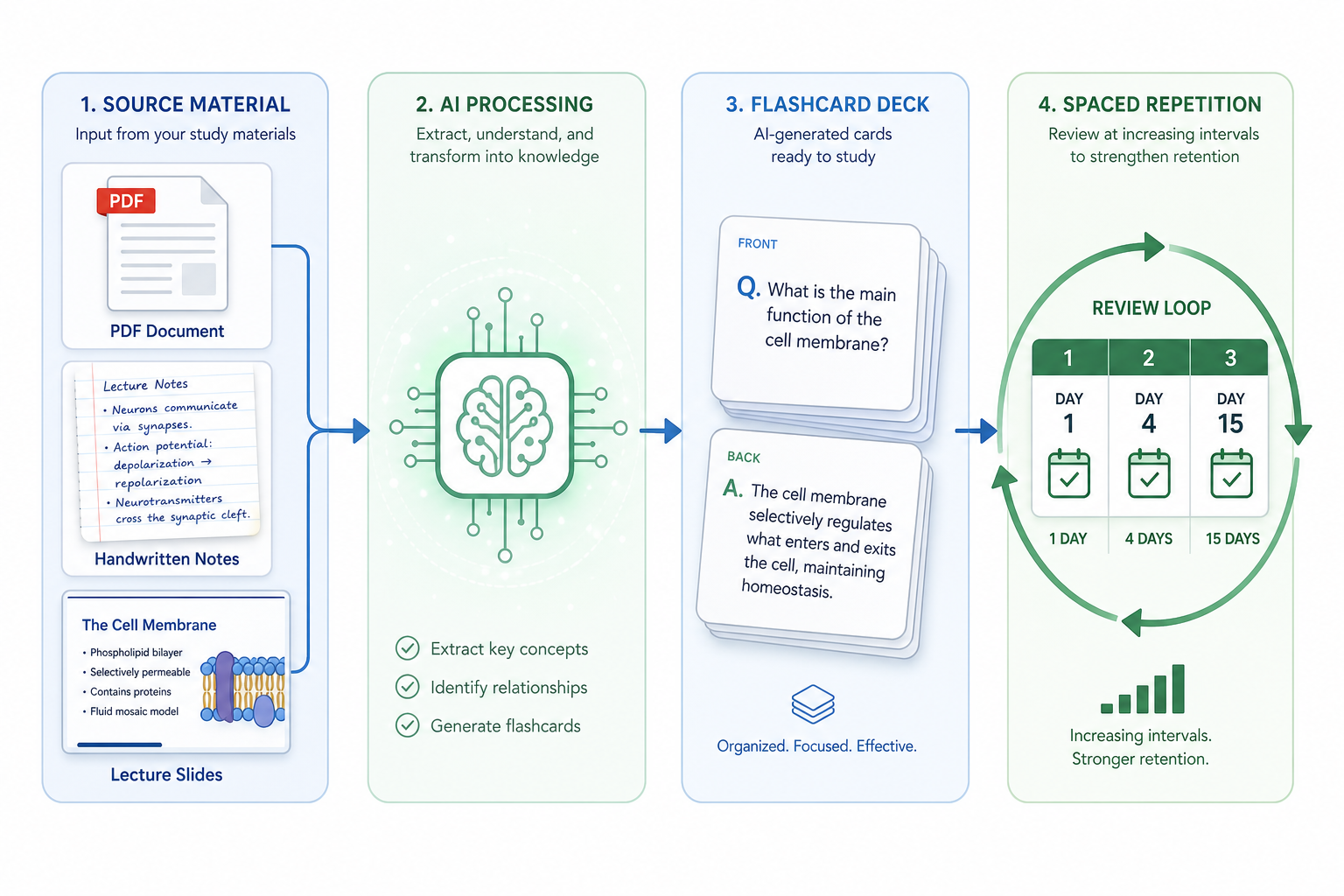
An AI flashcard generator is a tool that takes source material — a PDF, a set of typed notes, a lecture transcript — and automatically produces a set of question-and-answer cards from it. Instead of writing each card by hand, you upload your material, the AI processes it, and you get a working deck in minutes.
That is the surface-level description. What actually makes it different from a manual deck builder is where the cognitive effort goes. When you create flashcards by hand, most of your time is spent deciding what to turn into a card, how to phrase the question, and typing it all out. With an AI generator, that drafting work is handled automatically. Your job shifts to reviewing, correcting, and curating what the tool produces — a fundamentally different task, and a more efficient one for most students.
Under the hood, most AI flashcard tools use natural language processing to parse the structure of your source material. The model looks for signals of importance: section headings, bolded terms, definition patterns, numbered lists, and repeated concepts. It then converts those identified concepts into card pairs — typically a question on one side and an answer on the other. More sophisticated tools can also generate cloze deletions (fill-in-the-blank), scenario cards, and comparison cards, though this usually requires better prompting or post-editing.
What an AI flashcard generator is not: it is not a quiz app that tests you on pre-built content, and it is not a passive reading tool. It is a card-creation accelerator. The value comes from what you do with the output — specifically, whether you review it critically and connect it to a system that schedules your reviews over time. Without those two steps, faster card creation does not translate into better retention. The rest of this guide is about making sure those steps happen.
How AI Flashcard Generation Works Under the Hood
The generation process starts with your input. Most tools accept PDFs, plain text, and typed or pasted notes. A growing number also handle PowerPoint slides, image-based documents, and audio transcripts. The format matters because it affects how cleanly the AI can parse your material — a well-structured PDF with clear headings gives the model much more to work with than a photo of handwritten notes or an unformatted text dump.
Once the input is processed, the model identifies candidate concepts. It does this by analyzing text hierarchy — headings signal topics, bold or italicized terms signal vocabulary, definition sentences signal Q&A pairs, and numbered lists signal sequential or enumerable content. The model assigns weight to these signals and generates cards for the concepts it judges most likely to be significant.
The default output for most tools is a basic question-and-answer pair: a question derived from the concept and a short answer pulled from the surrounding text. This is fast to generate and easy to review, but it tends toward surface-level recall — testing whether you recognize a definition rather than whether you can apply a concept. More advanced card types require either a more capable model, specific prompting, or manual editing after generation.
The practical implication is that the quality of what you put in sets a ceiling on what comes out. A lecture slide deck with clear headings, bolded key terms, and explicit definitions will produce a significantly better initial deck than a wall of unformatted prose. This is not a limitation to work around — it is a reason to think about source preparation as part of your workflow, not as an afterthought.
Three Types of AI Flashcard Tools
Not all AI flashcard tools work the same way, and the differences matter for how you integrate them into a study workflow. There are three distinct categories, each with different trade-offs around automation depth, accuracy control, and spaced repetition integration.
Standalone AI Generators
These are purpose-built tools whose primary function is generating flashcards from uploaded source material. You upload a PDF or paste text, the tool produces a deck, and you review and export. They typically offer the most seamless input-to-card pipeline and support the widest range of source formats (PDFs, slides, audio). The trade-off is that most of them have limited or no built-in spaced repetition — you will need to export to Anki or another SRS system to get the scheduling benefits.
SRS-First Apps with AI Features Added
These are established flashcard or note-taking apps that have added AI generation as a feature on top of their core spaced repetition system. Examples include
Examples in this category include Quizlet (with its Magic Notes AI generation feature), RemNote (which integrates AI card generation directly into its note-taking and SRS workflow), and Anki with community add-ons that add AI generation capabilities. The advantage here is that your cards land directly inside a proven spaced repetition system. The trade-off is that AI generation is often secondary to the core product — it may be less polished, less flexible in input formats, or gated behind a paid tier.
Raw LLM Prompting with Manual Export
This approach uses a general-purpose language model — ChatGPT is the most common — with a carefully written prompt to generate cards from pasted text, then manually copies the output into a flashcard app. It requires the most manual effort but gives you the most control over card type and phrasing. A well-crafted prompt can request a specific mix of Q&A, cloze, and comparison cards tailored to a subject. The downside is that this approach has no automation pipeline — every step from input to deck requires manual action, and there is no built-in export to Anki or any other SRS.
Source-grounded tools like NotebookLM occupy a related but distinct space — they generate study materials anchored to your uploaded documents rather than drawing on general training data, which reduces (but does not eliminate) hallucination risk for factual content.
| Tool Type | Automation Depth | SRS Integration | Accuracy Control | Best For |
|---|---|---|---|---|
| Standalone AI generator | High — full pipeline from upload to deck | Limited — export required | Moderate — requires curation pass | Students who want fast generation and will export to Anki |
| SRS-first app with AI | Moderate — AI is an add-on feature | Built-in — cards go directly into SRS | Moderate — depends on the app's AI quality | Students who want an all-in-one system |
| Raw LLM prompting | Low — every step is manual | None — manual export required | High — full control over prompting and output | Students who want precise card types and phrasing |
How to Choose the Right Tool for Your Situation
The right tool depends on your specific situation, not on which product gets the most favorable reviews. Before choosing, work through these four questions.
- What format is your source material in? If you primarily work from PDFs and lecture slides, a standalone AI generator or a well-integrated SRS app will handle those formats most smoothly. If your notes are handwritten or in a format that requires transcription first, factor in that additional step.
- How much time can you spend on curation? All three tool types require a curation pass — reviewing and editing the generated deck before studying it. If you have very limited time, a standalone generator with a fast review interface may be more practical than a raw LLM approach that requires more manual assembly.
- Do you need built-in SRS, or will you export to Anki? If you already use Anki and have an established review habit, exporting from a standalone generator is a natural fit. If you are starting from scratch and want everything in one place, an SRS-first app with AI features reduces the number of tools you need to manage.
- What is your budget? Free tiers exist across all three categories, but meaningful AI generation features are often gated behind paid plans. Raw LLM prompting via a free ChatGPT account is a genuinely useful zero-cost option, at the cost of more manual effort. The quality gap between mid-tier and high-tier paid tools in the standalone generator category is often smaller than the price difference suggests.
| Your Situation | Recommended Starting Point |
|---|---|
| PDFs and slides as primary source material, already use Anki | Standalone AI generator with Anki export |
| Want everything in one system, new to flashcard apps | SRS-first app with AI features (e.g., RemNote or Quizlet) |
| Need precise card types for a high-stakes exam, comfortable with manual steps | Raw LLM prompting with manual export to Anki |
| Zero budget, willing to invest time in setup | Free LLM prompting + Anki (both free on desktop) |
| Source material is heavily image-based (e.g., anatomy diagrams) | Standalone generator with image occlusion support, or manual cards in Anki |
The Five-Step Workflow: From Raw Notes to a Review-Ready Deck
Most students who try AI flashcard generators and find them disappointing are skipping one or more of these steps — usually step three. The workflow below is the complete process. Each step matters.
Step 1: Prepare Your Source Material
Before you upload anything, take five minutes to assess your source material. The AI's output quality is directly tied to the structure it can detect in your input.
Structured material — notes with clear headings, bolded key terms, and explicit definition sentences — produces significantly better AI output than a raw text dump or a lightly formatted PDF. If your notes are unstructured, spend a few minutes adding headings or bolding the terms you know are important. This is not extra work; it is the most efficient investment you can make before generating.
- Use clear H2/H3 headings to separate topics and subtopics.
- Bold key terms and concepts you know will appear on the exam.
- Write definition sentences explicitly: "[Term] is defined as..." rather than implying definitions in running prose.
- Remove irrelevant content (administrative notes, page numbers, professor anecdotes) before uploading — the AI will try to make cards from whatever you give it.
- For very long documents, consider chunking by topic rather than uploading the entire semester's notes at once. Smaller, focused inputs produce more coherent decks.
Step 2: Generate Your First Deck
Upload your prepared material and run the generation. Do not spend time optimizing settings on the first pass — generate with defaults, then adjust based on what you see. Most tools will produce 20–60 cards from a typical lecture's worth of notes. If you get significantly fewer, your source material may be too sparse or unstructured. If you get significantly more, the tool may be generating cards for every sentence rather than for key concepts.
If you are using a raw LLM approach, a useful prompt structure is: specify the subject, specify the card types you want (Q&A, cloze, comparison), specify the level of specificity ("question-level detail, not topic-level"), and paste the source text. Ask for output in a format you can easily copy into your flashcard app — numbered pairs or a table format both work well.
Step 3: Curate the Deck
This is the step most students skip, and it is the most important one. A generated deck is a first draft, not a finished product.
A practical curation pass takes 15–30 minutes for a typical lecture deck. Work through each card and ask three questions: Is this factually accurate? Is this specific enough to enforce real recall? Does this card test something worth knowing?
- Delete duplicate cards — AI tools frequently generate two or three cards for the same concept with slightly different phrasing.
- Fix vague questions — "What is the role of X?" is weaker than "What specific function does X perform in Y context?" Rewrite broad questions to force specific recall.
- Verify any factual claim you are not certain about against your source material or textbook before keeping the card.
- Add cards the AI missed — AI tools tend to underweight procedural knowledge, exceptions, and comparative relationships. Add those manually.
- Flag cards you are unsure about rather than deleting them immediately — review flagged cards against your notes before making a final decision.
The curation pass also functions as a first review of the material. Going through each card and deciding whether it is accurate and useful is itself an active recall exercise — you are already studying while you curate.
Step 4: Export to a Spaced Repetition System
Faster card creation only improves your retention if your cards get reviewed on a schedule that fights forgetting. That schedule is what a spaced repetition system (SRS) provides — it surfaces cards at the moment you are about to forget them, extending retention with each successful review.
A 2025 retrospective cohort study of 523 French medical students found that students who used spaced repetition were approximately twice as likely to pass their medical school entrance exam compared to those who did not, even after controlling for other factors. Only about a quarter of all students in the study used spaced repetition — which means most students who create flashcards, AI-generated or otherwise, are leaving a significant retention advantage on the table by not scheduling their reviews.
For students who want the most control and the strongest SRS algorithm, Anki remains the standard recommendation. It is free on desktop, uses the FSRS algorithm (one of the most research-supported scheduling algorithms available), and accepts imports from most standalone generators via APKG or CSV formats. If you are new to Anki, the Anki setup guide walks through the full installation and import process before you bring in your first AI-generated deck.
For a deeper explanation of how spaced repetition works and why the research supports it, see the spaced repetition study method guide.
Step 5: Build a Daily Review Habit
An SRS only works if you show up for reviews. The scheduling algorithm calculates when you need to see each card — skipping a day does not pause the schedule, it creates a backlog. Daily reviews of 15–30 minutes are more effective than a single long session once a week, because the algorithm is designed around consistent intervals.
The most common failure mode is generating a large deck, doing a few reviews, and then abandoning it when the review queue grows. The solution is to keep decks manageable — add new cards gradually rather than importing 500 cards at once — and to treat the daily review session as a fixed commitment, not an optional extra. The active recall guide covers the cognitive science behind why consistent retrieval practice produces durable learning.
Subject-Specific Strategies
The workflow above applies broadly, but the card types and source preparation strategies that work best vary significantly by subject. Here is how to adapt the approach for five common contexts.
Medical and MCAT
Medical content is high-volume, highly specific, and heavily tested on factual recall — which makes it one of the best use cases for AI flashcard generation. Prioritize high-yield facts, mechanism-of-action cards, and comparison cards that distinguish similar conditions, drugs, or pathways.
- Use image occlusion cards for anatomy — hide a labeled structure in a diagram and identify it. Most standalone AI generators do not produce these automatically; you will need to add them manually or use a tool with explicit image occlusion support.
- Generate comparison cards for drug classes, diagnostic criteria, and pathophysiology — "How does X differ from Y in mechanism/presentation/treatment?"
- Apply the curation caveat with extra care. Medical content is exactly the domain where AI hallucinations are most dangerous — a confidently stated but incorrect drug dose or diagnostic criterion is worse than no card at all.
For MCAT-specific guidance on tools, timelines, and pre-made deck sources, see the MCAT study prep guide and the MCAT Anki decks guide — pre-made community decks can supplement AI-generated cards for high-yield content.
Law and Bar Exam
Legal study involves a mix of rule memorization and application — two tasks that require different card types. AI generators handle rule memorization reasonably well; application cards require more manual effort.
- Use element list cards for legal rules: "What are the elements of [tort/crime/doctrine]?" These are well-suited to AI generation from structured outlines.
- Create case-rule pairs: "What rule does [case name] establish?" AI tools can generate these from briefed cases, but verify the holdings carefully.
- Add hypothetical scenario cards manually — AI-generated scenarios for legal application often oversimplify fact patterns in ways that undermine the training value. Write these yourself or use professor-provided hypos.
STEM
STEM subjects require cards that test both conceptual understanding and procedural application. AI tools are adequate for the former and weak on the latter.
- For formulas, create decomposition cards: "What does each variable in [formula] represent?" rather than just asking for the formula itself.
- Add step-by-step application cards manually: "What is the first step when solving [problem type]?" AI generators rarely produce these from source text alone.
- Use cloze deletions for sequences and processes — they are faster to review than Q&A pairs for dense procedural content.
Languages
Language learning is one of the most straightforward applications for AI flashcard generation — vocabulary, sentence patterns, and conjugation tables all translate naturally into card pairs. Provide the AI with vocabulary lists, grammar rule summaries, or sample sentences as input rather than full reading passages.
- Generate bidirectional vocabulary cards (target language → English and English → target language) for active production, not just recognition.
- Use cloze deletions for sentence patterns: "[Verb] _____ (conjugated form) when the subject is third-person plural."
- Add audio or pronunciation cards manually if your tool supports media — recognition of written forms alone is insufficient for spoken language exams.
General Humanities
Humanities subjects — history, philosophy, literature, social science — involve more nuance and fewer discrete facts than medical or STEM content. AI generators tend to oversimplify complex arguments into definition cards, which is the weakest card type for this material.
- Use compare-contrast cards for theories, movements, and thinkers that students frequently confuse: "How does [Theory A] differ from [Theory B] in its core claim?"
- Generate timeline and causation cards: "What event directly preceded X, and why did it matter?"
- Review AI-generated cards for humanities content with extra skepticism — nuanced arguments are frequently flattened into inaccurate one-sentence summaries.
Card Types Explained: Which to Use and When
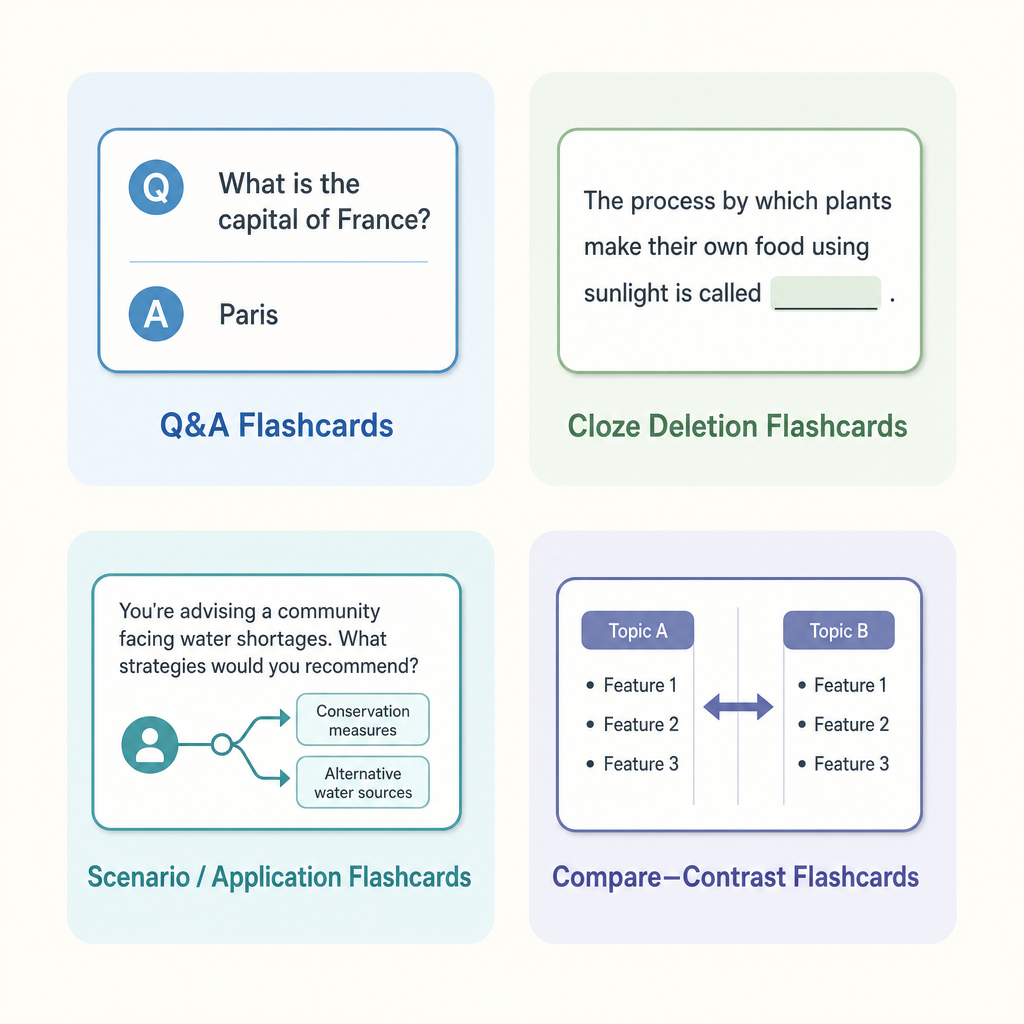
Most AI generators default to basic Q&A cards because they are the easiest to generate from running text. But Q&A is only one of five card types, and it is not always the most effective one for the material you are studying.
| Card Type | How It Works | Best For | AI Generation Quality |
|---|---|---|---|
| Q&A | A direct question with a factual answer | Definitions, facts, terminology, dates | High — AI generates these reliably from most structured text |
| Cloze deletion | A sentence with a key term blanked out | Dense factual subjects, sequences, vocabulary, formulas | Moderate — AI can generate these but quality varies; worth editing |
| Scenario / application | A situation requiring application of a concept | Bar exam, MCAT clinical vignettes, STEM problem-solving | Low — AI oversimplifies scenarios; usually requires manual creation |
| Compare-contrast | Two related concepts compared on a key dimension | Psychology theories, drug classes, literary movements, economic models | Moderate — AI can generate these with explicit prompting |
| Image occlusion | A labeled region in an image is hidden for identification | Anatomy, geography, circuit diagrams, any visual content | Very low — requires manual creation or a tool with explicit support |
The practical takeaway is that AI generation handles Q&A cards well and cloze deletions adequately. For scenario, compare-contrast, and image occlusion cards — the types that tend to produce the deepest understanding — you will need either more specific prompting or manual post-editing. A deck that mixes all five types is more effective than one that relies exclusively on Q&A, but it requires more curation effort to build.
Common Mistakes That Undermine AI Flashcard Results
- Generating without curating. Studying from an uncurated AI deck means studying from a document that likely contains factual errors, duplicate cards, and vague questions. This wastes review time and risks encoding incorrect information.
- Relying only on definition and recognition cards. A deck of 200 "What is X?" cards tests whether you recognize definitions, not whether you can apply, compare, or explain concepts. For most exams, recognition is the lowest level of what is being tested.
- Skipping daily SRS reviews. An AI-generated deck that never gets reviewed is just a file on your device. The spaced repetition schedule is what converts card creation into long-term retention — and it only works with consistent daily engagement.
- Uploading unstructured source material. Raw, unformatted text produces lower-quality cards. Five minutes of source preparation before uploading consistently produces better output than any amount of post-generation editing.
- Marking cards Easy too liberally. In Anki and most SRS systems, marking a card Easy pushes it far into the future. If you are marking cards Easy because you just read the material, you are not actually testing recall — you are testing recognition while the information is still in working memory. Mark Hard or Good unless you genuinely recalled the answer before seeing it.
- Importing too many cards at once. Importing 500 cards at once creates a review backlog that grows faster than you can clear it. Add cards gradually — by topic or by week — so your daily review queue stays manageable.
Frequently Asked Questions
How accurate are AI-generated flashcards?
It depends on the subject, the quality of the source material, and the tool. For well-structured factual content in common academic subjects, AI generators produce a high proportion of usable cards. For specialized, nuanced, or clinically precise content, the error rate is meaningfully higher. A 2025 study testing GPT-4 on graduate medical exam questions found that roughly a third of the output required significant revision or rejection before it was suitable for use — and that was with expert reviewers who could catch errors. For most students, a careful curation pass is the practical substitute for expert review.
What is the hallucination risk and how do I manage it?
Hallucination refers to AI-generated content that is stated confidently but is factually incorrect. The risk is highest for specific numerical values (dosages, dates, statistics), nuanced distinctions between similar concepts, and content that requires precise technical accuracy. The management strategy is straightforward: never study from an uncurated AI deck, and for any card containing a specific factual claim you are not certain about, verify against your source before keeping it. Source-grounded tools — which generate content anchored to your uploaded documents rather than general training data — reduce but do not eliminate this risk.
Are AI-generated cards better than handmade cards?
Neither is categorically better. AI-generated cards are faster to produce at scale, which matters when you need hundreds of cards for a content-heavy course. Handmade cards are better when the act of creating them is itself the studying — writing a card forces you to process the material in a way that reading and approving an AI-generated card does not. Handmade cards are also better when the subject requires precise phrasing (your professor's specific question style), when the material is conceptually nuanced (philosophy, legal reasoning), or when accuracy is critical and you do not trust the AI's output for the domain. The hybrid approach — AI generation for bulk content, manual cards for edge cases and application-heavy content — works well for most students.
How do I get AI-generated cards into Anki?
Most standalone AI generators offer an Anki export option, either as an APKG file (which imports directly into Anki) or as a CSV file (which can be imported via Anki's File > Import menu). If your tool does not support direct Anki export, exporting as a CSV and importing into Anki manually takes about five minutes. For step-by-step instructions on the import process, the Anki setup tutorial covers this in detail.
Do AI flashcards replace reading the material?
No. Flashcards — AI-generated or handmade — are a retrieval practice tool. They help you consolidate and retain information you have already encountered. They do not substitute for the initial comprehension that comes from reading, attending lectures, or working through problems. If you generate cards from material you have not yet read, you are likely to pass the curation phase without catching errors and to struggle with reviews because you lack the conceptual framework to understand what the cards are asking. The most effective workflow is: read and understand the material first, then generate cards to reinforce retention of what you learned.
Authoritative source
No specific exam hub matched
Browse the exam hubs directory for the authoritative plan on any of the five exams.
Report an error in this tool's output
Found something this tool got wrong beyond what's documented above? Report it so the accuracy log stays current.
Comments
Join the discussion with an anonymous comment.