
Why iPhone 18 Pro Performance Matters for Study Apps
Wondering if the iPhone 18 Pro's A20 Pro chip and 12GB RAM actually speed up your study apps? This guide explains which apps benefit, which don't, and what real-world performance gains you can expect for flashcard generation, multitasking, and longer study sessions.
Updated:
The real test of iPhone 18 Pro performance for study apps is not whether a benchmark graph jumps. It is whether the phone still feels awake after the easy part of studying is over: 40 minutes into Anki, a PDF open in the background, Notion half-loaded with lecture notes, Safari tabs full of sources, and an AI flashcard tool chewing through a recorded lecture while the phone is already warm.
That is where older “fast” phones start to feel less impressive. The first 10 minutes are fine. Then a card review stutters, a browser tab reloads, an AI tool takes long enough that you stop trusting the workflow, or the phone gets hot enough that everything feels slightly delayed. None of that ruins a semester by itself. It just adds friction at exactly the wrong time.
The iPhone 18 Pro is not official yet as of July 19, 2026, and Apple has not published final specifications. The useful claims right now come from leaks, analyst reporting, regulatory-document coverage, and performance previews, so they need to be treated as strong signals rather than settled product facts. The current reports point to an A20 Pro chip built on a 2nm process, WMCM packaging, 12GB of RAM, and a larger Neural Engine aimed heavily at on-device AI workloads.[1][2][3]
If those reports hold, the most important change for students is not peak speed. It is sustained speed under the ugly, ordinary load of studying.
The study bottleneck is usually heat before it is raw speed
A chip can be extremely fast for a burst and still become annoying in a long review session. That matters because studying is rarely a single clean task. Flashcard reviews stretch. Video lectures keep playing. PDFs stay open. AI tools run in the background. The phone is not just launching one app; it is holding a stack of decisions, files, and browser state while you are trying not to lose your place.
The reported A20 Pro change that actually maps to this problem is WMCM, short for Wafer-Level Multi-Chip Module. Instead of stacking the RAM directly on top of the chip, reports say Apple is moving memory beside the chip package. MacRumors described the point of that arrangement as reducing thermal coupling between the processor and memory, which should help limit throttling during extended use.[1]
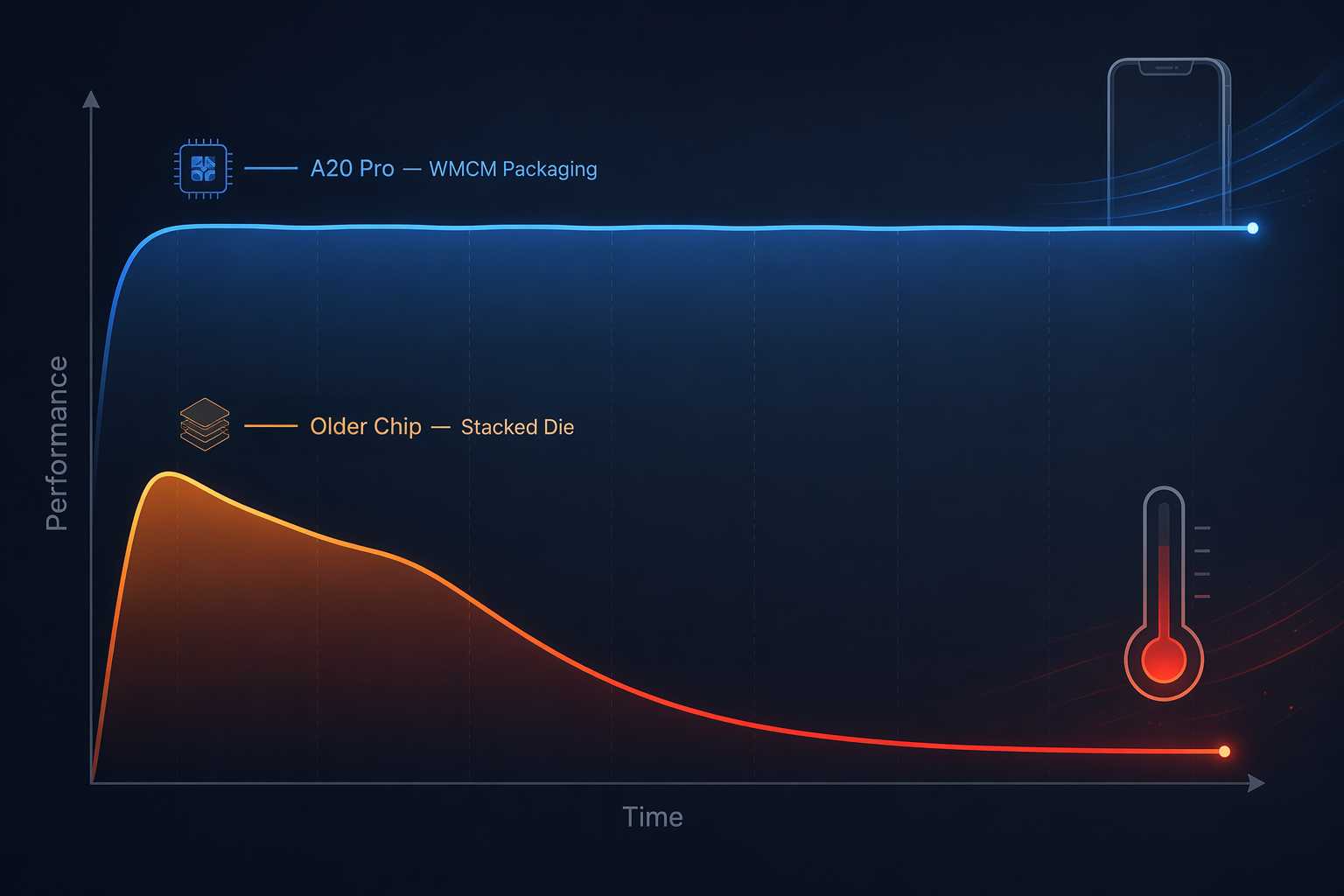
That is a much more believable student benefit than “this phone is faster.” If a device is already quick for the first few minutes, the real improvement is whether it avoids the later dip. A long Anki session exposes that. So does watching lecture video while reviewing notes. MacRumors specifically noted iPhone 17 Pro user complaints around heat during long Anki reviews or video-based studying, which is exactly the kind of workload where peak benchmark speed stops being the whole story.[1]
This does not mean every study app suddenly feels transformed. A timer does not care. A simple checklist does not care. But a flashcard app with heavy scheduling, media, sync, and a large deck can become painful when the system starts managing heat and memory more aggressively. The best version of the A20 Pro story is that fewer of those slowdowns show up in the middle of the session, not that the first tap feels magical.
12GB RAM matters when your study setup is messy
The rumored 12GB RAM upgrade is easy to overstate and easy to dismiss. For a clean single-app workflow, it is boring. For a real research session, it can be the difference between returning to the same place and watching an app reload right when your brain was finally tracking the argument.
Reports in early and mid-2026 pointed to 12GB RAM for the iPhone 18 Pro, with LPDDR5X at 8.5Gbps or a possible LPDDR6 setup on a 96-bit bus discussed in coverage around Apple’s 2026 hardware direction.[2][3] The exact memory standard matters less to most students than the practical result: more room for large decks, note databases, PDFs, browser tabs, and AI tools to coexist without the phone constantly deciding what to evict.
Anki is the clearest example because serious decks get big and ugly. Reported examples include community decks over 1GB and Anki community forum accounts of desktop Anki using more than 10GB of RAM with large custom sessions. That is not a controlled iOS benchmark, and mobile memory management is different, so it should not be read as “Anki on iPhone will use 10GB.” It does show the direction of the problem: large decks, media, filters, and advanced scheduling can become memory-heavy enough that extra RAM stops being a luxury spec.[2]
FSRS-style spaced repetition adds another reason to care about the whole stack, especially for students who tune retention targets and run large review queues. If your workflow is already built around Anki, the phone’s job is not to make memory science better. It is to stay out of the way while the app does its work. For readers trying to tune that side of the workflow, an FSRS optimization guide matters more than a new phone if the deck itself is poorly configured.
The same RAM argument applies to Notion databases, GoodNotes notebooks, and research-heavy browser sessions, though not equally. Notion can become sluggish when databases, embeds, and cross-linked pages pile up. GoodNotes can involve large notebooks and imported PDFs. Browser research is often just chaos with a search bar. More RAM does not make those apps smarter, but it gives iOS less reason to throw away state while you move between them.
| Study workflow | Likely iPhone 18 Pro gain | Why it changes |
|---|---|---|
| Large Anki decks with media, filtered sessions, or FSRS-heavy review | High | 12GB RAM and steadier thermals reduce stutters, reloads, and heat-related slowdown during long sessions |
| AI flashcard generation from lecture notes or transcripts | High | A larger Neural Engine can reduce generation latency when tools use on-device processing |
| Notion plus browser tabs plus PDFs during research | Medium to high | More RAM helps preserve app state and makes switching less punishing |
| GoodNotes notebooks and large PDFs | Medium | Large files may benefit, but handwriting comfort still depends more on iPad and Apple Pencil |
| Forest, Todoist, My Study Life, simple timers, basic notes | None to low | These apps do not push the chip, memory, or Neural Engine in a way students are likely to feel |
AI study tools are where the speed jump could feel immediate
AI flashcard generation is one of the few study workflows where speed is not just a nice bonus. If a tool takes too long to turn a lecture into usable cards, students stop using it consistently. The friction is not theoretical: the old manual version of this work can take roughly 2 to 3 hours per lecture, while the A20 Pro’s larger Neural Engine could help bring AI flashcard generation under a minute per lecture when the app’s pipeline is built to use that on-device acceleration.[4]
That is the kind of performance gain I would actually care about. Not because faster cards are automatically better cards, but because the waiting time changes whether the workflow survives a normal week. If generating a first draft takes long enough that you avoid doing it, the tool becomes another abandoned productivity experiment. If it produces a draft quickly, you can spend the saved time checking, deleting, splitting, and rewriting cards.
The checking part still matters. A faster Neural Engine does not know whether a card tests the wrong concept, hides the clue in the prompt, or turns one lecture slide into five shallow facts. AI can reduce the blank-page work of card creation, but it does not remove the student’s responsibility to verify. That boundary is easy to ignore when chip previews talk about AI performance as if lower latency equals better learning.
Macworld’s A20 Pro preview says the A20’s NPU takes significantly more die area and may double AI performance over the A19 Pro.[4] The word “may” is doing real work there. Until Apple ships the phone and study apps are tested on the final hardware, this is a plausible performance direction, not a guaranteed classroom outcome.
The apps most likely to benefit are the ones that turn messy input into structured study material: lecture recordings, pasted notes, PDFs, textbook sections, or slide decks. Tools in the same category as Mindomax, Knowt, NotebookLM, StudyGlen, and Notelyn make sense here if their 2026 versions actually use on-device AI or hybrid processing well. If you are choosing between tools, the better question is not just “does it have AI?” but “does it make reviewable cards quickly enough that I still edit them?” A broader comparison like the best AI flashcard generator for lecture notes is where that app-level difference matters.
Benchmarks help less than sustained behavior
Macworld’s estimate of roughly 4,200 Geekbench single-core for the A20 Pro is useful context, but it is still an estimate based on historical year-over-year extrapolation, not a confirmed score from shipping iPhone 18 Pro hardware.[4] It also does not answer the student question by itself.
A benchmark can say the chip is faster. It cannot tell you whether Safari kept your source page alive while Notion reopened, whether your Anki review stayed smooth after the phone warmed up, or whether an AI card generator produced a usable draft before you gave up and started copying bullets manually. Those are the points where performance becomes study time.
This is also why thermal design deserves more weight than the flashiest score. A phone that spikes high and then drops hard can look excellent in a launch chart and still feel worse in a long session than a phone that holds a lower level steadily. For studying, consistency usually beats theatrics.
Battery life is probably not the upgrade story
The 2nm process should be more efficient, but students should be careful with the battery assumption. Forbes reported a 4,288 mAh battery for the U.S. iPhone 18 Pro model and noted that much of the efficiency gain is expected to be redirected toward on-device AI processing rather than a big runtime jump.[5]
That means the sensible expectation is comparable battery life to the iPhone 17 Pro, not a dramatic leap.[5] If your study pain is “my phone dies before my evening review,” the iPhone 18 Pro may not solve that in the clean way a bigger battery pack, better charging routine, or different device split would. If your pain is “my phone gets warm and laggy while doing the work,” the A20 Pro story is stronger.
Some study apps will not feel different at all
There is a whole category of study tools where the iPhone 18 Pro is overqualified. Forest, Todoist, My Study Life, basic Pomodoro timers, simple habit trackers, and plain note apps do not need a 2nm Pro chip to work well. If those are your main tools, the phone may feel nicer because it is new, but the study workflow itself is not meaningfully faster.
That distinction matters because “study apps” sounds like one category, but the workloads are completely different. A timer waits. A task manager stores text. A large flashcard deck loads media, schedules reviews, syncs state, and may sit open for an hour. An AI generator transforms raw lecture material into cards. Those should not be judged by the same upgrade logic.
Flashcard apps also vary. A lightweight Quizlet-style review session is not the same as a giant Anki setup for the MCAT or medical school. If your use is casual, app design and content quality matter more than hardware. If your deck is your second brain and you review daily under pressure, then fewer reloads and steadier performance become more valuable. For that heavier end, guides like using Anki for the MCAT without wasting hours are closer to the real problem than another phone comparison chart.
The iPad boundary is real for handwriting-heavy students
There is one study style where the iPhone 18 Pro’s performance gains may be beside the point: handwriting. Mueller and Oppenheimer’s 2014 research found that students taking longhand notes performed better on conceptual questions than students taking laptop notes, even though laptop note-takers recorded more words.[6] That does not prove every student should handwrite everything, and it does not compare iPhones to iPads. It does support a narrower point: the input method can matter as much as the processor.
If your studying is built around annotating PDFs, drawing diagrams, and writing out explanations, an iPad with Apple Pencil may change your learning environment more than a faster iPhone. The iPhone 18 Pro can still be a strong companion for review, capture, and AI generation, but it is not suddenly the best surface for every kind of study.
Who should actually care
The iPhone 18 Pro makes the most sense for students whose study work is computationally heavy and long-running. That means AI-powered flashcard generation, large Anki decks, research sessions with multiple apps open, big PDFs, Notion databases, and repeated switching between sources and review tools. In those cases, the rumored A20 Pro, WMCM thermal design, and 12GB RAM line up with real bottlenecks.
- Upgrade for performance if your current phone heats up during long review sessions, reloads apps while you switch between sources, or makes AI card generation slow enough that you avoid using it.
- Wait for real tests if your decision depends on exact battery life, final RAM configuration, or confirmed A20 Pro Neural Engine gains.
- Skip the performance argument if your workflow is mostly timers, basic notes, calendars, task lists, or light flashcard review.
- Consider an iPad first if handwriting, PDF annotation, and diagramming are the center of your study system.
For the heavy study stack, the iPhone 18 Pro’s performance story is credible because it targets the right annoyances: heat, memory pressure, and AI wait time. For simple study apps, the same hardware mostly buys status and headroom. That is not useless, but it is not the same as getting your study time back.
References
- iPhone 18 Pro Rumored to Feature WMCM Chip Packaging, MacRumors, July 14, 2026.
- iPhone 18 Pro Rumored to Feature 12GB of RAM, MacRumors, January 19, 2026.
- iPhone 18 Pro May Use Faster Memory Architecture, AppleInsider, June 26, 2026.
- A20 Pro preview, Macworld.
- Apple Documents Confirm Powerful iPhone 18 Pro Specs, Forbes, July 6, 2026.
- The Pen Is Mightier Than the Keyboard: Advantages of Longhand Over Laptop Note Taking, Psychological Science, 2014.
Comments
Join the discussion with an anonymous comment.