

How Students Can Fact-Check Photos Online in Under Five Minutes
Learn a simple four-step method to verify whether a photo online is real, fake, AI-generated, or taken out of context — using free tools and no specialized training.
Updated:
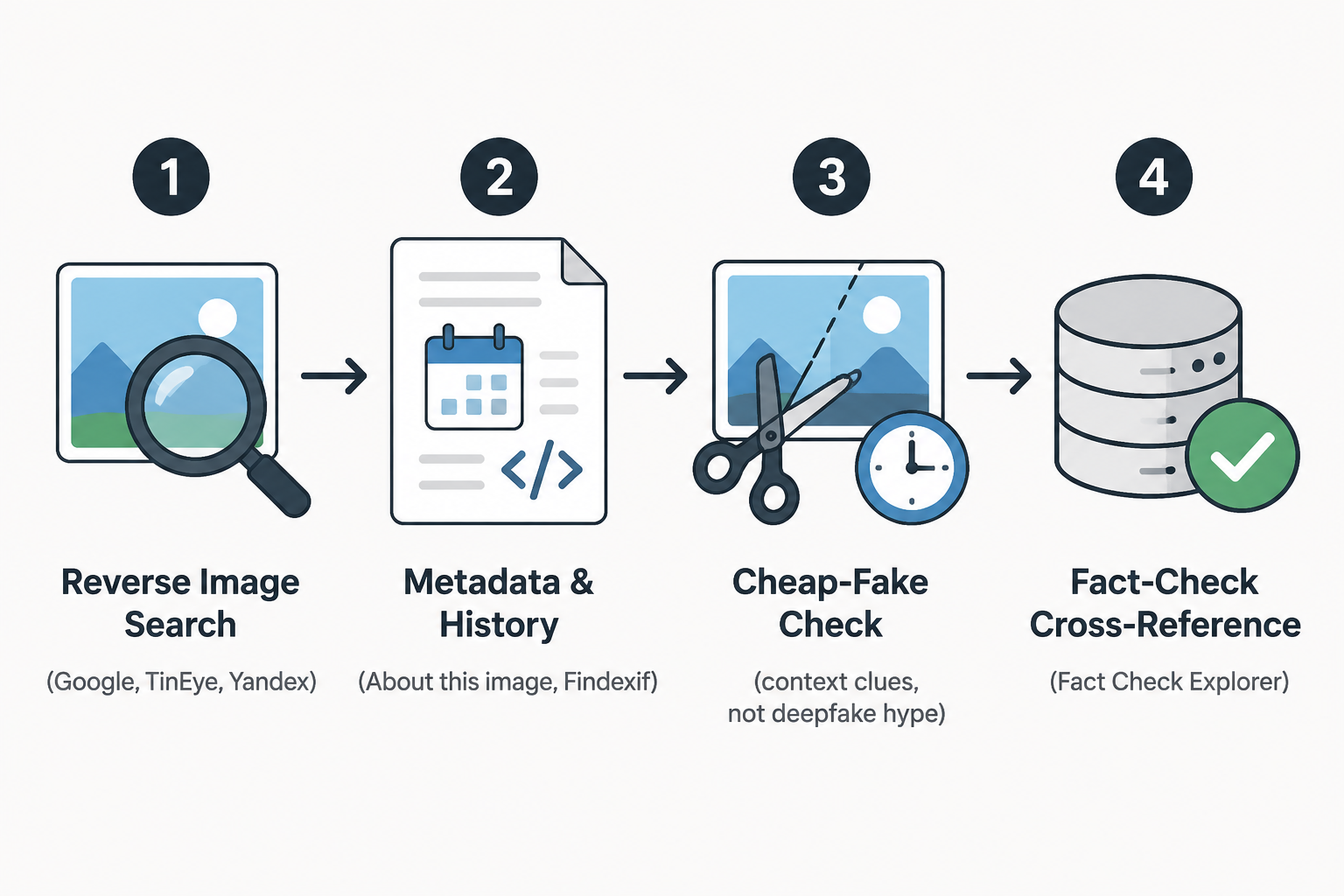
You do not have to settle a questionable photo in your head before class starts. If you are fact-checking photos online for students, the first move is a quick, repeatable workflow: reverse image search, check metadata and image history, look for cheap-fake context clues, then cross-reference a fact-check database. In one 2025 study of 192 Swedish students ages 15–19, a 1.5-hour intervention raised spontaneous use of verification tools from 18% to 57%, which shows the habit can change even if the result is not proof that every student will get the same outcome in every setting [1].
The four-step check
- Reverse the photo in more than one search engine. Start with Google Images or Google Lens, then try TinEye, Yandex Images, or Lenso.ai if the first result does not explain the picture. One vendor comparison found a headshot produced 847 results on Google, 12 on TinEye, and 1,203 on Yandex, which is a useful reminder that different engines index different parts of the web, even though those counts are vendor-reported rather than independently audited [2].
- Check metadata and history. Use Google's About this image and, if needed, Findexif.com to see whether the file still contains EXIF data, when it was first indexed, and how other sites describe it [3].
- Look for cheap-fake clues before you assume AI. Ask whether the image is old, cropped, re-captioned, or pulled from a different event, because the caption is often the problem.
- Cross-reference the claim in Google Fact Check Explorer. If another outlet or fact-checking team has already handled the same image or claim, compare the context, not just the verdict.
Reverse search first
The first search is rarely the full answer. Google is a strong broad search, TinEye is useful when you need older versions or edited copies, Yandex can surface different matches, and Lenso.ai is worth a quick pass when you want another index without much friction. The point is not to find a single matching copy; it is to find the earliest useful context. That is why a photo can look "verified" in one tab and still be incomplete in another.
The vendor comparison above is not a scientific benchmark, but it makes the practical problem easy to see: one engine can miss what another finds [2]. If the closest match is the same image with a different caption, that is already useful. It tells you the file has likely circulated before, which is often more important than whether the picture looks polished or dramatic.
Cheap-fake clues catch more than deepfakes
A misleading photo does not have to be AI-generated. It can be real and still misleading because it was cropped, relabeled, or reused in a new story. Before you start hunting for synthetic artifacts, read the visible details: street signs, weather, uniforms, language, shadows, and whether the moment fits the post's date or location.
- Does the background match the caption?
- Does the same image appear with a different label elsewhere?
- Does the crop hide the key clue?
- Would the photo make sense on the date being claimed?
If those clues do not line up, you already have enough to pause sharing or citing the image. That is the useful part of the method: it helps students catch obvious context failures without pretending every bad image is a high-end forgery.
Metadata helps when it exists
Google's About this image, available globally since October 2023, can show the first indexed date, related descriptions from other sites, and metadata when it survives [3]. Findexif.com can extract EXIF data from files that still carry it. When metadata is blank, do not treat that as a dead end or a clean bill of health; many platforms strip it automatically.
What to do when it still feels uncertain
The hardest part is not the search itself. It is knowing when to stop pretending you have certainty. The same Uppsala study also found that lower-performing students could become more confident without becoming more accurate after reverse-image-search instruction, so a quick lesson can create the feeling of mastery faster than it creates actual judgment [1].
The safer habit is to compare at least two independent sources before you trust the first caption that sounds right. That is the basic lateral-reading move in the CTRL-F framework: open tabs, compare them, and read across sources rather than down one page [4].
After five minutes, you may still not know whether the photo is real, fake, or just stripped of context. You often will know something more useful: whether it has circulated before, whether the caption fits, whether metadata is missing, and whether any reliable database has already checked it. That is enough to keep it out of a paper or a post until you can say more.
References
- Image verification training study — Tandfonline, 2025
- Google Search's new fact-checking features — Google Blog, October 2023
- Best Reverse Image Search Tools — Social Catfish, July 2026
- Questioning Images — CTRL-F
Comments
Join the discussion with an anonymous comment.