
How to Use Discord Spoiler Channels for Study Groups
Learn how to set up Discord spoiler channels for your study group, with step-by-step instructions, practical use cases for answer keys and exam discussions, and tips for effective channel naming and topic text.
Updated:
The useful moment happens before anyone sees the answer. A student opens a Discord channel named for an answer key, exam discussion, or advanced unit, and Discord puts a notice in the way. The notice shows the channel name and its topic text, then asks the student to choose whether to view the channel. That is the basic reason spoiler channels can work for study groups: they slow down accidental exposure without making the channel private or buried.
A Discord spoiler channel hides an entire channel behind an opt-in screen. Discord’s support page describes the feature as a channel-level visibility setting, and Android Authority covered its rollout in July 2026.[1][2] For study groups, that makes it different from hiding one line of text with spoiler formatting. The channel itself becomes the warning.
Spoiler Channels Are Not Spoiler Tags
Discord has more than one feature with “spoiler” in the neighborhood, and mixing them up leads to bad study-group setup advice.
| Discord feature | What it hides | Best study-group use |
|---|---|---|
| Spoiler channel | An entire supported channel behind an opt-in notice | Answer-key channels, exam-cohort discussion, sensitive study topics, advanced material |
| Spoiler tag | A specific piece of text or media, such as text wrapped in ||spoiler bars|| | One answer, hint, screenshot, or solution inside a normal channel |
| Age-restricted channel | Access to mature-content spaces | Not the right tool for normal academic spoilers or answer keys |
The distinction matters because a student who wants to self-test is not usually asking for a locked room. They need a clean boundary between “I am still trying” and “I am ready to check.” A spoiler tag can protect one message. A spoiler channel can protect the whole place where answer discussion happens.
Age-restricted channels should not be repurposed as academic spoiler channels. They exist for a different kind of content gate, and using them for answer keys confuses members about what kind of material they are about to enter.
How to Turn On a Discord Spoiler Channel
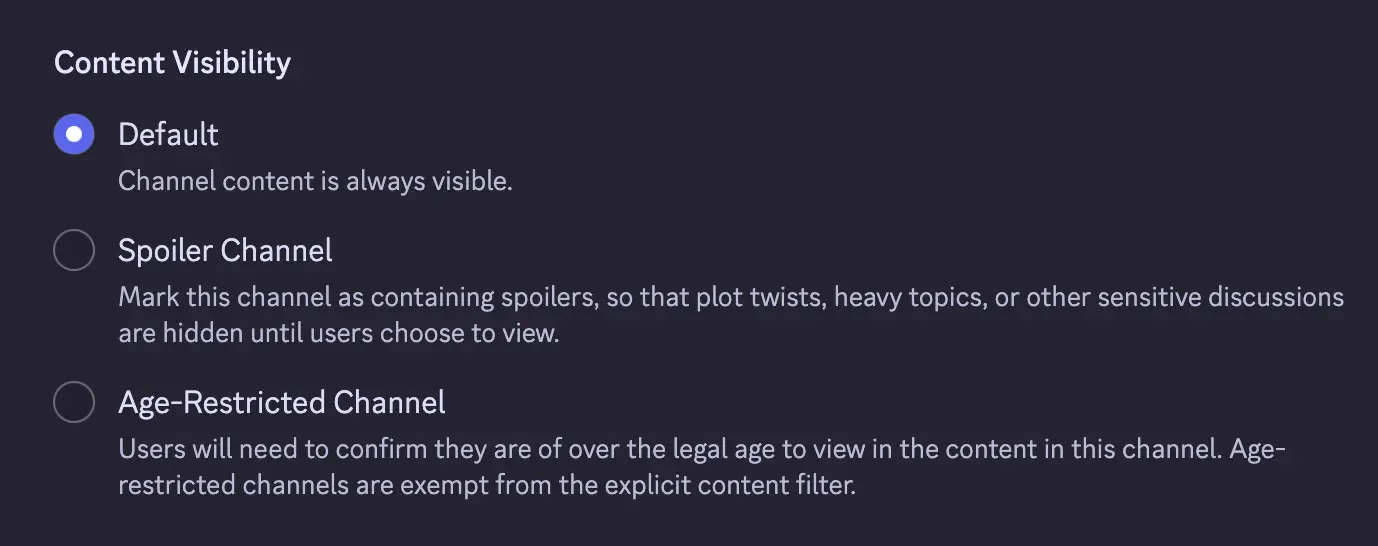
On desktop or web, the setup path is short: choose or create the channel, open Edit Channel, go to Overview, find Content Visibility, and turn on Spoiler Channel.[1] Android Authority’s July 15, 2026 coverage also describes the feature as a new channel-level option, so if the toggle is missing, rollout may be the first thing to check rather than your moderation permissions or server design.[2]
- Create a new channel or choose an existing one that should be opt-in.
- Open
Edit Channel. - Stay in or switch to
Overview. - Find
Content Visibility. - Switch on
Spoiler Channel. - Save the change, then review the channel name and topic before announcing it.
Discord’s FAQ says spoiler channels are supported for text, voice, forum, and announcement channels.[1] That is broader than most study groups will need, but it is useful. A text channel can hold answer keys. A forum channel can separate problem sets into posts. An announcement channel can warn members that final-exam discussion is now available without dropping the details into everyone’s normal feed.
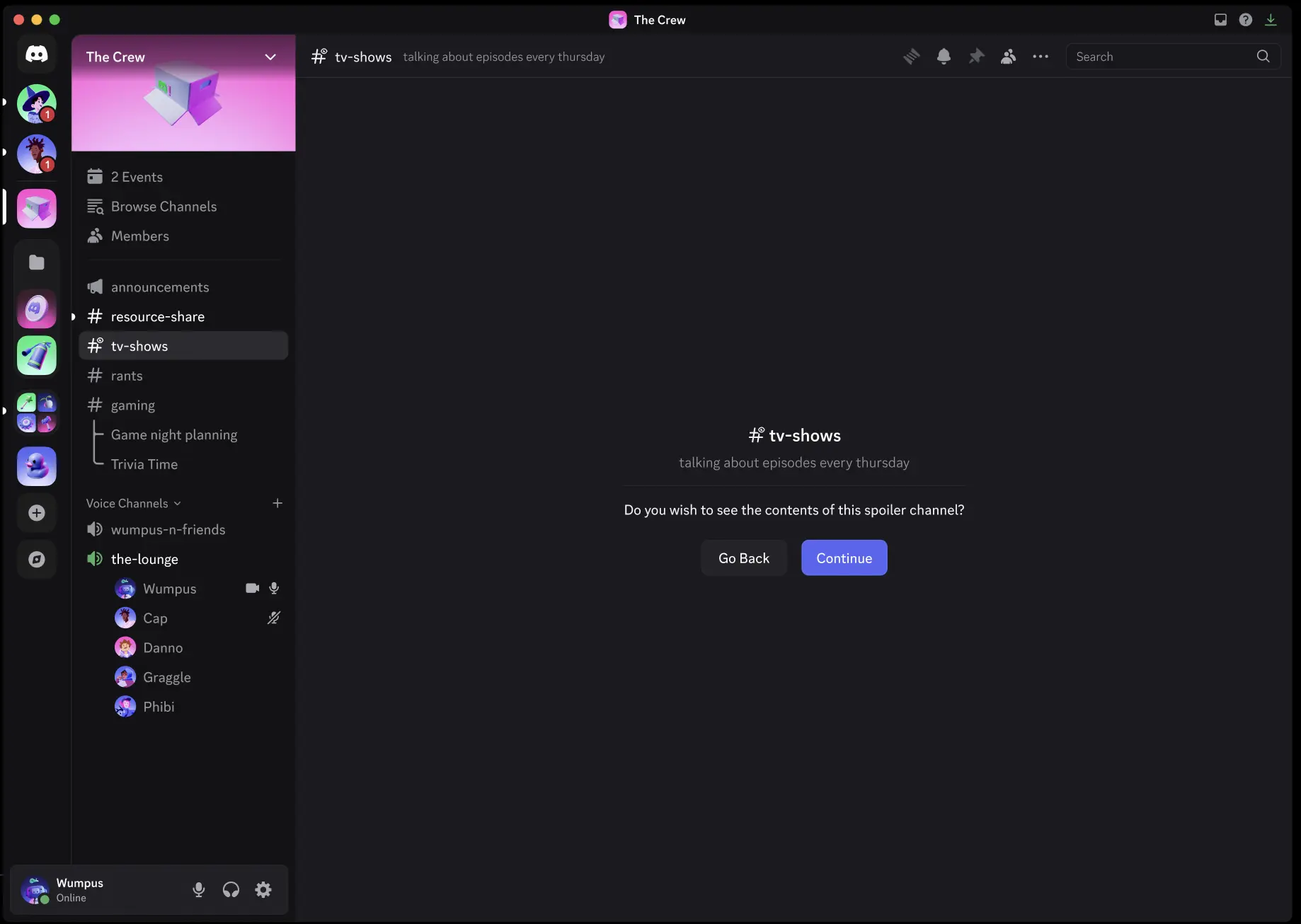
The toggle is only half the setup. The channel name and topic are part of the member’s decision because Discord shows them on the notice screen before the channel opens.[1] A vague channel called “spoilers” still makes people guess. A channel called “week-5-answer-key” with a topic that says “Open only after attempting all Week 5 practice problems” gives the student enough information to protect their own attempt.
Write the Topic Like It Is the Warning Label
A good topic does not need to be dramatic. It needs to answer three questions quickly: what is inside, who should wait, and when it is reasonable to enter. In a class server, that usually matters more than clever channel naming.
| Channel name | Useful topic text |
|---|---|
| week-5-answer-key | Solutions for Week 5 practice set. Open only after attempting all questions. |
| midterm-section-b-discussion | For students who have already taken Section B midterm. Late testers should wait. |
| calc-ii-hard-mode | Optional advanced integration problems and solution discussion beyond the required set. |
| grades-stress-room | Sensitive academic-stress discussion. No instructor speculation, screenshots, or personal attacks. |
Notice what those examples do not do. They do not promise that nobody will copy answers. They do not turn the channel into a grading policy. They simply make the choice legible before the click.
Use Cases That Actually Fit Study Groups
The strongest use case is an answer-key channel for retrieval practice. If your group posts solutions too early in the same discussion channel where people are still working, one helpful person can spoil the work for everyone else. A spoiler channel lets the group keep answers available without placing them directly in the main work stream.
That fits especially well with active recall routines: attempt the questions first, check the key second, then return to the problems you missed. If your group already follows a weekly self-testing rhythm, the spoiler channel can sit at the “check and correct” stage rather than the “try from memory” stage. For a fuller study-method workflow, see the retrieval-practice weekly schedule.
Exam-cohort channels are the next obvious fit. If one section takes an exam earlier than another, a normal channel can become a hazard even when nobody is trying to cheat. A channel named “bio101-exam1-taken” with a topic like “Post-exam discussion only; do not enter if your exam is still ahead” gives late testers a clean warning.
Advanced or elective material also works, though the stakes are different. Some students want enrichment problems, alternate proofs, or graduate-level context. Others are still trying to master the assigned method and do not need five elegant detours in their face. A spoiler channel can make the extra material opt-in without treating it as forbidden.
Sensitive academic-stress channels need more care. A spoiler channel can put a pause before venting about grades, workload, or a rough exam, but it does not replace moderation. If a channel is likely to include personal information, instructor accusations, or escalating conflict, the topic should say what is allowed and a moderator should still be watching.
What Members See When They Opt In
When a member opens a spoiler channel, Discord shows a notice with the channel name and topic text, plus a button to view the channel.[1] That is the whole interaction. There is no study timer, no quiz lock, and no claim that the student attempted the work first. The value is the pause.
For moderators, this means the best setup test is simple: ask whether a member can understand the consequence before pressing View Channel. If the answer is no, the problem is probably not the Discord feature. It is the copy.
- Use the assignment, week, unit, or exam name in the channel name.
- Put the “wait until” condition in the topic text.
- Avoid joke names for channels that protect answer keys or exam discussion.
- Archive or rename old spoiler channels so members do not confuse Week 3 answers with Week 8 review.
- Use normal permissions when access must be restricted; spoiler visibility is not the same as permission control.
A Practical Setup Pattern for Answer Keys
For most class servers, one answer-key channel per current unit is easier to manage than a permanent catch-all channel. A permanent “answers” channel tends to become a junk drawer. A unit channel gives the topic text a specific job.
| Step | What the organizer does |
|---|---|
| Before practice starts | Create the normal work channel where students discuss hints, approaches, and stuck points without full solutions. |
| When the answer key is ready | Create or update the spoiler channel for that week or unit. |
| Before posting solutions | Set the topic to say exactly when students should enter. |
| After the deadline or review session | Rename, archive, or move the channel so it no longer competes with current work. |
A clean pairing might look like this: “week-5-practice” for attempts, hints, and questions; “week-5-answer-key” as the spoiler channel for worked solutions. The first channel stays safe for people still practicing. The second channel is available when they are ready to check.
If your group uses forum channels, the same idea can apply by problem set or exam topic. Discord lists forum channels among the supported spoiler channel types, so a forum-style answer space can still sit behind the opt-in screen.[1] Just keep the forum post titles specific enough that people do not have to open five threads to find the relevant solution.
What This Feature Does Not Solve
Spoiler channels are new as of July 2026, and availability may vary while Discord rolls the feature out.[2] There are also no first-party adoption statistics in the available material, so nobody should be claiming that most study servers use them or that they measurably improve grades.
The study-group use here is a practical adaptation, not an official Discord study feature. Discord documents how spoiler channels work; it does not present them as a learning-science tool.[1] Classroom Discord guides show that instructors and students do use Discord-like spaces for course organization and discussion, but that still does not prove a spoiler channel changes learning outcomes.[3]
That limitation is fine. The standard does not need to be “will this raise everyone’s exam score?” A better standard is whether the channel reduces accidental exposure, gives late exam cohorts a fair warning, and makes answer checking easier to separate from answer attempting.
A good spoiler channel is not merely toggled on. It is named and described clearly enough that students can protect their own learning before they click.
References
- Spoiler Channels FAQ, Discord Support
- Discord spoiler channels, Android Authority, July 15, 2026
- Classroom Discord, Ryan Cordell
Comments
Join the discussion with an anonymous comment.