Is ChatGPT Safe for Studying? The Real Privacy Risks
Accuracy Warning — ChatGPT
Consumer ChatGPT is not private by default; prompts and uploaded files may be used for training until data controls are changed.
- Accuracy:
- Moderate
- Tested:
- Privacy and data-control review for exam prep
- Last tested:
- 2026-08-25
If you are about to paste a GRE essay, upload a practice-test PDF, or ask ChatGPT to diagnose your weak areas from score data, the privacy answer is: yes, ChatGPT can be safe enough for studying, but consumer ChatGPT is not private by default.
As of Q3 2026, the important update is that the June 2025 court order requiring OpenAI to preserve consumer ChatGPT data ended on September 26, 2025. OpenAI’s October 22, 2025 update says its standard deletion and Temporary Chat mechanics are back in force, so articles still treating that preservation order as active are stale on a central point.[1]
That does not make your study chats confidential. On consumer plans, your prompts, uploaded files, essays, study questions, and chat contents can be used to improve OpenAI’s models unless you change the relevant data-control setting; chats remain in your history unless you delete them; Temporary Chats and deleted chats are generally purged within 30 days, with limited exceptions; and saved memories are handled separately from chat deletion.[2]

The short verdict before you upload anything
Use ChatGPT for low-sensitivity study work: generating quiz questions, explaining a concept, making a timed study plan, converting notes into flashcards, or giving general feedback on an essay draft after you remove personal details.
Be much more careful with anything that would hurt if it resurfaced later: official score reports, disability or accommodations paperwork, admissions essays with personal disclosures, names of recommenders, school IDs, screenshots from a testing portal, private medical history, financial information, passport details, or a full practice-test PDF you do not have permission to upload.
The practical line is not “never use AI.” It is: change the settings first, use Temporary Chat for sensitive-but-not-red-list material, and do not treat ChatGPT like a confidential tutor, score vault, diary, or document locker.
What actually happens to study data in consumer ChatGPT
The privacy risk is easiest to understand if you follow one normal test-prep session from input to storage. A student opens ChatGPT and enters some combination of a prompt, a pasted essay, an uploaded worksheet, diagnostic scores, and a request such as “Tell me what to study for the next 10 days.” Each of those items becomes content in the conversation. If files are uploaded, the file contents can be processed as part of the chat. If the account is on a consumer plan and model-improvement is enabled, OpenAI says that content may be used to improve its models.[2]
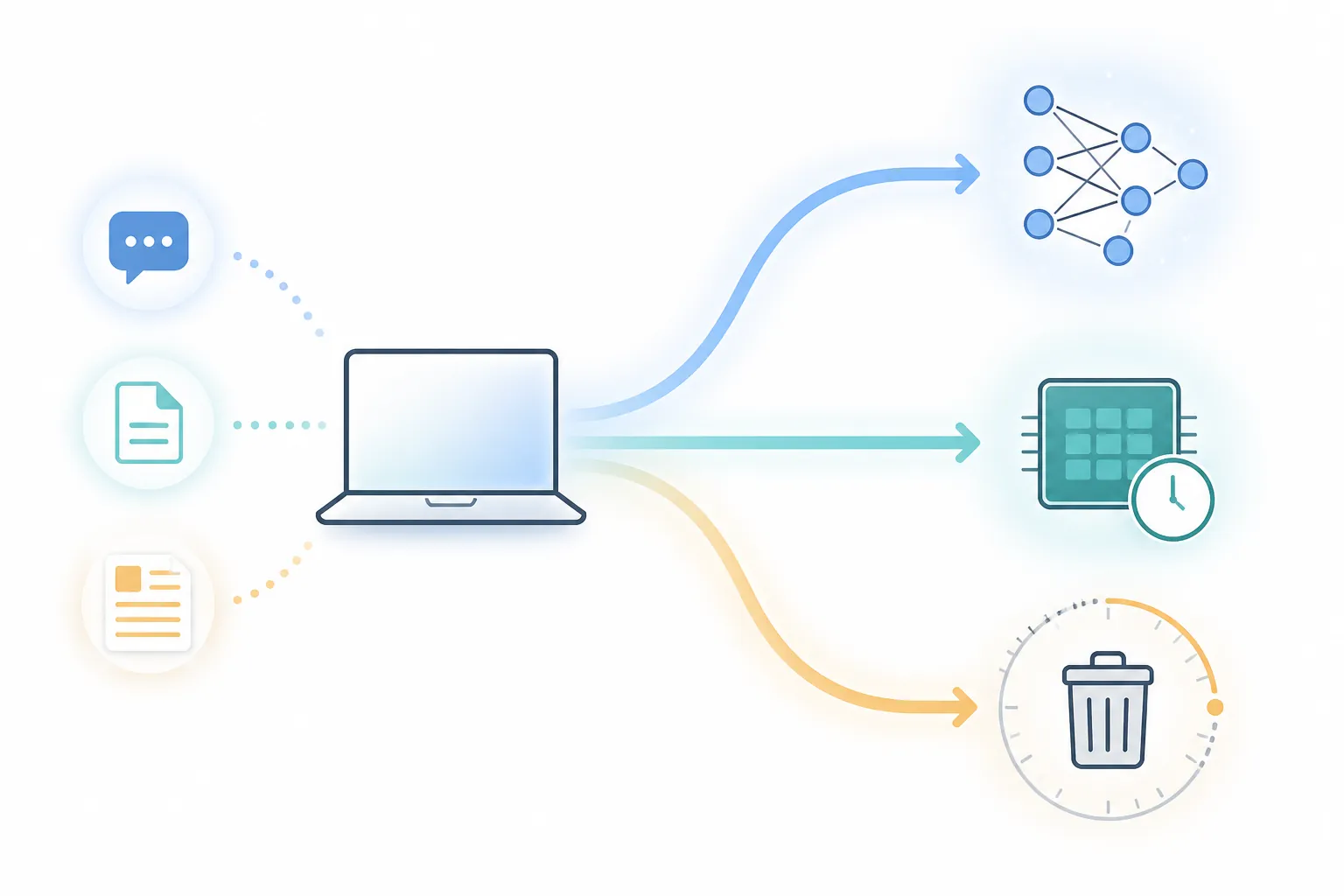
That is the part many students miss. The useful study output — the grammar critique, the MCAT content review, the algebra explanation — is not the only consequence of the upload. The input may also sit in chat history, become eligible for model improvement unless you opt out, interact with memory if memory is enabled, and be subject to safety or abuse monitoring under OpenAI’s policies.[2][3]
| Study input | Why students use it | Privacy issue |
|---|---|---|
| Pasted essay | Get stricter feedback, find weak arguments, improve structure | May contain admissions details, personal experiences, names, schools, or medical/family history |
| Practice-test PDF | Ask for answer explanations or a study plan from missed questions | May include copyrighted material, account details, marks, scores, or identifying metadata |
| Diagnostic score breakdown | Find weak areas and prioritize the next week of study | Can reveal testing history, target schools, disability accommodations, or performance patterns |
| Chat history across weeks | Let ChatGPT remember the test, target date, and weak topics | Persistent context can be convenient, but it also creates a longer record |
Training use: the default matters
For Free, Plus, and Pro users, the setting that matters is “Improve the model for everyone.” OpenAI’s Data Controls FAQ says users can turn this off, and when it is off, new conversations are not used to train OpenAI’s models.[2]
For a test-taker, that setting should be changed before the serious studying begins. Turning it off after a month of essay uploads is better than doing nothing, but it does not undo the fact that previous material may already have been available for model improvement. Privacy guides from Kaspersky and PIRG both warn against assuming opt-out controls can pull already-used data back out of trained models.[4][5]
Chat history: deletion is not the same as never stored
Normal chats remain available in your account history until you delete them. OpenAI’s Data Controls FAQ says deleted chats are scheduled for permanent deletion from OpenAI systems within 30 days, unless OpenAI must retain them for security or legal reasons, or they have already been de-identified and disassociated from your account.[2]
That 30-day expectation is useful, but it is not the same as a private tutoring session that disappears when you close the tab. If you pasted a scholarship essay with family history into a normal chat, deleting the chat later is cleanup, not prevention.
Temporary Chat: better for sensitive study tasks, still not magic
Temporary Chat is the cleaner choice when you want help with a sensitive study task but do not need the conversation saved. OpenAI says Temporary Chats do not appear in history, are not used to train models, and do not create memories. OpenAI also says it may keep a copy for up to 30 days for safety purposes.[2]
So Temporary Chat is useful for a diagnostic-score discussion, a de-identified essay critique, or a one-off explanation of questions you missed. It is not a reason to upload a full admissions file, medical documentation, an official score report, or anything you would normally reserve for a secure school portal.
Memory: the separate layer students forget
Memory is separate from chat history. OpenAI describes memory as a feature that can save details and use them in future conversations; users can ask what ChatGPT remembers, tell it to forget something, or manage memory in settings.[3]
This matters for exam prep because memory can feel helpful in exactly the moment it becomes too sticky: “I’m applying to retake the GRE after a bad quant score,” “I have testing accommodations,” “I’m targeting a specific medical school,” “I panic on timed reading sections.” If those details are saved as memories, deleting the original chat does not necessarily remove the saved memory. OpenAI says memories can be deleted separately, and Kaspersky also flags that clearing chat history and managing memory are distinct actions.[3][4]
The five-minute privacy setup before a study session
Do this before using ChatGPT for exam prep, not after you have already uploaded the messy folder.
- Turn off model improvement. Go to ChatGPT settings, open Data Controls, and turn off “Improve the model for everyone.” OpenAI says conversations are not used to train models when this control is disabled.[2]
- Check memory. Open personalization or memory settings, review what has been saved, delete study details you do not want carried forward, or disable memory if you do not need it. Do not assume deleting chats clears memories.[3]
- Use Temporary Chat for sensitive one-off work. That includes de-identified essay feedback, diagnostic-score interpretation, and “help me plan the next two weeks” conversations that do not need to remain in your history.[2]
- Enable multi-factor authentication if your account supports it. A private setting does not help much if someone else logs in and reads your saved chats.
- Periodically export your data so you can see what is actually in the account, then delete old chats you no longer need. Privacy International’s ChatGPT settings guide also recommends using available account controls rather than assuming old conversations are harmless.[6]
The important habit is sequencing. If the setting is off before you paste the essay, the risk profile is different. If you disable memory before a month-long study sprint, fewer personal details are carried from session to session. If you use Temporary Chat for the sensitive work, you are not leaving the same long paper trail in your visible history.
What never belongs in a ChatGPT study prompt
A red list works better than trying to make a privacy decision every night at 11:40 p.m. before a practice test.
- Official score reports with your name, registration number, testing ID, address, or account information
- Disability, medical, or testing-accommodation documents
- Admissions essays that include trauma, family history, immigration status, medical history, financial hardship, or identifiable third parties
- Full screenshots from testing-company dashboards or school portals
- Passport numbers, Social Security numbers, student IDs, payment information, home addresses, or phone numbers
- Copyrighted practice-test PDFs or question banks you are not allowed to upload to third-party tools
For most study tasks, you can get nearly the same benefit with a scrubbed version. Replace the real school name with “School A.” Replace the exact score report with “Quant: weak in rates and probability; Verbal: weak in inference questions.” Paste one paragraph of an essay without the personal identifying story, or ask for a rubric you can apply yourself. If you need privacy more than automation, use an offline method instead; a no-upload workflow like offline study tools that work is still the safer route for highly sensitive documents.
Business and Edu accounts change the baseline
If your school gives you ChatGPT Edu or your workplace provides a Business or Enterprise account, do not assume it behaves like a personal Free or Plus account. OpenAI says its business products do not train on business data by default. Its enterprise privacy page also lists security controls including SOC 2 Type 2, SAML SSO, AES-256 encryption at rest, and TLS 1.2+ encryption in transit.[7]
That makes an organizational account a better starting point for many students, especially if the account is managed by a campus with clear rules. It still does not turn ChatGPT into a confidential counselor or a secure document locker. Your organization may have its own admin controls, logging, acceptable-use rules, and access policies. The safer default is to treat campus ChatGPT as lower-risk than a consumer account for training exposure, not as a place to store private exam records.
Encryption answers only one privacy question
When a platform says data is encrypted, that usually answers whether outsiders can casually read traffic or stored files. It does not automatically answer whether the provider, reviewers, vendors, or systems operating the service can access stored conversations under defined circumstances.
OpenAI’s enterprise materials describe encryption in transit and at rest for business products, but that is not the same as end-to-end encryption where only the user holds the keys.[7] Proton and ESET both warn that encryption in transit and at rest should not be confused with zero-access confidentiality for AI chat systems.[8][9]
For studying, the practical consequence is simple: encryption is good, and you still should not paste material that requires confidentiality. “Encrypted” is not the same sentence as “no human, vendor, admin, or system process can ever access this.”
The risk is not theoretical
ChatGPT has already had privacy and security failures around the edges of the product ecosystem. In March 2023, a Redis bug exposed some users’ chat titles and, for some users, payment-related information; privacy and security explainers continue to cite that incident as an early example of how account data can leak even when the model itself is not the issue.[4][9]
Credential theft is another boring but serious path. Kaspersky cites Group-IB’s 2024 reporting that more than 100,000 compromised ChatGPT account credentials had appeared in logs traded on the dark web.[4]
In July 2025, shared ChatGPT conversations surfaced in Google search results, a reminder that “share” features can create exposure beyond the original account if users misunderstand what is public or indexable.[5][8] In 2025, OpenAI also disclosed that an analytics vendor breach exposed some customer API-related information, though OpenAI said ChatGPT conversations, API usage data, passwords, payment information, government IDs, and systems were not compromised in that incident.[8]
None of those incidents proves that your LSAT study plan will leak. They do prove that privacy risk is mechanical, not imaginary: accounts can be stolen, shared links can be mishandled, vendors can be breached, and bugs can expose data that users thought was safely tucked away.
A safer exam-prep workflow
For ordinary studying, use ChatGPT where it is strongest and where privacy exposure is low. Ask it to explain a concept, turn your own notes into practice questions, create a study calendar, quiz you on formulas, compare two answer explanations, or critique the structure of an anonymized essay. If you are still comparing assistants for exam prep, a hands-on comparison such as Grok vs. Copilot tested for exam prep can help separate tool choice from privacy setup.
For medium-sensitivity work, lower the data detail. Instead of uploading the entire practice-test PDF, paste the topic labels for missed questions. Instead of uploading a score report, type a summary. Instead of pasting a personal statement with real names and institutions, replace identifying details and ask for structure-level feedback.
For high-sensitivity documents, do not use ChatGPT. That includes official testing records, accommodations paperwork, medical documentation, financial forms, and admissions drafts where the personal facts are the essay. Use local files, paper, or a trusted human reviewer under the right confidentiality expectations.
The cleanest decision rule is: ChatGPT belongs among AI study tools as a conditionally usable study assistant, especially for lower-sensitivity tasks. With training off, memory controlled, Temporary Chat used deliberately, and a red list enforced, it can be safe enough for a lot of exam prep. It should not be treated as confidential by default.
References
- OpenAI’s response to The New York Times’ data demands, OpenAI, October 22, 2025
- Data Controls FAQ, OpenAI Help Center
- Memory and new controls for ChatGPT, OpenAI
- ChatGPT privacy and security, Kaspersky
- ChatGPT Privacy, PIRG Education Fund
- ChatGPT settings and good practices, Privacy International
- Enterprise privacy at OpenAI, OpenAI
- Is ChatGPT safe?, Proton
- Is ChatGPT safe? 2026 guide, ESET
Authoritative source
For the authoritative version of this contentHow to Read the '1 in 4 NFL Players CTE' Study
Report an error in this tool's output
Found something this tool got wrong beyond what's documented above? Report it so the accuracy log stays current.
Comments
Join the discussion with an anonymous comment.