
How to Turn YouTube Lectures into Study Notes: A 4-Stage Hybrid Workflow
✓ After this tutorial: Organized study notes, flashcards, and practice questions from a YouTube lecture using a hybrid human-AI workflow.
This tutorial walks through a repeatable four-stage workflow for converting YouTube lectures into organized study notes, flashcards, and practice questions. It combines manual transcript extraction and Cornell-style structuring with task-specific AI prompts, a hybrid approach that a 2026 study found significantly more effective than using AI alone or taking notes entirely manually.
The risky moment comes right after the lecture ends. You have a YouTube tab, maybe a transcript that thinks “mitosis” is “my toes,” maybe a page of half-finished notes, and a very reasonable desire to paste the whole thing into an AI tool and be done. That can produce a neat summary. It does not automatically produce study notes.
If you want to know how to turn YouTube lectures into notes you can actually review, the workflow needs four stages: get a clean transcript, organize it into a study-note structure, use AI for specific transformations, then convert the result into recall practice. The student still has work to do, but the work is smaller, better placed, and less likely to collapse the night before a quiz.
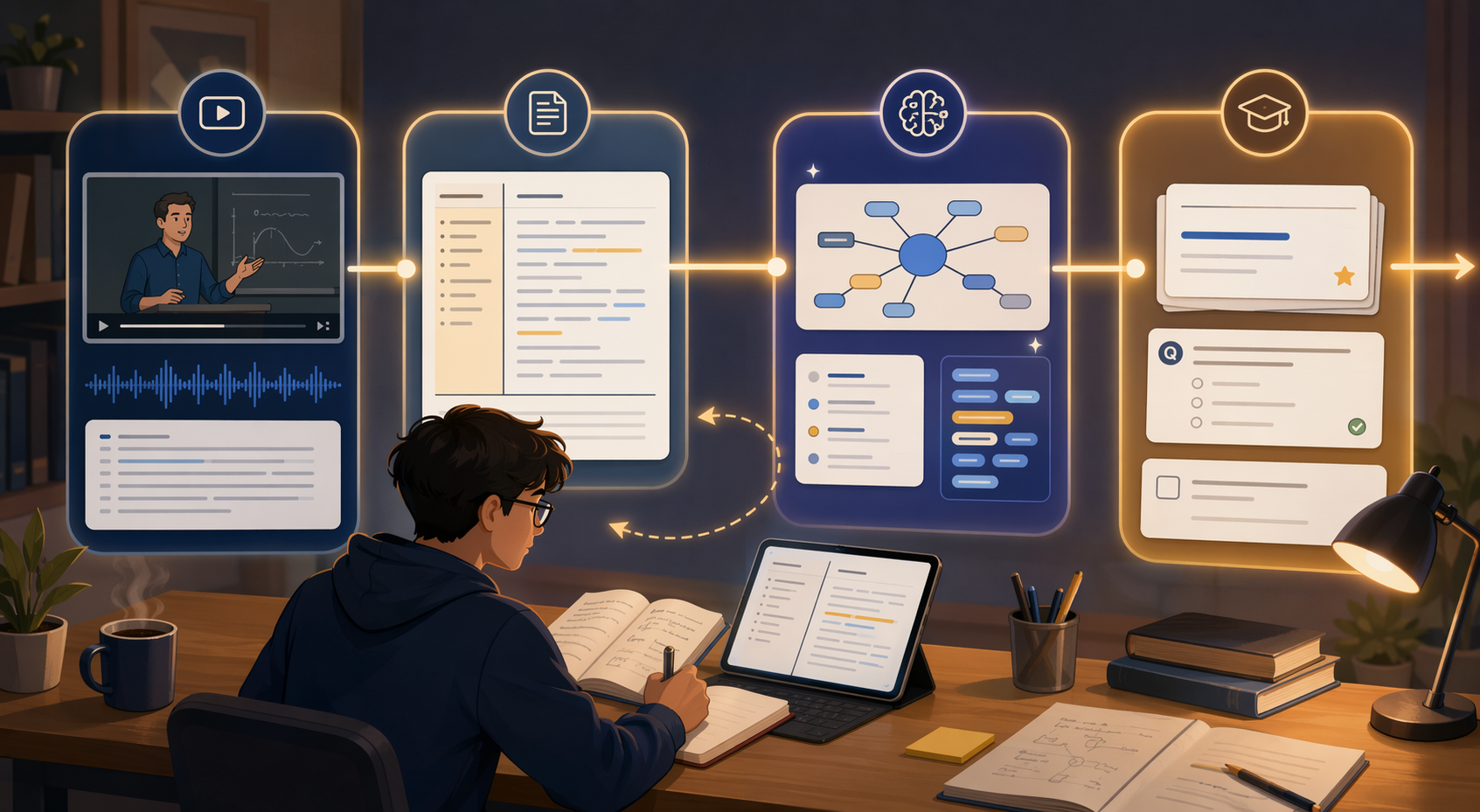
| Stage | What you produce | What AI can safely help with | What you should not skip |
|---|---|---|---|
| 1. Extract | A cleaned transcript with timestamps or screenshots where needed | Transcription, rough cleanup, segment labels | Checking names, formulas, technical terms, and noisy-audio errors |
| 2. Structure | Adapted Cornell notes with cues, main notes, summary, gaps, and visuals | Reformatting, grouping, cue suggestions, learning-outcome alignment | Deciding what matters and marking what you do not understand |
| 3. Transform | Concept maps, key terms, examples, confusion checks, and question sets | Generating task-specific study assets from your structured notes | Prompting from cleaned notes instead of raw lecture text |
| 4. Practice | Flashcards and practice questions for active recall | Drafting cards, cloze prompts, quizzes, and answer explanations | Testing yourself before rereading |
That division of labor is not just a preference. A 2026 randomized study by Pi and colleagues in Contemporary Educational Psychology compared learner-only notetaking, AI-only notetaking, and learner-AI notetaking for video-based STEM learning. In a sample of 92 participants, the learner-AI condition significantly outperformed both AI-only and learner-only conditions on knowledge acquisition and creativity, with reported significance at p < 0.001.[1] The caveat matters: this was STEM video learning, the sample was not huge, and full methods may be limited behind the publisher’s access controls. Still, the result lines up with what many students discover the hard way: AI is most useful when it drafts and reshapes material that the learner is actively checking, not when it replaces the learner’s contact with the lecture.
For a broader look at why the AI-versus-manual framing is too thin, see how AI changed online study tools. For this tutorial, the practical point is simpler: AI should reduce the clerical burden, while you keep control over accuracy, organization, and retrieval practice.
Stage 1: Extract a Transcript That Will Not Poison the Rest of the Workflow
Start with the transcript, not the summary. A bad transcript quietly damages everything built on top of it: the outline, the definitions, the flashcards, the quiz questions, even the confidence with which an AI tool explains the wrong term.
Use YouTube’s transcript panel if it is available, or an AI transcription tool if it is not. The goal at this stage is not beautiful notes. The goal is a source document clean enough that later steps are working from the lecture rather than from transcription noise.
- Keep timestamps at least every few minutes, especially for long lectures, worked examples, demonstrations, or slides you may need to revisit.
- Correct obvious errors in names, equations, technical vocabulary, dates, book titles, and acronyms.
- Mark places where the transcript is uncertain instead of smoothing them over. Use a simple tag such as [CHECK AUDIO] or [UNCLEAR TERM].
- Capture screenshots or slide references when the lecturer explains a diagram, code block, chart, anatomical structure, formula, or proof that the transcript cannot carry by itself.
- Delete filler only after checking that you are not deleting a contrast, exception, or example the lecturer uses to make the concept understandable.
This is the least glamorous stage, but it prevents the most expensive failures. Ask Maeve’s discussion of YouTube-to-notes workflows reports that Whisper-class models can reach under 5% word error rate on clean audio but rise above 20% word error rate with background noise, citing JETIR accuracy data.[2] Treat those figures as a practical warning rather than a universal benchmark. Clean seminar audio and a recorded lecture with music, hallway noise, or heavy room echo are not the same input.
You do not need to correct every comma. You do need to correct the words that would change meaning. In biology, “meiosis” and “mitosis” cannot be allowed to swap places. In economics, “nominal” and “real” are not decorative adjectives. In programming, one missing negation can turn the example inside out.
If the video depends heavily on visuals, add them now. HoverNotes’ own tool comparison emphasizes timestamped screenshots for on-screen material such as code and diagrams, which is exactly the kind of detail a transcript usually drops.[3] Because that claim comes from a tool’s own blog rather than independent testing, it should not be read as proof that one product is best. The underlying distinction is still sound: a lecture about a graph, derivation, or code trace is not fully captured by words alone.
Stage 2: Put the Lecture Into an Adapted Cornell Structure
Once the transcript is usable, do not ask AI for “good notes” yet. First, give the material a shape. The adapted Cornell method works well for video lectures because it separates the raw content from the things you will later use to study: cues, questions, summaries, formulas, diagrams, and points of confusion.
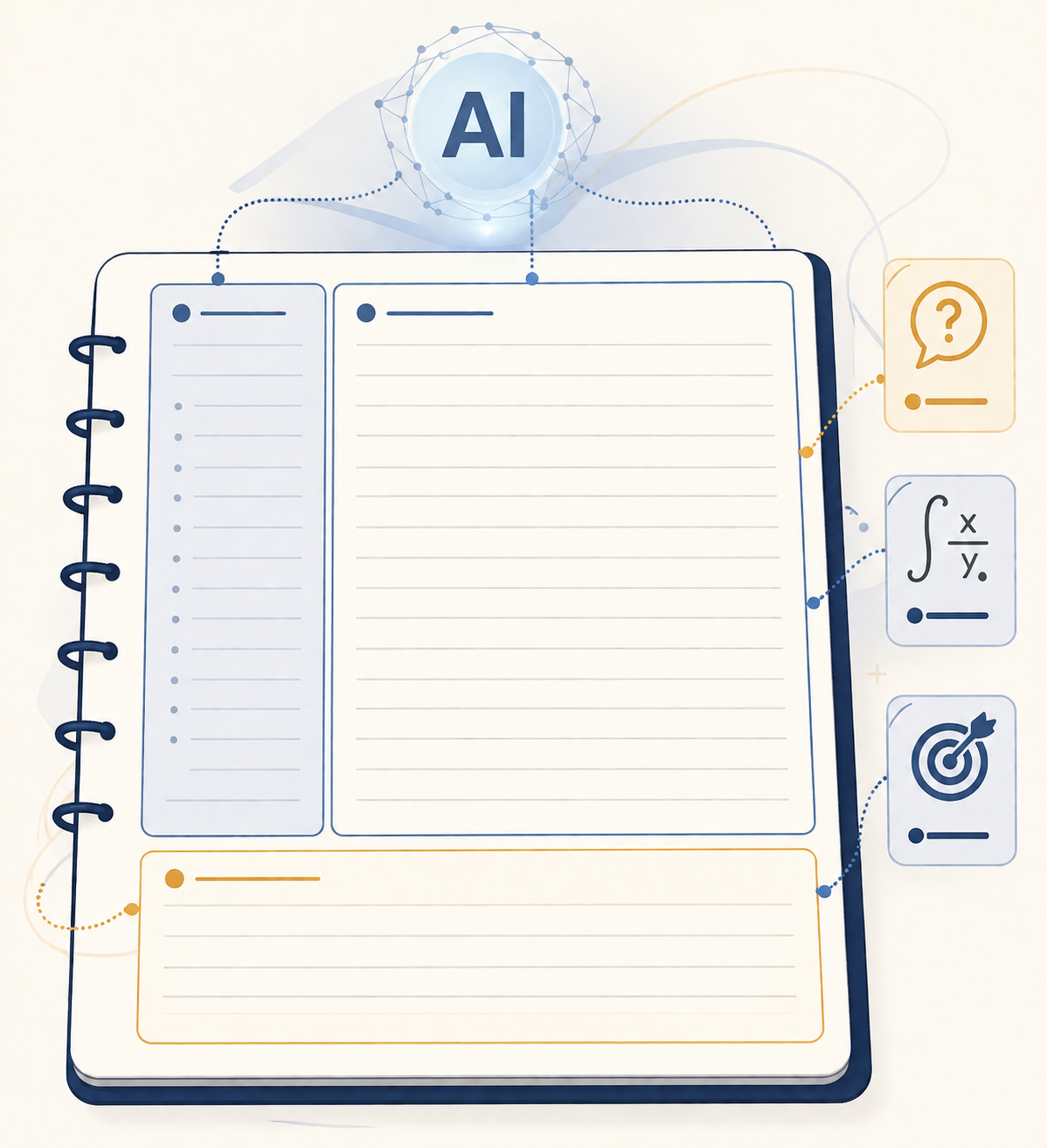
Traditional Cornell notes use a cue column, a main notes area, and a summary section. For recorded lectures, add a few working fields: timestamp, slide or screenshot reference, unclear point, formula or diagram, and learning outcome. If you want examples of digital layouts, the comparison of Cornell note-taking apps is useful here, but the method matters more than the app.
| Field | What goes there | Why it matters later |
|---|---|---|
| Cue or question | A short prompt such as “What causes X?” or “When does this formula apply?” | Becomes a flashcard front, quiz question, or review prompt |
| Main notes | The cleaned explanation, example, definition, step, or claim | Gives AI enough context to transform without guessing |
| Timestamp or visual | Video time, slide number, screenshot, diagram, or code reference | Lets you return to the source when something looks wrong |
| Unclear point | Anything you could not explain after the first pass | Creates a repair list instead of hiding confusion inside neat notes |
| Summary | A short explanation of the segment in your own words | Checks whether you processed the section rather than copied it |
This structure is where the learning starts to happen. A transcript is chronological; study notes need to be usable. If the professor spends five minutes introducing a problem, ten minutes solving it, and two minutes naming the principle, your notes may need to put the principle first, then the problem, then the worked steps. That reordering is not cosmetic. It turns a watched lecture into material you can question.
The note-taking research base supports that kind of active handling, though it does not give one universal template. Cult of Pedagogy’s research roundup summarizes several relevant findings: more complete notes have been associated with better retention, Cornell-style systems have support in the literature, guided notes can improve achievement, drawing can help memory, and revising notes during deliberate pauses can be valuable.[4] The same roundup also keeps the handwriting-versus-digital question appropriately unsettled, noting that Mueller and Oppenheimer found advantages for handwriting in 2014 while Carter and colleagues found no significant difference in 2017.[4] For this workflow, the important choice is not pen versus keyboard. It is whether the notes make later recall possible.
A useful pass through the lecture can look like this:
- Skim the video title, description, slides, or chapter markers before watching so your brain has a rough frame for the topic.
- Watch in sections instead of trying to process an hour as one block.
- Pause only when the lecture changes task: definition to example, example to proof, theory to application, or explanation to exception.
- Write cue questions as you go, even if they are rough.
- End each section with a two- or three-sentence summary before asking AI to polish anything.
That “pause only when the lecture changes task” rule is worth protecting. The University of Bristol’s student strategies for recorded lectures recommend skimming slides beforehand, using a “pickier pause” approach to avoid doubling watch time, using shorthand, and writing a post-lecture summary against learning outcomes.[5] That is a sensible guardrail for students who otherwise turn a 50-minute lecture into a three-hour transcription project.
At the end of Stage 2, your notes should look unfinished in the right way. They should contain clear explanations, rough cue questions, marked gaps, and links back to the source. If they look perfect but you cannot tell which ideas you actually understand, the structure is doing decoration rather than work.
Stage 3: Ask AI for Specific Study Assets, Not a Generic Summary
Now AI becomes genuinely useful. Feed it the cleaned, structured notes from Stage 2, not the raw transcript from Stage 1. This single choice changes the output. A raw transcript invites compression. Structured notes invite transformation.
The prompt should name the task, the source boundaries, and the format you need. It should also tell AI what not to do: do not invent examples from outside the lecture unless asked, do not hide uncertainty, and do not turn unclear points into confident explanations.
Prompt for a concept map
Using only the structured notes below, create a concept map in text form. Show the central concept, major branches, sub-concepts, and relationships between them. Mark any relationship that is implied but not directly explained in the notes as [needs checking]. Do not add outside facts.

Structured notes:
[Paste notes]
This is useful after lectures that introduce a system: photosynthesis pathways, constitutional principles, database normalization, market structures, literary movements. The map helps you see whether the lecture was organized by chronology, cause and effect, hierarchy, comparison, or procedure.
Prompt for a confusion check
Review these notes as if you are helping me prepare for a quiz. Identify: 1) concepts that are defined but not explained, 2) steps that appear to be missing, 3) terms that may be easy to confuse, 4) places where my summary may be too vague, and 5) questions I should ask my instructor or look up in the source video. Keep each item tied to the relevant timestamp or section when possible.

Structured notes:
[Paste notes]
This prompt is better than asking “What did I miss?” because it gives the model categories of failure to inspect. It also keeps the output attached to sections of your notes, which makes repair possible. A free-floating warning that “you should review Chapter 4” is much less useful than “your notes define opportunity cost at 12:40 but do not include the example the lecturer used to distinguish it from accounting cost.”
Prompt for key terms and distinctions
Extract the key terms from these notes. For each term, give: a short definition based only on the notes, the cue question it answers, one related term it could be confused with, and the difference between them. If the notes do not contain enough information for a definition, write [insufficient information].

Structured notes:
[Paste notes]
The “confused with” column is where many weak notes become useful. Students often know the definition well enough to recognize it on a page but not well enough to separate it from a neighboring idea under quiz pressure. The prompt forces comparison before the practice test does.
Prompt for example problems
Based on the worked examples in these notes, create three new practice problems at similar difficulty. For each problem, include a step-by-step solution and label which lecture concept each step uses. If the notes do not contain enough worked-example detail to create a fair problem, say what information is missing instead of inventing it.

Structured notes:
[Paste notes]
Use this carefully. If your lecture includes formulas, proofs, accounting entries, coding patterns, or quantitative examples, AI can draft practice problems quickly. But the answer key must be checked. A wrong explanation in a practice set is worse than no practice set because it trains the mistake with confidence.
Prompt for quiz questions
Turn these structured notes into a quiz. Include: 8 short-answer questions, 5 multiple-choice questions, and 3 application questions. For each question, provide the correct answer, a brief explanation, and the section of the notes it came from. Make at least one question target a common confusion or exception marked in the notes.

Structured notes:
[Paste notes]
Notice the source requirement: “the section of the notes it came from.” That small constraint makes the quiz easier to audit. If a question cannot be traced back to your notes or the lecture, it belongs in a separate “outside review” pile, not in the core study set for Friday’s quiz.
Some tool blogs report striking time savings from AI-assisted note workflows. Ask Maeve cites student reports of saving 30–45 minutes per tutorial video by converting videos to notes first and also cites AI-assisted Cornell workflows producing 1-hour video notes in about 10 minutes, framed as 75–85% time savings.[2] Those figures are useful signals, not independent proof. The safer expectation is that AI should reduce rewriting, formatting, and first-draft generation. It should not remove the checking stage.
Thetawave says more than 300,000 students use its YouTube-to-notes features for structured notes, flashcards, and quizzes.[6] That kind of adoption shows demand for the workflow, not evidence that every generated note set is effective. Adoption is not the same as learning. The difference is what happens after the output appears.
Stage 4: Turn the Notes Into Recall Practice
At this point, stop improving the notes and start testing them. A clean summary can make you feel prepared because everything looks familiar. Recall practice shows whether you can produce the idea without staring at the explanation.
Convert your cue questions, key terms, unclear points, and worked examples into flashcards and practice questions. If you are choosing where those cards should live, the guide to flashcard apps that sync across devices can help you avoid a setup that strands your review on one laptop.
- Use cue-column questions as flashcard fronts and the main-note explanations as backs.
- Turn formulas into cards that ask when to use the formula, not only what the formula is.
- Turn diagrams into blank-label or explain-the-arrow prompts.
- Turn unclear points into “repair cards” only after you have checked the source or asked for help.
- Turn worked examples into problem cards where the answer requires the next step, not passive recognition.
For a lecture on cellular respiration, a weak card asks, “What is glycolysis?” A better card asks, “What happens to glucose during glycolysis, and why does this stage not require oxygen?” For a programming lecture, a weak card asks, “What is recursion?” A better card asks, “Given this base case and recursive call, what stops the function from running forever?”
If you use a study system with multiple apps, keep the pipeline simple: transcript and screenshots in one place, structured notes in one place, recall cards in one place, and deadlines somewhere you actually check. The broader guide to building a study app stack is useful if your tools are multiplying faster than your assignments.
Ask Maeve also reports a claim, attributed to Mapify, that students using spaced repetition with video-derived flashcards saw grade improvements up to 91%.[2] That number should be treated cautiously because the research brief notes that the exact statistic was not found on Mapify’s own page. The practical advice does not need the larger claim to stand: once your lecture notes become questions, you can test memory instead of rereading familiarity.
What You Can Safely Automate, and What Still Needs Your Judgment
The workflow is efficient because it does not ask you to be heroic. You do not need to handwrite every sentence from a recorded lecture. You also should not outsource the whole chain and trust the first polished output.
| Task | Safe to automate? | Student check required |
|---|---|---|
| Rough transcription | Yes | Check technical terms, names, formulas, and unclear audio |
| Removing filler | Usually | Make sure examples, exceptions, and transitions were not deleted |
| Reformatting into Cornell-style sections | Yes | Decide whether the cues and summaries reflect the lecture’s real priorities |
| Generating key terms | Yes | Verify definitions against the lecture and course materials |
| Creating practice questions | Yes | Check answer keys and reject questions not supported by the notes |
| Deciding what you understand | No | Test yourself without looking |
A good AI note workflow leaves traces. You can see the source transcript, the timestamps, the structured notes, the unclear points, the generated study assets, and the flashcards. When something seems wrong, you can walk backward and fix it. A bad workflow gives you a clean summary with no handles.
The best version is neither “let AI take notes for me” nor “do everything manually because that is more virtuous.” It is a division of labor. AI drafts and transforms quickly. You clean, organize, question, correct, and practice. Those are the parts that cannot be safely skipped.
References
- Generative AI affordances for notetaking in STEM video learning, Contemporary Educational Psychology, 2026
- YouTube Video to Notes, Ask Maeve
- HoverNotes blog, HoverNotes
- Note-taking: A Research Roundup, Cult of Pedagogy
- How I make notes from recorded lectures, University of Bristol Study Skills, December 16, 2021
- YouTube to Notes, Thetawave
Next Steps
- The Complete Guide to Downloading Anki Flashcards (App + Shared Decks + Import) →
A step-by-step tutorial for beginners covering the full Anki flashcard pipeline: downloading the app on any device, finding quality pre-made shared decks, and importing .apkg files correctly. Designed for students and lifelong learners who get stuck on deck sourcing and import.
- How to Import MCAT Decks into Anki (Both Methods, Step by Step) →
A step-by-step tutorial for pre-med students who have chosen an MCAT Anki deck and need to get it working fast — covering the direct .apkg file method for static community decks and the AnkiHub subscription method for the AnKing MCAT deck, plus post-import configuration and fixes for the most common failure states.
- How to Make Flashcards on Quizlet Using AI: From Notes, PDFs, and Lecture Slides →
Tired of typing flashcards by hand? This tutorial walks you through three AI-powered methods on Quizlet — Magic Notes, the AI Flashcard Generator, and Smart Assist — so you can turn your existing class materials into study sets in seconds. We also cover the free tier limits and how to get the best results from each method.
Comments
Join the discussion with an anonymous comment.