
The Ultimate Guide to Truly Free Flashcard Apps in 2026: What You Actually Get Without Paying
The Free Tier Erosion Problem: Why "Free" Doesn't Mean What It Used To
If you've opened a flashcard app recently hoping to study without paying, you've probably hit a wall. The free tier you relied on last semester now hides spaced repetition behind a paywall, limits you to a handful of decks, or bombards you with ads. This isn't your imagination — it's a pattern.
Quizlet, once the go-to free flashcard platform, has steadily contracted its free offering. The company now charges $35.99 per year for Quizlet Plus, and the free version no longer includes Learn mode or true spaced repetition scheduling. Brainscape follows a similar playbook: its free tier restricts users to 20 personal decks, blocks offline access, and lacks a native iOS spaced repetition engine. The message is clear — the free lunch is over.
But the story doesn't end there. While some apps have pulled back, a new generation of tools has stepped in with genuinely free offerings. Anki remains the gold standard for power users. Apps like Knowt, Flashcards World, RemNote, and MintDeck have built free tiers that don't feel like a tease. The challenge is separating the real deals from the ones that will ask for your credit card after your third study session.
What "Truly Free" Means: Our Evaluation Framework
To cut through the marketing, we evaluated each app against five criteria. An app earns the "truly free" label only if it delivers on all of them without requiring a subscription.
- Free spaced repetition algorithm (SRS): The app must include a working spaced repetition scheduler — either the modern FSRS, the classic SM-2, or a proprietary equivalent — at no cost. Without SRS, you're just flipping through cards randomly.
- No card or deck creation limits: You should be able to create as many cards and decks as you need. Apps that cap you at 20 decks or 100 cards per set are not truly free for serious study.
- No mandatory ads: Occasional, non-intrusive ads are tolerable. But apps that force you to watch a video before each study session or display pop-ups that interrupt your flow don't qualify.
- Offline access: Studying on the subway, in a library basement, or anywhere without Wi-Fi should work. If the app requires an internet connection to review cards, it fails this test.
- No mandatory sign-up: Some students want to try an app before creating an account. Apps that let you study immediately without registration score higher on accessibility.
We applied these criteria to ten popular flashcard apps. The results reveal a clear divide between apps that respect your time and budget, and those that use "free" as a marketing hook.
Free Flashcard Apps Compared: What You Actually Get Without Paying
| App | Free SRS Algorithm | Card Limits | Ads in Free Tier | Offline Access | Sign-Up Required | Truly Free? |
|---|---|---|---|---|---|---|
| Anki (Desktop/Android) | FSRS & SM-2 | Unlimited | None | Yes | No | Yes |
| Knowt (Basic) | Proprietary | Unlimited | None | Yes (app) | Yes | Yes |
| Flashcards World | FSRS | Unlimited | Ad-free on web; optional in-app purchases on mobile | Yes | No | Yes |
| RemNote (Free) | FSRS & SM-2 | Unlimited | None | Yes (app) | Yes | Yes |
| MintDeck | FSRS | Unlimited | None | Yes | Yes | Yes |
| Quizlet (Free) | None (gated behind Plus) | Limited (set creation limits) | Yes | No | Yes | No |
| Brainscape (Free) | Confidence-based (limited) | 20 personal decks max | Yes | No | Yes | No |
| StudySmarter (Free) | Proprietary (basic) | Limited | Yes | Limited | Yes | No |
| Mochi (Free) | SM-2 | Unlimited | None | No (sync requires Pro) | Yes | No |
| AnkiApp (Free) | Proprietary (Advanced SRS) | Unlimited (but locks features with frequent use) | None | Yes | Yes | No |
Deep Dive: The Top 5 Truly Free Flashcard Apps
1. Anki — The Gold Standard (with a Catch)
Anki remains the most powerful free flashcard tool available — provided you're not on an iPhone. The desktop app (Windows, Mac, Linux) and the Android app (AnkiDroid) are completely free. The iOS app, AnkiMobile, costs a one-time fee of $24.99.
What you get for free is unmatched: unlimited cards, full control over scheduling with both FSRS and SM-2 algorithms, extensive add-on support, and free sync via AnkiWeb. A 2023 study by Gilbert et al. published in Medical Science Educator found that medical students using Anki scored 12.9% higher on comprehensive exams compared to those who didn't.
The trade-off is the learning curve. Anki's interface is functional, not friendly. Setting up FSRS, configuring deck options, and finding quality shared decks requires patience. There are no built-in AI features — no automatic card generation from PDFs or videos.
2. Knowt — The Quizlet Refugee's Best Friend
Knowt has positioned itself as the direct answer to Quizlet's free tier erosion. Its basic plan is genuinely free: you get unlimited flashcards, spaced repetition, and the ability to import Quizlet sets with one click. For students who have years of Quizlet content, this migration path alone is worth the download.
Knowt also offers AI-powered flashcard generation from PDFs, notes, and videos in its free tier — a feature that most apps reserve for paid plans. However, reports indicate Knowt has begun adding some paid features, so the exact boundaries of the free tier may shift.
For a full breakdown of Knowt's features and limitations, read our Knowt Flashcard App Review. If you're ready to move your Quizlet sets, our step-by-step migration guide walks you through the process.
3. Flashcards World — Zero Friction, Full Power
Flashcards World is the closest thing to a no-compromise free flashcard app in 2026. It requires no sign-up to start studying. It uses the modern FSRS spaced repetition algorithm. It supports offline study and cross-device sync. The web version is completely ad-free.
The app reports over 1 million students, 7 million downloads, and a 4.8 average app store rating. It offers 100,000+ pre-made sets, imports from Anki (.apkg), Quizlet, CSV, and Excel, and includes four study modes: classic, multiple choice, writing, and timed match. The only paid features are optional in-app purchases for AI card generation and HD voice on mobile.
4. RemNote — For Students Who Take Notes First
RemNote is unique because it combines note-taking and flashcard creation into a single workflow. You write notes in class, and RemNote automatically generates flashcards from them. The free plan includes unlimited cards, both FSRS and SM-2 algorithms, and 100 free AI credits per month for generating cards from PDFs or text.
This makes RemNote particularly valuable for students who prefer to build their study materials organically rather than downloading pre-made decks. The trade-off is that RemNote's free tier is more limited on AI features than Knowt's, and the app's dual note-taking/flashcard interface can feel overwhelming at first.
5. MintDeck — The Best Free Option for iPhone Users
If you're on an iPhone and don't want to pay $24.99 for AnkiMobile, MintDeck is the strongest free alternative. It offers unlimited card creation, FSRS spaced repetition, and the ability to import Anki .apkg files — all for free. It also includes on-device audio for five languages and supports offline study.
MintDeck gives you 10 free AI credits upon sign-up, with additional credits starting at $1.99. The app is iOS-native and designed specifically for iPhone, which means it feels more polished than cross-platform tools on Apple devices. However, it's a newer app with a smaller user base, so long-term stability is less certain than with Anki.
Quick Decision Guide: Which Free App Is Best for You?
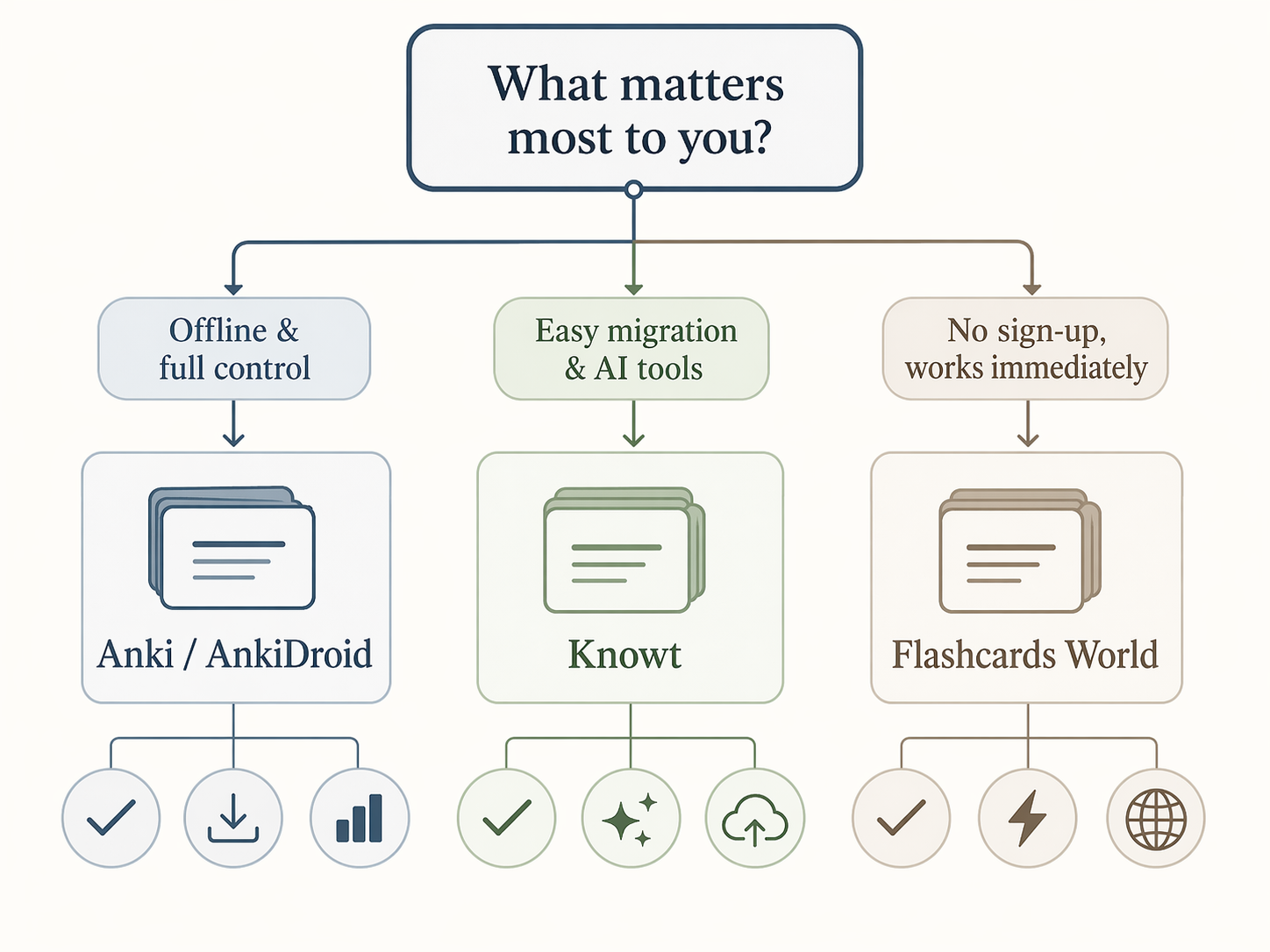
If the flowchart doesn't cover your exact situation, here are specific recommendations by student type:
- Medical students: Anki with FSRS. The 12.9% exam score improvement found in the Gilbert et al. study is hard to ignore. Use Anki on desktop/Android for free, or pay the $24.99 for iOS.
- Language learners: Flashcards World or Anki. Flashcards World's on-device audio and no-sign-up approach is ideal for quick vocabulary drills. Anki offers more control over card formatting and scheduling.
- Students who want AI help: Knowt or RemNote. Knowt offers free AI generation from PDFs and videos. RemNote gives you 100 free AI credits per month. For a deeper comparison of AI flashcard tools, see our AI flashcard generators comparison.
- iPhone users who want free: MintDeck. It's the only app that offers FSRS, unlimited cards, and Anki import without charging an upfront fee on iOS.
- Students migrating from Quizlet: Knowt. One-click import, free spaced repetition, and AI features make it the smoothest transition. Our migration guide covers the process step by step.
- Students who want zero sign-up friction: Flashcards World. No account needed, no email verification — just start studying.
Frequently Asked Questions About Free Flashcard Apps
Is Anki really free?
Yes and no. The desktop app (Windows, Mac, Linux) and the Android app (AnkiDroid) are completely free. The iOS app, AnkiMobile, costs a one-time fee of $24.99. If you're on iPhone and don't want to pay, MintDeck or Flashcards World are strong free alternatives.
Can I migrate my Quizlet sets for free?
Yes, to multiple apps. Knowt offers one-click Quizlet import. Flashcards World supports importing from Quizlet via CSV. Anki can import Quizlet sets using a browser extension or by exporting to CSV first. Our Quizlet-to-Knowt migration guide provides detailed instructions.
Do any free apps have AI features?
Yes. Knowt offers free AI flashcard generation from PDFs, notes, and videos. RemNote's free plan includes 100 AI credits per month for generating cards from text or PDFs. MintDeck gives you 10 free AI credits on sign-up. For a detailed comparison of AI flashcard generators, see our dedicated guide.
Are newer apps like Flashcards World and MintDeck stable?
Flashcards World has over 1 million students and a 4.8 app store rating, which suggests a healthy user base. MintDeck is newer and smaller. Both are actively maintained, but they don't have the decade-plus track record of Anki. If long-term stability is your top priority, Anki is the safest bet.
The Bottom Line: Pick the App That Matches Your "Free" Definition
There is no single best free flashcard app — only the best app for your specific definition of "free." If you want maximum power and don't mind a learning curve, Anki is unbeatable. If you want the easiest migration from Quizlet with AI features, Knowt is your answer. If you want to start studying immediately without creating an account, Flashcards World wins. If you're an iPhone user who refuses to pay $24.99, MintDeck fills the gap. And if you want to build flashcards from your notes, RemNote's integrated workflow is unique.
The apps that failed our "truly free" test — Quizlet, Brainscape, StudySmarter, Mochi, and AnkiApp — aren't bad tools. They just don't offer a complete free experience. If you're willing to pay, they may still be worth considering. But if your budget is zero, the five apps above will serve you well.
Related case links
No matching exam hub found
Browse the exam hubs directory to find the study plan for this exam.
Did a similar plan work for you?
Share whether a comparable timeline and starting point produced a similar result — this is verification discussion, not general commentary.
Comments
Join the discussion with an anonymous comment.