
MCAT Study Prep Hub: How to Integrate Anki, UWorld, and AAMC Into One Workflow
Most pre-med students use 4–6 MCAT tools but lack a system to connect them. This guide shows how to build a feedback loop that turns flashcards, question banks, practice exams, and planners into a single, score-boosting workflow.
- MCAT
- Anki decks
- study schedule
- free resources
- medical school
The Integration Problem: Why Tool Hopping Hurts Your Score
Most pre-med students preparing for the MCAT juggle multiple resources simultaneously — flashcards, question banks, practice exams, content review books, and a planner. It is not unusual to see a desk cluttered with Anki, UWorld, AAMC materials, Kaplan books, and a weekly schedule. Yet despite this arsenal, many students plateau around the 500 mark. The missing piece is rarely another tool; it is a system that connects what you learn in one tool to what you practice in another.
Observations from MCAT prep communities suggest that fewer than 20% of students have an explicit workflow that links their content review, flashcards, practice questions, and mistake tracking into a closed feedback loop. The rest operate in silos: they read a chapter, do Anki reviews, occasionally take a UWorld block, and maybe log mistakes — but none of these activities inform the next. This fragmented approach, sometimes called tool hopping, wastes time because you repeatedly review material you already know while neglecting areas where you consistently miss questions.
The consequences are measurable. When students finally integrate their tools, they often see rapid score improvements — not because they found a magic resource, but because they stopped revisiting mastered content and started targeting the gaps revealed by practice questions. The goal of this hub is to show you exactly how to build that integrated workflow using the most popular MCAT tools: Anki (with FSRS), UWorld, AAMC Official Prep, and a planner like MCAT.tools or UWorld's built-in scheduler.
Designing the Core Loop: Content → Flashcards → Practice → Mistakes → Recalibration
At the heart of any effective MCAT study system is a five-stage feedback loop. Each stage feeds directly into the next, creating a cycle that continually sharpens your knowledge and exposes weak spots. The image below illustrates the loop; the sections that follow break down each step.
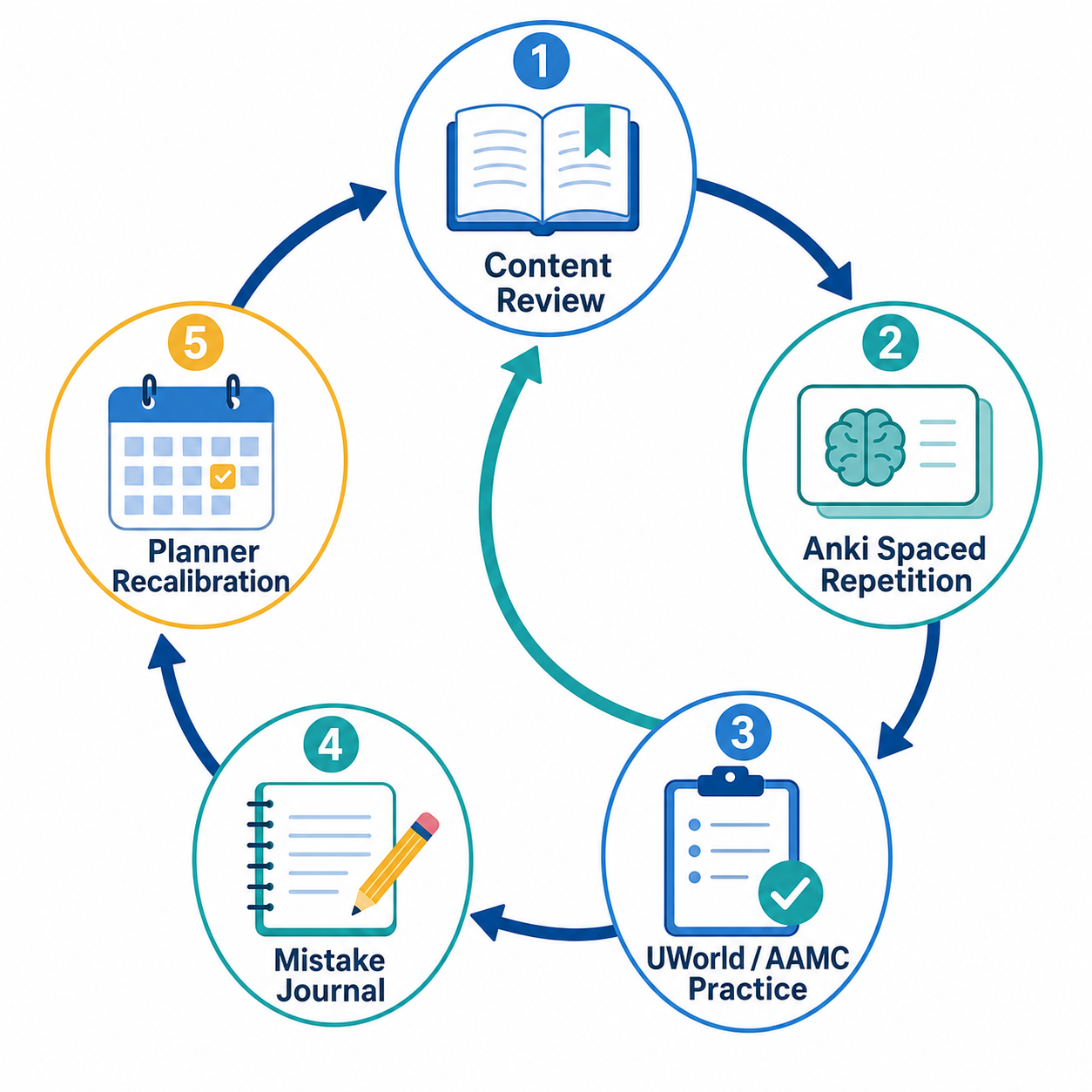
Let’s define each stage and how you move between them.
- Content Review: Read a chapter from a content source (Kaplan, Princeton Review, or the official AAMC Content Outline). This is where you build foundational knowledge. Do not highlight everything — focus on understanding mechanisms and noting concepts you cannot explain from memory.
- Anki Spaced Repetition: Within 24 hours of reading, convert the chapter’s key facts, equations, and relationships into Anki cards. Use the FSRS (Free Spaced Repetition Scheduler) algorithm — native in MintDeck and optional in Anki — to schedule reviews optimally. At MCAT scale (8,000–15,000 cards), FSRS can save 15% or more of review time compared to the older SM-2 algorithm, freeing hours for practice.
- UWorld / AAMC Practice: After you have a solid base of cards, start working through question banks. UWorld’s MCAT QBank contains 3,000+ questions and is trusted by over 400,000 students. The AAMC Official Prep Bundle adds 2,710 unique passage-based and independent questions plus six full-length exams. Treat every question block as a diagnostic: note which topics produced errors.
- Mistake Journal: After each practice block, record every mistake — not just the correct answer, but the reasoning error (content gap, misinterpretation, calculation slip, or test-taking mistake). This journal becomes the direct input for your next Anki card additions and your planner recalibration.
- Planner Recalibration: Use your mistake data to adjust your daily and weekly schedule. If your journal shows a cluster of errors in physics circuits, increase the time allocated to physics reviews and Anki that week. Tools like MCAT.tools (which has generated over 9,000 study plans) and UWorld’s adaptive study planner can automate this recalibration, but even a simple spreadsheet works.
| Stage | Primary Tool(s) | Key Output |
|---|---|---|
| Content Review | Kaplan / AAMC Outline (PDF) | Anki card material |
| Anki Spaced Repetition | Anki (FSRS) or MintDeck | Retained knowledge; weak topic flags via recall failures |
| Practice Questions | UWorld QBank / AAMC Bundle | Performance data; mistake log |
| Mistake Journal | Notebook or MCAT.tools Mistakes Journal | Actionable error categories |
| Planner Recalibration | MCAT.tools / UWorld Planner / custom spreadsheet | Adjusted study schedule targeting weaknesses |
This loop is not theoretical. Students who commit to closing the feedback cycle — meaning they never let a UWorld mistake die in the journal; they immediately turn it into a new Anki card — consistently report more efficient study weeks and higher confidence on practice exams.
Tool-by-Tool Integration Guide
The core loop works only if each tool is configured to share data with the next. Below is a breakdown of how to set up the major tools so that they form a pipeline rather than a collection of islands.
Anki (with FSRS) synced to Your Content Schedule
Start by aligning your Anki deck creation with your content review calendar. Read one chapter per day, then spend 15–20 minutes converting the material into flashcards. You can do this manually or use AI generation tools — see our guide on How to Generate Flashcards from a PDF for a step-by-step process. Enable FSRS in Anki 23.10+ (or use MintDeck, which has FSRS natively) to optimize review intervals. Anki is free on desktop and Android; the iOS version costs $24.99.
Pre-made decks like MilesDown, JackSparrow2048, or Ortho528 can jump-start your collection, but treat them as supplementary. The act of making your own cards forces deeper encoding. If you do use a shared deck, go through it card by card and remove anything you already know cold — otherwise FSRS will waste time on overlearned material.
UWorld QBank as the Weak-Topic Detector
UWorld’s MCAT QBank contains over 3,000 questions organized by subject and difficulty. After you have a core deck of at least 500 cards, start doing 20–30 UWorld questions daily, timed. For every question you get wrong or guess correctly, open your mistake journal and note the topic and the reason for the error. Then add one or two Anki cards that address the specific gap.
UWorld’s AI-powered tutor (UAsk) can explain concepts on the spot, but do not rely on it alone — encoding the explanation into your own flashcard is what solidifies the learning. The UWorld Study Planner can also sync your mistake data to create a custom schedule for retesting weak areas.
AAMC Official Prep Hub as the Capstone
The AAMC’s Official MCAT Prep Bundle ($323.70 for the Online-Only version, valid for 365 days) includes 2,710 passage-based and independent questions and six full-length practice exams (Practice Exams Two through Six). These represent the closest approximation to the real test. Save them for the final 8–10 weeks of your prep.
When you take an AAMC full-length, treat it as a capstone assessment: after reviewing your score report, return to your mistake journal and add Anki cards for every question you flagged or answered incorrectly. Do not move on to the next full-length until you have closed all content gaps revealed by the previous one.
Planners: MCAT.tools, UWorld Planner, or a Simple Spreadsheet
Your planner is the glue that holds the loop together. Every Sunday, review your mistake journal and adjust the coming week’s schedule. If your journal shows heavy misses in metabolism, allocate extra Anki reviews and an extra UWorld block on biochemistry.
MCAT.tools offers a personalized planner (over 9,000 study plans created) with a Chrome extension that captures activity across Anki, UWorld, AAMC, Kaplan, and other tools. Its AI coach, Alex, uses your actual plan, scores, and weaknesses to suggest daily priorities. UWorld’s built-in study planner also integrates AAMC question sets and practice exams. For a simpler approach, you can start with our Weekly Study Planner Template for Students and adapt it to MCAT needs.
Alternatives and Cautionary Notes
Other flashcard tools like RemNote combine flashcard creation with PDF annotation and may appeal to students who want fewer apps. However, for MCAT-scale prep, Anki’s FSRS implementation and larger shared-deck ecosystem give it an edge. Quizlet has a limited free tier and uses a proprietary algorithm that has not been validated for the high-card-volume, long-interval demands of MCAT studying. We recommend Anki or MintDeck as your primary spaced repetition tool.
| Tool | Primary Role | Integration Note |
|---|---|---|
| Anki (FSRS) / MintDeck | Spaced repetition flashcard system | Sync deck creation to content review schedule; use FSRS for 15%+ time savings |
| UWorld MCAT QBank | 3,000+ practice questions | Post-block mistake log feeds new Anki cards; UWorld Planner adjusts schedule |
| AAMC Official Prep Bundle | 2,710 questions + 6 full-length exams | Capstone practice; full-length review triggers detailed mistake analysis |
| MCAT.tools or UWorld Planner | Adaptive study schedule | Recalibrate weekly based on mistake journal; Chrome extension aggregates cross-tool data |
| Kaplan / Princeton Review books | Content review foundation | One chapter per day → 15–20 min card creation |
Real 3-Month Study Plan: A Daily Breakdown Across Tools
To make the core loop concrete, here is a sample 12-week plan that shows how the five stages play out in real study days. Adjust the timeline and weekly hours to your own availability — most successful plans allocate 20–25 hours per week over 12–16 weeks.
| Month | Focus | Typical Daily Schedule |
|---|---|---|
| Month 1 (Weeks 1–4) | Content foundation + core Anki deck | 2 hours content review → 30 min new card creation → 20 min daily Anki review of previous days’ cards → 30 min of UWorld (un-timed, subject-specific) → 10 min mistake journal |
| Month 2 (Weeks 5–8) | Practice acceleration + weak-topic targeting | 1 hour content review (finishing chapters) → 40 min daily Anki review (FSRS adjusted) → 1 hour UWorld timed blocks (40 Qs) → 20 min mistake journal + new flashcards → 10 min planner recalibration |
| Month 3 (Weeks 9–12) | Capstone full-lengths + final gap closure | 1 hour focused Anki review on weakest topics → 1 full-length exam every 7–10 days (AAMC) → rest day after full-length → next day: full-length review + mistake journal + add Anki cards → remaining days: targeted UWorld blocks on weakest subjects |
During Month 1, your priority is building the habit of daily Anki reviews and mistake logging. Do not worry about speed on UWorld yet — focus on accuracy and understanding. In Month 2, shift to timed practice and let FSRS handle your review load. The 15% time savings from FSRS (which at 10,000 cards translates to roughly 10–12 fewer review hours per month) should be reinvested into practice questions and mistake analysis. By Month 3, your Anki reviews should be highly targeted because FSRS has pushed mastered cards to long intervals, leaving only your challenging material visible.
AI Study Coaches as Workflow Integrators
One of the biggest challenges of the core loop is discipline: it takes effort to manually sync mistakes into Anki cards and recalibrate your planner every week. A new generation of AI study coaches aims to automate the integration burden.
MCAT.tools’ AI coach, Alex, uses your actual study plan, practice scores, and weakness data to recommend what to review each day. Its Chrome extension captures activity from Anki, UWorld, AAMC, and other resources, so Alex can detect when you have been neglecting a particular topic and suggest an extra block. The tool has already generated over 9,000 personalized study plans.
UWorld’s AI-powered MCAT Tutor (UAsk) provides instant explanations and can generate practice questions on the fly. Combined with UWorld’s adaptive study planner, it creates a semi-automated loop: practice generates mistakes → mistakes are explained → planner adjusts future assignments.
- Alex (MCAT.tools): Aggregates data across tools, provides daily priorities, detects weak topics, and integrates with UWorld, AAMC, Blueprint, Jack Westin, Kaplan, and Princeton Review.
- UAsk (UWorld): On-demand explanation and question generation; best used after practice blocks to clarify misconceptions.
- AI flashcard generation (MintDeck, etc.): Converts notes or PDFs into flashcards in seconds — useful for Month 1 when building your initial deck, but do not rely on AI to create cards for concepts you do not understand.
These AI coaches are not replacements for the core loop; they are accelerators. The fundamental work — reading, making cards, taking timed practice, reflecting on mistakes — cannot be outsourced. But if you use AI tools to reduce the friction of syncing and scheduling, you will have more mental energy for the learning itself.
Common Failure Modes and How to Fix Them
Even with a solid workflow, most students hit predictable roadblocks. Here are the most frequent failure modes and how to correct them within the core loop.
| Failure Mode | Warning Signs | Root Cause | Fix |
|---|---|---|---|
| Ignoring weak topics | Anki shows 90%+ retention but UWorld scores stagnate | Cards are too easy; you are skipping the hard material | Review your mistake journal weekly: any topic with errors appears for at least 2 additional study sessions. Use FSRS’s ‘hard’ button more often. |
| Passive review | You can recite definitions but cannot apply them to passages | Reading notes or watching videos instead of active recall and practice | Replace one hour of content review with one timed UWorld block. Apply the ’30/70 rule’: 30% content review, 70% active practice. |
| Review volume overload | You have 15,000 cards with 500+ due daily | Added too many cards too quickly without pruning | Suspend cards from pre-made decks that you already know. Set a daily new card limit (30–50). FSRS will naturally compress reviews of mastered cards. |
| Skipping the mistake journal | You log scores but not error patterns | Time pressure; you treat question blocks as assessment, not diagnosis | Build a 10-minute review window after every practice block. Use MCAT.tools’ Mistakes Journal or a simple spreadsheet with columns for topic, error type, and fix. |
| Over-relying on one tool | You use only UWorld or only Anki | Comfort with a single interface; fear of fragmentation | Revisit the core loop: if you are not feeding mistakes back into Anki, you are missing the feedback. Commit to at least 20 minutes of cross-tool work daily. |
If you catch yourself falling into one of these patterns, do not abandon the system. Adjust one variable: reduce new card intake, increase mistake journal detail, or swap one UWorld block for a full-length review day. The loop is resilient because it is self-correcting — as long as you keep data flowing through every stage.
Related exhibits & inventory
Verified outcomes
No verified outcomes on file for this exam yet
See Methodology for how outcome evidence is disclosed once logged.
Planners
No planner filed for this exam yet
A downloadable timeline template for this exam hasn't been published yet.
Tool verdicts
AI-tool cautions
No AI tools tested for this exam yet
No hands-on AI-accuracy logs have been filed for this exam.
Questions about this plan
Ask a question about a specific section, timeline, or citation in this plan — or flag something that needs correcting.
Comments
Join the discussion with an anonymous comment.