
Concept Map Tools for Nursing Students: What Works and What Doesn’t
Graded nursing concept maps need labeled linking phrases to show clinical reasoning, but most mind mapping tools skip that feature. This guide explains which tools support the format instructors score, highlights free and paid options, and notes where paper still beats digital.
Updated:
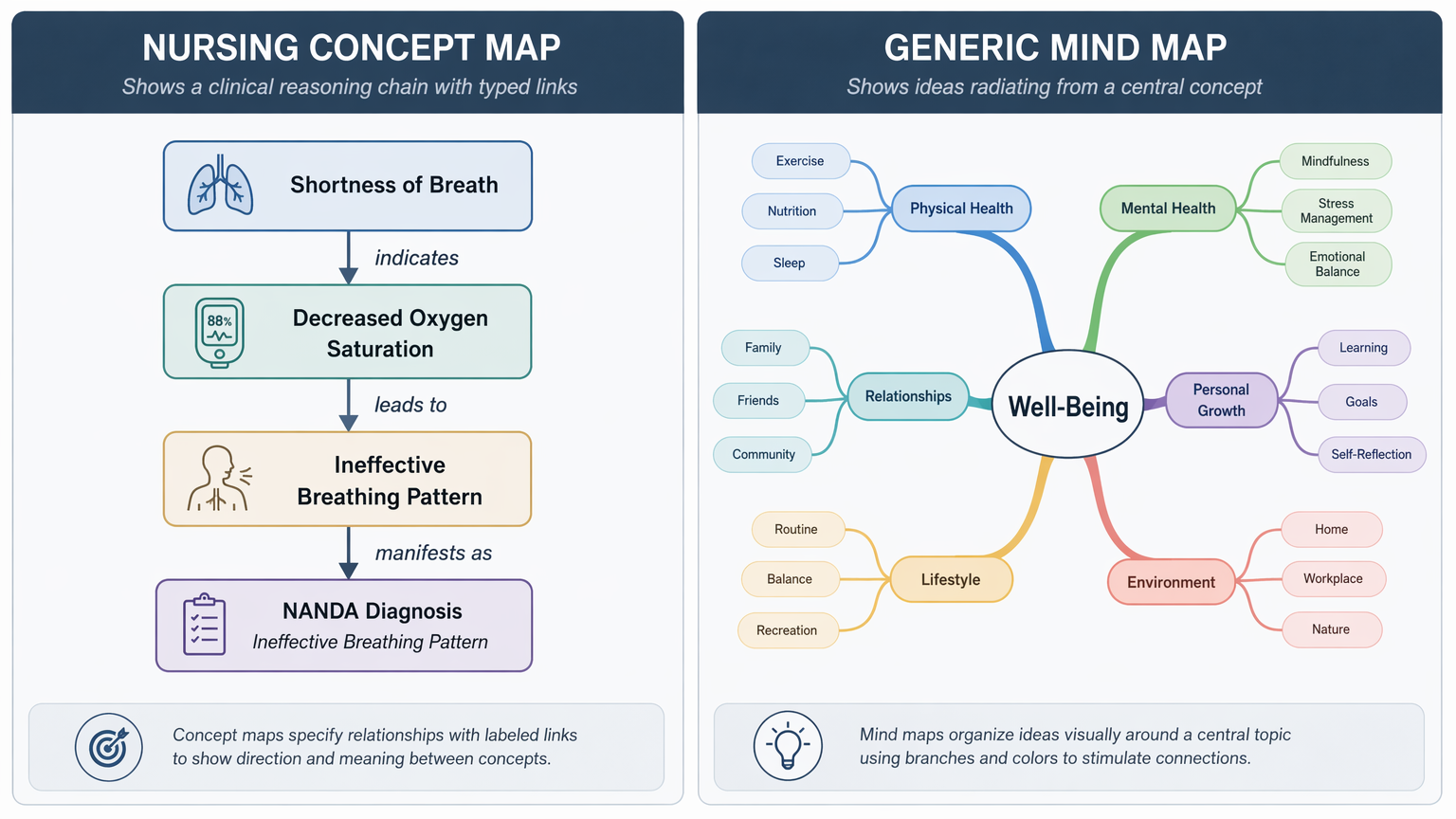
The easiest way to choose the wrong concept map tool for nursing students is to search for “mind map app,” pick the prettiest template, and then discover that the program has no clean way to label the relationship between two ideas. That missing label is not a cosmetic detail. In a nursing concept map, the arrow should be able to say something: “indicates,” “is explained by,” “requires,” “is measured by.” Without that phrase, the instructor has to guess whether the student understands the clinical reasoning chain.
This is why CmapTools keeps coming up in serious teaching resources even though it does not look like the newest design app. The University of Waterloo Centre for Teaching Excellence recommends CmapTools when the primary need is creating effective concept maps with linking phrases, which is exactly the feature many nursing students do not know they need until the rubric is already in front of them.[1] IHMC, the organization behind CmapTools, describes it as a Novak-style concept mapping tool built around concepts and labeled relationships rather than loose visual brainstorming.[2]
The Rubric Usually Wants a Concept Map, Not a Mind Map
A mind map usually starts with one central topic and branches outward. It is useful when the job is collecting ideas: symptoms, lab values, medications, risk factors, teaching points. A nursing concept map has a stricter job. It should show how a cue connects to pathophysiology, how that supports a nursing diagnosis, how the diagnosis drives goals and interventions, and how the plan will be evaluated.
The difference matters because nursing students are not only being asked to remember content. They are being asked to display judgment. allnurses’ 2026 concept map guide connects this directly to Next Gen NCLEX preparation, noting that the Clinical Judgment Measurement Model requires students to show reasoning links between assessment cues, priority problems, and interventions.[3] UWorld’s nursing concept map guidance uses the same practical ingredients students see in care-plan work: NANDA diagnoses, pathophysiology chains, and clinical reasoning flow.[4]
| If the assignment asks for | The tool must let you show | What to avoid |
|---|---|---|
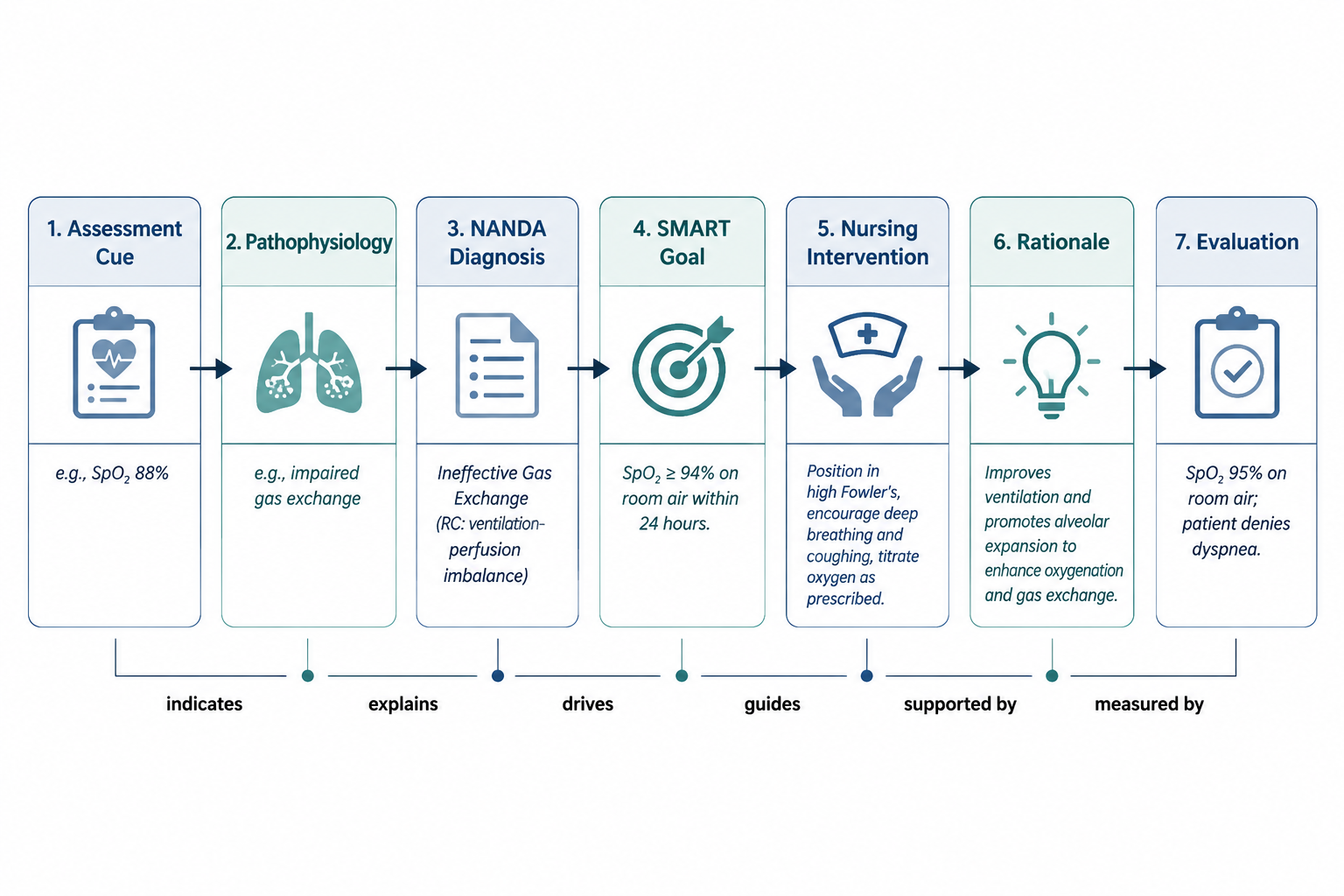
| Care-plan concept map | Assessment cue → NANDA diagnosis → goal → intervention → rationale → evaluation | A radial map with unlabeled branches |
| Pathophysiology map | Cause, mechanism, manifestation, complication, and treatment relationships | A list of disease facts arranged in bubbles |
| Clinical judgment or NCLEX-style reasoning | Which cue supports which priority and why | A polished diagram that hides the reasoning |
| Group presentation | Readable layout, comments, version control, and export options | A tool that looks good but makes relationship labels hard to add |
A colorful diagram can still be wrong for the task. If two boxes are connected but the line does not say what the relationship means, the map may look complete while leaving the clinical logic hidden, unclear, or both.
What a Nursing Concept Map Tool Has to Do
For graded nursing work, the tool has to do more than arrange boxes. It needs to make relationships visible without forcing the student into awkward workarounds. A decent concept map tool for nursing students should support these tasks:
- Labeled linking phrases, so an arrow can explain whether one concept causes, supports, indicates, worsens, guides, or evaluates another.
- Hierarchical structure, so the map can move from broad patient problem to specific cues, mechanisms, interventions, and outcomes.
- Readable revision, because first drafts of nursing maps are often messy and need to be reorganized after feedback.
- Nursing language, or at least enough flexibility to write NANDA diagnoses, SMART goals, rationales, and evaluation criteria without fighting the template.
- Export options that match submission rules, usually PDF or image export for a learning-management system upload.
The labeled-link requirement is the one most general apps fail. A student can always type “impaired gas exchange” into a bubble. The harder question is whether the tool lets the student show that low oxygen saturation indicates impaired gas exchange, that alveolar fluid explains the cue, that positioning and oxygen therapy are directed at the problem, and that reassessment measures whether the intervention worked.
Best Free Choice for Graded Nursing Concept Maps: CmapTools
CmapTools is the strongest free answer for a graded nursing concept map because its basic structure matches the academic format: concept, linking phrase, concept. That sounds plain until you compare it with tools that treat every line as a decoration. In CmapTools, the relationship label is not an afterthought. It is part of the map’s grammar.
That makes it a good fit for care-plan maps where the instructor expects the student to defend a chain of reasoning. A simple nursing sequence might look like this: crackles and dyspnea “indicate” impaired gas exchange; fluid in alveoli “contributes to” the assessment findings; impaired gas exchange “requires” oxygenation-focused interventions; oxygen saturation and work of breathing “measure” the response. The exact patient details would change, but the map’s job stays the same: show why the plan follows from the data.
CmapTools also has the right kind of discipline for beginners. It nudges the student away from decorating clusters and toward writing propositions: this concept relates to that concept in a specific way. Waterloo’s teaching-resource endorsement of CmapTools for concept maps with linking phrases is important for that reason; the recommendation is about the structure of thinking, not about software fashion.[1] IHMC’s own positioning of CmapTools around Novak-style mapping reinforces why it belongs in the center of this discussion.[2]
The trade-off is friction. CmapTools can feel dated next to browser-first tools such as Miro, Canva, or Lucidchart. It is not the obvious choice if the student’s top priority is a slick presentation, fast template browsing, or mobile convenience. But for a first- or second-year student trying to meet a concept-map rubric without paying for a subscription, the awkward interface is often less risky than a beautiful tool that cannot label clinical relationships cleanly.
When Lucidchart or Miro Makes Sense
Lucidchart and Miro are not wrong choices. They become useful when the assignment has a presentation component, when a group needs to collaborate, or when a student wants a cleaner-looking submission than CmapTools can easily produce. They also offer templates and flexible diagramming environments, which can save time when the student already understands what the map must show.
The condition is that the student has to build in the nursing logic deliberately. A flowchart template does not automatically become a nursing concept map because the boxes are blue and the title says “patient care.” The arrows still need labels. The relationships still need to be defensible. NANDA language, goals, interventions, rationales, and evaluations still need to sit in a structure that an instructor can follow.
| Tool type | Good use | Main nursing risk |
|---|---|---|
| CmapTools | Graded concept maps where linking phrases matter most | Older interface and less presentation polish |
| Lucidchart | Clean diagrams, flowcharts, group projects, polished submissions | May require manual setup to preserve concept-map relationships |
| Miro | Collaborative boards, class groups, brainstorming before cleanup | Large boards can become visually impressive but clinically vague |
| Canva-style design tools | Final presentation visuals when the reasoning is already built | Design templates can encourage decoration over labeled reasoning |
For paid or freemium tools, check current plan limits before starting the assignment. External pricing comparisons can help identify which tools have free tiers, student-friendly plans, or paid collaboration features, but pricing changes often; treat any listed plan information as needing verification at the time you sign up. As of this review date, July 4, 2026, Storyflow’s mind-mapping comparison is useful for scanning tools such as MindMeister, XMind, Miro, Lucidchart, and Coggle, but the final price check should happen on the vendor’s own site.[7]
Where General Mind Mapping Apps Fall Short
MindMeister, XMind, Coggle, and similar mind mapping tools are often pleasant to use. They are fast for getting material out of your head: disease in the center, symptoms on one branch, labs on another, meds on another, nursing care on another. For early studying, that can be enough.
The problem appears when the map has to carry clinical reasoning. A branch labeled “interventions” sitting near a branch labeled “symptoms” does not prove that the student knows which symptom supports which priority problem, or why a specific intervention belongs with that diagnosis. Some mind mapping apps let users add notes, icons, cross-links, or floating text, but if labeled relationships are not part of the normal workflow, the student ends up patching a concept map onto a mind map.
That workaround may be acceptable for private study. It is a poor gamble for graded care-plan work unless the instructor has explicitly allowed a mind map format. If the rubric mentions relationships, rationales, priority setting, pathophysiology, or clinical judgment, use a tool that makes those links visible.
Paper Still Has a Place
Digital tools are best when the map needs to be revised, cleaned up, submitted, shared, or presented. They are not automatically best for the first pass. When a student is still trying to understand a disease process, paper can be faster and less distracting. Draw the messy version first. Cross out the weak link. Rewrite the pathophysiology chain. Notice where the nursing diagnosis does not actually follow from the cues.
That rough work is not wasted. It prevents the common digital problem where a student spends twenty minutes aligning boxes before realizing the diagnosis is unsupported. Once the logic is stable, CmapTools, Lucidchart, or Miro can turn the map into something readable enough for submission.
The Research Supports the Method, Not One Magic App
Concept mapping is worth taking seriously because the evidence base is not limited to “students like diagrams.” A 2025 BMC Medical Education meta-analysis of 44 studies found that concept mapping significantly improved academic performance and critical thinking in nursing students, while emphasizing that consistent practice mattered more than the specific tool used.[5] A 2026 BMC Medical Education systematic review of 12 studies in pediatric nursing education found improvements in CPR skills, critical thinking scores, and self-efficacy compared with traditional instruction.[6]
Those findings do not prove that CmapTools causes better grades than Miro, or that a paid diagramming app will improve clinical performance. They support a narrower and more useful point: concept mapping can help nursing students practice the kind of connected reasoning that lectures and flashcards may leave hidden. The tool should protect that reasoning, not blur it.
A Decision-Ready Recommendation
For a graded nursing concept map, start with CmapTools unless your instructor requires another platform. It is free, it is built for Novak-style concept mapping, and it treats labeled linking phrases as part of the map rather than an optional decoration.[2]
For first-pass pathophysiology study, use paper if it helps you think faster. The goal at that stage is not a polished submission; it is finding the real relationships among cause, mechanism, cue, problem, and intervention.
For group work, polished visuals, or template-heavy assignments, Lucidchart or Miro can work well if you deliberately add labeled arrows and nursing language. Do not assume the template has done the clinical thinking for you.
For quick brainstorming, general mind mapping tools such as MindMeister, XMind, and Coggle are fine. For care-plan submission, they are only safe if they can clearly show the relationship between the cue and the intervention, not just place both words on the same page.
References
- Concept Mapping Tools, University of Waterloo Centre for Teaching Excellence
- CmapTools, IHMC
- What Is a Nursing Concept Map?, allnurses, 2026
- Mastering Nursing Concept Maps, UWorld Nursing
- BMC Medical Education meta-analysis of 44 studies, BMC Medical Education, 2025
- BMC Medical Education systematic review, BMC Medical Education, 2026
- The 12 Best Mind Mapping Tools, Storyflow, 2026
Comments
Join the discussion with an anonymous comment.