

NotebookLM Deep Research for Students: What It Does, Where It Falls Short, and How to Use It in 2026
This guide explains how NotebookLM's Deep Research feature can automate source gathering and analysis for student projects, where its limitations actually matter, and how to use it effectively within academic integrity boundaries.
Updated:
NotebookLM Deep Research for students is worth trying in 2026 if you need a sane starting point for a research-heavy assignment. It can search the web, build a research report, and then let you bring selected sources into NotebookLM, where answers stay tied to uploaded or imported materials. That is a real improvement over dropping a vague prompt into a chatbot and hoping the citations are real.
It is not, however, a finished-paper machine. Google introduced Deep Research for NotebookLM in November 2025 as a way to automate source discovery inside the product, with a choice between faster and deeper research modes and support for more source types.[1] The parts that matter for students are also the parts that can go wrong: source vetting happens before the material becomes useful inside a notebook, Deep Research reports cannot be exported cleanly, and notebooks remain more isolated than many students expect.[2][3]
The short version: use Deep Research to find leads, not to outsource judgment. Use NotebookLM to question sources you have checked, not to replace reading. If your instructor, department, or university says a tool is not allowed for a particular assignment, that policy wins no matter what the software can do.
What Deep Research Actually Adds to NotebookLM
Ordinary NotebookLM starts from sources you provide. You upload PDFs, paste links, add Google Docs or other supported materials, and then ask questions against that notebook. Deep Research changes the entry point. Instead of beginning with a blank notebook and a pile of files, you can ask NotebookLM to investigate a topic on the web and produce a research report with sources it found.[1]
That difference is bigger for students than it may sound. A student starting a seminar paper on housing policy, climate adaptation, literary reception, or nursing burnout often does not yet know which terms, institutions, journals, or policy documents matter. Deep Research can help generate that first map. It can surface source candidates, cluster material around a question, and give you something more structured than a search-results page.
The danger is that the report looks like the work is already done. It is not. A Deep Research report is closer to an annotated lead sheet than a literature review. It may include useful sources, weak sources, duplicated angles, outdated pages, or materials that look relevant until you actually read them. XDA’s review was especially sharp on this point: the source-vetting process before import can be clunky, and that friction matters because NotebookLM’s best features only become useful after good sources are inside the notebook.[2]
Price and Access in Q3 2026
Pricing is one of the first practical questions students ask, and it needs a date attached. As of this article’s July 4, 2026 review, the student-relevant figures in the available pricing summaries are: the free tier includes 10 Deep Research uses per month, 50 sources per notebook, and 50 chats per day; Pro is listed at $19.99 per month and becomes relevant for heavier research loads or frequent use of audio and studio-style outputs.[4]
| Tier or situation | What it means for a student |
|---|---|
| Free tier | Likely enough for ordinary course projects if you use Deep Research selectively and keep notebooks focused. |
| Pro at $19.99/month | Worth considering only if you are handling large literature reviews, many notebooks, or heavy Audio Overview and Studio output use. |
| Education or institution account | Availability may depend on your school’s rollout, admin settings, and data policy. |
| Current pricing page | Check before paying; NotebookLM tiers and limits have changed often enough that old screenshots are not reliable. |
There was also a rollout wrinkle. Deep Research was announced in November 2025 with availability rolling out over the following week, and third-party launch coverage described the Fast and Deep modes as part of that release.[5] By Q3 2026, many students should see the feature, but managed school accounts can still differ from personal accounts. If a classmate has it and you do not, that may be an account or admin issue rather than user error.
A Student Workflow That Keeps You in Control
The useful workflow is not “ask Deep Research, paste the answer, submit.” It is a sequence that keeps the machine doing the gathering and sorting while you keep responsibility for source choice, interpretation, and final claims.
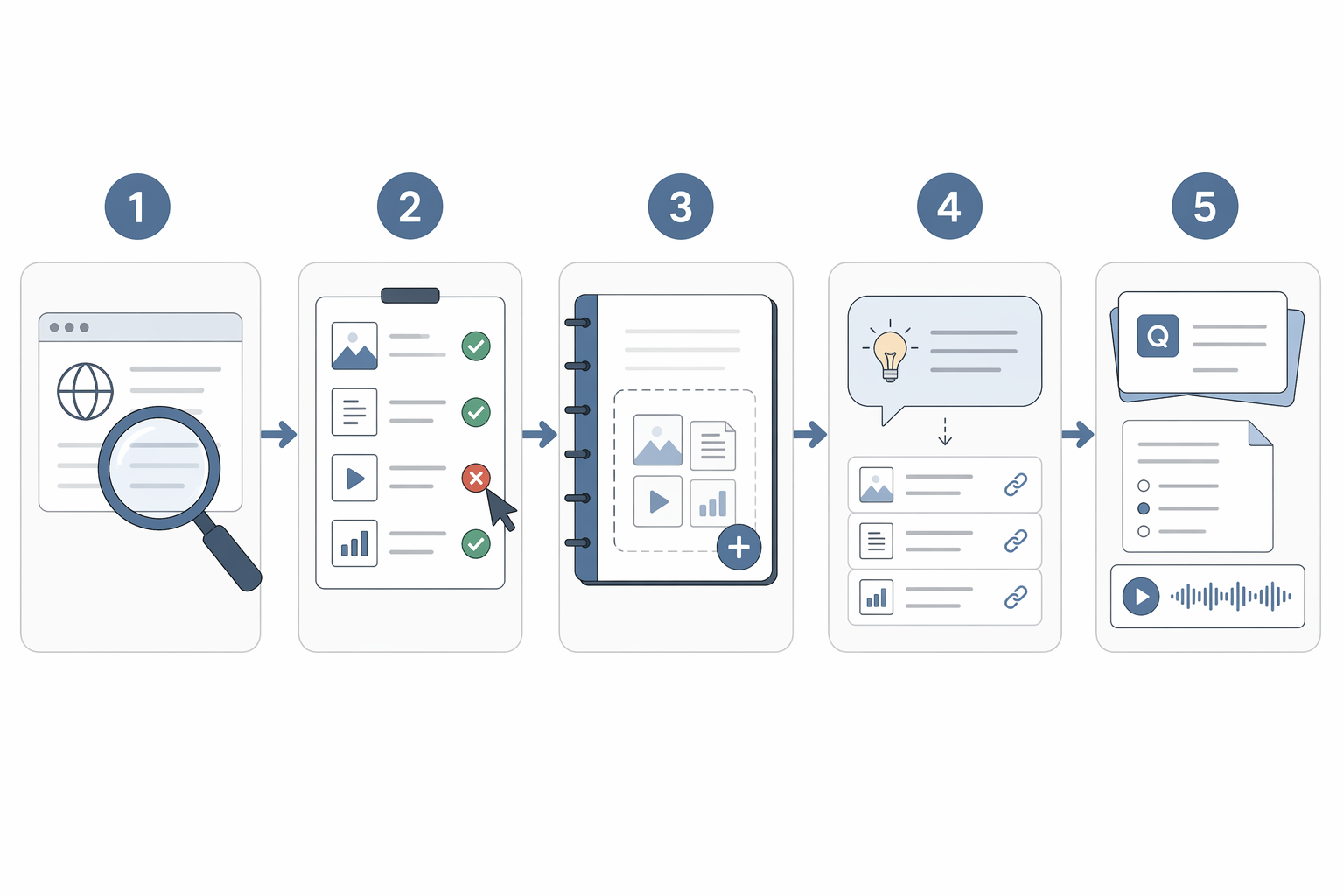
- Start with a research question narrow enough to guide source discovery.
- Run Deep Research to produce a source lead list and report.
- Inspect and reject sources before importing them.
- Use NotebookLM’s cited answers to interrogate the verified source set.
- Turn the notebook into study outputs or an essay research map you can explain without AI.
Start with a question that can survive a search
Deep Research works better when you give it a task that resembles an academic search, not a paper title pretending to be a question. “Write about social media and mental health” is too broad. “Find recent scholarly and institutional sources on how short-form video use is associated with sleep quality among college students” gives the system dimensions to search: population, behavior, outcome, and source type.
At this stage, do not worry about perfect wording. You are trying to generate a map of possible materials. If your assignment requires peer-reviewed sources, say that. If it allows government reports, policy briefs, primary texts, or data sets, say that too. If your instructor has date limits, include them. The more your search request reflects the assignment sheet, the less cleanup you create later.
Treat the Deep Research report as a lead sheet
Once Deep Research returns a report, slow down. This is the moment when students are most tempted to accept the polished structure as evidence of quality. Instead, read the source list like a teaching assistant would read your bibliography: What kind of source is this? Who produced it? Is it current enough? Does it answer the assignment question, or only share a keyword?
Reject sources that fail the assignment’s requirements even if the summary sounds helpful. A think-tank page may be useful background but not count as a peer-reviewed source. A news article may explain a controversy but not support a causal claim. A highly cited older study may be important historically but still need newer evidence beside it. Deep Research can widen the net; it cannot decide what your course counts as evidence.
Import only the sources you are willing to defend
This is where the workflow becomes less magical and more useful. Do not import everything. Import the sources that pass your first inspection, then build the notebook around a manageable set. A smaller notebook with strong materials is easier to question than a bloated notebook full of weakly related pages.
The complaint that Deep Research can drift from NotebookLM’s original source-first identity is not just a purist objection. Lifehacker argued that having NotebookLM search the web for you can defeat the purpose of a tool built around user-provided sources.[3] For student work, the practical compromise is simple: let Deep Research suggest, but make yourself the gatekeeper before anything becomes part of the notebook.
Question the sources with citations open
NotebookLM becomes more valuable after the source set is clean because its answers can point back to source passages. DataCamp’s tutorial describes NotebookLM’s inline citation system as numbered links that open the exact source passages behind an answer.[6] That is the feature students should care about. Not the confidence of the prose. The trail.
Ask questions that force comparison and retrieval: “Which sources define the key term differently?” “Which studies support the strongest version of this claim?” “Which source disagrees?” “What evidence is missing from this notebook?” Then click the citations. If the cited passage does not support the answer, do not use the answer. If the passage does support it, read around the passage before making it part of your paper.
That citation habit is what separates a responsible NotebookLM workflow from ordinary AI-assisted guessing. UChicago’s academic technology guidance recommends NotebookLM in part because source-grounding can reduce hallucination compared with general-purpose AI tools.[7] Reduce is the important word. It does not mean eliminate. Source-grounded answers still need checking, especially when your paper depends on a nuanced distinction or a contested claim.
Turn research into study outputs, not just prose
For students, one underrated use of NotebookLM is after source collection, when the work shifts from finding material to understanding it. Google’s September 2025 student-feature announcement highlighted one-click flashcards, quizzes, the Learning Guide, and Audio Overviews as built-in ways to study notebook materials.[8] These outputs are not substitutes for the paper. They are ways to test whether you understand the source base well enough to write the paper.
- Use flashcards for key terms, theorists, methods, dates, and distinctions.
- Use quizzes to reveal which source claims you recognize but cannot yet explain.
- Use the Learning Guide when you are new to a topic and need a sequenced path through the materials.
- Use Audio Overviews for review during low-stakes time, then return to the source passages before citing anything.
If you are comparing NotebookLM with other tools in your study stack, the useful question is not which app sounds smartest. It is which tool helps you retrieve, explain, and apply what you read. For a broader comparison, see AI Study Tools Comparison: Which Tools Actually Support Active Recall and Spaced Repetition?.
Where Custom Instructions Help
Custom Instructions are useful after source selection, not before it. Shareuhack’s 2026 power-user guide says NotebookLM supports Custom Instructions up to 10,000 characters and argues that they can substantially improve output quality.[4] For students, the safest use is to make the notebook behave more like the assignment requires.
Good instructions are boring in the best way. Tell NotebookLM to distinguish peer-reviewed studies from policy reports. Tell it to flag when a source is making a causal claim versus reporting an association. Tell it to avoid claims not supported by the imported sources. Tell it to answer in a format that helps your next step, such as a comparison table, method summary, or evidence map.
A useful instruction for essay research might be: “When answering, separate direct evidence from background context. Include citation links for every source-based claim. If the notebook does not contain enough evidence, say what is missing rather than filling the gap.” That does not make the output automatically correct, but it nudges the tool toward the behavior a student should want: traceable restraint.
The Academic Integrity Line
The cleanest rule comes from Florida State University’s ethical-use guidance: ask whether you are using AI to learn better or to avoid learning.[9] That test is more useful than trying to memorize every possible allowed and forbidden use, because it points directly at the student behavior that matters.
| Usually safer use | Higher-risk use |
|---|---|
| Finding possible sources to inspect | Submitting a Deep Research report as your own research |
| Asking NotebookLM to explain a difficult passage you then reread | Using a summary so you can avoid the assigned reading |
| Generating quiz questions to test understanding | Generating claims you cannot explain without the tool |
| Building an evidence map with citations open | Citing a source because NotebookLM mentioned it, without checking the passage |
FSU’s red flags include being unable to explain conclusions without AI and using AI to avoid original readings.[9] Those are exactly the failure modes NotebookLM can hide if you let the interface become a substitute for the work. A neat answer with citation links may still leave you unable to describe the study design, the author’s argument, the evidence limits, or why the source belongs in your paper.
Institutional guidance can support careful use, but it is not blanket permission. Columbia’s NotebookLM page provides an example of university-level support while also warning about sensitive-data restrictions.[10] That matters if you are working with interviews, clinical details, unpublished research, student records, proprietary lab data, or anything your course or institution treats as confidential. Do not upload restricted material just because a study tool accepts files.
Course policy is the final authority. Some instructors allow AI for brainstorming but not drafting. Some allow source organization but require disclosure. Some prohibit generative tools entirely for a given assignment. If the policy is unclear, ask before you build the workflow around NotebookLM.
Where the Workflow Breaks Down
Deep Research is strongest at getting a student unstuck at the beginning. Its weak points show up once the assignment becomes specific.
Source vetting happens at the most annoying moment
The source list arrives before you have a clean notebook. That means the student has to inspect candidates in a transitional space: enough information to be tempted, not always enough convenience to evaluate quickly. XDA’s criticism that pre-import vetting is clunky is fair because the entire quality of the notebook depends on that step.[2]
The workaround is to create a rejection habit. Before import, drop sources into three piles: clearly useful, maybe useful, and no. Import the first group. Keep the second group in reserve if your argument changes. Do not import the third group just because the tool found it.
Deep Research reports are not easy research artifacts
The lack of clean export for Deep Research reports is not a cosmetic issue for students.[2] Research assignments often require process notes, annotated bibliographies, citation managers, or draft planning documents. If a report cannot move easily into the rest of your academic workflow, you may end up copying, rechecking, and reorganizing material by hand.
Do not build your entire paper plan inside a report you cannot comfortably reuse. Move durable information into a place you control: your citation manager, a research log, a document outline, or the notebook itself once sources are selected.
Notebooks stay isolated
NotebookLM’s notebook model is helpful when you want boundaries around a class, unit, or paper. It is less helpful when you need synthesis across several projects. Atlas Workspace’s May 2026 comparison identifies notebook isolation as a key boundary: each notebook is separate, so cross-course synthesis requires another route, such as Gemini mounting or a separate workspace.[11]
For most students, the answer is not to make one giant notebook. Keep notebooks aligned with actual tasks: one literature review, one exam unit, one capstone chapter, one methods cluster. If you need a cross-course knowledge base, NotebookLM may be only one part of a broader system. The guide Best Study Apps 2026: Build a Smarter 3–4 App Stack is a better frame for that decision.
Source-grounded answers are still not original scholarship
NotebookLM can help you find what the sources say. It can help compare them. It can help you notice gaps. It cannot supply the intellectual work your instructor is grading: your question, your selection, your interpretation, your synthesis, and your ability to defend the argument in your own words.
A practical test before you draft: close NotebookLM and explain your emerging argument aloud. Name the strongest sources. Explain what each contributes. State one limitation. If you cannot do that without the tool open, you are not ready to write from it.
NotebookLM Versus Free Alternatives
The main advantage of NotebookLM Deep Research is the combination: automated web research followed by source-grounded notebook analysis. Many free tools can summarize text. Many can answer questions in a chat window. Some can browse. Fewer give students a workflow where discovered sources can become a bounded research notebook with citation-linked answers.
That does not mean NotebookLM should replace traditional research methods. Library databases, subject guides, citation chaining, and instructor-recommended sources remain better for many academic tasks, especially when you need peer-reviewed literature and controlled vocabulary. A good student workflow may start with Deep Research, move to the library database, return to NotebookLM for source interrogation, and then finish in a document editor or citation manager.
If you are deciding when AI belongs in the process at all, the distinction is covered more broadly in AI Study Tools vs. Traditional Study Tools: What Actually Works in 2026. NotebookLM is strongest when it supports active reading and source comparison. It is weakest when it becomes a shortcut around both.
Should Students Pay for Pro?
Most students should start on the free tier and spend their attention on workflow quality rather than subscription features. Ten Deep Research uses per month is not generous if you run it casually, but it is workable if you save it for real assignments and refine your search request before launching another search.[4]
Pro starts to make sense when the free tier becomes the bottleneck rather than your habits. That may apply to graduate students doing a large literature review, students writing a thesis across many source clusters, or anyone relying heavily on Audio Overviews and other Studio outputs. It is harder to justify if you mainly need help organizing one or two ordinary course papers.
Do not pay to avoid learning the free workflow. If you import weak sources, skip citation checks, and let summaries replace reading, a larger limit only lets you make a larger mess.
A Student-Ready Decision Rule
Use NotebookLM Deep Research to discover and organize leads. Use NotebookLM to question and study sources you have verified. Use your syllabus, institutional policy, and instructor guidance to decide what role AI may play in the assignment. Before anything reaches submitted work, make sure you can explain the claim, the source, and the reasoning without the tool.
Stay on the free tier unless your real workload exceeds it. Pay for Pro only when you are already using the workflow responsibly and the limits are slowing down legitimate research or study work. Deep Research is useful because it can shorten the path from topic confusion to source-aware reading. It stops being useful the moment it becomes a polished excuse not to read.
References
- NotebookLM adds Deep Research and support for more source types, Google Blog, Nov 2025.
- NotebookLM's new Deep Research feature disappointed me, XDA, Nov 2025.
- Why I'm Not Using NotebookLM's Deep Research Tool, Lifehacker, Nov 2025.
- NotebookLM Power User Guide, Shareuhack, Mar 2026.
- NotebookLM adds Deep Research and support for more source types, TechCrunch, Nov 2025.
- NotebookLM Tutorial: The Complete Guide, DataCamp, 2026.
- NotebookLM, University of Chicago Academic Technology, Apr 2026.
- 6 ways to use NotebookLM to master any subject, Google Blog, Sep 2025.
- Ethical Use of AI, Florida State University.
- NotebookLM, Columbia University Information Technology.
- NotebookLM comparison, Atlas Workspace, May 2026.
Comments
Join the discussion with an anonymous comment.