

NotebookLM Audio Overview for Exam Review: A Step-by-Step Workflow Guide
Learn how to use NotebookLM's Audio Overview formats, customize focus prompts, and combine passive listening with active recall to turn your notes into an exam-ready study tool.
Updated:
You have notes uploaded, an exam coming, and NotebookLM is offering to turn everything into an Audio Overview. The useful move is not simply pressing generate. For exam review, the workflow is: choose the right audio format, narrow the focus before generation, listen with interruptions when something is unclear, then finish with retrieval practice through quizzes, flashcards, or your own blank-page recall.
That last step matters. A polished AI conversation can make a chapter feel familiar, especially when the hosts explain it smoothly. Familiarity is not the same thing as being able to define a term, solve a problem, compare two theories, or write an essay under time pressure. NotebookLM Audio Overview for exam review works best when the audio is treated as a guided pass through your sources, not the final proof that you know them.
Start With the Exam, Not the Audio
Before choosing a format, look at what the exam will actually ask you to do. A cumulative biology final, a vocabulary-heavy language quiz, a political theory comparison question, and an essay defense do not need the same audio session.
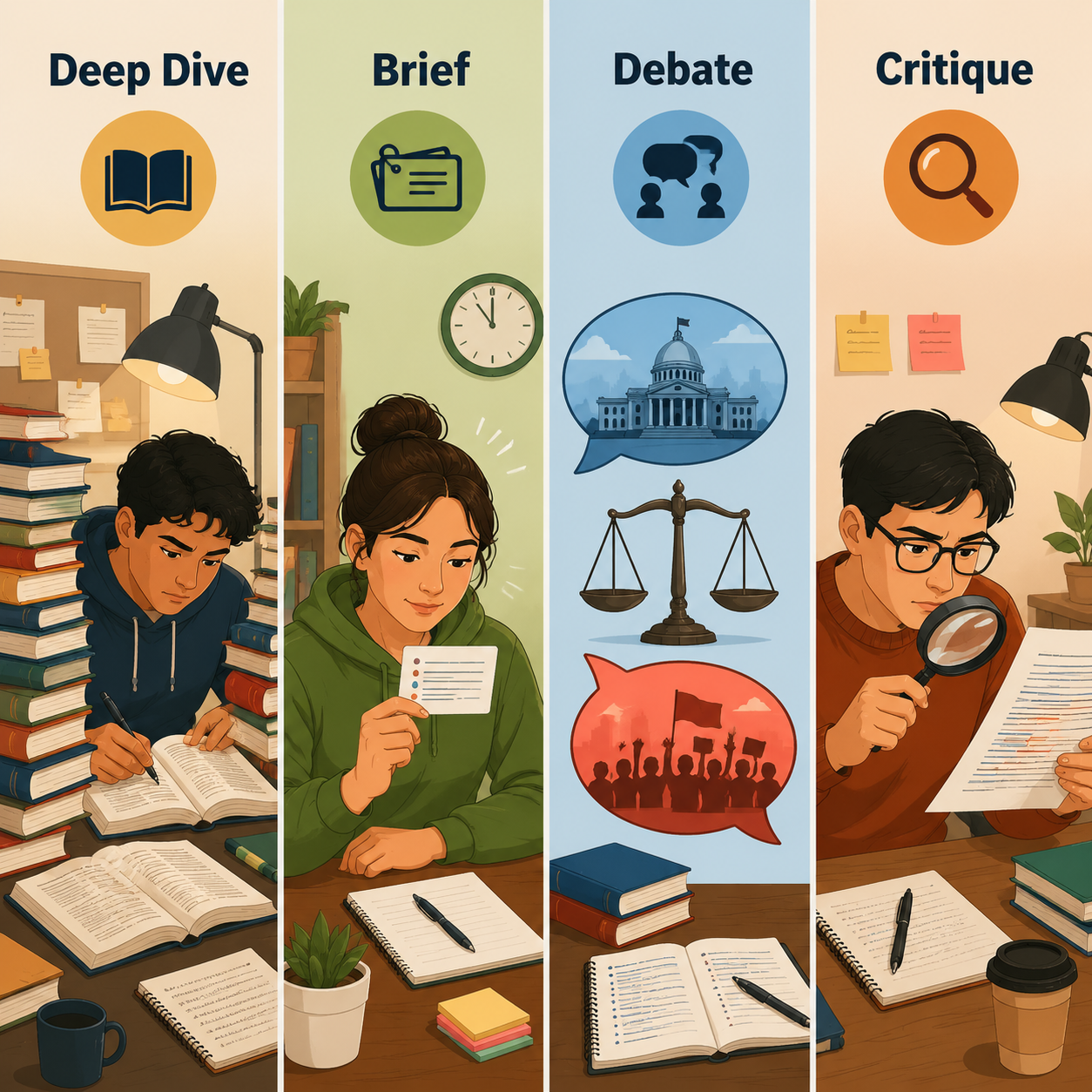
NotebookLM currently offers multiple Audio Overview formats, including Deep Dive, Brief, Debate, and Critique. Google’s help materials describe Audio Overview as an experimental feature generated from your notebook sources, and the newer formats are meant to change the style and purpose of the generated discussion rather than simply shorten or lengthen the same summary.[1]
| If your exam looks like this | Choose this format | Why it fits |
|---|---|---|
| Cumulative final, broad midterm, several weeks of lecture notes | Deep Dive | It gives the hosts room to connect topics, explain major concepts, and build a fuller review pass. |
| Last-minute refresh, terminology check, quick commute review | Brief | It is designed as a short, single-speaker overview under 2 minutes, so it is better for reminders than first-time learning. |
| Compare-and-contrast questions in history, politics, ethics, philosophy, literature, or social science | Debate | It helps surface opposing positions, trade-offs, and tensions you may need to explain in an exam answer. |
| Essay exam, paper defense, presentation, argument review | Critique | It is better suited for testing the strength, gaps, and assumptions in an argument. |
The wrong choice is usually not ridiculous; it is just mismatched. Deep Dive sounds responsible, so students use it for everything. But if you have 25 minutes before class and only need to refresh the difference between operant and classical conditioning, a long conversational overview can waste the time you should spend retrieving definitions. Brief is not shallow when the task is narrow.
Step 1: Prepare Sources That Match the Test
NotebookLM can only work from the sources in the notebook, so the first exam-review decision happens before audio generation. Put in the materials that represent the test: lecture slides, study guides, textbook excerpts, lab instructions, problem-set explanations, essay prompts, rubric notes, and your own corrected mistakes if you have them.
Do not treat the notebook like a semester junk drawer. If the exam covers Units 3 through 5, make a notebook for Units 3 through 5. If the professor said the exam will emphasize lecture over textbook detail, make sure lecture materials are present and do not bury them under unrelated readings. Better sources make better audio, and they also make it easier to spot when the audio drifts away from what you will be tested on.
One planning catch: Audio Overviews are snapshots. If you add new sources after generating an overview, you need to regenerate the audio for those sources to be reflected.[1] That matters during finals week, when students keep adding review sheets, practice exams, and last-minute clarifications from class.
Step 2: Pick the Format Based on the Job
Use Deep Dive for the first serious pass
Deep Dive is the format to choose when you are still rebuilding the map of the course. It is useful for broad finals, multi-unit midterms, and subjects where the danger is not one missed definition but losing the relationship between ideas.
This is the format for a walk across campus, a bus ride, cleaning your room, or another low-friction moment when you can listen without needing your hands. Student reports describe using Audio Overviews during daily walks, including one XDA writer who frames the habit around listening during “10k steps.” The same account praises the newer format choices but still treats them as part of a larger study routine, not as a replacement for testing yourself.[2]
Use Brief when speed is the point
Brief is for the moment when you are not trying to rebuild the whole course. Google’s format description presents Brief as a short, single-speaker version under 2 minutes.[1] That makes it a decent fit for vocabulary refreshers, key formula reminders, “what did this reading argue again?” checks, or a final pass before office hours.
The trap is asking Brief to do Deep Dive’s job. If you never understood the Krebs cycle, constitutional scrutiny levels, or confidence intervals, a tiny overview will not repair that. Use it after you have already studied, or when the target is genuinely small.
Use Debate when the exam rewards contrast
Debate is useful when your professor cares about tension: Keynesian versus classical economics, federalists versus anti-federalists, deontology versus utilitarianism, nature versus nurture, competing interpretations of a novel, or policy trade-offs. XDA’s student workflow coverage calls Debate especially useful for studying subjects where different perspectives matter.[2]
Use it when you need to hear the disagreement clearly enough to reproduce it. After listening, you should be able to make a two-column comparison from memory. If you cannot, the debate sounded interesting but did not yet become exam preparation.
Use Critique when you need to defend or improve an argument
Critique fits essay-based exams, research presentations, oral defenses, and draft review. It is the format to choose when your grade depends on whether your claim is well-supported, whether your evidence matches the prompt, or whether you can anticipate objections.
For an essay exam, Critique can help you notice that your argument skips a definition, leans too hard on one source, or ignores a counterargument. Still, the audio cannot guarantee that your final answer satisfies your instructor’s rubric. Keep the rubric or prompt visible while listening.
Step 3: Write a Focus Prompt Before You Generate
The focus prompt is the hinge of the whole workflow. Without it, the hosts may spend time introducing background, retelling obvious context, or explaining material you already know. That can feel comforting, especially when you are tired, but it is not the best use of a limited review session. Student workflow guides specifically recommend customizing the focus so the overview targets exam-relevant material instead of becoming a general tour of the sources.[2][3]
A good exam prompt tells NotebookLM what to ignore, what to emphasize, and what kind of recall you need afterward. It does not need to be elegant. It needs to be specific.
| Study situation | Focus prompt to try |
|---|---|
| You already read the chapter once | Assume I have already read the material once. Focus only on testable concepts, definitions, formulas, and common confusions. |
| You are preparing for a cumulative final | Create an exam-review overview that connects the major ideas across these sources. Emphasize relationships between units and concepts that are likely to appear in short-answer or essay questions. |
| You are weak on one topic | Focus only on [topic]. Explain the core concept, the steps I need to reproduce, and the mistakes students commonly make when applying it. |
| You need compare-and-contrast practice | Focus on the differences and similarities between [concept A] and [concept B]. Make the distinction clear enough that I could answer an exam comparison question. |
| You are reviewing an essay or presentation | Critique the argument in these sources. Focus on unclear claims, missing evidence, weak transitions, counterarguments, and likely questions from an instructor. |
| You are almost out of time | Give me a last-minute exam refresh. Prioritize high-yield definitions, distinctions, and steps. Skip broad background unless it is necessary to avoid a common mistake. |
Replace bracketed terms with your actual course language. “Focus on osmosis and diffusion” is better than “help me study biology.” “Compare Locke and Rousseau on consent and sovereignty” is better than “make this political theory easier.”
If your instructor gave a study guide, quote its categories directly in the prompt. If your professor keeps saying “this will be on the exam,” put that phrase into your source notes and ask the overview to prioritize those sections. The goal is not to make the AI sound smarter; it is to stop the audio from wandering through material that will not help you perform.
Step 4: Plan Around Generation Limits
As of July 2026, Google’s support table lists daily Audio Overview generation limits as 3 per day on the free tier, 6 per day on Plus, and 20 per day on Pro.[4] These limits can change, so the official support page is the place to check before building an exam-week plan around them.
For a student on the free tier, 3 generations a day is enough if you stop treating every small edit as a reason to regenerate. Make the notebook clean first, write the focus prompt second, then generate. If you have four courses, do not burn all three daily generations experimenting with voices or vague prompts for one class.
- Use Deep Dive for the course or unit where you are most behind.
- Use Brief for quick refreshers only after your sources and prompt are already clear.
- Save Debate and Critique for exams where comparison or argument quality is actually graded.
- Regenerate after adding important new sources, not after every tiny note correction.
The snapshot limitation and the daily cap belong in the same planning conversation. If your professor posts a practice exam tonight, that is probably worth a regeneration. If you added one decorative example to notes you already reviewed, it probably is not.
Step 5: Listen With Interruptions, Not Just Headphones
Interactive mode is where Audio Overview starts to feel less like a podcast and more like a tutoring session. Google added the Join feature in beta in December 2024, and support materials describe it as a way to join the conversation and ask questions while the audio is playing.[1][5] Google’s support page also notes that Interactive mode is English-only.[1]
Use the interruption button when your brain does one of three things: it loses the thread, it recognizes a likely exam distinction, or it notices that the hosts made something sound too easy. That is the moment to stop the flow and make the audio work harder.
- For confusion: “Pause and restate that more slowly. What is the difference between the two terms?”
- For exam practice: “Ask me a short-answer question about this concept, then wait for my answer.”
- For comparison: “Explain how this differs from [related concept] in a way I could use on an exam.”
- For problem-solving: “Walk through the steps I would need to reproduce without notes.”
- For essays: “What objection would a professor raise against this argument?”
Do not wait until the end to ask everything at once. Interrupt while the concept is still in working memory. If the hosts explain a distinction and you know your professor loves that distinction, ask for a test-style version immediately. If they introduce a formula, ask what each variable means and when students choose the wrong one.
XDA’s Interactive mode walkthrough describes this as the feature that changes the experience from passive listening into a real-time study exchange.[5] That is exactly the right use case for exams: not more audio for its own sake, but a way to catch weak understanding before it becomes a blank answer box.
Step 6: Turn the Audio Into Recall
After the audio ends, do not reward yourself only for finishing it. The next 10 to 20 minutes decide whether the session was review or just a pleasant explanation.
NotebookLM includes study features such as flashcards and quizzes, which Google presents as part of using the tool to master a subject.[6] Those are the natural follow-up to Audio Overview: listen first to organize the material, then quiz yourself to find out what you can retrieve without the hosts carrying you.
A 30-day student review from AI Study Master reached a similar practical conclusion: Audio Overview was most useful when followed by active recall rather than treated as the whole study session.[7] That lines up with what many students learn the hard way. You can nod through an explanation of meiosis, judicial review, or Bayes’ theorem and still fail to produce it cold.
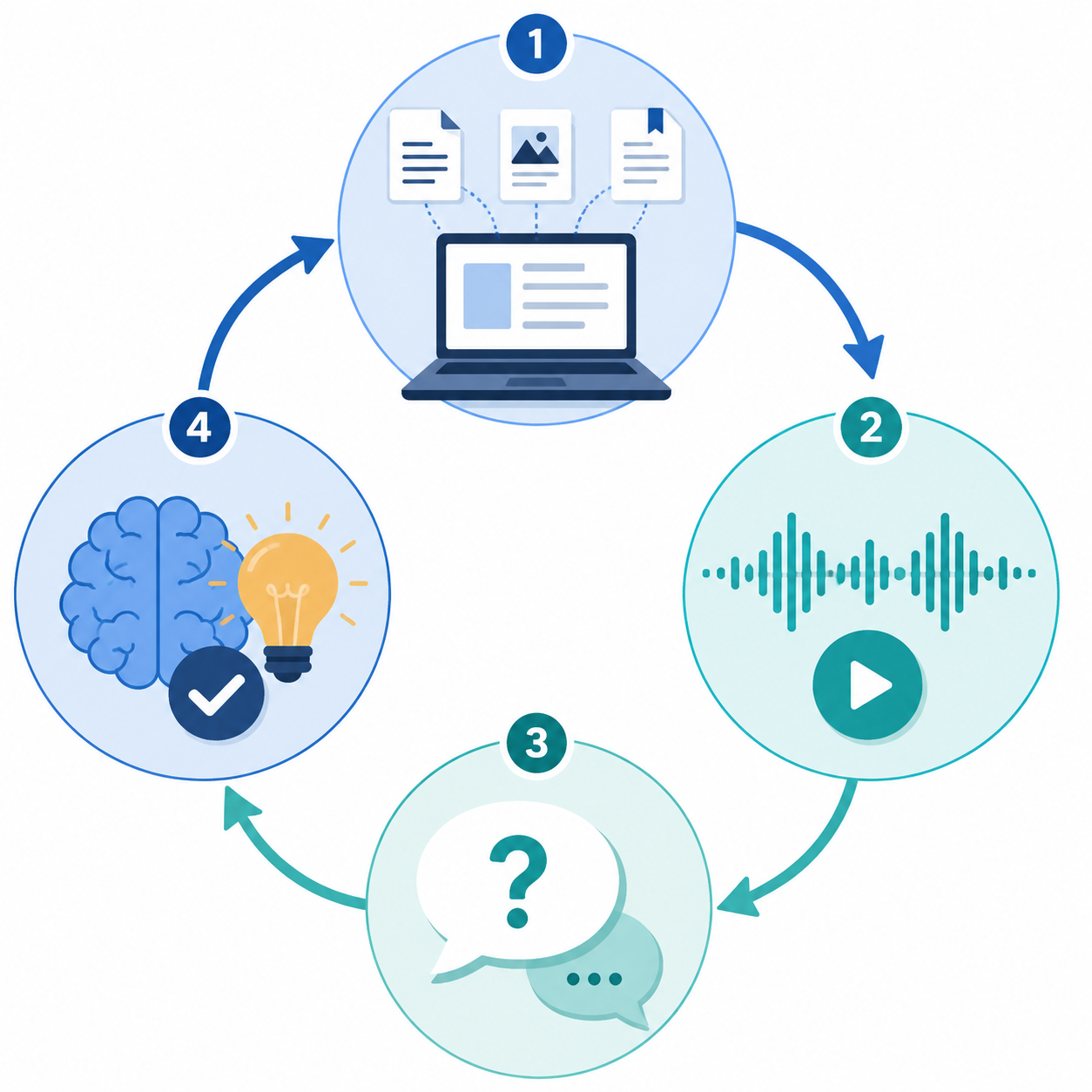
A simple loop is enough:
- Listen to the Audio Overview with your focus prompt in mind.
- Interrupt during Interactive mode for anything unclear or exam-shaped.
- Close the audio and write down the main concepts from memory.
- Generate or use flashcards and quizzes for the same notebook.
- Mark what you missed, then return to the original source for those items.
If you want a fuller routine for the last part of that loop, use How to Use NotebookLM Quizzes and Flashcards for College Study. If you are deciding whether NotebookLM’s flashcards are enough or whether you need a dedicated flashcard app, compare it with Quizlet vs NotebookLM for Flashcards.
A Practical Exam-Week Routine
Here is a realistic version for a student who is behind but not giving up.
| When | What to do | What not to pretend |
|---|---|---|
| Three to five days before the exam | Build a clean notebook for the tested units and generate one Deep Dive with a targeted focus prompt. | Do not count the audio as proof that you can answer questions yet. |
| Two to three days before the exam | Use Interactive mode during a second pass or targeted section review. Ask for distinctions, steps, and likely short-answer questions. | Do not let the hosts keep explaining what you already know. |
| One to two days before the exam | Use quizzes, flashcards, and blank-page recall. Revisit original sources for missed items. | Do not keep regenerating audio to avoid the discomfort of retrieval. |
| Exam day | Use Brief for a narrow refresher if you have a clear target. | Do not use a new long overview as your main study method at the last minute. |
This routine leaves room for audio learning without letting it take over the whole study plan. Listening during a walk can be genuinely useful. So can a short refresher while eating breakfast. The problem starts when a completed audio file becomes the emotional substitute for a completed practice test.
Where the Real Cases Help, and Where They Do Not
There are good reasons students are excited about this. One Medium case study describes a parent helping his daughter prepare for a machine learning certification exam by condensing more than 50 hours of lectures into a 100-page study guide and using NotebookLM as part of the preparation process; the author reports saving more than 20 hours of study time.[8] That is a useful illustration of what source organization plus AI study tools can make possible.
It is not proof that every student will save that amount of time. It is one reported case, with a specific learner, exam, source set, and support system. Treat it as encouragement to build a tighter workflow, not as a promise that NotebookLM will compress a neglected semester into one perfect afternoon.
There is also formal-course use. The University of Wisconsin-Milwaukee’s Center for Advancing Student Learning highlights a math professor using Audio Overview to turn course notes into audio for students.[9] That does not make every generated explanation automatically correct, but it does show why the feature belongs in serious study conversations rather than only in novelty demos.
Check Accuracy Before High-Stakes Use
Google labels Audio Overview as experimental, and support materials warn that generated audio may contain inaccuracies.[1] That caveat is not decoration. If you are preparing for a high-stakes exam, certification, placement test, or anything with professional consequences, verify important claims against the original source, instructor materials, or an approved textbook.
Be especially careful with formulas, dates, legal standards, clinical facts, historical causation, and anything your instructor has phrased in a very particular way. Audio can smooth over uncertainty. Exams often punish that smoothing.
For a broader check process, use the AI Hallucination Checklist for Students. The basic rule is simple: if a wrong answer would cost you more than a little embarrassment, verify it before trusting it.
The Repeatable Workflow
Use NotebookLM Audio Overview for exam review like this: prepare only the sources that match the test, choose the format based on the exam task, write a focus prompt that forces the hosts toward testable material, generate within your daily limits, interrupt during Interactive mode, then end with recall.
Regenerate when your sources meaningfully change. Verify facts when the stakes are high. And when the audio ends, do not stop at “that made sense.” Close the tab, cover the notes, and make yourself produce the answer.
References
- Generate Audio Overview in NotebookLM, Google Help.
- NotebookLM Audio Overview is the secret weapon I use to learn complex topics in half the time, XDA.
- 10 NotebookLM Prompts For Studying, LearnWithMeAI.
- Upgrade NotebookLM, Google Support.
- I regret ignoring this NotebookLM interactive audio overview, XDA.
- 6 ways to use NotebookLM to master any subject, Google Blog.
- NotebookLM Review 2026: My Honest Experience Using It as a Student, AI Study Master.
- How I Used NotebookLM to Turn 50+ Hours of ML Lectures into an Exam-Ready Study Guide, Medium.
- Audio Overview, University of Wisconsin-Milwaukee Center for Advancing Student Learning.
Comments
Join the discussion with an anonymous comment.