

Kimi K3 AI Model Comparison: A Student's Guide
Compare Kimi K3 against GPT, Claude, and Gemini from a student perspective — benchmark performance, pricing, context window size, and practical use cases to decide which AI assistant fits your study workflow and budget.
Updated:
Last reviewed: July 18, 2026. Kimi K3 launched on July 16, 2026, so this comparison should be read as a launch-week decision guide, not a settled verdict after months of independent testing.
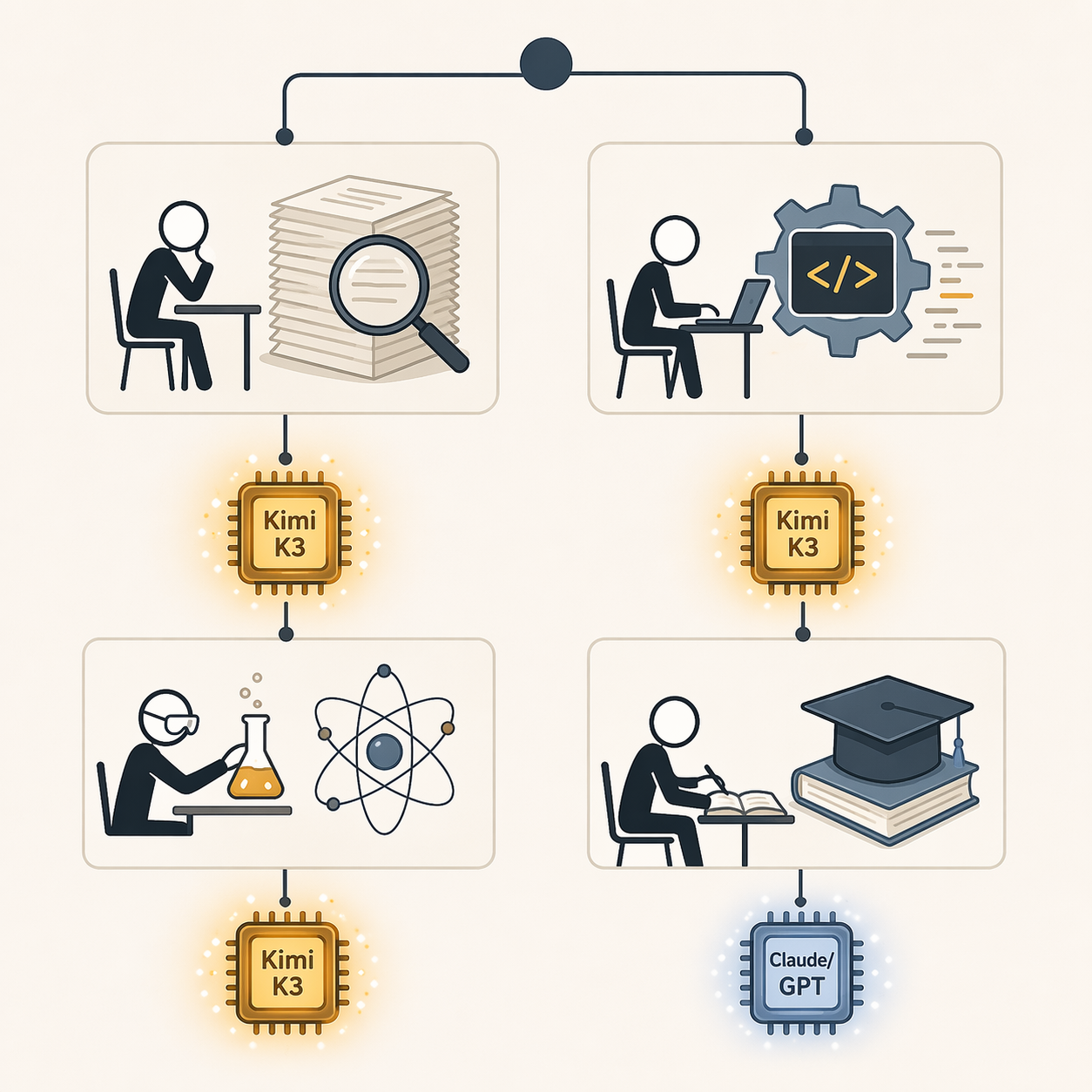
If your student budget is the main constraint, Kimi K3 is the model to try first in Q3 2026. It is unusually strong where student work gets expensive fast: long PDFs, research synthesis, coding assignments, graduate-level STEM questions, and projects that need a model to keep track of far more context than a normal chat window can hold.
| Student situation | Best first pick | Why |
|---|---|---|
| You have $0 | Kimi K3 through the free Kimi app | It gives access to a frontier-level model without starting another monthly subscription, though exact free-tier caps are not yet independently confirmed. |
| You can spend around $20/month | Kimi K3 if your work is research-heavy or long-context; ChatGPT Plus or Claude Pro if you already depend on those ecosystems | The Kimi subscription is reported around $19/month, while ChatGPT Plus and Claude Pro are $20/month comparisons in this budget band. |
| You are a CS student | Kimi K3 for frontend/UI work and sustained engineering sessions | It ranks first on Arena.ai Frontend Code Arena and posts a strong SWE Marathon score. |
| You write literature-heavy papers | Kimi K3 | Its BrowseComp result and 1M-token context window map directly to reading across many sources at once. |
| You are doing STEM exam prep | Kimi K3 or GPT-5.5 | K3 matches GPT-5.5 on GPQA Diamond in the supplied benchmark data. |
| You use an API or credits | Kimi K3 only if you watch output length | Its input/output rates are low, but always-on max reasoning can generate about twice the output tokens of peers. |
Fast Verdict by Study Workflow
For a free-tier student, Kimi K3 is the obvious first stop. The Kimi app offers K3 access without requiring a subscription, while the usual premium assistant decision still sits around the $19-$20/month line for Kimi, ChatGPT Plus, and Claude Pro. The catch is that K3’s exact free-tier usage limits are still not independently confirmed in launch week, so the free app is a serious advantage but not yet a blank check.
For a research-paper writer, Kimi K3 has the cleanest case. It leads BrowseComp at 91.2, ahead of Claude Opus 4.8 at 84.3 and GPT-5.5 at 84.4 in the supplied Artificial Analysis data, which matters because BrowseComp is closer to deep information retrieval and synthesis than a short-answer classroom quiz.[1]
For a CS student, the answer depends on the assignment. If the work is frontend-heavy, Kimi K3’s Arena.ai Frontend Code Arena score of 1,679 and first-place ranking make it hard to ignore. If the work is a long engineering task rather than a single function or bug fix, K3’s SWE Marathon score of 42.0 beats Claude Opus 4.8 at 40.0 and is three times GPT-5.5’s 14.0 in the provided comparison data.[1]
For STEM exam prep, Kimi K3 is in the top group rather than merely “good enough.” It scores 93.5% on GPQA Diamond, matching GPT-5.5 and exceeding Claude Opus 4.8’s 91.0 in the supplied benchmark set.[1] That does not mean it replaces working problem sets yourself, but it does mean the model is credible for graduate-level science questions where shallow pattern matching usually shows.
For API users, the recommendation is more conditional. K3’s standard API pricing is listed at $3 per million input tokens and $15 per million output tokens, which is low for this performance tier.[2] But K3’s always-on max reasoning mode is not optional, and the supplied launch data says it produced about 130 million output tokens on the Intelligence Index compared with a 63 million median for peers.[3] If you pay per token, a model that thinks out loud for longer can eat the savings you thought you had.
Where Kimi K3 Actually Beats the Expensive Models
The headline benchmark number is simple: Kimi K3 has an Artificial Analysis Intelligence Index score of 57, tied with Claude Opus 4.8 and GPT-5.5 in the supplied data.[1] By itself, that number would not settle a student buying decision. A tied index score could still hide a model that is great at abstract puzzles and mediocre at the work sitting in your course portal.
The useful part is the pattern underneath. K3’s strongest reported areas line up with annoying student workloads: finding information across sources, holding a large project in memory, writing and debugging code, and answering technical science questions. That is why its BrowseComp, GPQA Diamond, SWE Marathon, and Frontend Code Arena results matter more than a generic “best AI model” label.
| Metric | Kimi K3 | Closest comparison in brief | Student meaning |
|---|---|---|---|
| Artificial Analysis Intelligence Index | 57 | Claude Opus 4.8: 57; GPT-5.5: 57 | K3 is in the same frontier reasoning band as the premium closed models. |
| BrowseComp | 91.2 | Claude Opus 4.8: 84.3; GPT-5.5: 84.4 | Stronger fit for research discovery and multi-source synthesis. |
| GPQA Diamond | 93.5% | GPT-5.5: 93.5%; Claude Opus 4.8: 91.0% | Credible for graduate-level science QA and difficult STEM review. |
| SWE Marathon | 42.0 | Claude Opus 4.8: 40.0; GPT-5.5: 14.0 | Better signal for sustained software engineering than quick coding prompts. |
| Arena.ai Frontend Code Arena | 1,679, ranked #1 | No higher score listed in the brief | Especially relevant for CS students building interfaces and UI projects. |
| Context window | 1M tokens | Claude Opus 4.8: 200K tokens | Can keep far more readings, notes, or code in one prompt. |
That BrowseComp lead is the most student-specific result in the set. A model that is better at retrieving and synthesizing scattered information is more useful when you are asking, “What do these fifteen papers disagree about?” than when you are asking for a polished paragraph from one source. The difference between 91.2 and the mid-84 range is large enough to affect which model deserves the first attempt on a literature-heavy assignment.[1]
The coding numbers are similarly practical. A short benchmark can reward a model that writes a neat isolated function. SWE Marathon is more interesting for students because real projects sprawl: dependencies break, tests fail, requirements change, and the first fix creates the second bug. K3 scoring 42.0 against Opus 4.8’s 40.0 and GPT-5.5’s 14.0 is not a promise that it will rescue every repo, but it is a meaningful signal for long engineering sessions.[1]
The frontend ranking has a narrower use case, which makes it more useful rather than less. If your assignment is a UI, web app, interactive dashboard, or design-to-code project, K3’s 1,679 score and first-place Frontend Code Arena ranking should move it ahead of a general assistant that feels smoother in chat but performs worse on the task you actually need to submit.[1]
How the 1M-Token Context Window Changes Student Work
Kimi K3’s context window is listed at 1 million tokens, compared with Claude Opus 4.8’s 200,000 tokens.[4] That is the difference between choosing excerpts and loading the messy pile: lecture notes, draft chapters, readings, code files, and your own half-organized comments.

The supplied context estimate puts 1 million tokens at about 1,573 A4 pages, or roughly five times Claude Opus 4.8’s 200K-token window.[5] Estimates like that vary with formatting and language, but the practical point is not delicate: K3 can accept much larger study material in one pass.
For a literature review, that means you can ask the model to compare a larger batch of papers without constantly compressing them first. For a thesis draft, it means you can keep more of the argument visible while checking whether the introduction, methods, and conclusion still match. For a codebase, it means fewer awkward prompts where the model confidently edits a file while forgetting the architecture around it.
The context window does not make the model automatically right. Long-context models can still miss details, over-weight nearby text, or answer from the wrong part of the material. But when your actual problem is “the model cannot see enough of my work,” K3’s window solves a real bottleneck instead of offering a nicer version of the same cramped workflow.
The Research-Heavy Graduate Student Case
The most vivid launch-week example is the astrophysics I-Love-Q reproduction. In the reported case, Kimi K3 autonomously reproduced the relation in about 2 hours after reading more than 20 papers and writing more than 3,000 lines of Python.[3] That is not a normal student homework example, and it should not be treated as proof that every graduate workflow will compress into an afternoon.
It is still a useful proof point because the task resembles the kind of graduate work where cheaper chatbots usually start to feel fake: read across a field, convert papers into working code, test an idea, and keep enough context alive to avoid losing the thread. The value is not that the model becomes a supervisor. The value is that it can plausibly become the tireless research assistant students keep trying to build out of three separate subscriptions.
Cost Is Where Kimi K3 Looks Best, Then Gets Complicated
Kimi K3’s value case starts with access. The Kimi app provides free K3 access with usage limits, while the paid subscription comparison sits around $19/month for Kimi versus $20/month for ChatGPT Plus and $20/month for Claude Pro in the supplied pricing context.[2][6] For a student who is already paying for cloud storage, course materials, exam software, and maybe one other AI tool, that difference between “try it free” and “add another subscription” matters.
On API pricing, K3 is listed at $3 per million input tokens and $15 per million output tokens.[2] Claude Sonnet 5 also has $3/$15 introductory pricing until August 31, 2026, according to the supplied comparison, but that is time-limited rather than the stable baseline described for K3.[2]
| Cost factor | Why it helps students | What can go wrong |
|---|---|---|
| Free Kimi app access | Lets students test K3 before paying | Launch-week free-tier caps are not yet independently confirmed. |
| $3/MTok input, $15/MTok output API pricing | Undercuts closed frontier Western models in the supplied pricing data | Output-heavy reasoning can raise total spend. |
| Mooncake cache-hit reductions | Repeated long-context work may reduce effective input cost to about $0.30/MTok | The benefit depends on repeated content and cache hits, not every prompt. |
| Around $19/month subscription comparison | Fits the same student budget band as ChatGPT Plus and Claude Pro | A familiar ecosystem may still be worth paying for if it saves time. |
| Open-weight release planned for July 27, 2026 | Could eventually matter for self-hosting | Not a launch-week practical guarantee, especially for students without compatible hardware. |
The Mooncake architecture is the part API users should notice if they work on repeated long-context material. The supplied pricing brief says cache-hit behavior can reduce effective input cost to about $0.30 per million tokens, a reduction of more than 90%, when content is reused successfully.[3] That is the thesis-student scenario: same paper library, same codebase, same notes, many questions over time.
But output tokens are the bill you can forget to estimate. K3’s always-on max reasoning mode reportedly produced about 130 million output tokens on the Intelligence Index, compared with a 63 million median for peers.[3] If you are using the free app, longer reasoning may feel like a bonus. If you are using the API, it can turn a cheap model into a surprisingly talkative one.
A practical rule: use K3 freely for long-context reading, research synthesis, and hard reasoning when you are inside the app or when cache hits apply. Be more careful when using the API for quick repetitive tasks where a shorter-answer model would solve the problem with fewer output tokens.
When GPT, Claude, or Gemini Still Make Sense
Kimi K3 being the best-value first pick does not make every other model irrational. If your class workflow already lives inside ChatGPT, the switching cost is real. Saved prompts, custom study routines, plug-ins, file habits, and group project norms can be worth more than a benchmark lead if they keep you moving during a deadline week.
Claude still has an argument for students who value mature long-form writing workflows and want confirmed usage behavior after launch dust settles. Claude Opus 4.8’s 200K context window is much smaller than K3’s 1M, but it is still large enough for many paper drafts, policy memos, and reading packets.[4] If you do not need the full million-token ceiling, stability and familiarity may matter more.
GPT remains easy to justify for students already embedded in OpenAI’s ecosystem or who need broad tool familiarity across classmates, tutors, and online examples. A model can lose a narrow price-to-performance comparison and still win the “everyone in my group project knows how to use it” comparison.
Gemini may still fit students whose work is tied tightly to Google’s ecosystem. The supplied K3 materials do not establish that Gemini is the best value for research synthesis, coding, or STEM reasoning against K3, but integration can be a valid reason to stay if it reduces friction across documents, email, storage, and class collaboration.
The Caveats That Could Change the Recommendation
The biggest caveat is timing. Kimi K3 is a two-day-old launch as of this review date, because it was released on July 16, 2026.[4] Launch benchmarks can be directionally useful and still miss problems that only show up after thousands of students try the model on ugly PDFs, broken repos, niche subjects, and overloaded free tiers.
The second caveat is model economics. K3 is described as a 2.8T-parameter mixture-of-experts model, but the active parameter count is not published in the supplied materials.[4] Without that active count, inference-cost comparisons are incomplete. Total parameters sound dramatic; active parameters are closer to what affects the cost of serving each request.
The third caveat is benchmark comparability. Some coding comparisons use different agent harnesses, such as KimiCode, Claude Code, and Codex-style setups. That does not make the numbers useless, but it does mean a benchmark win is not always a pure model-vs-model contest. The surrounding tools may be helping.
The fourth caveat is access. The Kimi app free tier is the reason K3 is so exciting for students, but exact K3 usage caps are not yet independently confirmed in the supplied launch-week material. If the caps are generous, K3 becomes a much stronger default. If they are tight during peak demand, the value shifts toward students who can use the API efficiently or pay for the subscription.
The fifth caveat is the open-weight release. Kimi’s open weights are planned for July 27, 2026, under an open-weight license.[4] That may eventually matter for labs, student clubs, and technically ambitious students with access to serious hardware. It is not, on launch week, a practical promise that a typical laptop can self-host a 2.8T MoE model for free.
So Which Model Should You Use?
Use Kimi K3 first if your main work is research synthesis, long-document reading, coding projects, STEM reasoning, or anything where the 1M-token context window prevents you from chopping your materials into pieces. It is the strongest default value pick because it combines frontier benchmark results, free app access, low listed API rates, and the largest context window in the supplied comparison.
Use GPT, Claude, or Gemini instead if your workflow is already built around them, if you need more mature post-launch validation, if you prefer confirmed usage limits over a new free-tier promise, or if your tasks are simple enough that K3’s long reasoning and giant context window do not change your outcome.
For most students choosing in Q3 2026, the clean answer is conditional but still clear: Kimi K3 is the best-value default for serious academic work, especially through the free app or in repeated long-context API workflows. Just do not ignore the meter if you are paying per output token.
References
- Kimi K3, Artificial Analysis
- Artificial Analysis pricing page, Artificial Analysis
- VentureBeat coverage, VentureBeat
- Kimi K3 official blog, Kimi
- Kie.ai article, Kie.ai
- Fello AI article, Fello AI
Comments
Join the discussion with an anonymous comment.