

Stop Downloading Everything: The 4 Free Apps That Actually Move Your Grades (Backed by Research)
Most students have 14 study apps but only use 2. This article cuts through the noise by recommending a minimal stack of 4 free, research-backed apps (Anki, OneNote, a Pomodoro timer, and Google Calendar) and explains why committing to them for one semester outperforms constantly trying new tools.
Updated:
The App-Hopping Trap: Why 14 Apps Don't Help
Walk into any college library during midterms and you'll see the same pattern: a student opens Forest to start a focus session, switches to Notion to check their notes, remembers they haven't reviewed their Quizlet set, opens Anki for two minutes, then spends ten minutes reorganizing their Todoist board. By the end of the week, they've touched eight apps and finished almost nothing.
This isn't laziness. It's a structural problem with how we choose study tools.
Observational data from academic coaching practice suggests a typical high school student has downloaded around 14 study apps but genuinely uses only 2 or 3 of them. The rest sit in folders labeled "productivity" and serve as what one coach calls productivity theater — the feeling of being prepared without actually doing the work. Another source puts the figure at 8 to 12 apps before a student settles on a consistent system, though that number comes from an uncited claim and should be treated as a rough indicator rather than a hard statistic.
The real problem isn't motivation — it's choice overload. Every new app adds a decision: which tool should I open right now? Where did I put that note? Does this app sync with that one? Each micro-decision drains a little more mental energy before you've studied a single fact. The solution isn't a better app. It's fewer apps, used consistently.
The Research Foundation: What Actually Works
Before recommending any specific app, it's worth asking a more fundamental question: what does the evidence say actually moves grades?
In 2013, cognitive psychologists Dunlosky, Rawson, Marsh, Nathan, and Willingham published a landmark review that ranked ten common learning techniques by their effectiveness across a wide range of conditions. The two techniques that came out on top were practice testing and distributed practice. Both received the highest possible utility rating. Techniques like rereading, highlighting, and summarizing — the ones most students rely on — ranked low to moderate.
Separate work by Karpicke and Roediger (2008) demonstrated that retrieval practice — actively pulling information out of your memory rather than passively reviewing it — dramatically improves long-term retention. Students who tested themselves within 24 hours of a lecture retained roughly 50% more than those who simply reviewed their notes.
Then there's the tool-consistency factor. Research by Rosen, Carrier, and Cheever (2013) found that students who use a consistent set of tools for an entire semester score higher on exams than those who constantly switch between apps. The mechanism is straightforward: when you know exactly where your notes live, how your flashcard system works, and when your review sessions are scheduled, you spend less time managing tools and more time actually learning.
Taken together, these findings point to a clear strategy: pick a small number of tools that directly implement practice testing, distributed practice, and retrieval practice — then commit to them long enough for the consistency benefit to kick in.
App 1: Anki — The Gold Standard for Spaced Repetition (Free on Desktop & Android)
If you only install one app from this list, make it Anki.
Anki is a free, open-source flashcard application that implements spaced repetition using a well-researched algorithm. On desktop (Windows, macOS, Linux) and Android, it costs nothing. On iOS, there is a one-time charge of roughly $25 — a price that reflects the development cost of the native app, not a subscription model. For students who own an Android phone or a laptop, the full experience is entirely free.
The algorithm behind Anki has evolved over the years. The original SM-2 algorithm, developed by Piotr Wozniak in the 1980s, schedules reviews at intervals based on how easily you recall each card. More recently, the FSRS (Free Spaced Repetition Scheduler) algorithm has become available as an option, offering more precise interval timing. Both are grounded in the spacing effect — the finding, first described by Hermann Ebbinghaus in 1885 and rigorously validated by Cepeda et al. in 2006, that information is remembered far longer when review sessions are spaced out over time rather than crammed into a single session.
What makes Anki different from most flashcard apps is that it directly implements both practice testing and distributed practice — the two techniques Dunlosky's review ranked as most effective. Every time you review a card, you are actively retrieving information from memory (practice testing), and the algorithm schedules your next review at the optimal moment before you would naturally forget it (distributed practice). Most students who commit to Anki consistently find that they retain material with far less total study time than they would using traditional review methods.
For readers who want to compare Anki against other spaced repetition flashcard apps before committing, our spaced repetition flashcard app buying guide for 2026 covers the full landscape of SRS tools, including free alternatives and paid options.
App 2: OneNote — Free Note-Taking That Forces Active Processing
The second slot in the stack goes to Microsoft OneNote — a free, cross-platform note-taking application that offers unlimited storage and works on Windows, macOS, iOS, Android, and the web.
Why OneNote rather than a paid alternative like GoodNotes or Notability? The answer comes down to two factors: cost and flexibility. OneNote's free tier covers everything a student actually needs — unlimited notebooks, sections, and pages; text formatting; image and file embedding; audio recording; and sync across all devices. There is no storage cap, no limit on the number of notebooks, and no subscription required. For students on a budget, it is arguably the best option for powerful note-taking without spending anything.
The research angle here is more nuanced than with Anki. A widely cited study by Mueller and Oppenheimer (2014) found that students who handwrite their notes retain more than those who type, because handwriting forces you to process and paraphrase information rather than transcribe it verbatim. This has led many to recommend handwriting-only apps like GoodNotes with an iPad and stylus.
But the reality is that most students do not own an iPad and stylus, and handwriting every lecture's worth of notes is not always practical — especially in fast-paced STEM courses where diagrams, equations, and code snippets need to be captured quickly. OneNote handles both modes well: you can type for speed, handwrite with a stylus on a tablet, or mix both in the same page. The key is to avoid passive transcription. Whether you type or write, the goal is to rephrase the material in your own words, add questions in the margins, and connect new information to what you already know.
- Use the Cornell note-taking layout within OneNote: create a narrow left column for cues and questions, a wider right column for notes, and a summary section at the bottom.
- After each lecture, spend five minutes writing a brief summary of the key points in your own words — this alone significantly boosts retention.
- Tag concepts you don't fully understand and return to them during your next Anki review session.
App 3: A Simple Pomodoro Timer — Focus Management Without the Frills
The third app is the simplest on the list: a Pomodoro timer.
The Pomodoro Technique — working in focused 25-minute intervals followed by 5-minute breaks — has been around since the 1980s, and it consistently outperforms unstructured study time in research on attention and task completion. The mechanism is straightforward: a short, bounded work period lowers the barrier to starting, and the regular breaks prevent the mental fatigue that sets in during long, unstructured study sessions.
You do not need a paid app for this. Pomofocus is a free, clean, web-based timer that works in any browser with no account required. If you prefer not to use a separate website, the iPhone's built-in Focus mode can be configured to run Pomodoro-style intervals, and the same is true for Android's Digital Wellbeing timer. The point is to keep it minimal: a timer that counts down 25 minutes, a timer that counts up 5 minutes, and nothing else.
App 4: Google Calendar — Time-Blocking Your Study Sessions
The fourth and final app is Google Calendar — free, cross-platform, and almost certainly already on your phone.
The research on planning is less flashy than the research on spaced repetition, but it is just as important. Students who schedule specific study tasks — not just "study time" but "review Chapter 4 biology flashcards" or "work through practice problems 1–15" — are far more likely to actually complete those tasks than students who rely on a vague mental to-do list. This is the difference between time-based planning ("I'll study from 3 to 5") and task-based time-blocking ("I'll review 30 Anki cards from 3:00 to 3:25, then work through five calculus problems from 3:30 to 4:00").
Google Calendar is simple and effective for this. Create recurring blocks for your fixed commitments (classes, work, meals), then fill the remaining time with specific study tasks. Color-code by subject. Set notifications to remind you when a block is about to start. The goal is to remove the decision of "what should I do now?" from your study sessions — when the calendar tells you it's time to review Anki cards, you open Anki and review cards.
For students who want a more structured starting point, our exam countdown study planner template provides a 30-day framework that can be imported directly into Google Calendar.
The Integrated Workflow: How These 4 Apps Work Together in a Real Study Week
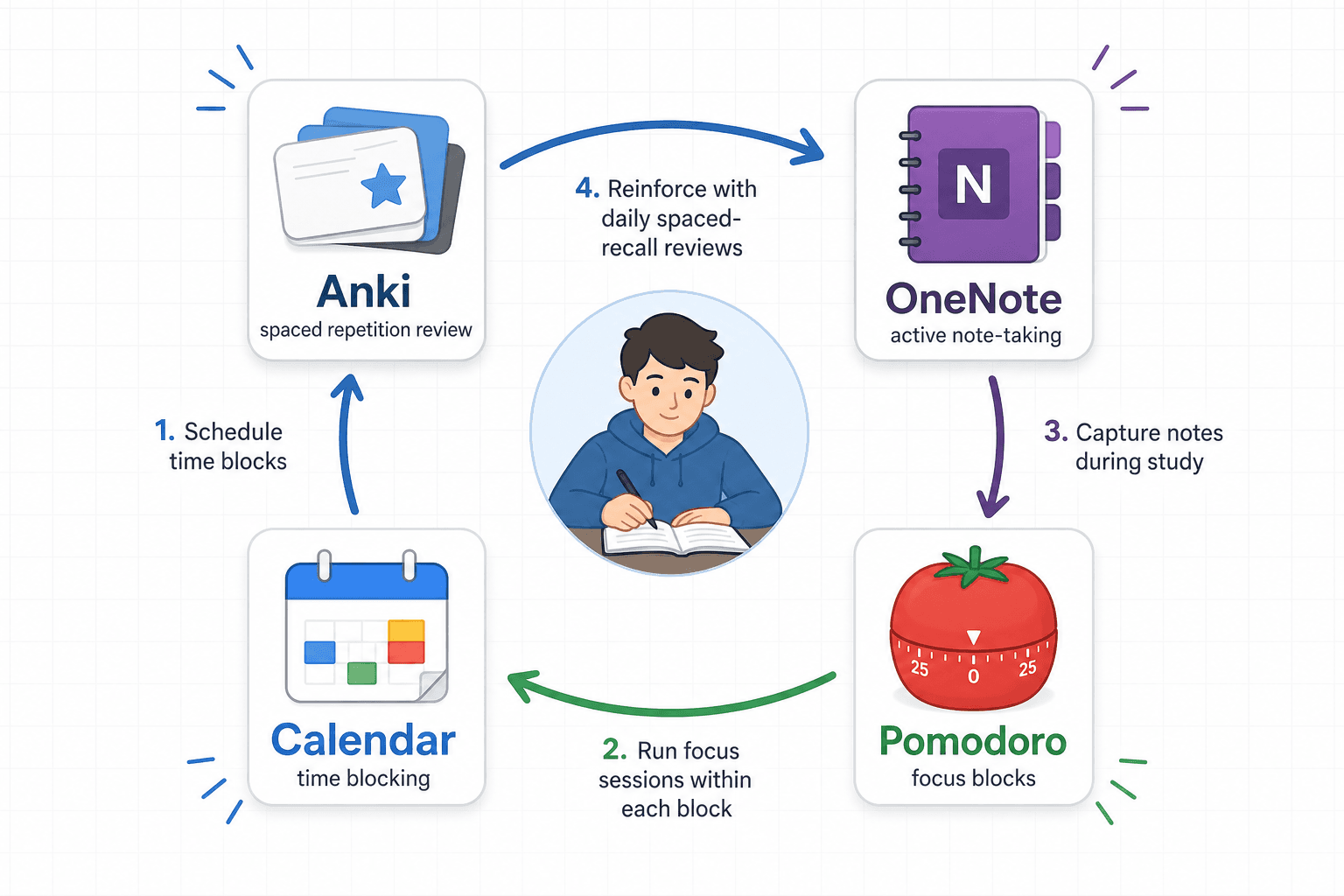
The real power of this stack is not any single app — it's how the four apps fit together into a complete weekly workflow that covers planning, focus, note-taking, and long-term retention without overlap.
| Day | Planning (Google Calendar) | Focus (Pomodoro) | Note-Taking (OneNote) | Review (Anki) |
|---|---|---|---|---|
| Monday | Block 3:00–5:00 PM for biology lecture + review | 4 Pomodoros during blocked time | Take Cornell notes during lecture; write summary at 5:00 PM | Review 20 new cards from last week's material (10 min) |
| Tuesday | Block 10:00–11:30 AM for problem set | 3 Pomodoros | Work through problems in OneNote; annotate with questions | Review 15 cards from Monday's lecture (8 min) |
| Wednesday | Block 2:00–4:00 PM for chemistry + reading | 4 Pomodoros | Outline textbook chapter using OneNote sections | Review 20 new chemistry cards + 15 biology cards (12 min) |
| Thursday | Block 9:00–10:30 AM for practice test | 3 Pomodoros | Review incorrect answers in OneNote; create new Anki cards from mistakes | Review all cards marked 'hard' this week (15 min) |
| Friday | Block 1:00–2:30 PM for weekly review | 3 Pomodoros | Write one-page summary of the week's key concepts | Full deck review: all cards due (20–30 min) |
| Weekend | One 45-minute block each day | 2 Pomodoros per block | Catch up on any incomplete notes | Review cards you missed during the week |
Notice what is missing from this workflow: there is no separate app for task management, no habit tracker, no second note-taking app, no alternative flashcard system. Each app has a single, well-defined job, and they never compete with each other. Google Calendar tells you what to do and when. The Pomodoro timer keeps you focused while you do it. OneNote captures and organizes the material. Anki ensures you don't forget it.
ADHD-Friendly Picks Within This Stack
The core four-app stack works well for most students, but some — particularly those with ADHD — may need additional scaffolding to stay on track. The good news is that the research-backed additions are minimal and inexpensive.
- Forest (paid, ~$2 on iOS): A Pomodoro-style timer where you plant a virtual tree that grows during your focus session. If you leave the app, the tree dies. The visual commitment — and the mild emotional cost of killing a tree — provides external motivation that can be especially helpful for ADHD students who struggle with self-directed focus. Forest is an optional addition to the free Pomodoro timer, not a replacement.
- Time Timer: A visual countdown clock that shows time passing as a disappearing red disk. Unlike a digital timer that just shows numbers, the Time Timer gives an immediate visual sense of how much time remains, which reduces the anxiety of open-ended work sessions. Available as a physical clock or a mobile app.
- FocusMate: A body-doubling service that pairs you with another person for a 50-minute work session via video call. You share your goal at the start, work silently, and report your progress at the end. Research on body doubling suggests it significantly improves task initiation and sustained attention for ADHD students. FocusMate offers a limited free tier.
The One-Semester Commitment Rule: Install These 4, Use Nothing Else
Here is the rule that makes the stack work: install these four apps and use nothing else for one full semester.
No trying out a new flashcard app in week three. No switching from OneNote to Notion in week seven because a friend showed you a cool template. No downloading a "better" focus app in week ten. For one semester, these four apps are your entire study system.
The reasoning comes directly from the Rosen, Carrier, and Cheever (2013) finding: consistency with tools predicts exam performance more strongly than which specific tools you use. A student who uses a mediocre flashcard app every day for four months will outperform a student who switches between three excellent flashcard apps every few weeks. The switching itself — the time spent learning new interfaces, migrating data, and rebuilding habits — is a tax on your study time that you never see accounted for in app store reviews.
The most common objection to this rule is: "But what if I find a better app?" The answer is: you will. There will always be a shinier, more feature-rich app next month. That is not the point. The point is that the marginal benefit of a slightly better app is almost always smaller than the cost of switching. The research is clear on this. Trust the process, not the promise of a better tool.
Frequently Asked Questions
Can you really study entirely for free?
Yes. Anki is free on desktop and Android. OneNote is free on all platforms with unlimited storage. Pomofocus is free in any browser. Google Calendar is free. The only potential cost is Anki on iOS at roughly $25 one-time — but if you have access to a laptop or Android device, the full experience costs nothing. There is no subscription, no hidden paywall, and no feature that requires payment for core functionality.
What if my school requires a specific tool?
Some courses require specific platforms like Pearson MyLab, McGraw-Hill Connect, or Canvas quizzes. In those cases, treat the required tool as a fifth app that you use only for that specific course. Keep the core four-app stack for everything else. For example, a student preparing for the SAT might supplement the stack with targeted practice resources from our SAT exam prep guide, which covers recommended tools, study plans, and section strategies for the digital SAT.
What about AI study tools?
AI tools like NotebookLM, ChatGPT, and AI flashcard generators can be useful for specific tasks — generating practice questions from a PDF, summarizing a dense article, or creating an initial set of flashcards. However, they are not replacements for the core study process. AI-generated materials should always be verified for accuracy before use, especially for high-stakes exams. If you choose to experiment with AI tools, add them as a temporary supplement to the four-app stack, not as a permanent replacement for any of the four core apps.
What if I already have a paid app I like?
If you already have a paid app that you use consistently and it serves one of the four core functions (flashcards, note-taking, focus, planning), there is no need to switch. The principle is not "use these exact four apps" — it is "use exactly four apps, one per function, and commit to them." If you already pay for GoodNotes and use it daily, keep it. The goal is minimalism and consistency, not a specific brand.
Comments
Join the discussion with an anonymous comment.