
Flashcard Apps for Language Learning Compared: Features, Algorithms, and Pricing
Choosing the right flashcard app for language learning depends on your budget, stage, and how you study. This comparison examines pricing, spaced repetition algorithms, and AI card generation to help you decide.
Updated:
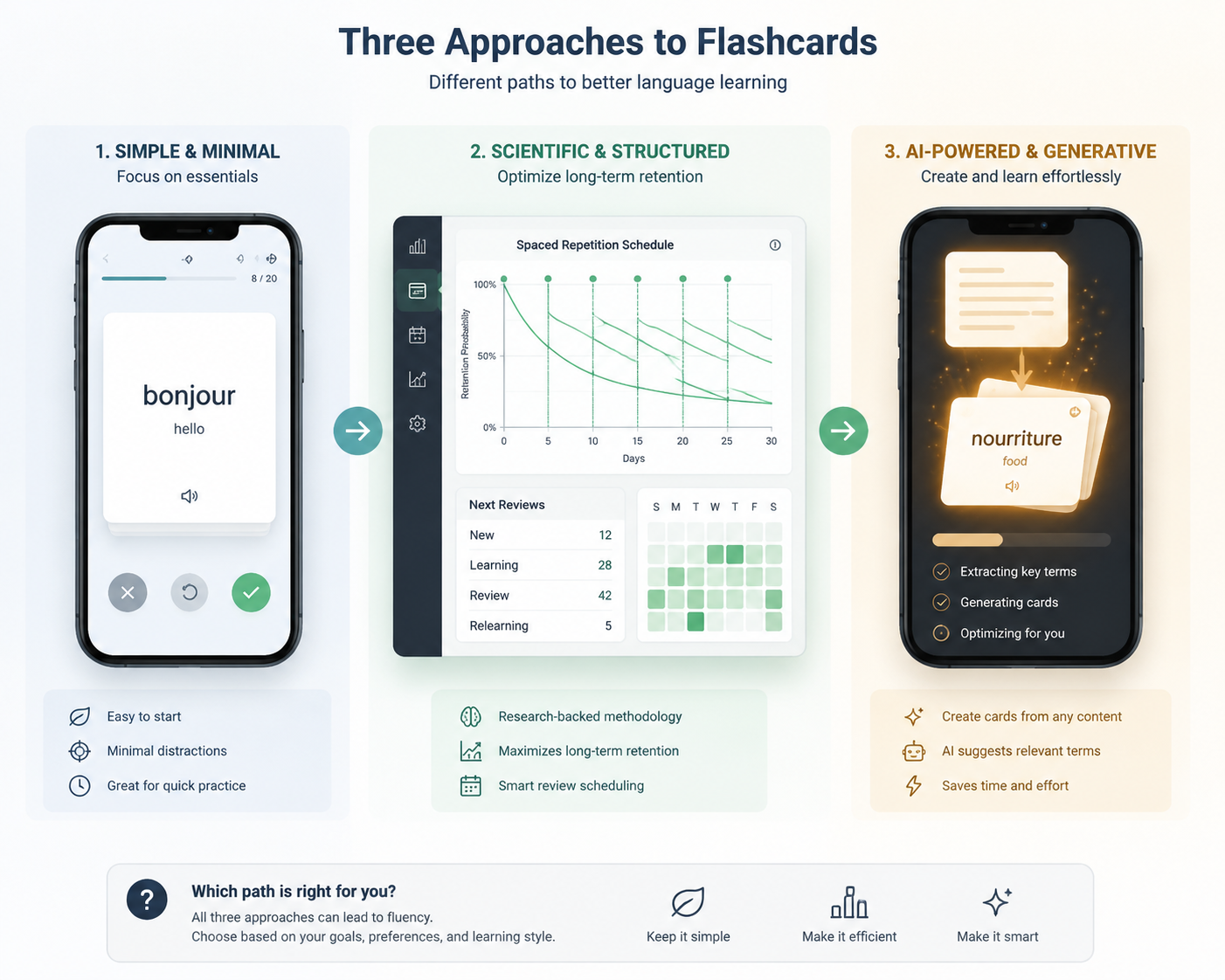
There is no single best flashcard app for language learning in 2026. The right choice depends on what is actually slowing you down: too many reviews, too much time making cards, too little pronunciation support, or too much setup before you have even built the habit.
If long-term retention is the priority, start with an FSRS-centered setup such as Anki with FSRS enabled or MintDeck. If card creation is the bottleneck, look harder at AI-generation tools that can turn text, topics, PDFs, or notes into usable cards. If you are starting from zero and need momentum, a free app with audio support may matter more than maximum customizability. If you are cramming for a class quiz, Quizlet can still make sense because of its familiar interface and pre-made sets, even though several learning features now sit behind Quizlet Plus pricing reported at $2.99/month in 2026 comparison sources.[1]
Quick Comparison: Flashcard Apps for Language Learning in Q3 2026
Pricing and feature access change often, especially for subscription apps. Treat the table as a Q3 2026 decision snapshot, not a permanent contract with reality. The commercial sources behind some of these figures have obvious incentives, so the useful move is to compare concrete feature claims rather than swallow any app’s ranking whole.
| App | Price / free tier | SRS algorithm | AI card generation | Audio / pronunciation | Mobile and sync | Import / ecosystem fit | Best fit |
|---|---|---|---|---|---|---|---|
| Anki | Desktop and AnkiDroid free; AnkiMobile for iOS reported at $24.99-$34.99 one-time[1] | FSRS available and adopted in Anki v23.10; SM-2 also historically central[2] | Not built in by default | No built-in TTS by default; add-ons and media fields can help | Strong, but iOS app is paid; setup takes effort | Excellent Anki ecosystem, community decks, add-ons, exports | Serious long-term learners and sentence miners |
| MintDeck | Free tier highlighted with FSRS and 5-language on-device audio[1] | FSRS | Generates cards from topic or pasted text[1] | On-device audio in 5 languages[1] | Positioned as beginner-friendly; verify device coverage before committing | Anki import support is a key decision point to check in current app | Beginners who want FSRS plus audio without Anki setup |
| Quizlet | Basic review free; Learn Mode, Practice Tests, and spaced repetition reported behind Quizlet Plus at $2.99/month[1][3][4] | Learning features available through paid tier; less transparent SRS control than Anki-style tools | Some creation and study assistance features vary by plan | Useful for common classroom vocabulary sets; pronunciation depth varies by content | Very approachable mobile and web experience | Strong pre-made set ecosystem; less suited to deep Anki-style workflows | Classroom review, short-term tests, and learners already using shared sets |
| StudyCards AI | Pricing and feature details reported in 2026 app-maker comparison material[3] | SRS support reported, but algorithm transparency should be checked | AI generation from study material is a core pitch[3] | Language support should be verified by target language | Designed around fast creation and mobile study | Not the same ecosystem depth as Anki | Learners whose biggest problem is making cards fast |
| Laxu AI | 2026 student-app comparison source reports paid AI-study positioning[4] | SRS support should be verified in current product | AI generation from PDFs or notes is a core use case[4] | Pronunciation support is not the main differentiator in available material | Mobile-first student workflow emphasis | Better for note-to-card pipelines than Anki ecosystem work | Crammers converting class material into cards quickly |
| Brainscape | Brainscape Pro reported around $7.99/month in 2026 comparison sources[4] | Confidence-based spaced repetition style | AI features depend on plan and current product state | Not primarily a language-audio tool | Polished cross-device study experience | Less flexible than Anki for sentence mining | Learners who want guided repetition without Anki complexity |
| Duolingo / full-course apps | Duolingo Super reported around $6.99/month in 2026 comparison material[4] | Course progression, not a dedicated flashcard scheduler | Not primarily an AI flashcard generator | Strong guided audio and beginner exposure | Excellent habit loop and mobile experience | Not a replacement for a flexible flashcard database | Beginners needing a course alongside, not instead of, flashcards |
For a broader non-language-specific comparison, the site’s 2026 flashcard app comparison is useful. For language learning, though, the ranking changes because pronunciation, sentence context, card creation speed, and review load matter more than a clean dashboard.
The Algorithm Question Matters More Once Your Deck Gets Big
A 60-card travel deck can survive almost any app. A 2,000-card language deck cannot. Once reviews pile up, the scheduling algorithm stops being an invisible technical detail and becomes the thing deciding whether Tuesday night is 25 minutes of useful recall or an hour of guilt.
The biggest algorithm shift in recent years is FSRS, or Free Spaced Repetition Scheduler. StudyGlen’s 2026 technical explainer reports that FSRS was trained on 700+ million real review logs from 20,000+ users, and that Anki adopted FSRS in v23.10 in November 2023.[2] MemoForge’s 2025 guide cites benchmark data across 500+ million review logs showing FSRS can schedule 20-30% fewer reviews than SM-2 at the same target retention.[5]
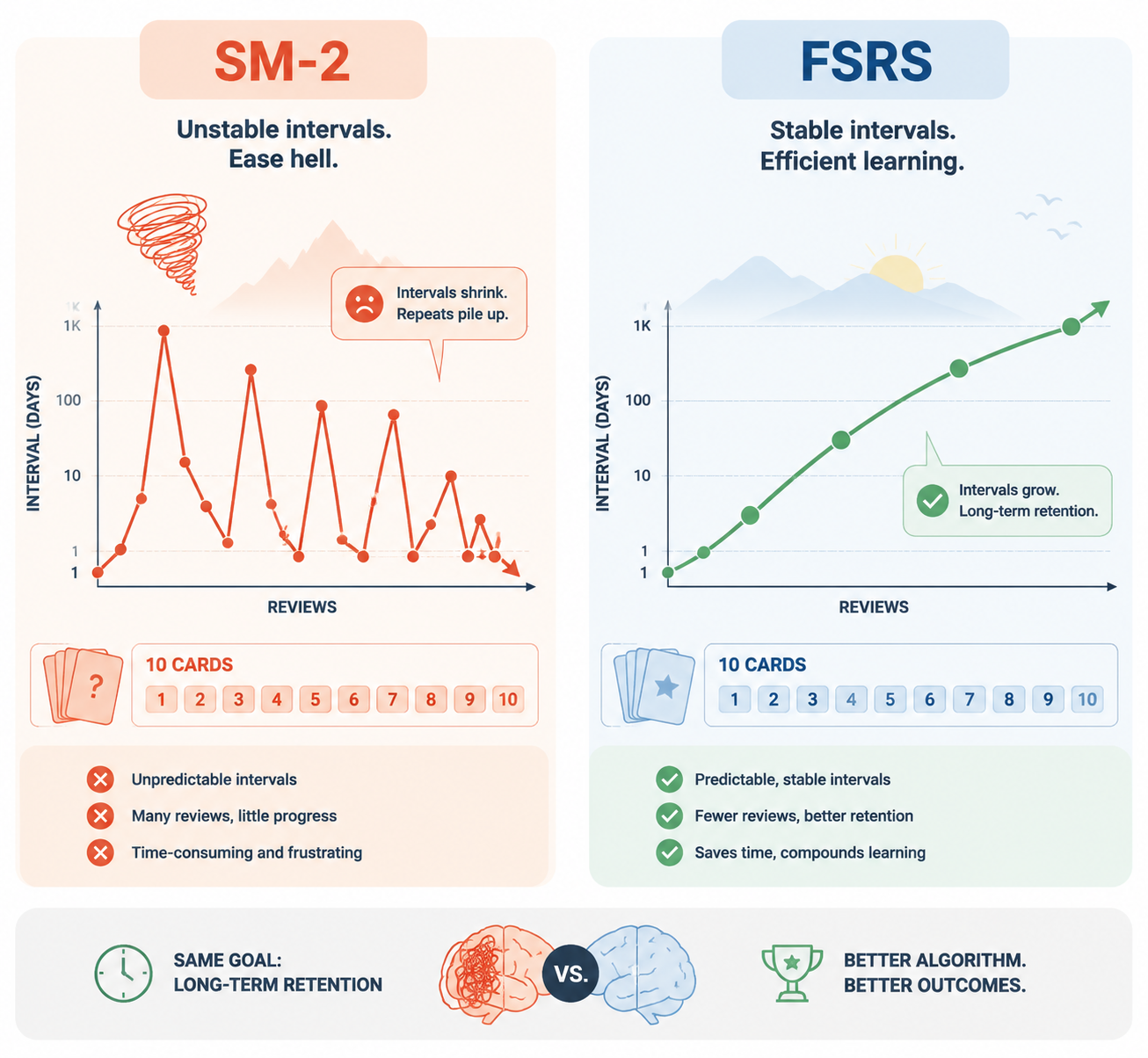
That does not mean every Spanish, Korean, or Arabic learner will personally see exactly 20-30% fewer reviews. The benchmark is broad, not language-specific. It includes general Anki behavior, not a controlled study of language learners only. The safer conclusion is still important: FSRS is now the most credible default for people who expect to keep a large deck alive for months or years.
The practical difference shows up in two places. First, FSRS estimates memory more directly around retrievability and stability instead of leaning on the older SM-2 ease factor model. Second, FSRS avoids the classic “ease hell” pattern, where repeated “Hard” ratings can drive intervals down and make a mature deck feel like it is punishing you forever.[2]
For a deeper technical breakdown, read why the algorithm is the most important feature in a language flashcard app. The short version for choosing an app is simpler: if you plan to keep thousands of vocabulary, sentence, grammar, and listening cards, algorithm efficiency is not nerd trivia. It is study-time budgeting.
When SM-2 Is Still Fine
SM-2 is not useless. Many learners built serious language skills with Anki long before FSRS arrived. If your deck is small, your exam is close, or you are mostly reviewing classroom word lists for a few weeks, the difference between algorithms may matter less than whether you open the app at all.
The mistake is choosing a low-control system for a long-term project and only discovering the limits after your reviews become part of daily life. A beginner can reasonably start with something simpler. A committed sentence miner should be much pickier.
AI Card Generation Helps Most When Creation Is the Bottleneck
Language learners do not quit only because reviews are hard. They also quit because making decent cards eats the study session before the studying starts. AI card generation is valuable when it shortens that drag: paste a paragraph, upload notes, enter a topic, and get draft cards before motivation leaks away.
MintDeck and StudyCards AI both report AI card generation workflows that can reduce deck creation from hours to under 2 minutes, with MintDeck describing generation from a topic or pasted text and StudyCards AI emphasizing fast AI-created study cards.[1][3] Laxu AI’s 2026 student-app guide also frames PDF- or notes-to-card generation as a central use case.[4]
That claim should be used carefully. “Under 2 minutes” can describe draft creation, not final learning quality. A machine can generate a stack of cards quickly; it cannot guarantee that the sentence is natural, the translation fits your level, the distractors are useful, or the grammar point is what you actually needed to learn.
For language study, AI-generated cards need a review pass. Delete duplicates. Fix unnatural sentences. Add audio if the app did not create it. Split overloaded cards. If a card asks for five facts at once, it will fail no matter how advanced the generator sounds.
The best use case is not “AI teaches me the language.” It is “AI gives me a rough first deck from material I was already studying, and I spend my limited energy improving the cards that matter.” That is still a real win, especially for test-prep learners staring at a chapter, lecture PDF, or vocabulary list the night before they need to review it.
Audio Is Not Decoration in a Language Flashcard App
A flashcard app for biology can get away with text. A language app cannot always do that. If you never hear the word, you are training recognition without pronunciation, rhythm, or listening memory. That is especially risky for beginners who are still building sound-letter mapping.
This is where MintDeck’s free on-device audio in 5 languages is genuinely decision-relevant, assuming your target language is supported.[1] It solves a boring but important beginner problem: you can make or review cards without immediately hunting for audio files, installing add-ons, or paying for a course app just to hear basic pronunciation.
Anki can handle audio extremely well, but not magically. You may need media fields, add-ons, imported decks, manual recordings, or another tool in the workflow. For immersionists, that flexibility is a strength. For an absolute beginner trying to survive week one, it can feel like being handed a workshop instead of a bicycle.
This is also why full-course apps still have a place. Wirecutter’s 2026 language-app guide focuses on broader course products such as Duolingo, Babbel, and Pimsleur rather than dedicated flashcard databases.[6] Those apps can be helpful for guided exposure, especially listening and habit formation. They are just not the same tool as a flexible SRS flashcard app.
Pricing: Free Is Not Always Cheap, and Paid Is Not Always Better
The 2026 pricing picture is less friendly than the old “just use whatever is free” advice suggests. Quizlet’s basic review remains accessible, but multiple 2026 comparison sources report that Learn Mode, Practice Tests, and spaced repetition are behind Quizlet Plus at $2.99/month.[1][3][4] If those are the features you actually need, the free tier is no longer the real comparison point.
Anki is the opposite kind of pricing puzzle. Desktop Anki and AnkiDroid are free, while AnkiMobile for iOS is reported at a one-time $24.99-$34.99.[1] For someone studying for years, a one-time iOS purchase can be cheaper than a subscription. For someone unsure they will last two weeks, it can feel like friction at exactly the wrong moment.
MintDeck’s free FSRS plus audio positioning is strong for beginners because it puts the two most language-relevant pieces, scheduling and sound, in the no-subscription column.[1] Brainscape Pro is reported around $7.99/month, while Duolingo Super is reported around $6.99/month in 2026 comparison material, though Duolingo belongs in the course-app category more than the dedicated flashcard category.[4]
Before paying, check three things on the current pricing page: whether offline study is included, whether the learning mode you want is paywalled, and whether AI generation has a monthly limit. The sticker price matters less than the first limit you will hit during an ordinary week.
Which App Should You Use?
The fastest way to choose is to stop asking which app is best and ask which failure mode you are trying to prevent. Different learners collapse in different places.
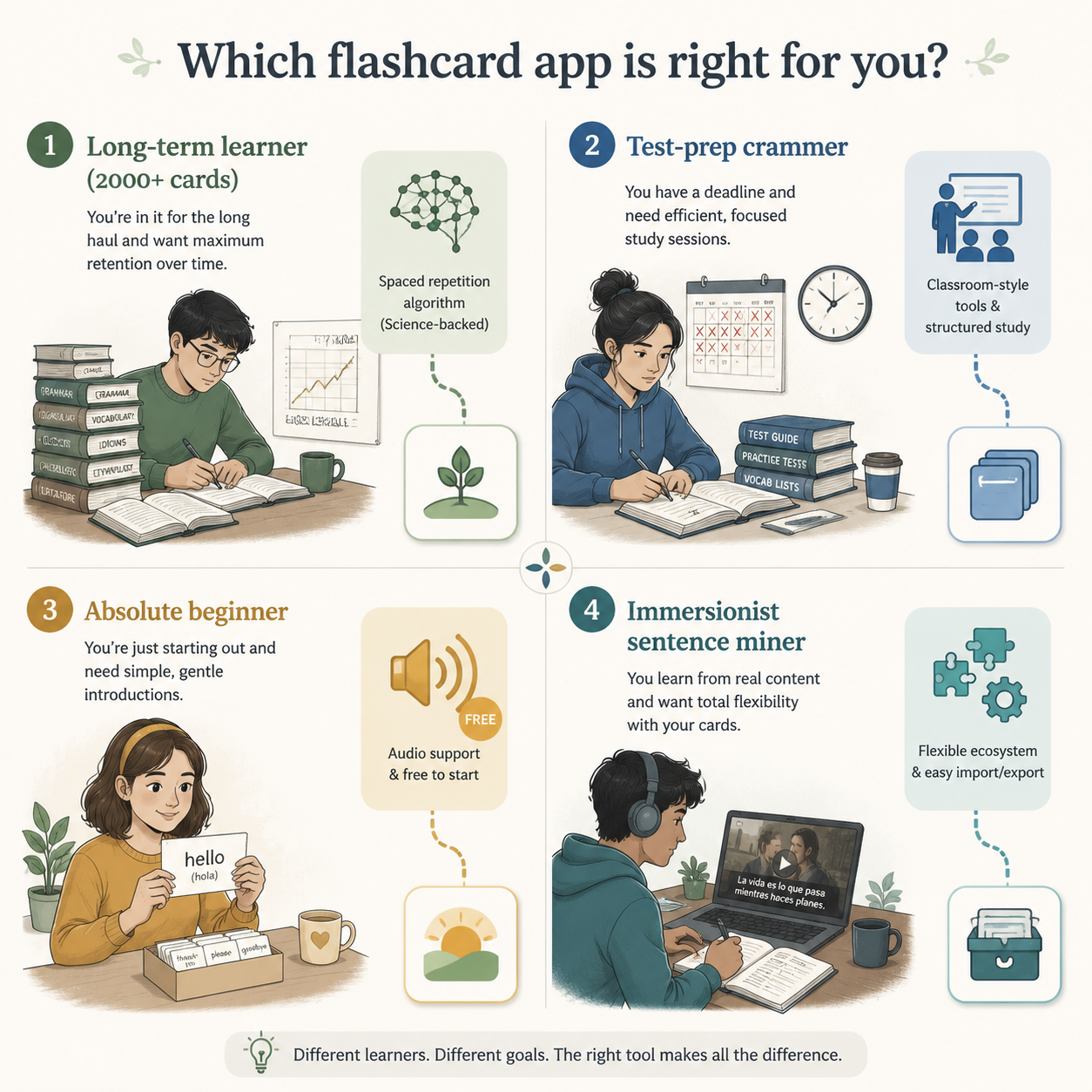
If You Are a Serious Long-Term Learner With 2,000+ Cards
Choose Anki with FSRS enabled unless you have a specific reason not to. The review-load advantage of FSRS, Anki’s ecosystem, add-ons, import/export options, and community deck culture all matter more as the deck grows. StudyCards AI’s Reddit-consensus article reports that Anki remains the most-recommended app for serious language learners in Reddit discussions, while Quizlet is more associated with classroom and test-prep use.[7]
This is the learner who benefits from flexibility: sentence cards, cloze deletions, audio fields, image occlusion, grammar notes, mined examples, and custom review settings. The cost is setup time. If Anki is the choice, use a sane beginner configuration before customizing everything; the site’s Anki setup guide for absolute beginners is the better next stop than another comparison table.
If You Are a Test-Prep Crammer
Choose the tool that gets cards made and reviewed fastest. Quizlet is still reasonable if your class already shares sets there, your exam is soon, and you care more about familiarity than algorithm control. AI-first tools such as StudyCards AI or Laxu AI may be better if you are converting notes, slides, PDFs, or pasted study material into a temporary review deck.
For cramming, card quality still matters, but the review horizon is shorter. You do not need a perfect lifelong vocabulary database for Friday’s quiz. You need a deck that is accurate enough, synced to your phone, and ready before the night disappears into formatting.
If You Are an Absolute Beginner
Choose the app that gives you sound, simple reviews, and a low-friction start. MintDeck is compelling here because the available comparison material places FSRS and 5-language on-device audio in the free entry point.[1] That combination matters for a beginner who is not ready to debug a template or decide whether a card should be recognition-only, production, or cloze.
A full-course app can also belong in the stack at this stage. Duolingo, Babbel, or Pimsleur-style products are not replacements for a serious flashcard system, but they can give a beginner guided input, pronunciation exposure, and a daily routine. If you are choosing for English specifically, the site’s English learning app decision framework looks at that broader app choice.
If You Are an Immersionist or Sentence Miner
Choose Anki unless another app clearly supports your exact import, export, audio, and card-template workflow. Sentence mining is messy by nature. You may want one card from a show, one from a graded reader, one from a podcast transcript, and one from a dictionary example. A rigid app that looks elegant on day one can become annoying when you start caring about fields, tags, source context, and media.
Language-specific ecosystems can change the answer. Mandarin learners, for example, may care about handwriting, tones, dictionary lookup, and character-specific workflows in a way that generic apps do not handle equally well. The site’s Mandarin flashcard and SRS app guide is a good example of why the best general app may not be the best language-specific stack.
Where Quizlet, Duolingo, and Course Apps Fit
Quizlet is not pointless just because it is not the deepest SRS system. Its strength is social gravity: teachers assign it, classmates share sets, and many students already know how to use it. For a short test-prep cycle, that can beat a more powerful system nobody in the class has populated.
The tradeoff is control. If you want transparent scheduling, long-term retention tuning, flexible templates, and a deck that can grow with your language life, Quizlet is usually not the first choice. The site’s Quizlet vs. Anki vs. Knowt vs. RemNote retention comparison goes deeper on that tradeoff.
Duolingo and Memrise-style course apps belong in a different part of the language stack. They can introduce material, maintain a habit, or provide guided listening and reading practice. They should not be judged as failed Anki replacements unless they are being sold as dedicated flashcard systems. A good language setup may use both: a course or input tool for exposure, and a flashcard app for deliberate retention.
A Practical Selection Rule
Pick based on the constraint you will actually feel this week:
- Choose Anki with FSRS if long-term retention, sentence mining, exports, templates, and ecosystem depth matter most.
- Choose MintDeck if you want a free, beginner-friendly path with FSRS and built-in audio for a supported language.
- Choose an AI-generation-heavy tool if the main problem is turning notes, PDFs, topics, or pasted text into cards before you run out of energy.
- Choose Quizlet mainly when class familiarity, shared sets, or short-term test prep outweigh deeper SRS control.
- Use a full-course app alongside flashcards when you need guided input, pronunciation exposure, or a daily habit loop.
The least-wrong app is the one that prevents your most likely failure: an overdue wall, an empty deck, silent vocabulary, a paywall at the wrong moment, or a setup process that becomes the hobby instead of the language.
References
- Best Flashcard App for Language Learning (2026) — MintDeck, 2026.
- Spaced Repetition Algorithms Explained: FSRS vs SM-2 vs Leitner (2026) — StudyGlen, 2026.
- Best Flashcard App for Language Learning (2026 Guide) — StudyCards AI, 2026.
- 5 Best Flashcard Apps for Students in 2026 — Laxu AI, 2026.
- FSRS vs SM-2: The Complete Guide to Anki's New Algorithm for Medical Students — MemoForge, 2025.
- The 4 Best Language Learning Apps of 2026 — NYT Wirecutter, 2026.
- Best Flashcard App for Language Learning Reddit Consensus — StudyCards AI.
Comments
Join the discussion with an anonymous comment.