
5 Ways the EU Digital Markets Act Changes Your Phone as a Student
The EU Digital Markets Act is already changing how students use their phones — from browser choice screens to the ability to delete pre-installed apps and install apps from outside the App Store. This explainer breaks down the five concrete changes that affect daily smartphone use and what to expect next.
Updated:
If your phone recently asked you to pick a browser before you could get on with your day, that was probably not random update clutter. In the EU, the Digital Markets Act, or DMA, is pushing the biggest tech platforms to loosen default settings that used to quietly decide what app opened first, what store you could install from, and how easily you could leave one phone ecosystem for another.
For students, the useful explanation is not a tour of Brussels terminology. It is this: the DMA is a rule for very large digital “gatekeepers,” and some of its most visible effects now show up as phone-level choices. A browser prompt. A delete button on an app that used to feel permanent. A warning before installing from somewhere new. A promise that moving from iPhone to Android, or the other way around, should become less miserable.[1]
1. Your Phone May Ask You to Choose a Browser or Search Engine
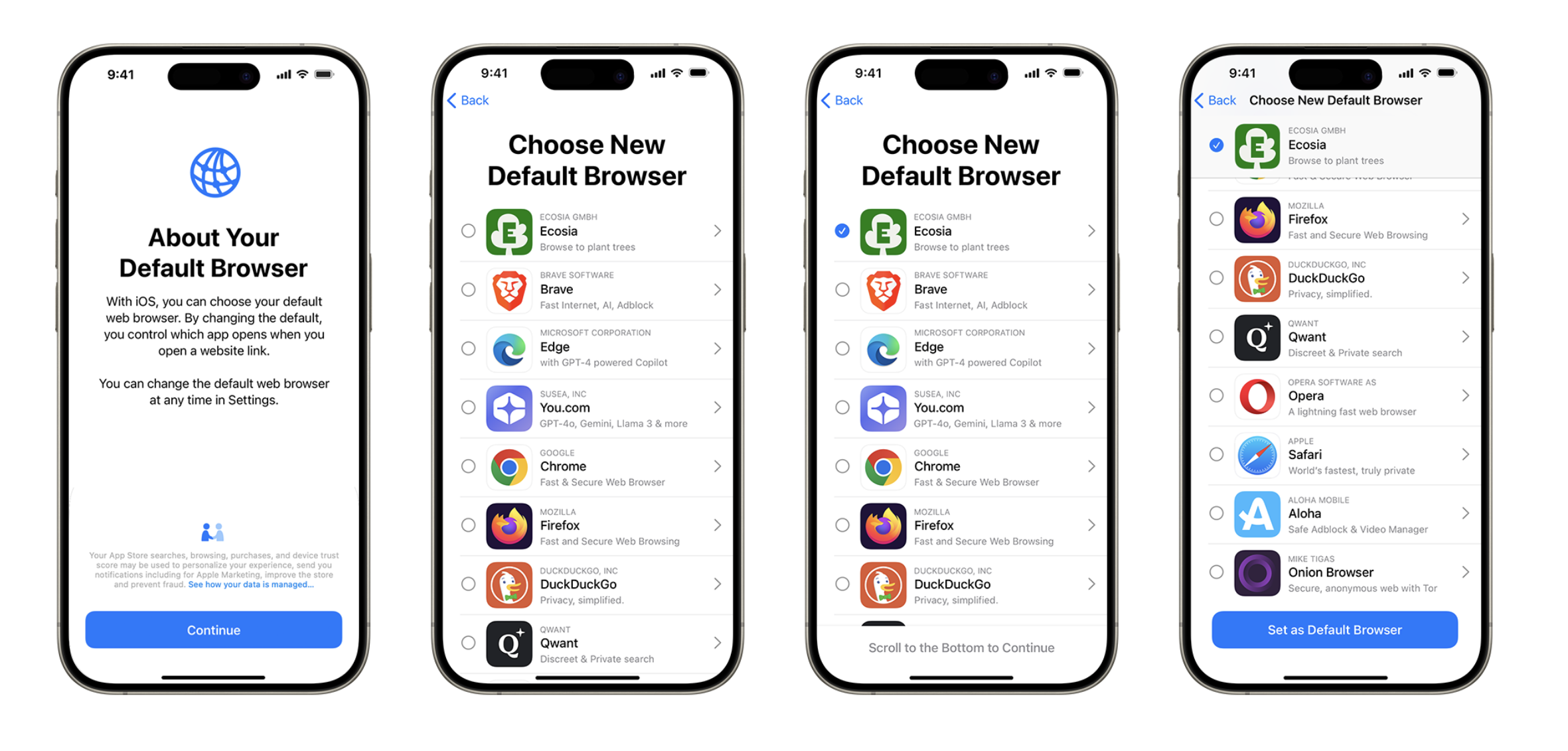
This is the cleanest example because you can actually see it. Instead of Safari or Chrome simply being treated as the obvious starting point, EU users can be shown a browser choice screen. The DMA pressure behind this comes from rules aimed at stopping gatekeepers from locking users into their own services through defaults, including obligations around access and choice under Article 6.[1]
The practical change is small but meaningful: when a student opens a newly updated phone or browser, the device may ask them to pick from a list rather than silently keeping the old default. That matters because defaults are powerful. Most people do not go hunting through settings between lectures just to test a different browser. A choice screen moves that decision into the moment when the phone is already asking for attention.
There is early evidence that the screen changed behavior, at least for some browser makers. A Reuters-reported 2024 data point, cited in coverage of the DMA, said Aloha Browser saw a 250% jump in EU users after the choice screens appeared; Vivaldi, Brave, and Ecosia also reported user gains.[2] That is worth noticing, especially because browser switching is usually boring and sticky. It is not enough to prove the whole DMA “worked,” and it should be checked against newer 2025 and 2026 evidence before anyone treats it as a final verdict. But it does show that a visible prompt can move real users, not just policy documents.
For everyday use, the student takeaway is simple: if you see a browser or search choice screen, slow down for ten seconds. Pick the one you actually want for coursework links, learning platforms, two-factor login pages, PDFs, and campus portals. You can usually change it later, but the whole point of the screen is that the first choice no longer has to be made for you.
2. Pre-Installed Apps Are No Longer Always Permanent
The next change feels almost fake if you grew up with default phone apps that behaved like furniture bolted to the floor. Apple said its EU changes for iOS 18 allow users to delete pre-installed apps including Safari, Messages, Photos, Camera, and even the App Store itself.[3]
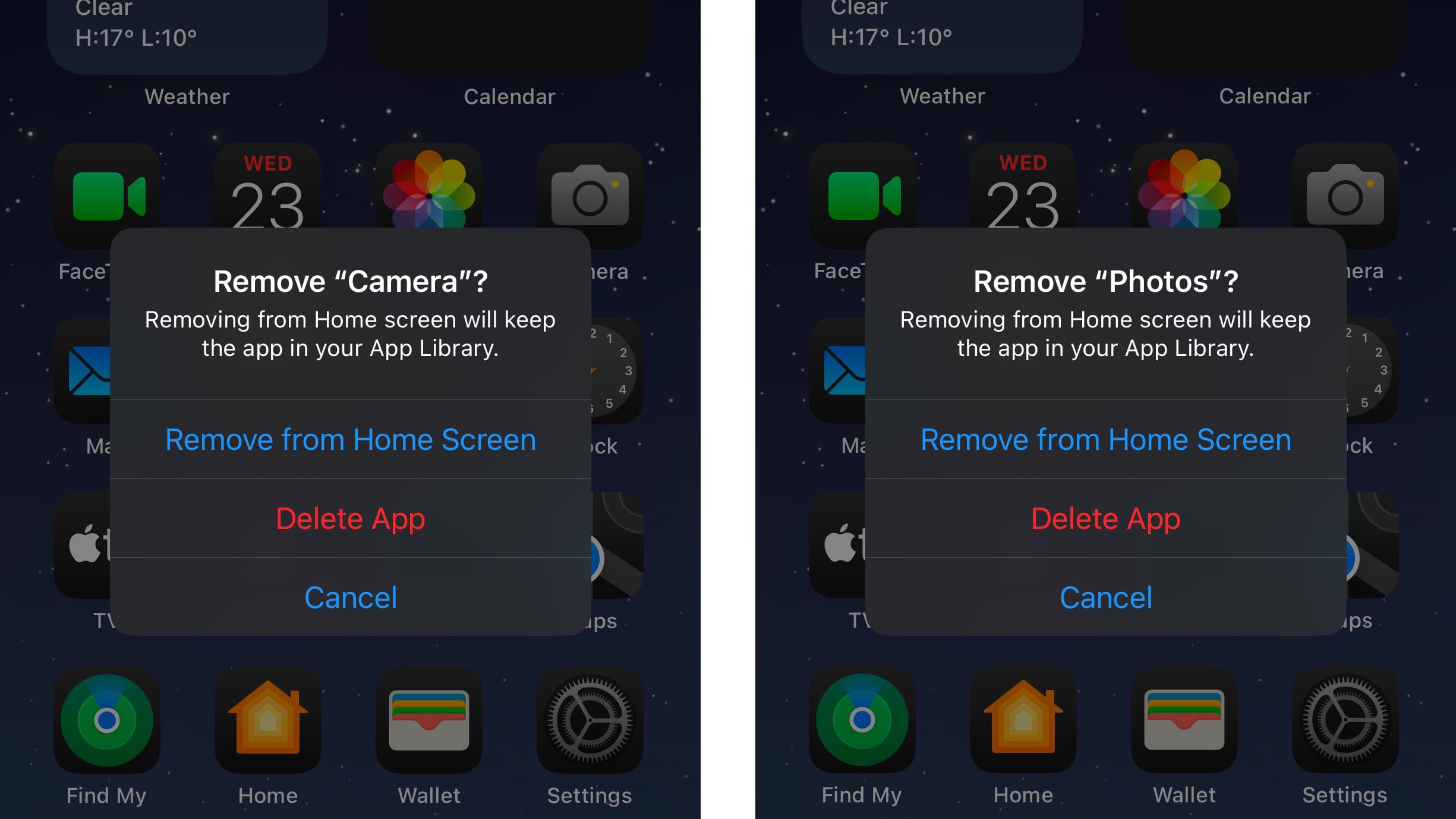
That does not mean every student should immediately delete half their phone. It means the phone is being pushed toward a more normal ownership model: if you do not use an app, and another app can handle the job, you may be allowed to remove it instead of hiding it in a folder named “stuff.”
The consequences are practical. A student who uses a different browser can remove Safari. Someone who keeps photos in another service may want less Apple app clutter. Someone trying to simplify a phone before exams can reduce distractions or confusion on the home screen. The delete button is not glamorous, but it is the kind of control people notice because it changes a daily surface.
The cautious part is that Apple’s own September 2025 explanation is also Apple’s argument about the DMA. It presents the company’s compliance choices alongside warnings about risks to users.[3] That does not make the information useless; Apple is the source for what it changed in iOS. But it is not a neutral classroom handout. Read it as a gatekeeper describing its own compliance, not as the final independent assessment of whether the DMA is good or bad.
| Phone-level change | What a student can notice |
|---|---|
| Browser and search choice screens | The phone asks which browser or search service to use instead of silently keeping the default. |
| Uninstallable default apps | Some pre-installed apps can be removed instead of only hidden. |
| Alternative app sources on iPhone in the EU | Apps may come from approved alternative marketplaces or direct web distribution, not only Apple’s App Store. |
| Messaging interoperability | WhatsApp and Messenger are supposed to open to competing services, though real-world use is still limited. |
| Data portability and phone migration | Moving data between iPhone and Android is being turned into a more complete, real-time transfer process. |
3. EU iPhone Users Can Install Apps From Outside Apple’s App Store
This is the change that needs the most care. In the EU, Apple has opened iPhone distribution to alternative app marketplaces and direct installation routes in response to the DMA. Apple’s compliance package also includes a new fee structure, including what it calls the Core Technology Fee.[3]
For years, the simple version of iPhone safety was: apps come from Apple’s App Store, Apple reviews them, and users do not have to think very hard about where an app came from. The DMA challenges that locked-down model. That can be good for students who need an app that is not available through the main store, who want a different store’s rules, or who care about developers having more ways to reach users.
It also creates a new responsibility gap. A less technical student may not know the difference between a legitimate alternative marketplace, a fake download page, and a sketchy copy of an app they already use for banking, transit, or school login. Apple emphasizes security and privacy risks in its DMA statements; the European Commission emphasizes that gatekeepers must not use control over app distribution to block contestability and user choice.[1][3] Both points can be true at the same time.
A good campus rule is boring but useful: if an app is tied to money, identity, school credentials, health, or two-factor authentication, be extra conservative about where it comes from. Alternative app stores are not automatically bad. Direct installation is not automatically dangerous. But “I found a download link in a group chat” is not the same thing as understanding the source.
- Check whether the marketplace or developer is named and recognizable before installing.
- Be more skeptical of apps that ask for contacts, photos, location, microphone, or accessibility permissions.
- Avoid installing school, banking, identity, or authenticator apps from unfamiliar sources.
- Treat urgent messages like “install this version now” as suspicious unless they come from the official service.
4. Messaging Apps Are Supposed to Open Up, but This Is the Slow Part
Messaging interoperability sounds like the dream version of the DMA: you use one messaging app, your friend uses another, and the chat still works. Article 7 of the DMA requires certain number-independent interpersonal communication services, including WhatsApp and Messenger, to make interoperability available to competing services under specified conditions.[1]
On a student’s phone, this would matter because group chats are social infrastructure. Class projects, roommate plans, club logistics, shift swaps, family calls, and campus societies often depend on whichever app reached critical mass first. If leaving a messaging app means losing everyone, the “choice” to leave is mostly theoretical.
This is also where restraint matters. As of the 2026 DMA review discussion, analysis of the Commission’s review found messaging interoperability to be one of the areas where impact has been limited so far.[4] That is not the same as failure forever. It means the phone in your hand may not yet show a clean, obvious “message anyone from anywhere” button. Technical integration, security, encryption, product design, and adoption by competing services all matter.
So if someone tells you the DMA already made WhatsApp fully open, be suspicious. If someone tells you nothing changed because your group chat still lives in one app, that is too simple as well. The obligation exists; the everyday version is still catching up.
5. Moving From iPhone to Android Should Get Less Painful
Data portability is the least flashy change until the day your phone breaks, your contract ends, or you finally decide to switch sides. Article 6(9) of the DMA requires gatekeepers to provide effective portability for data generated through a user’s activity, including continuous and real-time access where relevant.[1]
The European Commission’s May 2026 smartphone factsheet says Apple and Google are jointly developing a cross-OS data transfer tool covering contacts, messages, photos, Wi-Fi passwords, and third-party app data. The same factsheet says eSIM transfer is already operational and that full device migration is expected to roll out worldwide by late 2026.[5]
That is a bigger student issue than it may sound. Phone ecosystems trap people through inconvenience as much as through contracts. If your photos, message history, Wi-Fi passwords, app data, and eSIM are hard to move, then switching phones is not just buying a different rectangle. It is a weekend project with a real risk of losing something important before Monday morning.
For students, better migration can affect boring but high-stakes moments: logging into university accounts, keeping access to authenticator apps, preserving chat histories for group work, moving transit apps, and not losing photos of documents, whiteboards, IDs, or receipts. The Commission’s factsheet makes this the most concrete “coming next” phone change in the DMA story, because it names the data categories and gives a late-2026 expectation rather than only promising openness in general.[5]
There is still a difference between a transfer tool existing and a transfer tool being smooth. Anyone who has helped a friend move phones knows the danger zone: one app needs a separate login, another loses local files, a banking app wants re-verification, an authenticator needs advance setup, and one forgotten password blocks everything. The DMA can force portability obligations, but students should still prepare before switching devices.
- Before switching phones, check your authenticator app, password manager, banking apps, and school login method.
- Confirm that photos, contacts, and messages have completed transfer before wiping the old phone.
- Move your eSIM only when you have enough time to fix activation problems, not five minutes before class.
- Keep the old device available until key apps open and sync correctly on the new one.
What Is Already Usable, What Is Partial, and What Is Still Waiting
The DMA is easiest to understand if you sort changes by how visible they are on a phone right now. Browser choice screens and uninstall controls are already the most recognizable. Alternative app distribution on iPhone in the EU is real, but it comes with new safety decisions. Messaging interoperability is legally important but not yet an everyday breakthrough for most users. Data portability sits in the middle: eSIM transfer is already operational, while fuller iPhone-to-Android migration is still being developed with a late-2026 expectation.[3][4][5]
| Change | Status for students in 2026 | Best way to think about it |
|---|---|---|
| Browser and search choice screens | Visible and already used in the EU | A default that used to be quiet is now a decision. |
| Deleting pre-installed apps | Available for more Apple default apps in the EU under iOS 18 changes | The home screen is less locked than it used to be. |
| Alternative app stores and sideloading | Available in the EU with Apple’s DMA compliance model | More freedom, plus more responsibility about sources. |
| Messaging interoperability | Required by the DMA, but slow in practical impact | Do not expect every chat app to work together yet. |
| Data portability and migration | Partly operational, with fuller migration expected by late 2026 | Switching phones should become less punishing. |
The DMA does not answer every current tech question. The 2026 review discussion described the law as fit for purpose but did not turn it into a full AI rulebook or a complete social media interoperability regime.[4] Cloud investigations and enterprise infrastructure fights may matter a lot to the tech industry, but they are not why a student’s phone asks for a browser choice before a lecture.
The practical mental model is this: when your phone asks you to choose, lets you delete something that used to be fixed, permits an app from a different source, or promises an easier move to another operating system, that may be the DMA reaching daily device life. Some of those effects are already visible. Some are still limited. None of them removes the need to think before tapping.
References
- About the Digital Markets Act, European Commission, link
- Digital Markets Act, Wikipedia, link
- The Digital Markets Act's impacts on EU users, Apple Newsroom, September 2025, link
- What the EU's First Digital Markets Act Review Actually Changes, TechPolicy.Press, link
- How the DMA is making smartphones better, European Commission, May 11, 2026, link
Comments
Join the discussion with an anonymous comment.