

Does a Study Timer App Actually Help? The Science Behind Pomodoro Timers and Student Focus
This article examines the scientific evidence behind study timer apps, addressing skeptical students and educators who want proof that structured interval-based work improves focus, reduces fatigue, and boosts efficiency before choosing an app.
Updated:
In the late 1980s, a university student in Italy named Francesco Cirillo grabbed a tomato-shaped kitchen timer and set it for 25 minutes. He was drowning in textbooks and couldn't sustain focus for more than a few minutes at a time. That red timer — pomodoro in Italian — became the foundation of what millions of students now call the Pomodoro Technique. Four decades later, the question isn't whether the technique has staying power. It's whether the apps that digitize it actually deliver measurable improvements in focus, fatigue, and learning efficiency — or if they're just another productivity placebo.
This article doesn't rank the prettiest timer interfaces or list every app on the market. Instead, it starts with the evidence: what peer-reviewed research actually says about structured interval-based work, why the psychological mechanisms behind timers work, and how to choose an app based on features that science — not marketing — supports.
What the Science Says: Evidence That Timers Improve Focus and Reduce Fatigue
The most comprehensive recent analysis of the Pomodoro Technique comes from a 2025 scoping review by Ogut, published in BMC Medical Education. The review examined 32 studies with a total sample of 5,270 participants. Across three randomized controlled trials (n=87), structured Pomodoro intervals produced approximately 20% lower fatigue, a 0.5-point improvement in distractibility scores, and a 0.4-point increase in motivation compared to self-paced breaks. Five quasi-experimental studies (N=50–200 per study) reported 15–25% increases in self-rated focus and roughly 20% reductions in fatigue. Notably, 88% of all studies showed positive outcomes, and 57% used validated psychometric measures — not just self-reported satisfaction.
These numbers align with earlier work. Biwer et al. (2023), publishing in the British Journal of Educational Psychology, found that fixed Pomodoro-style breaks had "mood benefits and appeared to have efficiency benefits (similar task completion in shorter time) over self-regulated breaks." In other words, students who used structured breaks didn't just feel better — they got the same amount of work done in less time.
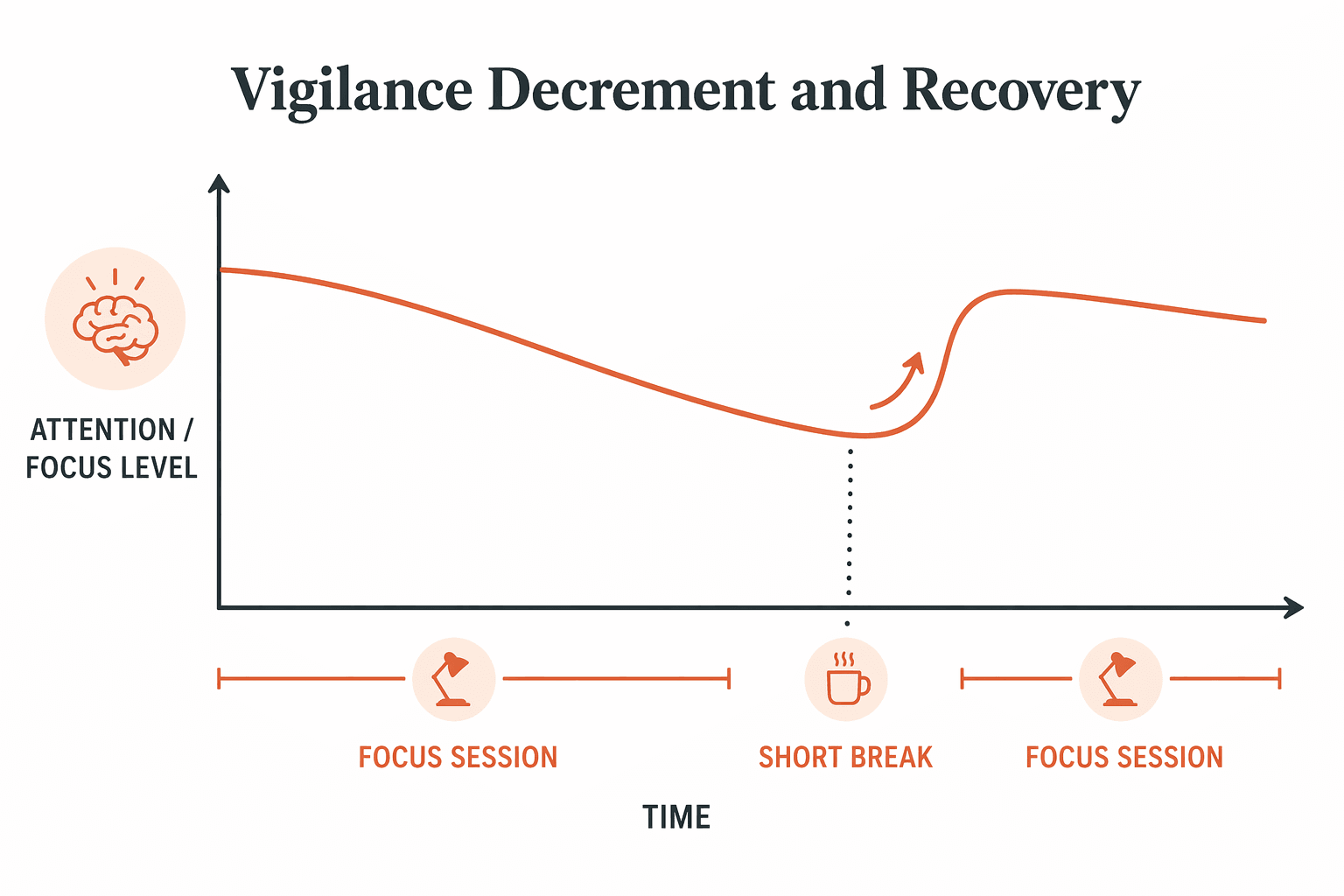
The cognitive mechanism behind these effects was identified even earlier. Ariga and Lleras (2011) demonstrated in Cognition that brief mental breaks prevent vigilance decrements — the natural decline in attention that occurs during prolonged tasks. Their experiments showed that even a short diversionary break allowed participants to sustain performance at near-original levels, while those who worked continuously experienced steady declines.
Real-world adoption data reinforces these lab findings. Clockify's 2026 Time Management Statistics report found that the Pomodoro technique helps 60% of participants handle their tasks 4 or 5 days a week. The same report notes that 82% of people don't have a dedicated time management system, and 47% of college students cite time management as the biggest challenge affecting their studies — suggesting that the problem a timer app solves is widespread and largely unaddressed.
Why Structured Time Beats Willpower Alone
The evidence is clear that structured intervals work. But why? Three psychological mechanisms explain why a simple timer outperforms raw willpower for most students.
- Parkinson's Law: Work expands to fill the time available. When a student sits down to "study for the afternoon," the task has no natural boundary. A 25-minute timer creates a hard constraint. The brain responds by allocating effort more efficiently because it knows the endpoint is near. Study timer apps leverage this principle directly — the visible countdown makes the time constraint concrete rather than abstract.
- The Urgency Principle: A ticking countdown creates productive pressure. This isn't anxiety — it's a focused state where distractions feel costly because they consume a limited resource. The same mechanism explains why students write faster the night before a deadline. A timer app recreates that urgency without the negative consequences of procrastination.
- External Structure Compensates for Limited Self-Regulation: Self-regulation is a finite resource that depletes over the course of a study session. By outsourcing the decision of when to work and when to rest to an external system, students preserve their limited willpower for the actual cognitive work of learning. The timer becomes a decision-making shortcut: when it's running, you work; when it stops, you rest. No internal negotiation required.
This is also where the connection to spaced repetition becomes relevant. Both techniques work because they replace internal decision-making with external structure. For a deeper look at how spaced repetition builds on similar cognitive principles, see our guide on the science behind Anki flashcards and peer-reviewed research on spaced repetition.
Key Features That Actually Matter in a Study Timer App
Not all timer features are created equal. Based on the research on focus, habit formation, and attention management, these are the features that genuinely improve outcomes — not just the ones that look good in screenshots.
- Customizable work/break intervals: The classic 25/5 split works for many, but not everyone. The Attention Deficit Disorder Association (ADDA) specifically recommends setting shorter work sessions initially to build momentum. An app that locks you into a single interval pattern ignores individual differences in attention span and task type.
- Break automation: The most common failure mode of timer-based studying isn't working too little — it's working through breaks. An app that automatically starts and stops break timers prevents the "just one more minute" trap that erodes the recovery benefit Ariga and Lleras identified.
- Analytics and progress tracking: Seeing how many focused sessions you completed in a week provides external reinforcement that builds the habit. Apps like Session offer post-session mood tracking and detailed analytics that help students identify their most productive times of day — a computer science student using Session was 40% more productive studying algorithms between 9-11am versus her usual late-night sessions.
- Distraction blocking: A timer alone can't stop you from picking up your phone. Apps with built-in distraction blocking — like Forest's Deep Focus Mode, which kills a growing tree if you leave the app — add a second layer of commitment that addresses the 0.5-point distractibility improvement gap identified in the Ogut review.
- Cross-platform availability: Consistency matters more than any single feature. An app that works on your phone, laptop, and tablet removes the friction of switching devices. If you can't track a session because you're on the wrong device, you break the habit chain.
App Recommendations Tied to the Evidence
The following apps are not ranked in a "best to worst" order. They are grouped by the specific evidence-backed feature they excel at. The right choice depends on which mechanism — gamification, analytics, distraction blocking, or ADHD-friendly design — matters most for your study habits.
| App | Core Strength | Evidence-Linked Feature | Pricing | Best For |
|---|---|---|---|---|
| Forest | Gamification & distraction blocking | Deep Focus Mode stops phone use; virtual tree dies if you leave the app. Over 2 million real trees planted via partnership with Trees for the Future. | Free on Android; $3.99 one-time on iOS | Students who need external motivation and phone-use reduction |
| Session | Analytics & habit tracking | Post-session mood tracking; detailed productivity analytics. Case study: 40% productivity improvement for a computer science student. | From $4.99/month | Students who want to identify peak productivity hours and track progress over time |
| Toggl Track | Professional time tracking | Pomodoro mode with unlimited projects on free tier; invoicing tools for freelance students. | Free tier available; paid plans from $9/month | Students who need detailed time allocation data across subjects |
| Study Bunny | Most generous free tier | Timers, to-do lists, and flashcards in one free app. No paywall for core timer functionality. | Free | Budget-constrained students who want multiple study tools in one app |
| Focusmate | Body doubling for accountability | Live video co-working sessions. Particularly effective for students with ADHD who struggle with task initiation. | $12/month | Students who need human accountability, especially those with ADHD |
| Llama Life | ADHD-friendly workflows | Combines to-do lists with time blocking; designed for short attention spans and task-switching needs. | Subscription-based | Students with ADHD who find standard Pomodoro intervals too rigid |
Forest deserves special mention for its scale: over 60 million people have used it since 2014, and it holds a 4.8 App Store rating. Many users with ADHD report that Forest "feels easier to stick with because the rewards are visible, the feedback is immediate, and progress builds over time." A biology major using Forest reduced phone interruptions by 80% after two weeks — a real-world demonstration of the distraction-blocking mechanism that the Ogut review identified as a key benefit of structured intervals.
Common Pitfalls and How to Avoid Them
Even with the best app and solid evidence, timer-based studying fails for many students. The problem is rarely the app — it's how the technique is applied. Here are the most common failure modes and how to fix them.
- Rigid adherence to 25-minute intervals: The classic Pomodoro length works for many, but not for everyone. ADDA recommends starting with shorter sessions — 10 or 15 minutes — and gradually increasing as focus builds. If you're spending the first 10 minutes of a 25-minute session just settling in, your interval is too long.
- Treating breaks as productivity time: Checking email, scrolling social media, or reviewing notes during a break defeats the purpose. The Ariga and Lleras research showed that breaks restore attention only when they are genuine diversions — not when they load the same cognitive systems you're trying to rest.
- Ignoring task-switching buffers: If you switch subjects every Pomodoro, you lose time to context switching. Group related tasks into blocks of 2-3 consecutive Pomodoros before switching. The timer should serve your workflow, not dictate it.
- Expecting the app alone to build discipline: No app can replace the habit of starting. The timer is a tool for structuring focus, not a substitute for the decision to sit down and work. If you find yourself opening the app but never starting the timer, the issue isn't the app — it's task initiation, which may require a different approach like body doubling or a shorter interval.
For a detailed breakdown of these mistakes and step-by-step fixes, read our guide on Pomodoro Done Right: 5 Critical Mistakes Students Make and How to Fix Them. It covers execution details that this article intentionally avoids — like how to handle interruptions, when to take longer breaks, and how to adapt the technique for group study sessions.
Conclusion: The App Matters Less Than the Habit
The evidence is clear: structured interval-based work improves focus, reduces fatigue, and increases study efficiency. The Ogut review, Biwer et al., and Ariga & Lleras all converge on the same conclusion — that the structure itself, not the specific tool, drives the benefit. The app you choose is secondary to the consistency with which you use it.
Here's the practical takeaway: pick one app from the table above. Use it for two weeks. Don't switch apps, don't optimize settings, don't read reviews of alternatives. Just build the habit of starting a timer when you sit down to study. After two weeks, evaluate whether the structure is helping — not whether the app has the perfect feature set.
The tomato timer that Francesco Cirillo grabbed in the 1980s wasn't magic. It was a constraint — a simple external structure that compensated for the limits of human attention. Four decades of research confirm that the principle works. The only remaining variable is whether you use it.
Comments
Join the discussion with an anonymous comment.