

Best Budget Smartphone for Students in 2026
Need a smartphone that balances cost, battery life, and software support for your college years? This guide covers the best budget phones for students in 2026, from $150 to $500, with honest trade-offs on updates and student-friendly features.
Updated:
A student phone has a harder job than a cheap backup phone. It has to make it through long class days, campus Wi-Fi dead zones, video calls, banking apps, two-factor codes, group chats, maps, photos, and the occasional drop on a dorm-room floor. For 2026, the best budget smartphone for students is the one that can stay charged, secure, and usable through school — not the one with the loudest processor or camera claim.
Prices move constantly around back-to-school sales, Prime Day, carrier promos, and Black Friday, so the ranges here reflect typical June–July 2026 street pricing rather than a permanent sticker price. The better question is not “Which phone is cheapest today?” It is “Which phone will still be safe and tolerable to use when finals, internships, and senior year arrive?”
| Budget | Best fit | Why it makes sense for students | Watch out for |
|---|---|---|---|
| Around $150–$200 | Samsung Galaxy A17 5G | Best overall value: about $200, six years of security updates, 5,000mAh battery, AMOLED display | Performance is budget-level, not gaming-phone fast |
| Under $200 | Moto G 2026 | Battery-first choice with more than 19 hours in Tom’s Guide testing | Shorter software support weakens the four-year value |
| $250–$300 | Samsung Galaxy A26 5G | Step-up durability with IP67 protection, 120Hz AMOLED, 5,000mAh battery, and six years of updates | Costs more than the A17 without changing the basic Android experience |
| Around $400 | Moto G Stylus 2025 | Built-in stylus, large OLED screen, 68W fast charging, 5,000mAh battery | Buy it for handwritten notes, not because it is the safest long-term update pick |
| $400–$500 | Google Pixel 9a or Pixel 10a | Best premium-budget Android choice: seven years of updates, strong camera, reliable battery | Near the top of the stated budget |
| Around $250 | TCL 50 Pro Nxtpaper | Worth considering for students who read heavily on their phone | The reading display is niche; most students should buy Samsung or Pixel first |
| $599 | iPhone 17e | Lowest-cost new iPhone option for students committed to iOS | It exceeds a strict $500 budget |
The Best Overall Value: Samsung Galaxy A17 5G
If I were answering the family group chat version of this question — “Is this phone good enough for college?” — the Samsung Galaxy A17 5G is the first phone I would check. At about $200, it brings the combination that matters most for a student budget: six years of security updates, a 5,000mAh battery, an AMOLED display, and a 50MP main camera. Wirecutter named it the best budget Android phone of 2026, and PCMag’s review also supports its position as a practical low-cost choice.[1][2]
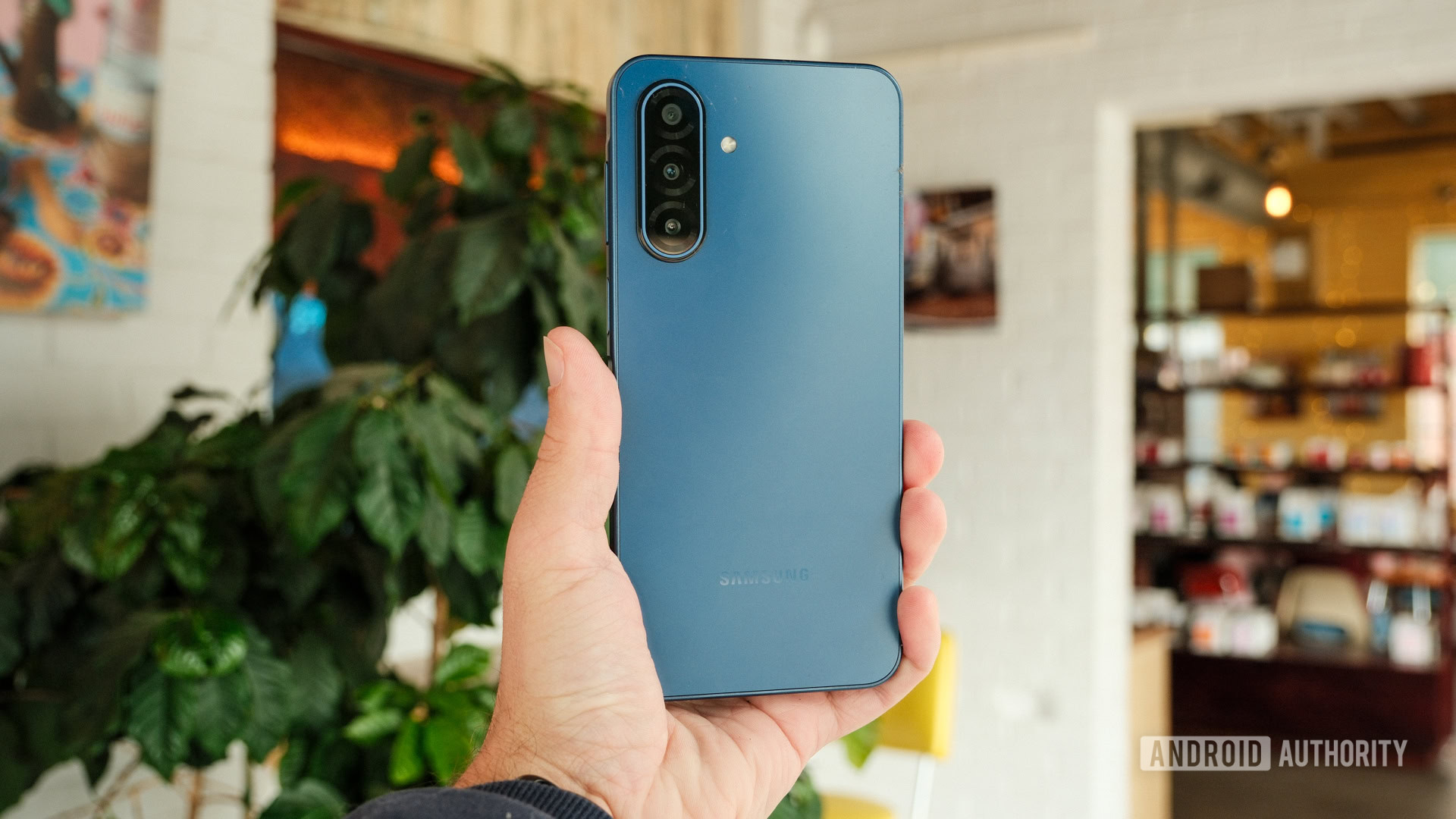
The six-year security window is the part that changes the math. A roughly $200 phone with support into about 2031 works out to about $33 per year of secure use if the student keeps it through the support period.[1] That does not mean the phone will feel brand-new in year six. It does mean the student is less likely to face the frustrating middle-of-degree problem: the phone still turns on, but the software support has quietly run out.
That matters for real student life. Banking apps, password managers, school email, authentication apps, ride-share accounts, and cloud notes all live on the phone. Once security updates stop, the bargain starts looking less like a bargain. I would rather see a student carry a slightly less exciting phone with a long support runway than a flashier cheap phone that becomes a replacement conversation in sophomore or junior year.
The A17 5G is not the phone to buy for heavy mobile gaming or the fastest possible camera processing. It is the phone to buy when the budget is tight, the household wants one clean purchase, and the student needs a dependable Android phone for classes, commuting, messaging, photos, and basic productivity.
Where The $200 Decision Gets Tricky
The hardest shopping zone is the one most families actually live in: under $200 to about $300. This is where a phone can look like a bargain on day one and become expensive later. The Samsung Galaxy A17 5G, Moto G 2026, and Samsung Galaxy A26 5G are the three phones that best show the trade-off.
| Phone | Approx. price | Student strength | Main compromise |
|---|---|---|---|
| Samsung Galaxy A17 5G | About $200 | Six years of security updates, 5,000mAh battery, AMOLED display | Not the strongest performance pick |
| Moto G 2026 | Under $200 | Exceptional tested battery life, with more than 19 hours in Tom’s Guide testing | Most Motorola budget phones offer only 2–3 years of software updates |
| Samsung Galaxy A26 5G | About $250–$300 | IP67 dust/water resistance, 120Hz AMOLED display, 5,000mAh battery, six years of updates | The extra cost is mainly for durability and display polish |
The Moto G 2026 deserves attention because battery life is not a small thing on campus. Tom’s Guide recorded more than 19 hours in its battery testing, the longest result among its budget-phone picks.[3] For a student who leaves at 8 a.m., works a part-time shift, takes transit, and forgets a charger, that kind of endurance is not a luxury feature.
The catch is software support. Most Motorola budget phones offer only about two to three years of updates, which can make a low initial price less appealing for a student trying to cover a full degree.[4] If the phone costs around the same as the A17 5G but receives a much shorter support window, the yearly cost of safe use can be worse even when the battery test looks better.
That does not make the Moto G 2026 a bad choice. It makes it a specific choice. Pick it when daily battery life is the real problem: long commute, long clinical shifts, outdoor work, weak access to outlets, or a student who reliably drains every phone by dinner. If the student mostly has access to a charger and needs a phone to last several school years, the A17 5G is the cleaner buy.
The Galaxy A26 5G is the sensible step-up when the budget can stretch to about $250–$300. Its IP67 dust and water resistance matters more than it sounds. Campus phones get rained on, dropped near sinks, carried to gyms, and shoved into overpacked bags. The A26 5G also keeps the long Samsung support story, with six years of updates, plus a 120Hz AMOLED display and 5,000mAh battery.[5]
So the short version is simple: choose the Galaxy A17 5G if $200 is the ceiling, the Moto G 2026 if battery life beats everything else, and the Galaxy A26 5G if an extra $50–$100 buys peace of mind against water, dust, and daily campus abuse.
Battery Tests Help, But Do Not Treat Them Like Final Grades
Battery life is one of the few specs students feel immediately. A phone that dies before evening changes behavior: the student turns off location, skips photos, avoids calls, or hunts for a wall outlet instead of heading to the next class.
Still, battery numbers from different reviewers are not perfectly interchangeable. A web-surfing test, a PCMark-style workload, video playback, and mixed real-world use can produce different rankings. The useful reading is not “Phone A is permanently the battery champion by one exact number.” The useful reading is that the Moto G 2026 sits in the exceptional battery category, while the Samsung A17 5G and A26 5G use large 5,000mAh batteries that should be enough for ordinary full-day student use.[1][3][5]
Fast charging can matter as much as total endurance. A student who can plug in for 20 minutes between classes may care less about winning a lab test and more about how quickly the phone recovers. That is one reason the Moto G Stylus 2025 earns a real place in this guide: its 68W charging can refill its 5,000mAh battery in under an hour.[6]
If You Can Spend Near $500, Buy The Pixel
At the top of the student budget, the Google Pixel 9a — and the same Pixel A-series buying slot if the Pixel 10a is available near this price — is the least complicated recommendation. Around $499, the Pixel 9a offers seven years of OS and security updates, Google’s Tensor G4 chip, a 5,100mAh battery, and camera quality that remains a major advantage at this price.[7][1][8]
The seven-year update promise is the reason to stretch. A student starting college in 2026 could reasonably expect the phone’s official support window to outlast a four-year degree. That is a different kind of value from getting one more camera lens or a slightly brighter spec sheet.
The Pixel is also the better answer for students who rely on their phone camera for more than casual snapshots: club events, lab documentation, social posts, family video calls, travel, resale listings, or content creation for a campus job. Budget phones have become good enough for daylight photos, but the Pixel A-series is still the safer bet when the student wants fewer bad shots without learning manual settings.
The only problem is the price. A $499 phone is not “cheap” in a household that came in hoping to spend $200. If the extra money means cutting into books, transportation, or an emergency fund, buy the Galaxy A17 5G instead. But if the question is “What Android phone can we buy once and stop worrying about?” the Pixel is the best premium-budget answer.
The Stylus Pick Is Not For Everyone, Which Is The Point
The Moto G Stylus 2025 is easy to overrecommend and easy to dismiss. Both reactions miss the point. It is the only sub-$400 phone in this group with a built-in stylus, and for the right student, that changes how the phone gets used.[6][8][9]
A stylus is not automatically a study tool. Plenty of students will use it twice, lose interest, and go back to typing. But for a student who works through chemistry mechanisms, math steps, language characters, music notes, quick diagrams, or margin-style annotations, a built-in stylus can remove friction. The student does not have to pull out a tablet, find a pencil, or balance a notebook while standing in a hallway.
The rest of the package is also student-friendly: a 6.7-inch OLED display, 5,000mAh battery, and 68W fast charging that can refill the phone in under an hour.[6] That last part is useful for students who live by short charging windows. The caution is the same one that follows Motorola’s budget phones generally: if long software support is the top priority, Samsung and Google are stronger bets.
The Reading Phone Has A Narrow But Real Audience
The TCL 50 Pro Nxtpaper is not the default student phone I would hand to most people. It is the phone I would mention after hearing one specific sentence: “I read on my phone for hours.” Its paper-like Nxtpaper display and E-Ink-style mode are designed to make long reading sessions easier on the eyes, and reviewers have treated that display as its defining feature.[8][9]
That can matter for commuters, literature students, language learners, and anyone who reads PDFs, articles, or ebooks on a phone because a laptop is not always available. It is not a universal advantage. If the student mostly uses a phone for messaging, photos, maps, and short videos, the Nxtpaper feature probably should not outweigh Samsung’s update support or Pixel’s camera and software package.
For iPhone Students, The 17e Is The Budget Floor
Some students need an iPhone because their family uses iMessage and FaceTime, their accessories are already Apple, or they simply prefer iOS. The iPhone 17e is the lowest-cost new iPhone option covered here, with an A19 chip, 256GB of base storage, MagSafe, and an expected 5+ years of iOS support.[4][3]
The problem is that $599 is outside a strict $150–$500 budget.[4] It belongs here because it is the relevant “new iPhone floor,” not because it is a cheap phone. If iOS matters more than staying under $500, it is the cleanest new-device path. If the budget limit is firm, a refurbished iPhone becomes the more realistic Apple route.
Refurbished Flagships Can Be Smart, But Check The Clock
A refurbished Galaxy S23 or iPhone 14 can outperform many new budget phones at the same price. Better cameras, faster chips, nicer materials, and stronger speakers can make a refurbished flagship feel like the obvious cheat code.
The catch is remaining support life. A refurbished flagship has already used part of its update window. That may still be fine for a student who upgrades often, gets a strong warranty, or finds a high-quality refurb from a trusted seller. It is less ideal for a family trying to buy one phone for the whole degree. Before choosing refurbished, check the model’s remaining OS and security support, battery health, return policy, and whether it is unlocked for the student’s carrier.
Do Not Skip Carrier Compatibility
A phone that looks perfect online can become a mess if it does not support the student’s carrier well. This matters especially for US buyers looking at enthusiast-friendly budget phones such as the CMF Phone 2 Pro or Nothing Phone 3a Pro. Their US carrier band support is limited: they are generally better fits for T-Mobile or AT&T and poor choices for Verizon users.[4]
This is not a small technical footnote. A student with weak dorm reception or unreliable data while commuting will not care that the phone was a great deal. Before buying any unlocked phone, check the exact model number against the carrier, not just the brand name. If the student is on a family plan, confirm compatibility with that carrier before clicking checkout.
A Practical Shortlist
- Buy the Samsung Galaxy A17 5G if you want the best overall student value around $200.
- Buy the Moto G 2026 if the student’s day genuinely depends on the longest possible battery life under $200.
- Buy the Samsung Galaxy A26 5G if you can spend closer to $300 for better durability and the same long-support logic.
- Buy the Google Pixel 9a or current Pixel A-series equivalent if you can spend near $500 and want the strongest update-and-camera package.
- Buy the Moto G Stylus 2025 if handwritten notes are part of how the student actually studies.
- Consider the TCL 50 Pro Nxtpaper only if long reading sessions on a phone are a central use case.
The final rule is the one I would use with my own money: buy the longest-supported phone you can afford, unless the student’s day genuinely depends on exceptional battery life, a stylus, iOS, or a reading-focused display.
References
- The Best Budget Android Phone of 2026 — Wirecutter / The New York Times
- Samsung Galaxy A17 5G review — PCMag
- Best cheap phones 2026 tested — Tom’s Guide
- Best budget phones 2026 — Android Central
- Samsung Galaxy A26 5G coverage — Tech Advisor
- Moto G Stylus 2025 review — PCMag
- Google Pixel 9a update promise coverage — Android Central
- Best budget phones buying guide — Tech Advisor
- Budget phone coverage — CNET
Comments
Join the discussion with an anonymous comment.