
How to Build a Weekly Study Schedule That Actually Sticks (Evidence-Based Guide)
Most study schedule templates fail within a week. This evidence-based guide walks you through the foundational steps — auditing your real week, mapping subjects to energy windows, and building in buffer time — so your schedule works with your brain, not against it. Includes a free downloadable template.
Why Most Study Schedules Fail (The Sunday Illusion)
You know the pattern. Sunday evening rolls around, and you sit down with a fresh notebook or a blank digital template. You map out the entire week in neat time blocks: Monday morning calculus review, Tuesday afternoon essay drafting, Wednesday evening lab report. It looks perfect. By Wednesday morning, the plan is dead. A class ran late, a friend needed help, the essay took twice as long as expected, and the calculus block got swallowed by everything else.
This is the Sunday Illusion — the belief that a well-designed template is enough to make a schedule stick. But the template isn't the problem. The problem is that most students skip the strategic groundwork: auditing their real week, matching subjects to energy patterns, and building in buffer time for the inevitable spillovers. Without that foundation, even the most beautiful planner is just a wish list.
Research from the Cornell Learning Strategies Center and AcademyNC offers concrete guidelines that can transform a failing schedule into a sustainable system. The steps below walk you through exactly how to build one that survives contact with reality.
Step 1: Audit Your Real Week (Before You Add Anything)
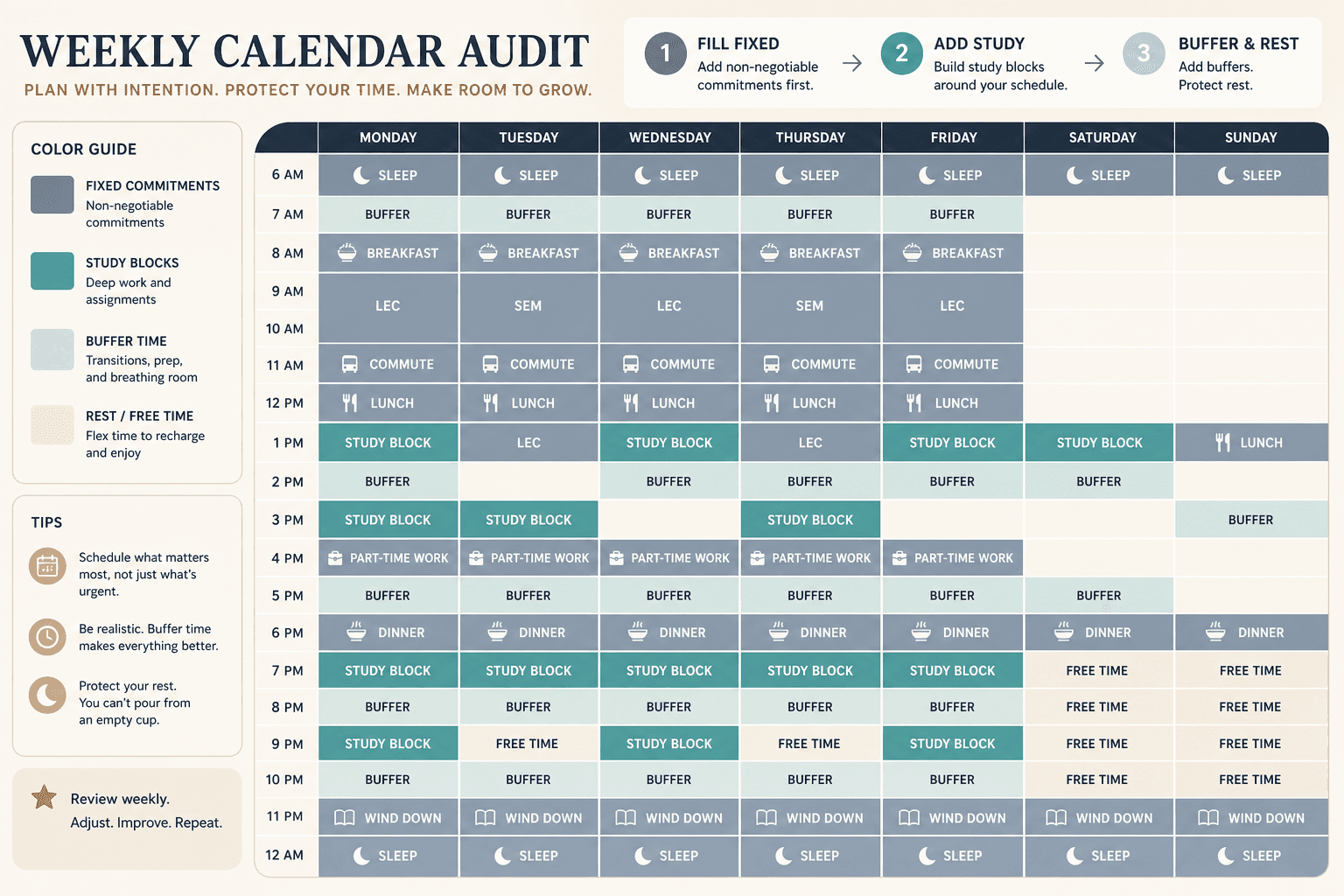
Most students build a schedule around what they think their week looks like, not what it actually is. That disconnect is the top reason schedules crumble. Before you write down a single study block, spend one full week tracking every fixed commitment: classes, meals, commuting, work shifts, sleep, exercise, and even downtime.
AcademyNC reports that students who audit their actual time use for two weeks and then rebuild their schedule around the real data maintain that schedule three times longer than those who guess. That is not a subtle edge — it is a 3× improvement from one week of honest tracking.
| Commitment | What to record |
|---|---|
| Classes + labs | Start and end time, day of week |
| Commute | Door‑to‑door minutes each way |
| Meals | Breakfast, lunch, dinner, snacks – 30 min each typically |
| Paid work | Shifts including travel time |
| Sleep | Bedtime and wake time (7–9 hours ideal) |
| Exercise / clubs | Scheduled activities |
| Downtime | Any recurring social or personal time |
Once the audit is done, transfer those fixed commitments into your template before adding a single study slot. This prevents the classic mistake of scheduling study time on top of a part-time shift or a commute that always runs long.
Step 2: Map Subjects to Your Energy Windows (Chronotype Method)
Not all hours are created equal. Your mental sharpness follows a natural rhythm — often a bimodal curve that peaks in the late morning and again in the early evening, with a dip after lunch. The Cornell LSC notes that concentration decreases rapidly after about 90 minutes, so it is more efficient to switch subjects every 60 to 90 minutes rather than grinding one topic for hours.
The chronotype method means you deliberately align your toughest subjects with your peak energy windows and save lighter tasks (reading, vocabulary review, organization) for lower-energy slots.
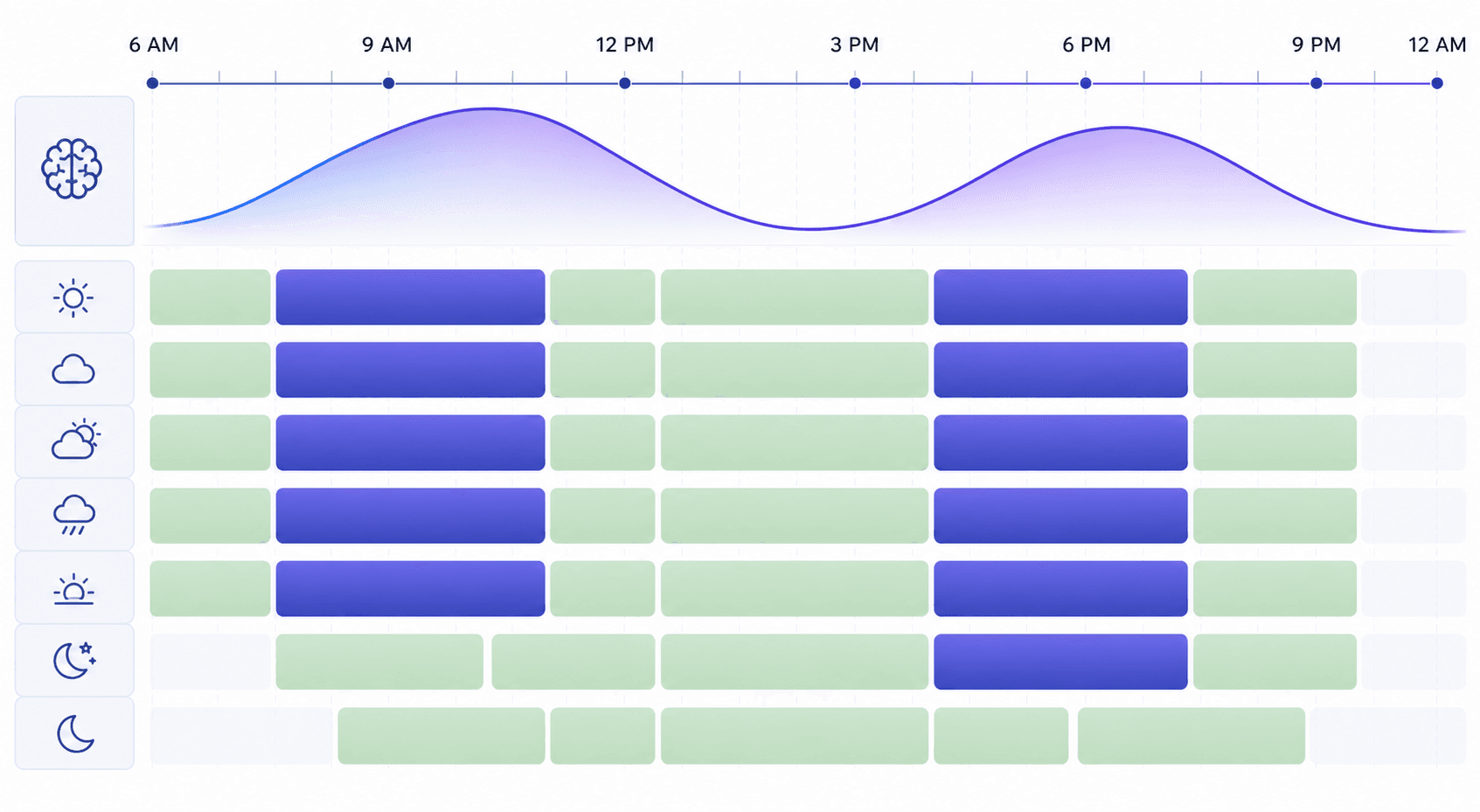
- High‑energy windows (morning peak, early evening peak): Block in math, physics, organic chemistry, coding, or any subject that requires deep analytical thinking.
- Medium‑energy windows (mid‑morning, late afternoon): Save lecture review, note reorganization, problem sets you already understand.
- Low‑energy windows (post‑lunch slump, late evening): Reserve for passive review, flashcards, light reading, or organizing your workspace.
If you are unsure of your personal rhythm, spend a few days noting when you feel most alert and when you drag. Use that data to assign subjects to slots. The goal is to reduce the friction of trying to do hard work when your brain is not wired for it.
Step 3: Apply the 2:1 Study-to-Class-Time Ratio
How many study hours do you actually need? The widely accepted guideline — cited by both AcademyNC and Cornell LSC — is two hours of study per credit hour per week. For a typical 15‑credit semester, that works out to about 30 hours of dedicated study time outside of class. Spread across six days, that is roughly five hours per day.
Here is the catch: most students underestimate how long tasks actually take. Cornell LSC recommends doubling your time estimates — if you think a reading assignment will take one hour, plan for two. AcademyNC echoes this for exam preparation: if you think you need four hours to review for a final, plan eight.
| Total Credits | Minimum Study Hours/Week | Approx. Per Day (6 days) |
|---|---|---|
| 12 | 24 | 4 |
| 15 | 30 | 5 |
| 18 | 36 | 6 |
Once you have your target hours, distribute them across the available slots from your audit. But do not just write “study” — specificity is the next key.
Step 4: Fill In the Template with Specific Subjects (Not Just ‘Study’)
A block labeled “study” is a decision waiting to happen. Every time you sit down at that block, you have to decide what to work on — and decision fatigue is exactly what derails productivity. Instead, assign a concrete subject or task to each block: “Organic chemistry chapter 5 problem set,” not “study chemistry.”
When you fill in your template, follow your energy map from Step 2. For example:
- Monday 9–10:30 AM (morning peak) → Calculus problem set — your hardest analytical task goes here.
- Monday 11–12 PM → History lecture notes review — medium effort, medium energy.
- Monday 2–3 PM (post‑lunch dip) → Spanish vocabulary flashcards — light, low‑energy task.
A detailed companion walkthrough of the template structure — including goal sections, priority lists, and daily review rows — is available in our Weekly Study Planner Template guide. That article covers the five essential sections every planner needs; here we focus on how to populate it in a way that respects your energy and reality.
Step 5: Add Buffer Blocks and Rest Days
This is the step that separates schedules that last from schedules that collapse. Life is unpredictable: a class runs over, you get stuck on a problem, a friend needs a ride. If every hour of your week is filled with a non‑negotiable task, one disruption knocks everything down.
Buffer blocks are empty or flexible periods that you leave intentionally unscheduled — or label “overflow / catch‑up.” AcademyNC warns that the most common mistake students make is including no buffer time at all. Their rule of thumb: if you think a task will take four hours, schedule eight — especially for high‑stakes finals.
- Add at least one buffer block per day (30–60 minutes) to absorb overruns.
- Reserve one full day or half‑day each week as a rest day — no study, no catch‑up. Brainscape's templates include exam countdown planners that preserve rest days.
- If you end up not using a buffer block, treat it as a win — you get free time.
Rest days are not optional luxuries. Your brain consolidates learning during downtime. A schedule that runs seven days straight will burn you out by week three.
Step 6: Review and Adjust Every Week
Your schedule is not a contract — it is a hypothesis. The first week or two are a trial run. At the end of each week, spend 15 minutes reviewing what worked and what did not. Ask yourself:
- Did I actually complete the tasks I scheduled in my peak energy windows?
- Which subjects took longer than I expected? (That tells you to allocate more time next week.)
- Did I use my buffer blocks? If not, maybe I can shrink them. If I used all of them, I need more buffer.
- Did I consistently skip a particular time slot? That slot may be misaligned with your energy.
Use the insights to adjust the following week's blocks. Over time, the schedule becomes increasingly accurate to your actual rhythm. Cornell LSC also points out that reviewing material within one hour of lecture is as effective as several hours of study days later — so if your schedule does not include a post‑lecture review slot, that is a high‑priority addition.
For a deeper look at the study techniques that fill those blocks — especially active recall and spaced repetition — see our guide on how active recall works and how to use it. Scheduling is only half the equation; what you do in those scheduled hours matters just as much.
Get Your Free Weekly Study Schedule Template
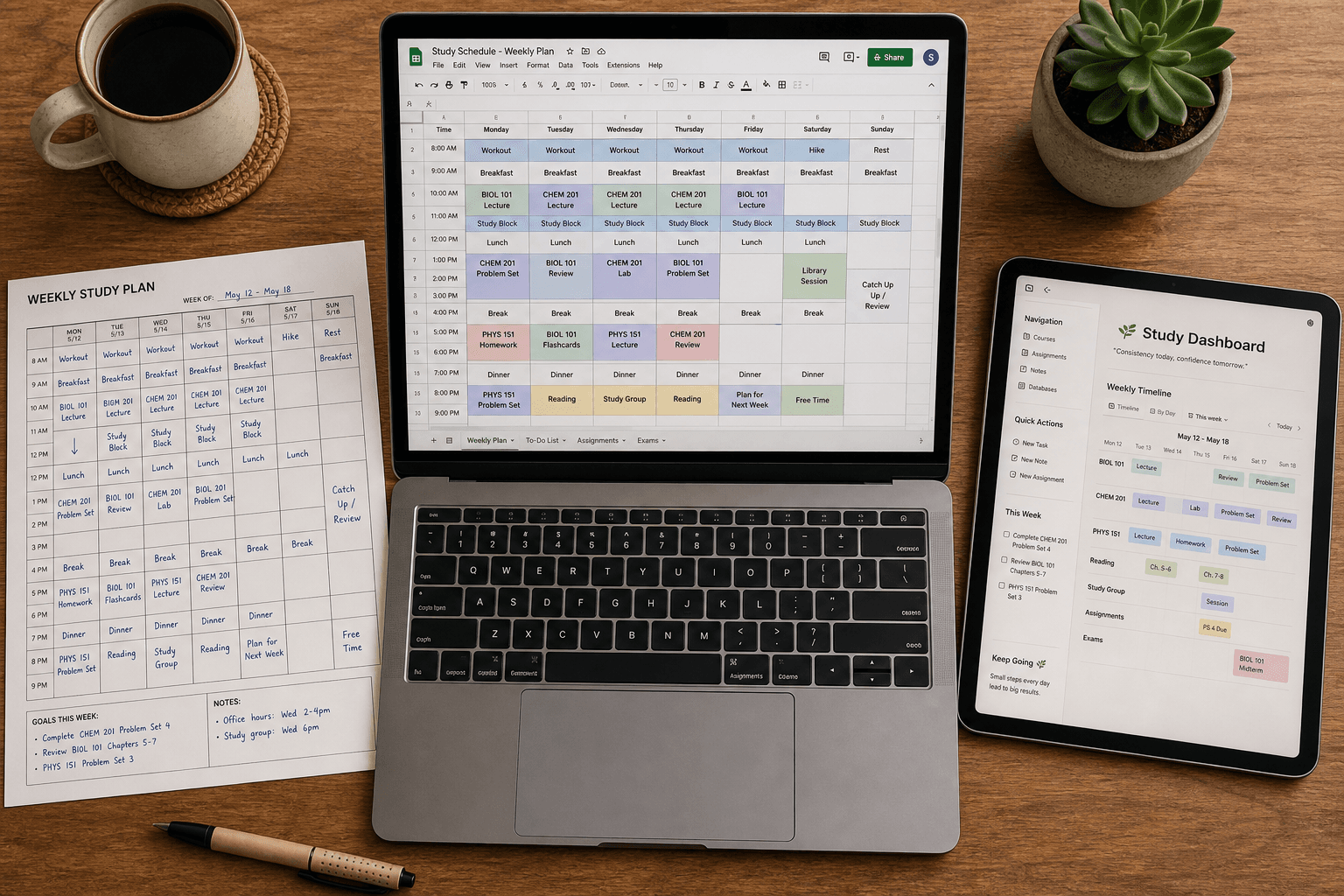
Now that you know the methodology, you need a container to put it into practice. Our downloadable template is available in two formats: a Google Sheets version (fully customizable, with 15‑minute increments and color‑coded time blocks) and a printable PDF for those who prefer pen and paper.
The template includes the structure we have discussed: blocks for fixed commitments, energy‑mapped study slots, buffer periods, and a rest day. To make it your own, adjust the start time and increment size to fit your schedule. Brainscape offers similar customizable Google Sheets planners with 2‑week, 3‑week, 1‑month, and 3‑month exam countdown versions — you can find more about those in our Brainscape Flashcard App Review.
Remember: the template is just the container. The methodology — auditing your week, mapping subjects to energy, applying the 2:1 ratio, adding buffer, and reviewing weekly — is what makes the schedule stick. Download the file, run your audit, and start building a schedule that works with your brain, not against it.
Apply This Method
Related Methods
- Weekly Study Planner Template for Students: 5 Must-Have Sections, Format Options, and How to Make It Stick
Most students abandon study planners within three weeks — not from lack of discipline, but because their template is missing key structural sections. This guide walks high school and college students through the five sections every effective weekly study planner needs, how to choose the right format for their situation, and a simple Sunday reset routine that turns a template into a lasting habit.
- Cornell Notes Template: Free Printable and Digital Formats for Students
A complete guide to the Cornell note-taking system for middle school, high school, and college students — explains what every section of the template is for, how to use the 5-Rs study loop, and where to download free templates in PDF, Google Docs, Microsoft Word, and Notion.
Comments
Join the discussion with an anonymous comment.