
Comparison
Switching from Quizlet to Knowt: A Step-by-Step Migration Guide and Honest Trade-Off Assessment
A practical guide for students who have built up flashcard sets on Quizlet and are considering moving to Knowt for its free features. Covers the one-click import process, what carries over and what gets lost, what you gain and lose by switching, and a verdict on when migration makes sense.
Verdict panel
- Compared
- not specified
- Target exam
- not specified
- Best for
- not specified
- Pricing last reviewed
- pricing currency unconfirmed
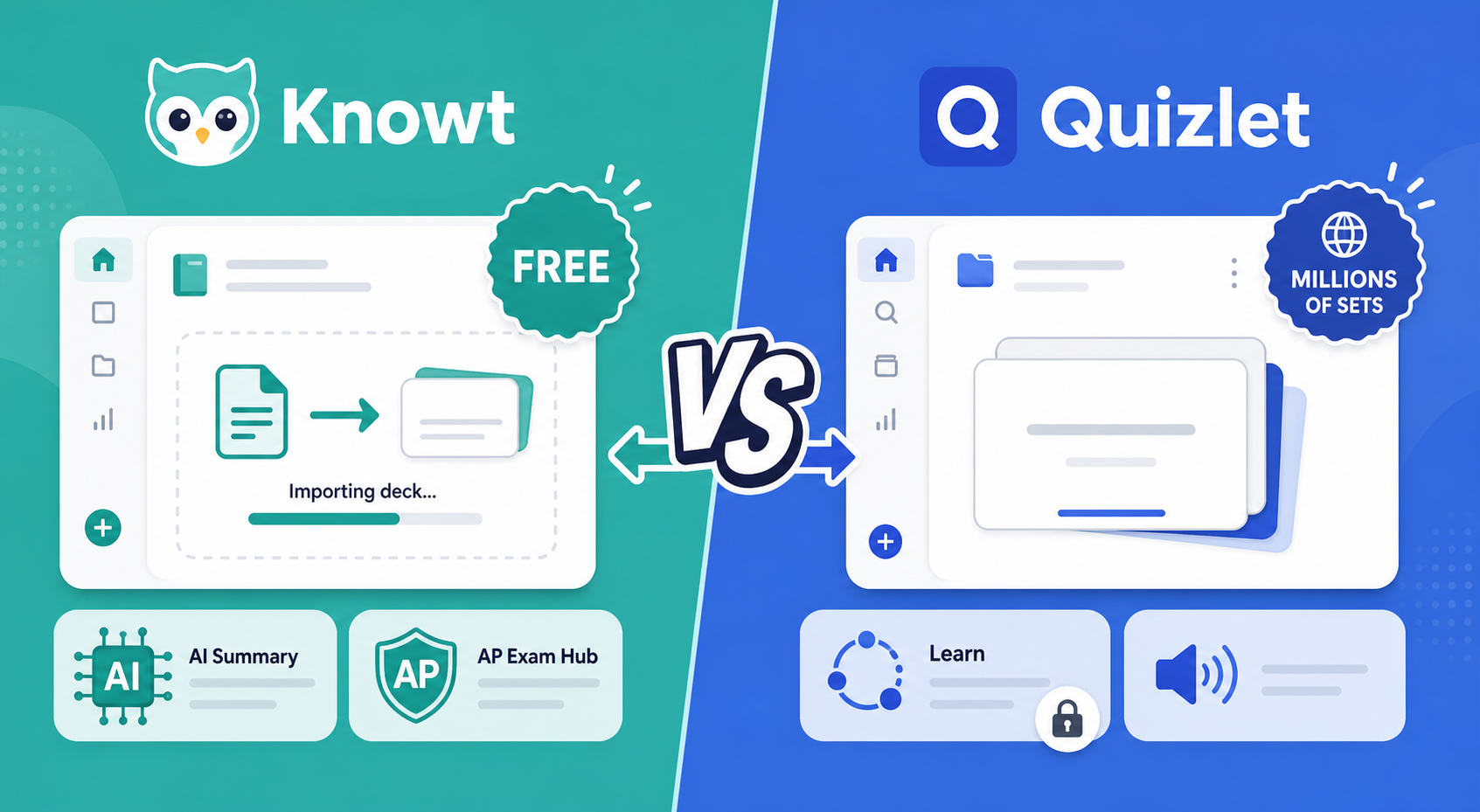
Why Students Are Leaving Quizlet: The Free-Tier Erosion Story
If you have been using Quizlet for a while, you have probably noticed the free tier shrinking. The company has gradually moved features that were once free — like unlimited Learn mode rounds, diagramming, and AI-powered tools — behind a paywall. Today, Quizlet's free plan still lets you flip through flashcard sets, but the moment you want to test yourself with Learn mode, you hit a cap. According to current pricing data, Quizlet Plus costs $35.99 per year, and the Plus Unlimited tier runs $44.99 per year. For students on a tight budget, that annual fee adds up, especially when you are already paying for textbooks, exam registration, and other school supplies.
This erosion of the free experience has sent a lot of students looking for alternatives. Knowt has emerged as the most popular destination, and for good reason: it offers a genuinely free tier that includes unlimited flashcards, multiple study modes, and even AI-powered features. But the biggest barrier to switching has always been the fear of losing the flashcard sets you have already built. Hundreds of terms, carefully formatted with images and audio — the thought of manually re-creating all of that is enough to make anyone stick with a platform they have outgrown.
Step-by-Step Guide: Importing Your Quizlet Sets into Knowt
Knowt's import tool is the single biggest reason switching is painless. You do not need to export anything from Quizlet, download a file, or re-type a single term. The process takes about 30 seconds per set.
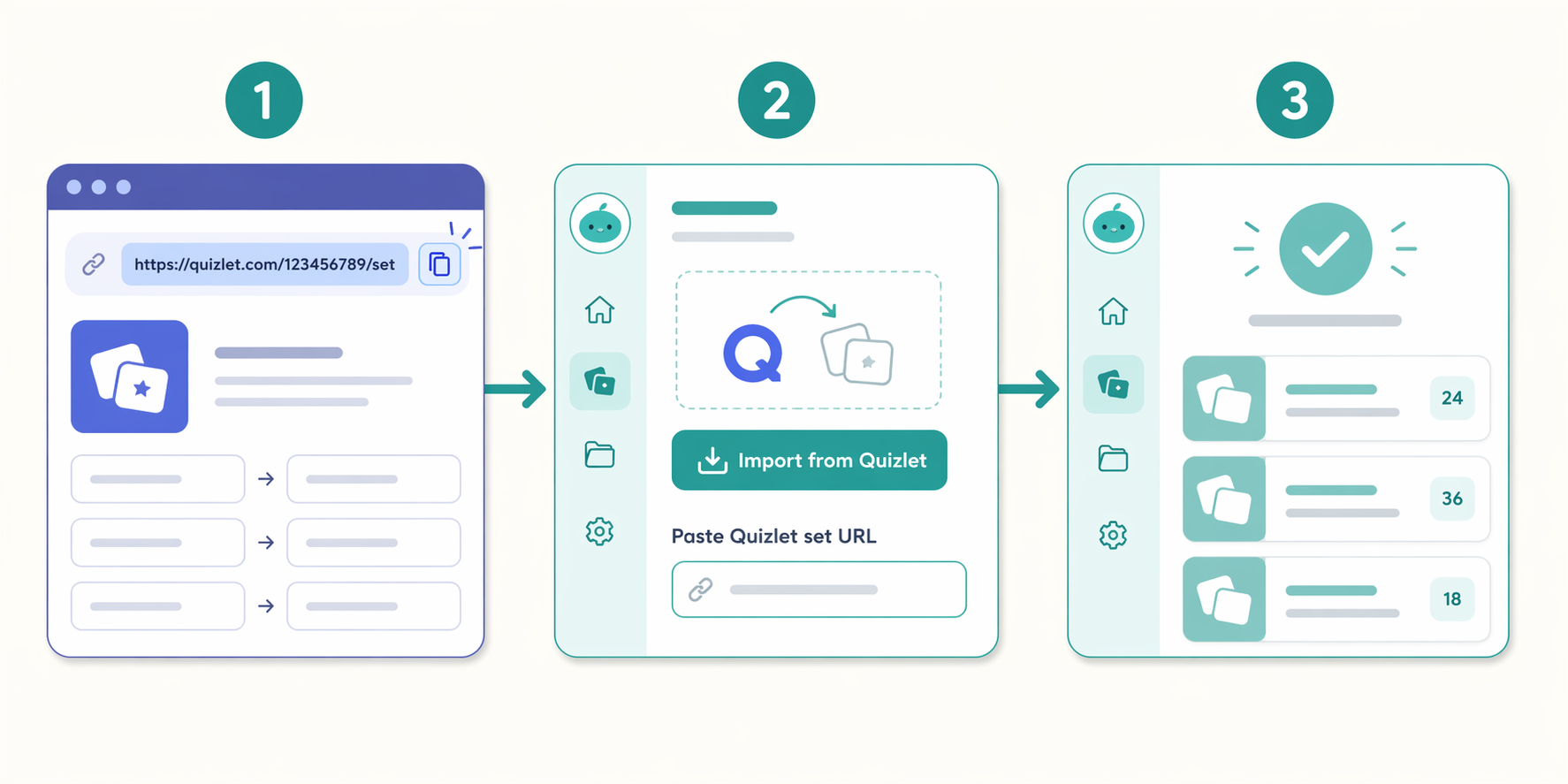
Method 1: Import by URL (Recommended)
- Log into your Knowt account (it is free to create one).
- Open the Quizlet set you want to import in your browser. The set must be set to public or unlisted — private sets cannot be imported.
- Copy the full URL from your browser's address bar.
- Go to Knowt and click the "Import from Quizlet" button (usually found on the dashboard or the create-set page).
- Paste the URL and click "Import." Knowt will pull in the terms, definitions, and basic formatting within a few seconds.
- Repeat for each set you want to move. There is no limit on how many sets you can import.
Method 2: Chrome Extension (For Bulk or Video Imports)
Knowt also offers a Chrome extension that adds an "Import to Knowt" button directly on Quizlet set pages. Instead of copying and pasting URLs, you just click the button while viewing a set. The extension also lets you generate flashcards from YouTube videos and web pages, which is useful if you want to create new study material from your class lectures or online resources.
What Carries Over vs. What Gets Lost During Import
The import tool is good, but it is not perfect. Knowing exactly what transfers and what does not will save you from unpleasant surprises after you have already deleted your Quizlet account.
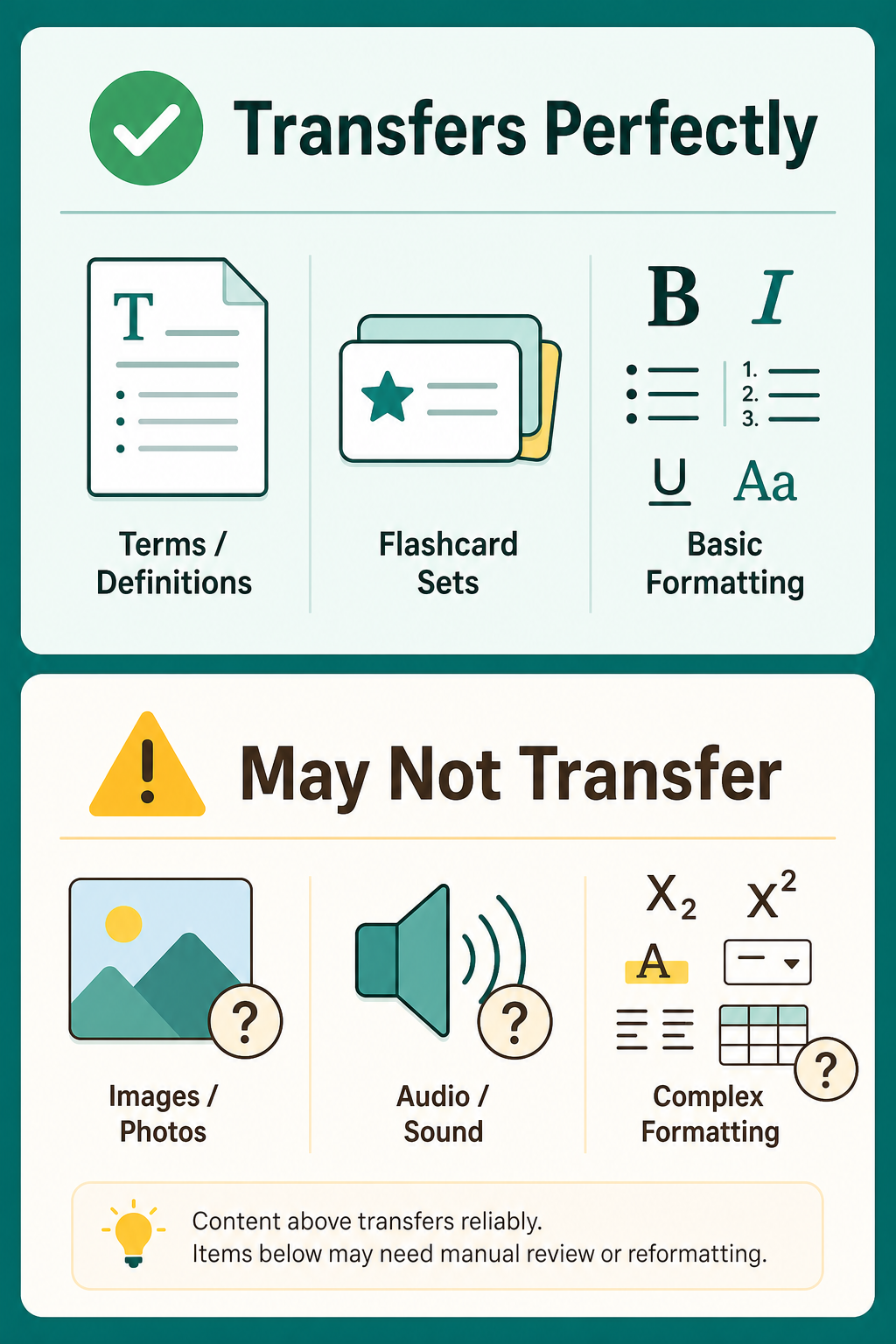
| Element | Transfers? | Notes |
|---|---|---|
| Terms and definitions | Yes | Plain text transfers perfectly, including bold and italic formatting. |
| Basic formatting (bold, italic) | Yes | Most inline formatting is preserved. |
| Images in definitions | Partial | Images may not carry over perfectly. Some users report success, others find broken links. Test a sample set first. |
| Audio recordings | No | Custom audio recordings and text-to-speech audio from Quizlet do not transfer. |
| Diagrams | No | Quizlet Diagram sets are not supported by the import tool. |
| Folders and classes | No | Sets import as individual decks. You will need to re-organize them into folders on Knowt. |
| Set descriptions and metadata | Partial | The set title and basic metadata usually transfer, but detailed descriptions may not. |
First-Day Checklist: What to Do After Migrating
Once your sets are imported, you might feel a bit lost. Knowt's interface is different from Quizlet's, and you will want to get organized before you start studying. Here is a practical checklist for your first day on Knowt.
- Verify your imported sets. Open each one and spot-check a few cards to make sure the terms and definitions came through correctly. Fix any formatting issues or missing content.
- Organize sets into folders. Knowt lets you create folders to group related sets (e.g., "Biology 101," "GRE Vocabulary"). This is the equivalent of Quizlet's class and folder system.
- Explore the free study modes. Knowt's free tier includes Learn mode, Matching, Practice Tests, Spaced Repetition, and Knowt Play. Try each one to see which fits your study style.
- Test the AI features. If you have a PDF of a textbook chapter or a lecture video link, try Knowt's AI summarizer. It can generate flashcards and practice questions from your materials in about a minute.
- Set up your spaced repetition schedule. Knowt's spaced repetition algorithm is available on the free plan. Configure your daily review limit and start working through your imported sets.
- Download the mobile app. Knowt has iOS and Android apps. Log in and make sure your imported sets sync correctly.
What You Gain by Switching to Knowt
Switching to Knowt unlocks several capabilities that are either limited or completely absent on Quizlet's free tier. Here is what you gain by making the move.
- Unlimited flashcards and study modes. Knowt's free plan includes unlimited flashcard creation and unlimited access to Learn mode, Matching, Practice Tests, and Spaced Repetition. On Quizlet, Learn mode is capped at 20 rounds per month on the free plan.
- AI-powered study tools. Knowt's free tier includes basic AI features with monthly limits. You can paste a YouTube link or upload a PDF, and Knowt will generate a summary, flashcards, and a practice test. In one test, the AI generated 18 flashcards and a 10-question test from a 22-page PDF in about one minute.
- AP Exam Hub. Knowt has a dedicated hub for AP students with pre-made study guides and practice questions for AP exams. This is a unique feature that Quizlet does not offer.
- Chrome extension for web and video content. The extension lets you generate flashcards from any web page or YouTube video, turning passive browsing into active study material.
- No ads on the free plan. Knowt's free tier is ad-free, which makes for a cleaner study experience compared to Quizlet's ad-supported free version.
For a deeper look at everything Knowt offers, check out our full Knowt Flashcard App Review, which covers the feature set, pricing tiers, and ideal use cases in detail.
What You Lose by Switching to Knowt
An honest migration guide also covers the downsides. Knowt is not a perfect replacement for every student, and there are real trade-offs you should know before you commit.
- Smaller public library. Quizlet has been around longer and has a massive library of user-created sets. Knowt's public library is growing but is still smaller. If you rely on finding pre-made sets for your classes, you may find fewer options on Knowt.
- Less polished mobile experience. While Knowt has mobile apps, many users report that the mobile interface is not as smooth or feature-complete as Quizlet's. If you do most of your studying on a phone, this is worth testing before you fully switch.
- No offline access on the free plan. Knowt's free tier requires an internet connection to study. Quizlet's free tier also requires online access, but some students find this limiting when studying on a commute or in areas with poor connectivity.
- Loss of audio features. If you use Quizlet's text-to-speech audio for language learning or pronunciation practice, you will lose that capability when you move to Knowt. Audio recordings and the built-in reader do not transfer.
- No diagram support. Quizlet's Diagram feature is unique and useful for subjects like anatomy, geography, and labeling exercises. Knowt does not have an equivalent feature.
For a detailed look at what Quizlet's paid AI features offer — and whether they are worth the subscription cost — see our Quizlet AI Features Review 2026.
Can You Use Both? A Hybrid Workflow Option
You do not have to choose one platform and abandon the other. A hybrid workflow lets you take advantage of each tool's strengths without committing to a full migration.
- Use Quizlet for discovery. Keep your Quizlet account active for browsing the public library and finding pre-made sets for your classes. The discovery advantage is real, and there is no reason to give it up.
- Use Knowt for creation and study. Create your own flashcards on Knowt, where you get unlimited study modes and AI features for free. Import any Quizlet sets you find useful into Knowt for studying.
- Use Quizlet for audio-dependent subjects. If you are studying a language and rely on Quizlet's audio features, keep using Quizlet for those specific sets. Study your other subjects on Knowt.
- Keep Quizlet for diagram-based subjects. For anatomy, geography, or any subject where you use Quizlet Diagrams, keep those sets on Quizlet and study them there.
The hybrid approach works because the import is one-way and non-destructive. You can import a Quizlet set into Knowt, study it there, and still keep the original set on Quizlet. Nothing gets deleted or overwritten.
Verdict: When Migration Makes Sense and When It Doesn't
The decision to migrate from Quizlet to Knowt depends on your specific study habits and needs. Here is a clear framework to help you decide.
| Scenario | Recommendation | Why |
|---|---|---|
| You create your own flashcards regularly | Migrate to Knowt | You get unlimited creation, free study modes, and AI tools without paying a subscription. |
| You rely on Quizlet's public library for pre-made sets | Stay on Quizlet or use hybrid | Knowt's library is smaller. Keep Quizlet for discovery and use Knowt for your own sets. |
| You study languages and need audio features | Stay on Quizlet or use hybrid | Audio does not transfer to Knowt. Keep language sets on Quizlet and use Knowt for other subjects. |
| You use Quizlet Diagrams for anatomy or geography | Stay on Quizlet | Knowt does not support diagrams. There is no equivalent feature on the platform. |
| You want AI features but cannot afford a paid plan | Migrate to Knowt | Knowt's free tier includes basic AI summarization. Quizlet's AI features require a paid subscription. |
| You study on mobile and want a polished app | Test both before deciding | Quizlet's mobile app is more mature. Try Knowt's app for a few days to see if it meets your needs. |
| You are on a tight budget and need free study tools | Migrate to Knowt | Knowt's free tier is more generous than Quizlet's. You get unlimited study modes without paying $35.99/year. |
For a broader look at other free alternatives to Quizlet, including tools like Anki, Brainscape, and StudyStack, see our guide to Free Quizlet Alternatives.
Back to the exam this applies to
Target exam not specified — see all exam hubs.
Comments
Join the discussion with an anonymous comment.