
The Hidden Cost of a Microsoft Teams Outage for Test Prep
Accuracy Warning — Microsoft Teams
Microsoft Teams outages can wipe out entire study blocks; lost time is often unrecoverable due to fixed exam dates.
- Accuracy:
- Limited
- Tested:
- Live exam prep sessions (tutoring, study groups, office hours)
- Last tested:
- 2026-07-07
The study group is supposed to start at 7:00 a.m. The tutor has a problem set ready, two students are joining before work, one has school drop-off at 8:30, and someone else has already warned the group that this is the only quiet block they get today. Then Microsoft Teams stalls. The meeting will not open, messages will not send, or the group cannot tell whether the tutor is late or the platform is failing.
That is the real Microsoft Teams outage impact on online learning for test prep. It is not just a frozen app. It is a scheduled live block losing minutes that were already assigned to a fixed exam date.

In a corporate setting, an hour-long outage may become a rescheduled meeting. In test prep, it can become a trade-off: cut the chemistry review, move the practice set to bedtime, shorten tomorrow’s verbal section, or pretend the lost block was not part of the plan. That last option is common because it is emotionally easier. It is also how prep schedules quietly fall behind.
Three 2026 outages that were long enough to matter
The useful question is not whether Teams is generally reliable or unreliable. That is too broad, and it does not help a student deciding what to do before tomorrow morning’s tutoring block. The better question is narrower: when Teams has gone down recently, were the disruptions long enough and timed closely enough to consume real study time?
Three incidents from 2026 answer that question clearly enough for planning purposes. On Jan. 21, 2026, a Microsoft 365 outage lasted about 1 hour and 5 minutes and hit during U.S. morning business hours, a window that overlaps many before-school, before-work, tutoring, and study-group sessions.[1][2] On June 24, 2026, a global Microsoft Teams outage lasted about 1 hour and 22 minutes and affected users across North America, Europe, Asia-Pacific, and South America.[1] On July 7, 2026, a Teams messaging outage lasted about 1 hour and 12 minutes and interfered with sending and receiving messages across mobile, web, and desktop clients.[1]
| Incident | Reported duration | Functions that matter for study groups | Why a test-prep student feels it |
|---|---|---|---|
| Jan. 21, 2026 Microsoft 365 outage | About 1h 05m | Access to Microsoft 365 services during U.S. morning hours | Can erase most of a short morning tutoring or study block |
| June 24, 2026 global Teams outage | About 1h 22m | Teams access for users across multiple regions | Can interrupt live groups across time zones rather than one local cohort |
| July 7, 2026 Teams messaging outage | About 1h 12m | Message sending and receiving across mobile, web, and desktop | Can break coordination even when students are trying to salvage the session |
Those durations are not catastrophic in enterprise-disaster language. They are also not tiny inside a student calendar. A 65-minute disruption inside a 90-minute tutoring session is not a delay; it is the session. An 82-minute outage inside a two-hour group block leaves enough time for apologies, maybe a rushed reset, and very little serious work. A messaging outage may sound less severe than a meeting outage until the backup plan itself depends on someone being able to post, “Move to the alternate room.”
There are limits to what these records prove. Status pages and outage trackers do not show every classroom, every tutor, or every student who was affected. A count of many incidents since January 2025 would mix major and minor events, and it would be careless to treat every one of them as an education disruption. User-submitted outage reports can show a trend, but they are not a headcount of affected learners. For test prep, the stronger evidence is simpler: these specific incidents lasted long enough to collide with scheduled learning windows.
The cost is easier to see as a percentage of the week
A lost hour feels subjective until it is converted into the plan it came from. Test-prep schedules are usually built in weekly blocks: reading sets, timed sections, content review, office hours, full-length test review, and targeted drills. Once a student gives each of those a place on the calendar, the time stops being generic.
For a rough planning estimate, consider three common workload bands rather than pretending there is one universal prep schedule. A GRE student might plan around 10 to 15 hours per week. An MCAT student in a more intensive period might plan around 20 to 25 hours per week. A SAT or ACT student balancing school, activities, and homework might plan around 5 to 10 hours per week. These are planning estimates, not lab-grade measurements; the student with a diagnostic score far from the target may need more, and the student doing light maintenance may need less.
| Weekly prep plan | One hour lost | Two-hour block lost | What that means in practice |
|---|---|---|---|
| 5 hours/week | 20% of the week | 40% of the week | A single failed session can wipe out a major part of a light weekly plan |
| 10 hours/week | 10% of the week | 20% of the week | The loss is large enough to force a real reschedule |
| 20 hours/week | 5% of the week | 10% of the week | The plan may survive, but only if there is a buffer |
| 25 hours/week | 4% of the week | 8% of the week | The loss is smaller as a share, but still meaningful in a high-hour plan |
The MCAT example shows why the phrase “just make it up later” deserves suspicion. Suppose a student has six two-hour morning blocks across the week, plus additional review time elsewhere, for a total plan near 20 to 25 hours. If one morning block disappears because the live session cannot run, the student has lost roughly 8% to 10% of that week’s planned work, depending on the exact weekly total. If the outage consumes only 65 to 82 minutes, the calendar damage may still be close to a full block because live tutoring rarely restarts cleanly the instant a platform recovers.
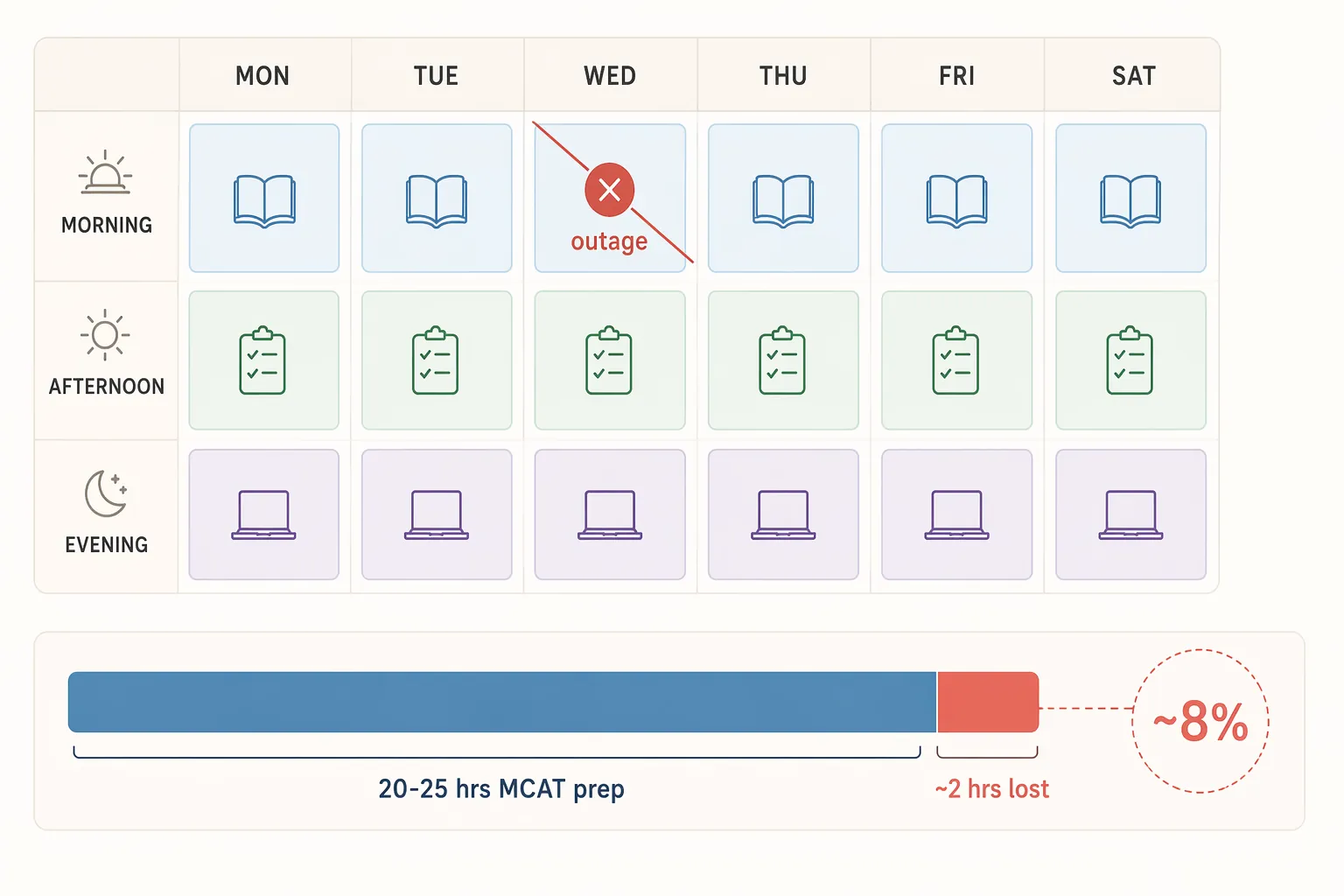
That difference matters. An outage record may say 1 hour and 5 minutes. The student may experience it as the loss of the entire two-hour slot because the group spent the first 15 minutes checking whether the issue was local, the next 20 minutes texting screenshots, and the final stretch deciding whether anyone still had enough time to begin. The platform’s downtime and the student’s usable learning loss are related, but they are not identical.
For GRE prep, losing a one-hour vocabulary review or quant office hour inside a 10-hour week is already 10% of the plan. For SAT or ACT prep, a weekly plan closer to five hours makes the same lost hour even more expensive. In lower-hour schedules, there are fewer unused pockets where recovery can happen. In higher-hour schedules, there may be more total time, but the fatigue cost is higher: making up two hours at night after an already planned study day is not the same as having protected those two hours in the morning.
Live prep is perishable
A recorded lecture can wait. A PDF can wait. A flashcard deck can wait. A live study block has people attached to it: the tutor who is paid for that window, the student who arranged child care, the classmate who agreed to review missed questions, the instructor holding office hours between other commitments.
That is why messaging failures deserve attention even when the video room still sounds like the main event. If the group cannot send or receive messages, students may not know whether to wait, switch tools, work independently, or leave. The July 7 messaging outage is a good reminder that coordination is part of instruction, not a side feature.[1] A study group that cannot coordinate its fallback is a study group that can lose the block while everyone is technically trying to be responsible.
The fixed test date is the hard edge. The MCAT, GRE, ASVAB, SAT, and ACT do not move because a Wednesday platform session failed. A student may be able to reschedule an exam, but that is a separate decision with its own cost, availability problem, and emotional weight. Most students are trying to protect the date they already have.
Continuity has to be planned before the login fails
The answer is not to declare one platform good and another platform safe forever. Test prep should not depend on that kind of confidence. The safer routine is platform-agnostic: assume any live tool can fail during a useful block, then decide in advance how the learning continues.
Microsoft’s own education-continuity discussion points in that direction. In a 2026 EdTech Magazine article, Microsoft education marketing vice president Deirdre Quarnstrom said that “continuity is not delivered by a single feature,” and the same discussion urged schools to plan for “intermittently connected” learning states.[3] That is a sensible standard for exam prep too. A continuity plan should not depend on the same tool that just failed.
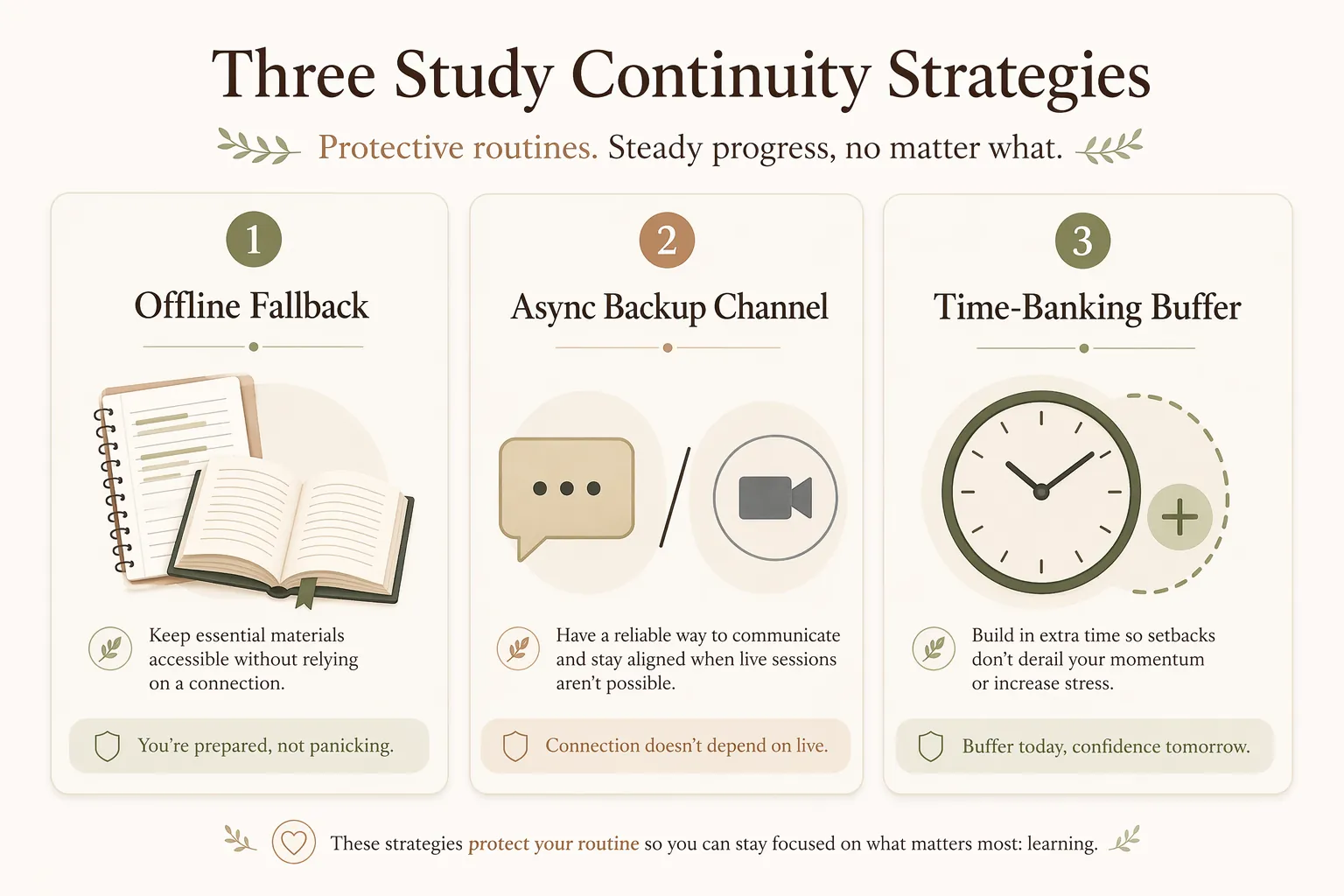
Keep offline fallback work ready for every live block
Before a live session starts, the student should already know what work replaces it if the room fails. This does not need to be elaborate. It does need to be specific enough that the first 20 minutes are not spent inventing a backup plan.
- For a tutoring session: download the question set, answer key, and any passage or data table before the meeting time.
- For a study group: assign a fallback drill, such as timed verbal questions, missed-problem review, or flashcard cleanup.
- For office hours: keep a ranked question list in a local document, not only in the meeting chat.
- For a full-length review session: save the score report, missed-question list, and notes outside the video platform.
The rule should be boring: if Teams is unavailable five minutes after the start time, everyone moves to the fallback assignment. If the platform recovers quickly, the group can return. If it does not, the block still produces study output.
Use a separate async check-in channel
The backup channel should not be another tab inside the same platform account. If Teams messaging is the failing function, a Teams chat cannot carry the rescue plan. A separate channel could be email, SMS, a learning-management-system announcement, or another agreed tool the group already checks. The best choice is the one every participant can access quickly without a new login ritual.
The check-in message should be standardized. For example: “If Teams is unavailable at 7:05, complete Set B independently and post your top three missed questions by 8:00 in the backup channel.” This is a hypothetical template, not a universal script. The point is to remove interpretation. Students should not have to decide during the outage whether silence means wait, leave, or improvise.
Build a time-banking buffer into the week
A buffer is not extra ambition. It is insurance for the plan that already exists. If a student schedules every available hour, any outage, work shift change, illness, commute delay, or family interruption becomes a debt. The debt then gets paid with sleep, rushed review, or dropped practice.
Time banking works best when it is attached to a real recovery window. A student with six planned morning blocks might protect one shorter weekend recovery slot. A student preparing after school might keep one evening as a catch-up and error-log block rather than filling it with new content. A student in a high-hour MCAT plan might reserve a weekly review buffer specifically for missed live sessions, not for adding more chapters when everything goes well.
The buffer should also have a priority order. If only 45 minutes can be recovered, the student should know whether that time goes first to missed tutoring problems, a timed section, flashcards, or review notes. Without that order, the recovery period becomes another decision point, and decision points are where tired students lose more time.
A simple outage rule protects the next block
The continuity routine does not need to be dramatic. It can fit in four lines at the top of a syllabus, group document, or tutoring confirmation email.
- Wait five minutes after the scheduled start.
- Check the separate backup channel.
- Move to the preassigned offline task if the platform is still unavailable.
- Use the weekly buffer only for work that could not be completed during the outage block.
That routine is intentionally unexciting. It does not solve Microsoft’s infrastructure problem, and it does not require the student to become an amateur systems administrator. It protects the thing the student actually controls: what happens to the next scheduled hour when the live tool is not available.
For deadline-driven prep, the platform may recover in an hour. The test date does not. A continuity plan is not a tech preference; it is schedule protection.
References
- Microsoft Teams Outage History, StatusGator.
- Microsoft 365 Outage Jan 21, 2026: Third-Party ISP Disruption Explained, WindowsForum.
- Digital Resilience: K–12 Planning for Cloud Outage Continuity, EdTech Magazine, May 2026.
Authoritative source
For the authoritative version of this contentHow Houthi Attacks Affect Oil Prices: An Economics AD-AS Study Guide
Report an error in this tool's output
Found something this tool got wrong beyond what's documented above? Report it so the accuracy log stays current.
Comments
Join the discussion with an anonymous comment.