
How to Build a Study Planner That Actually Works for ADHD College Students
A practical guide to designing a study planner template — printable or digital — that addresses time blindness, decision fatigue, and task initiation challenges so college students with ADHD can stick with it long-term.
Available Formats
Access links are provided in the guide below.
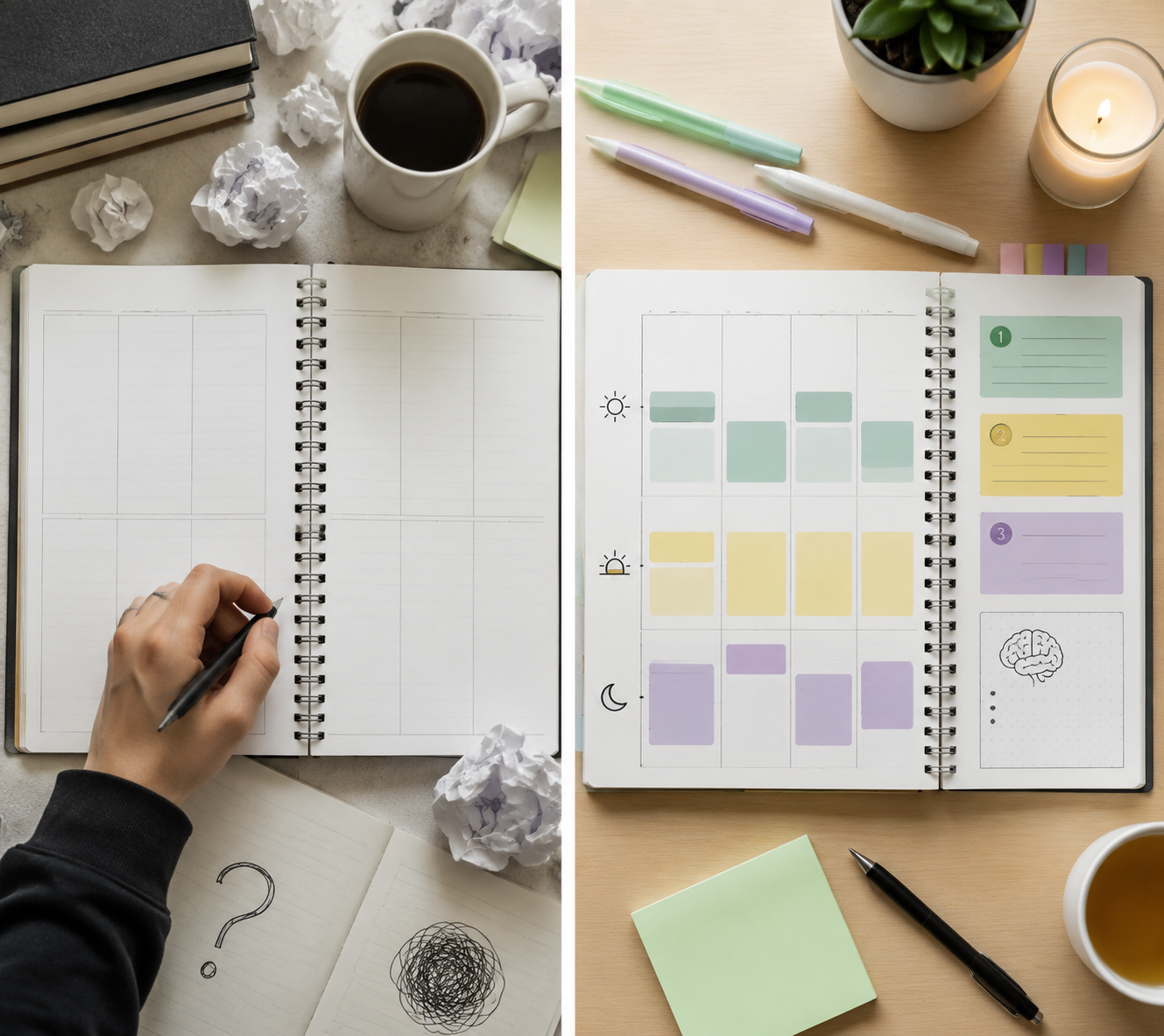
The planner usually gets abandoned in a very ordinary way. One missed class turns into three uncopied assignments. The weekly page stays blank because filling it in now means facing everything that was forgotten. The app still has last Tuesday’s tasks sitting there, accusing you in red. By the time you open the planner again, it no longer feels like a tool. It feels like evidence.
That failure pattern matters because a study planner for ADHD students in college cannot be judged by how clean it looks on Sunday night. It has to work after a low-sleep Monday, a lecture that ran long, a medication gap, an unplanned nap, and a week when your brain avoided Canvas because Canvas had become emotionally radioactive.
The difficulty is not imaginary. In a 2019 study of 52 college students with learning disabilities and/or ADHD at one large U.S. research university, students rated “managing time” at a median challenge severity of 65 out of 100 and “staying focused” at 75 out of 100. The same study grouped effective strategies into habits and routines, reframing, and symptom-specific strategies, which is a useful reminder: a planner is not just a place to write homework down. It has to carry some of the routine-building and symptom support that the student is otherwise expected to improvise alone.[1]
That is where standard planners tend to break. A blank weekly grid assumes you can estimate time, choose what matters, remember to look back, and restart without shame. Lifestack, a planner app company, puts this bluntly: standard paper planners are “almost perfectly designed to fail the ADHD brain” because they often provide blank pages, little structure, no reminders, and no accountability.[2] The source has a product interest, so it should not be treated as a neutral verdict on paper. But the critique names a real mismatch many students recognize immediately.
The Minimum Viable ADHD Study Planner
Before choosing paper, Notion, Google Calendar, a printable PDF, or a dedicated app, build the smallest planner that can survive disruption. It needs three non-negotiables.
- Visible time: a weekly view with blocks for class, study, meals, work, commuting, sleep, and recovery time.
- Limited daily choices: three to five priority slots, not a full-page task list pretending everything is equally urgent.
- Friction reducers: a brain-dump space, rollover rules, reminders or review points, and task-starting cues.
Everything else is optional. Habit trackers, grade calculators, meal plans, quote boxes, semester dashboards, and elaborate icon systems can be helpful for some students, but they are not the foundation. If the planner does not show time, limit today’s decisions, and make restarting easy, it is decorating the same failure point.
| Planner part | What it solves | Keep it simple by using |
|---|---|---|
| Weekly capture | Forgotten assignments and scattered syllabus dates | One inbox for every due date, exam, reading, lab, shift, and appointment |
| Visible time map | Time blindness and overbooking | Blocks for class, study, meals, movement, work, sleep, and buffer time |
| Daily priority cap | Decision fatigue and overcommitment | Three must-do items, with two optional small tasks if capacity allows |
| Task initiation supports | Staring at a task without knowing how to begin | First-action prompts, estimated time doubled, materials needed, and start cue |
| Rollover and reset | Blank-page guilt after missed days | Automatic migration, parking lot, and a weekly reset that does not require rewriting everything |
Start With Weekly Capture, Not a Perfect Weekly Plan
The first page of the planner should not ask, “What is your ideal week?” That question is too clean for college life. Start with capture: everything that is already real, whether or not you feel ready to organize it.
Use one weekly capture box for the mess. Pull from the syllabus, learning management system, email, group chats, lab schedule, work schedule, club commitments, and whatever is currently living on sticky notes or in your camera roll. Do not sort while capturing. Sorting too early is where many students lose the thread.
- Due dates: essays, problem sets, quizzes, exams, discussion posts, projects, readings, labs.
- Fixed commitments: classes, labs, work shifts, appointments, office hours, commute windows.
- Hidden work: printing, finding sources, emailing a professor, watching a missed lecture, downloading software.
- Life maintenance: meals, laundry, medication pickup, sleep, movement, banking, room cleanup.
Hidden work deserves a place in the planner because it is often the difference between “write essay” and actually submitting the essay. A task like “finish bio lab report” may contain five smaller actions: find the rubric, open the data file, make the graph, write the discussion, upload the PDF. If the planner only records the final product, the starting line stays blurry.
Make Time Visible Before You Assign Tasks
A to-do list can hold work without showing whether the week has room for it. That is dangerous when time already feels abstract. The weekly view should make hours visible before you decide what belongs on each day.
Block the fixed commitments first: class, lab, work, appointments, commuting, meals, sleep, and any recurring responsibilities. Then look for actual study spaces. Not imaginary ones. Not “after class” as a vague emotional category. Actual blocks: Tuesday 2:00–3:15, Wednesday 10:30–11:30, Thursday 7:00–8:00.
The University of Pennsylvania’s Weingarten Center recommends using color coding to create a structured schedule, with examples such as blue for classes, green for study, yellow for meals, and red for physical activity.[3] The exact colors do not matter. The point is that your eye should be able to tell the difference between “I am in class,” “I am studying,” and “I am a human being who needs food” without rereading every label.
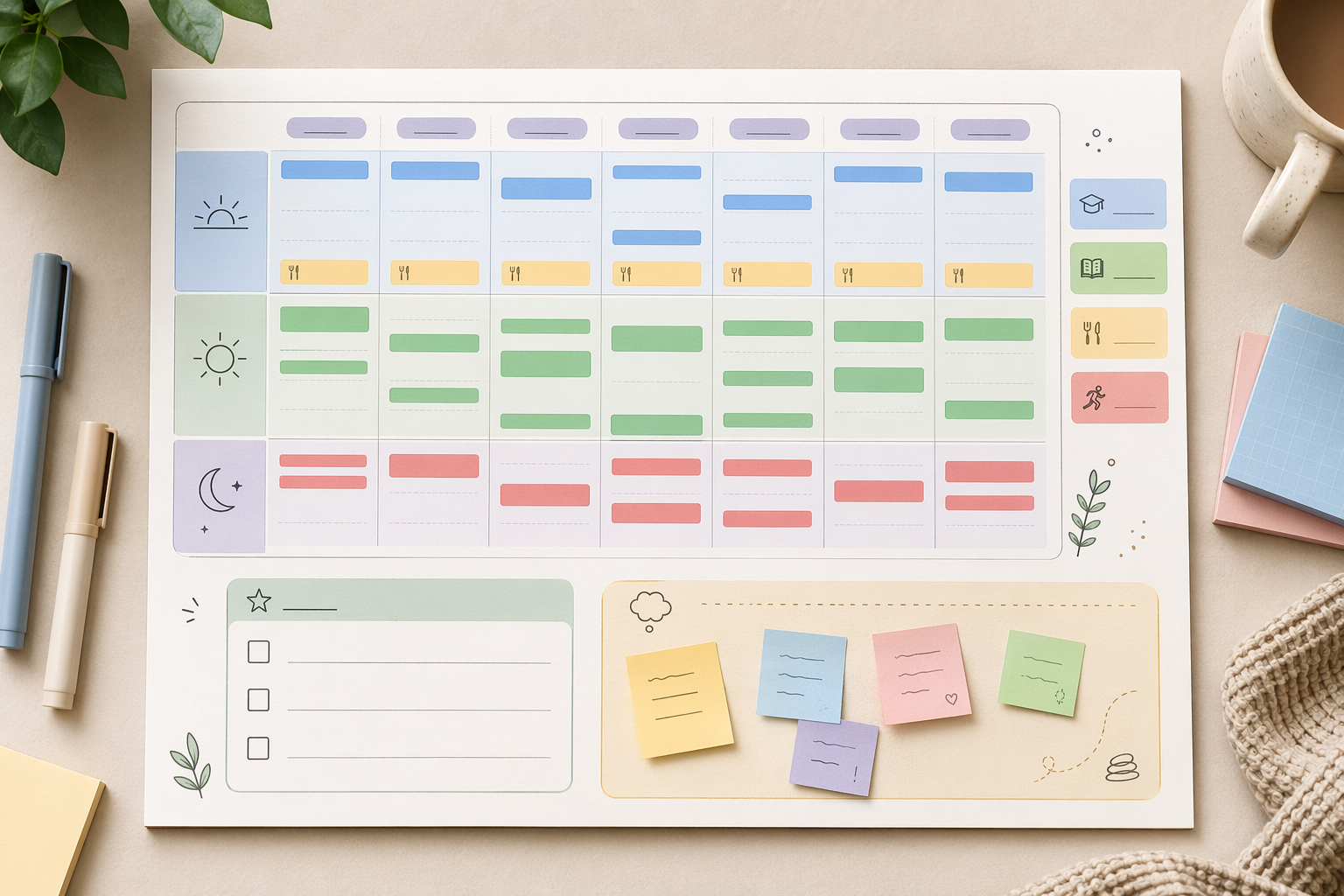
Time estimates need padding. Honestly ADHD’s printable daily planner asks users to multiply estimated time by two, a simple rule that directly addresses the familiar optimism of “this will only take twenty minutes.”[4] You do not need to be mathematically perfect. You need a planner that stops letting a four-hour project occupy one neat little line.
A workable color key
| Color | Use it for | Why it helps |
|---|---|---|
| Blue | Classes, labs, seminars | Shows where attendance is fixed |
| Green | Study blocks, tutoring, office hours | Makes academic work visible outside class |
| Yellow | Meals, breaks, medication, reset time | Protects basic maintenance from disappearing |
| Red | Exercise, commute, work, high-energy obligations | Marks activities that cost physical or emotional energy |
| Gray | Buffer, catch-up, rollover time | Gives missed work somewhere to land |
The gray buffer block is not a luxury. It is what keeps one bad estimate from wrecking the whole week. If everything is scheduled edge to edge, the planner is only useful in the version of your life where nothing goes wrong.
Cap Each Day at Three to Five Priorities
The daily page should not be a dumping ground. Dumping belongs in the brain-dump box. The daily page is for choosing.
Several ADHD-oriented planner templates use a hard cap here. Honestly ADHD limits daily goals to five slots, while PlanWiz recommends a top-three priority section and notes that “The simpler the layout, the more consistently an ADHD brain returns to it.”[4][5] These are template-design recommendations rather than independent clinical findings, but they are sensible because the daily list has a job: reduce decisions when energy is already limited.
A good daily priority box might look like this:
| Slot | Question | Example |
|---|---|---|
| Priority 1 | What must happen today because the consequence is close? | Submit chemistry problem set by 11:59 p.m. |
| Priority 2 | What reduces pressure later this week? | Draft outline for history essay |
| Priority 3 | What keeps me connected to class? | Watch missed lecture recording |
| Optional 4 | What is small enough to do if I have energy? | Email professor about office hours |
| Optional 5 | What helps tomorrow start cleaner? | Pack lab notebook and charger |
The cap is doing protective work. If eight tasks are written as equal priorities, the planner has handed you another sorting task. Three priorities force a decision while the weekly map is open, not later when you are standing in the library with a laptop, a headache, and no idea where to start.
Add a Brain-Dump Box That Does Not Become Today’s To-Do List
A brain-dump space is not decorative. It is a containment tool. ADHD planning often fails because random tasks arrive while you are trying to do something else: buy index cards, ask about extra credit, check financial aid portal, text lab partner, find headphones, print article, pay parking ticket. If every thought becomes an interruption, the planner is not protecting focus.
Give the brain dump a clear boundary. It can be a box on the right side of a daily page, a sticky note on a weekly spread, a notes widget, or an inbox list in an app. The rule is simple: capture first, sort later. Do not stop your study block to decide where every thought belongs.
- If it takes under two minutes and you are between tasks, do it or schedule it.
- If it has a deadline, move it to the weekly capture box or calendar.
- If it is vague, rewrite it as a next action before assigning it to a day.
- If it is not needed this week, park it in a later list instead of letting it crowd today.
This is one of the places where many beautiful planners quietly fail. They give the brain dump a charming label, then never explain when to empty it. A full brain-dump box should trigger sorting, not guilt.
Turn Assignments Into Startable Tasks
“Study for exam” is not a task. It is a weather system. It may be important, but it does not tell a tired brain what to do with its hands in the next five minutes.
Each study task needs a first action. Not a motivational phrase. A physical or digital move that starts the task before your brain has time to negotiate itself out of it.
| Too vague | Startable version |
|---|---|
| Study for psychology exam | Open lecture slides 5–7 and make 10 flashcards |
| Work on essay | Open document and write a rough thesis in ugly words |
| Do math homework | Complete problems 1–3 with notes open |
| Catch up in biology | Watch the first 20 minutes of missed lecture |
| Get organized | Put all due dates from syllabus into weekly capture box |
Add two small fields under any task that tends to stall: “materials needed” and “start cue.” Materials might be laptop, charger, textbook, calculator, headphones, lab notebook, or campus printer. A start cue might be “after lunch,” “at library table,” “with timer,” or “after texting study partner.” The cue matters because task initiation often improves when the beginning is attached to a visible context instead of a vague intention.
If timers help, keep them inside the planner rules rather than treating them as a separate system to maintain. A study block can say: “25 minutes: outline essay; 5 minutes: stand up; repeat once.” If standard Pomodoro feels too rigid, use a shorter launch timer: “work for 10 minutes, then decide whether to continue.” The planner’s job is to lower the starting cost.
Build Rollover So Missed Tasks Have Somewhere to Go
An ADHD-friendly planner needs a missed-day protocol. Without one, every unfinished task becomes a tiny moral crisis. With one, unfinished work is information: the task was too big, the estimate was too small, the day had less capacity than expected, or the work needs support.
Use a rollover mark that means “not done yet,” not “failed.” In a paper planner, that can be an arrow. In a digital planner, it can be automatic rescheduling or dragging the task to a buffer block. The important part is that rollover happens during a short review, not continuously all day.
- At the end of the day, move unfinished priority tasks to tomorrow, a weekly buffer block, or the parking lot.
- If a task rolls over twice, shrink it or define the first action more clearly.
- If a task rolls over three times, add support: office hours, tutoring, body doubling, professor email, study group, or a smaller deadline.
- If the task no longer matters, cross it out cleanly. Do not keep expired tasks as clutter.
Automatic rollover is one legitimate advantage of digital tools. A paper planner can still use rollover well, but the student has to rewrite or arrow tasks manually. That manual step is fine for some brains and fatal for others.
Paper or Digital: Choose by Failure Point
The paper-versus-digital question gets oddly moralized. It does not need to be. Paper helps some students because it is visible, tactile, and free from notification rabbit holes. Digital helps others because it can remind, roll tasks forward, sync across devices, and travel without being left on a dorm desk.
ADDitude’s planner guide, featuring Leslie Josel of Order Out of Chaos, argues strongly for paper planners and calls them “non-negotiable,” emphasizing handwriting and the absence of digital distraction.[6] That argument is useful, especially for students who open a planning app and wake up twenty minutes later in messages. It also comes from a context where Josel’s company sells academic planners, so it should be read as expert advice with a commercial connection, not as a universal rule.
Digital sources have their own incentives. ProductiveWithChris reports that Structured is the “#1 most downloaded day planner in the App Store” and highlights user language about time becoming visible rather than abstract.[7] That is a useful clue about why timeline-style apps appeal to ADHD students, but app rankings and app-review sites do not prove that one tool will work for a particular student’s semester.
| Choose paper if your biggest problem is... | Choose digital if your biggest problem is... |
|---|---|
| Getting distracted by apps while planning | Forgetting to look at the planner unless it reminds you |
| Remembering better when you physically write | Needing tasks to roll over automatically |
| Wanting your week open on a desk where you can see it | Needing the planner on your phone between classes |
| Feeling calmer with fewer menus and settings | Managing frequent schedule changes |
| Using highlighters, sticky notes, and wall calendars well | Syncing classes, work, and reminders across devices |
Hybrid is allowed. A student might use Google Calendar or a timeline app for reminders and time blocks, then use a paper daily page for the three priorities and brain dump. Another student might keep a paper weekly spread and use phone alarms only for class transitions and medication. The test is not purity. The test is whether the system catches you when memory drops the ball.
A Template You Can Copy Into Paper, Docs, Notion, or an App
Use this as the base layout. If you are building on paper, one weekly spread plus one daily half-page is enough. If you are building digitally, make these fields before adding databases, formulas, widgets, or automation.
Weekly page
| Section | Fields |
|---|---|
| Weekly capture | Assignments, exams, readings, labs, emails to send, errands, life tasks |
| Fixed schedule | Classes, labs, work, appointments, commute, meals, sleep |
| Study blocks | Course, task, location, start time, stop time |
| Buffer blocks | Catch-up, rollover, unfinished tasks, unexpected work |
| Support plan | Office hours, tutoring, study group, body doubling, professor emails |
| Parking lot | Useful but not-this-week tasks |
Daily page
| Section | Fields |
|---|---|
| Today’s 3 priorities | Must-do task, first action, estimated time doubled, deadline |
| Optional 4–5 | Small tasks only if capacity allows |
| Time blocks | Class, study, meals, movement, work, recovery |
| Brain dump | Unsorted thoughts captured during the day |
| Start support | Materials, location, timer, body double, reminder |
| Rollover | Move, shrink, support, or delete |
Effective Students’ executive-function planner guide emphasizes features such as a weekly view, academic-year alignment, room for extracurriculars, portability, and a monthly view.[8] Those features are worth considering once the core layout is working. They should not be the reason the planner becomes too heavy to use on a Tuesday.
The Weekly Reset Should Be Short Enough to Actually Happen
A weekly reset is not a life audit. It is a repair appointment. Fifteen to twenty minutes is enough for most versions of the routine; if it regularly takes an hour, the planner is probably storing too much or asking for too many decisions at once.
- Empty the brain dump into calendar items, task lists, the parking lot, or the trash.
- Check the syllabus and learning management system for new or changed deadlines.
- Block fixed commitments before adding study work.
- Choose the biggest academic pressure points for the week.
- Place study tasks into real time blocks and leave at least one buffer block.
- Write only the next day’s three priorities, not the whole week of daily lists.
That last rule matters. Planning every daily page too far ahead creates extra rewriting when the week changes. A weekly map can hold the structure. The daily page should stay flexible enough to respond to what actually happened.
What to Remove When the Planner Gets Too Heavy
If you stop using the planner, do not start by buying a prettier one. First remove weight. ADHD-friendly planning often improves by subtraction.
- Remove habit trackers that create shame without changing behavior.
- Remove decorative sections you avoid filling in.
- Remove duplicate task lists in multiple apps or notebooks.
- Remove priority systems with more than three levels.
- Remove weekly reflection questions unless they lead to a concrete adjustment.
A planner that requires you to become a different student is not a planner. It is another course you did not register for.
The Missed-Day Rule
The planner needs one rule for the day you disappear from it, because that day will come.
Do not backfill every missed box. Do not rewrite the week beautifully from scratch. Do not punish yourself by carrying every unfinished task forward as if nothing changed. Open to today, find the next real deadline, choose three priorities, and move only what still matters.
If you need a reset script, use this:
1. What is due next?
2. What is already scheduled today?
3. What are my three priorities?
4. What can move to the buffer block?
5. What can be deleted, postponed, or handed off?
6. What is the first action for priority one?
That is enough. The best study planner for ADHD students in college is not the most complete one. It is the one that makes time visible, limits today’s choices, and makes restarting easier than quitting.
References
- Strategies and supports used by students with learning disabilities and attention-deficit/hyperactivity disorder in postsecondary education, PMC, 2019, https://pmc.ncbi.nlm.nih.gov/articles/PMC6406620/
- ADHD Student Planner, Lifestack, 2026, https://lifestack.ai/blog/adhd-student-planner
- Creating a Structured Schedule with ADHD, University of Pennsylvania Weingarten Center, https://weingartencenter.universitylife.upenn.edu/creating-a-structured-schedule-with-adhd/
- Printable ADHD Daily Planner Template, Honestly ADHD, https://honestlyadhd.com/printable-adhd-daily-planner-template/
- ADHD Planner Template, PlanWiz, https://planwiz.app/adhd-planner-template/
- Best Planners for Students with ADHD, ADDitude, https://www.additudemag.com/best-planners-students-adhd-paper-visual/
- Best Planning Apps for ADHD 2025, ProductiveWithChris, 2025, https://productivewithchris.com/guides/best-planning-apps-adhd-2025/
- Executive Function Planner, Effective Students, https://effectivestudents.com/articles/executive-function-planner/
Related Guides & Templates
- How to Build a Study Calendar System That Actually Works (Apps + Templates + Science) →
Most study calendars fail because they don't address the behavioral science of habit formation. This guide shows you how to build a system that leverages implementation intentions, distributed practice, and frictionless task capture — with app recommendations and templates for every tier.
- The Best Study Schedule Apps for ADHD & Neurodivergent Students (2026 Guide) →
Traditional study planners assume neurotypical executive function. This guide reviews apps designed for (or adaptable to) ADHD brains — using visual timelines, flexible rescheduling, body doubling, and gamification — and provides setup strategies that work with, not against, how neurodivergent students process time and tasks.
- Cornell Notes Template: Free Printable and Digital Formats for Students →
A complete guide to the Cornell note-taking system for middle school, high school, and college students — explains what every section of the template is for, how to use the 5-Rs study loop, and where to download free templates in PDF, Google Docs, Microsoft Word, and Notion.
Comments
Join the discussion with an anonymous comment.