
How to Use NotebookLM Quizzes and Flashcards for College Study
Learn how to use NotebookLM's built-in quiz and flashcard features to create a complete active-recall study system for college exams. This guide covers setup, customization, the adaptive study loop, and tips for getting the most out of your uploaded sources.
Updated:
An exam is coming up, the lecture slides are open, the PDF is half highlighted, and the easiest next move is to reread everything until it feels familiar. That feeling is usually comfort, not recall. NotebookLM quizzes for college study are useful because they interrupt that habit: instead of asking a generic chatbot to “explain chapter 7,” you give NotebookLM the actual course materials and make it quiz you on those sources.
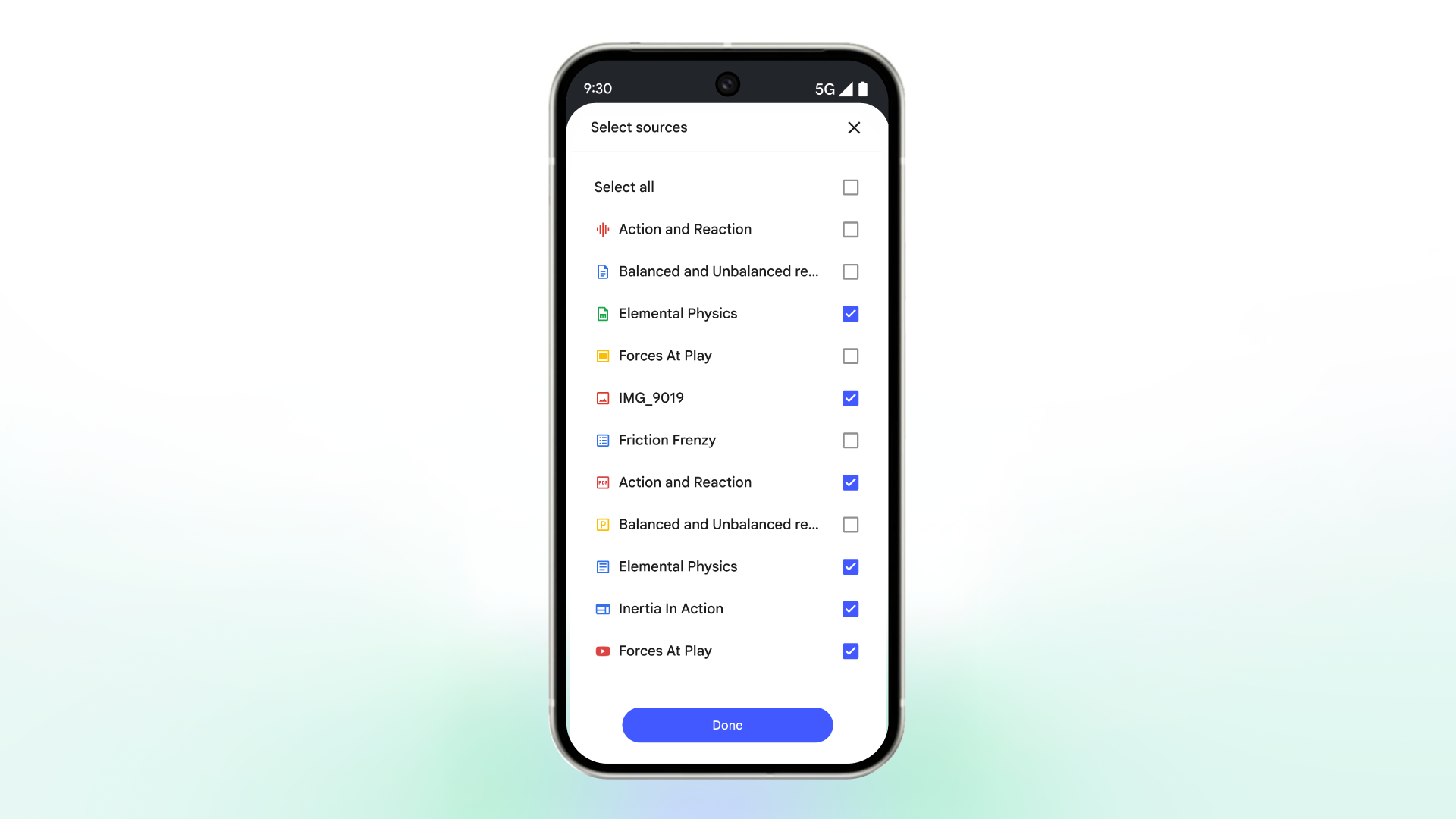
That source boundary matters. NotebookLM is built around notebooks made from uploaded sources such as notes, PDFs, slides, and web pages, and Google has presented its student study features as grounded in those materials rather than as open-ended chatbot answers.[1] Google’s help documentation also describes built-in flashcard and quiz generation, with controls for difficulty, length, topic focus, and explanations tied back to sources.[2]
So the better question is not whether NotebookLM is impressive. It is whether you can turn your messy course folder into a repeatable exam-prep routine: upload, quiz, miss things, trace the misses, regenerate practice, and repeat before panic takes over.
Start With Better Sources, Not Better Prompts
NotebookLM can only be as useful as the material you give it. For exam prep, start by building one notebook for one course unit, exam, or major topic. A “Midterm 1 Biology” notebook is easier to study from than a giant “Biology semester” notebook stuffed with everything since August.
Good first sources include lecture slides, your cleaned-up notes, assigned readings, lab handouts, professor review sheets, study guides, and allowed web pages from the syllabus. If your professor posts learning objectives, upload those too. They often tell NotebookLM what the exam is likely to care about, even when the textbook chapter wanders.
- Use slides for professor emphasis: repeated terms, diagrams, bolded concepts, and examples used in class.
- Use readings for depth: definitions, mechanisms, causes, evidence, and exceptions.
- Use your notes for class-specific framing: what the professor lingered on, warned about, or compared.
- Use study guides for targeting: they help keep quizzes from drifting into interesting but low-priority details.
Do not upload a chaotic pile just because the upload box allows it. If your notes contain unfinished shorthand, label it. If a PDF scan is unreadable, fix that before expecting useful questions. If two sources contradict each other, NotebookLM may surface the conflict, but it cannot know which version your professor wants unless the course material makes that clear.
Make the First Quiz Quickly
For a first session, keep setup boring. Create a notebook, add the sources for the unit you are studying, then use NotebookLM’s built-in option to generate a quiz or flashcards. Google’s support page says quizzes and flashcards can be generated from notebook sources and customized through options such as difficulty, number of questions, and topic focus.[2] CNET also reported the 2025 rollout of NotebookLM flashcards and quizzes as study features designed to work from uploaded material.[3]
| If you have... | Start with... | Why |
|---|---|---|
| A test tomorrow | A standard quiz on the professor’s slides and review sheet | You need weak spots fast, not a perfect system |
| A week before the exam | Medium-difficulty quizzes plus flashcards for missed terms | You have time to cycle through recall and repair |
| A reading-heavy class | Topic-focused quizzes by chapter or theme | Dense readings need smaller targets |
| A class with tricky wording | Custom prompts that imitate the professor’s question style | Recognition practice should resemble the exam |
The first quiz is not supposed to prove you are ready. It is supposed to reveal what your rereading was hiding. Choose “standard” or the default question count if you are unsure. Choose “medium” difficulty unless the exam is known for being either vocabulary-level or brutal. Then take the quiz without looking at your notes.
This is where students often sabotage the tool. They keep the PDF open “just to check,” search the answer, and then count the question as known. Do that during review, not during retrieval. During the quiz, your job is to find out what your brain can produce or recognize without the source sitting beside it.
When to Use Flashcards Instead
Use flashcards when the material has terms, dates, theories, formulas, structures, names, symptoms, or short cause-and-effect links. Use quizzes when you need to choose among similar concepts, apply a definition, or catch a misconception. Flashcards are not automatically easier; they just ask for a different kind of retrieval.
NotebookLM’s flashcards can help you mark what you got and missed, but they should not be treated as a formal spaced-repetition system. If you need long-term scheduling for hundreds of anatomy terms, language vocabulary, or medical-style decks, Anki still has the advantage because it is built around spaced scheduling rather than one-session review.
Use the Controls Without Turning Them Into Homework
NotebookLM gives you enough controls to steer the session without becoming a prompt engineer. The pencil icon and customization field can be used to adjust difficulty, question count, and topic focus; the Explain button gives source-cited explanations that point back to the relevant passage.[2]
- Difficulty: use easy for first exposure, medium for normal exam prep, and hard when you can already explain the basics.
- Question count: use fewer when you are diagnosing a topic, standard for normal review, and more only when you have time to review every miss.
- Topic focus: name the lecture, chapter, objective, mechanism, theory, case type, or slide section you actually need.
- Explain: use it after answering, especially after a lucky guess or a confident wrong answer.
A practical first prompt can be plain: “Create a medium-difficulty quiz on lecture 4 and the assigned reading, focusing on the concepts most likely to be confused.” That is better than “quiz me on everything,” because “everything” usually creates a scattered session that feels productive but does not tell you what to fix next.
If a question seems off, do not argue with it from memory. Open the explanation, check the source passage, and decide whether the issue is your understanding, the uploaded material, or the way the question was phrased. Source-grounding reduces the usual chatbot problem of invented answers, but it does not remove your responsibility to verify important material against what the course actually assigned.
The 15–20 Minute Adaptive Study Loop
The April 2026 upgrade is the part that makes NotebookLM feel less like a quiz generator and more like a study routine. An independent NotebookLM Guide report describes a workflow in which quiz sets now produce topic summaries, next-step study suggestions, and targeted regeneration for weak areas, with each cycle taking about 15–20 minutes.[4] That is not controlled evidence that NotebookLM raises exam scores. It is a description of a workflow that matches what students need: shorter feedback loops and less pretending.
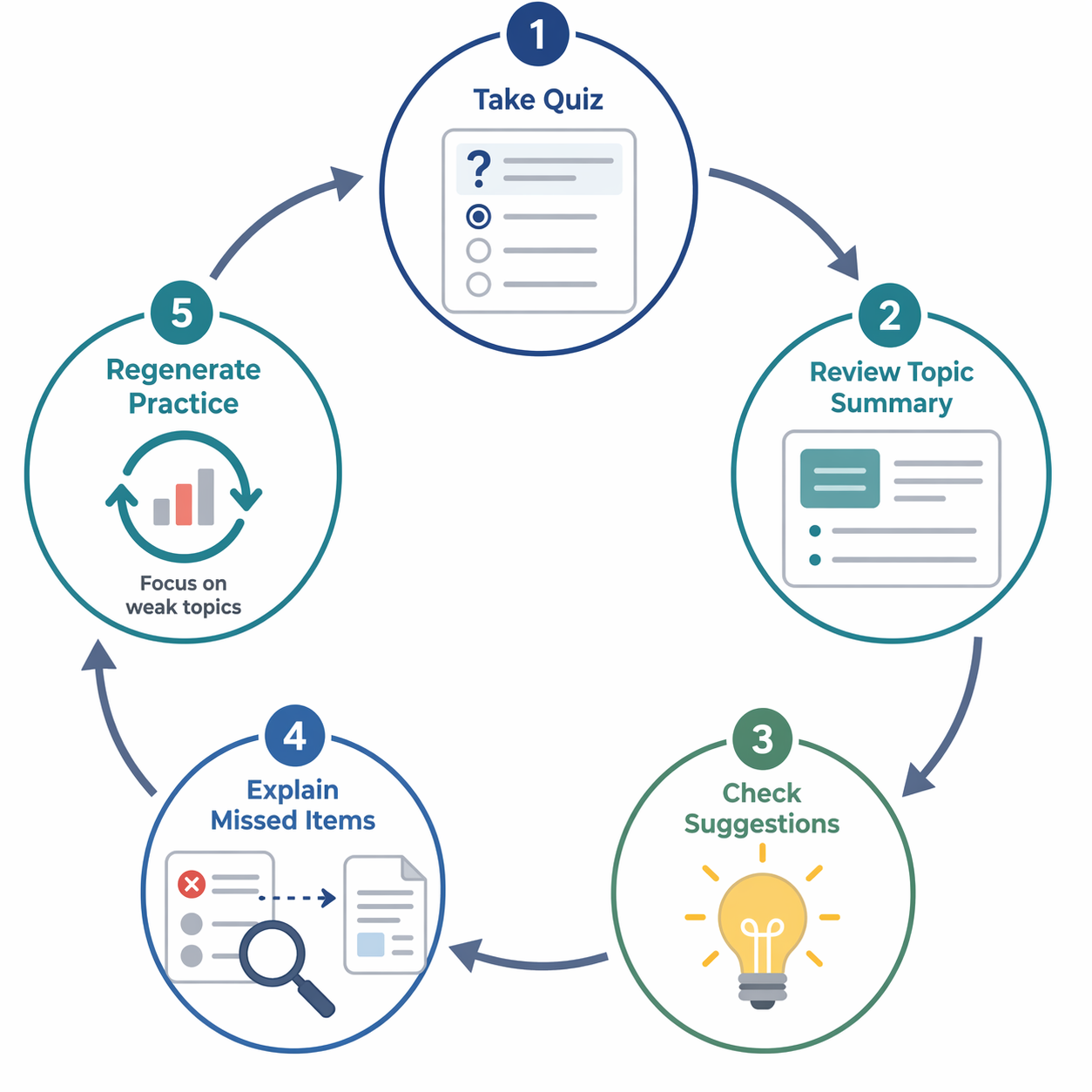
Run the loop like this:
- Take one quiz set without notes.
- Read the topic summary after the set instead of jumping straight into another quiz.
- Look at the next-step suggestions and pick one weak area, not five.
- Use Explain on missed or guessed questions and follow the source link back to the exact passage.
- Regenerate a smaller quiz or flashcard set focused only on that weak topic.
The important move is step four. A wrong answer is not just a red mark; it is a clue. Did you confuse two similar terms? Did you remember the definition but miss the exception? Did you know the slide title but not the mechanism underneath it? The explanation should send you back to the source, not just soothe you with a neat paragraph.
Here is what a single loop might look like in a real study session. A psychology student uploads lecture slides on classical conditioning, operant conditioning, and observational learning, plus the assigned chapter section. The first quiz shows missed questions on negative reinforcement. The student opens Explain, traces the answer to the source passage, rereads the comparison with punishment, and then asks NotebookLM for a short set only on reinforcement versus punishment. That is a better next action than rereading the whole chapter because the weak spot has a name.
Stop after two or three loops if your accuracy is falling because you are tired. More questions are not automatically more learning. The goal is not to drain the notebook dry; it is to leave with a short list of topics that have moved from “familiar on the page” to “retrievable under pressure.”
Prompt for the Exam You Are Actually Taking
Once the basic loop works, prompts become useful. Not fancy, just specific. The best exam-prep prompts tell NotebookLM what kind of thinking the exam rewards: definition recall, comparison, scenario application, sequencing, interpretation, or professor-style wording. A Learn With Me AI guide gives examples of NotebookLM study prompts aimed at matching question style, emphasized topics, and scenario-based practice.[5]
| Exam situation | Useful prompt |
|---|---|
| Professor loves compare-and-contrast questions | Create a medium-difficulty quiz that focuses on differences and similarities among the major theories in these sources. |
| Exam uses scenarios | Write application-style questions where I have to choose which concept best explains a short situation. Use only the uploaded course sources. |
| Review sheet lists broad topics | Generate questions for each review-sheet topic, weighted toward topics that appear in both the slides and readings. |
| You keep mixing up terms | Make flashcards that force me to distinguish these concepts from nearby concepts, not just define them. |
| Professor uses tricky phrasing | Create questions with plausible distractors based on common confusions in the sources. |
There is a line between matching an exam style and inventing secret knowledge. NotebookLM can work from uploaded review sheets, past practice questions your professor has allowed, and visible patterns in course materials. It cannot know what will be on the exam unless that information is in the sources. If you ask it to predict the test, treat the answer as a study organizer, not a leak from the future.
For essay exams, use quizzes as warm-up, then move into explanation practice. Ask for prompts that require you to outline an answer from the sources, compare two concepts, or defend a claim using assigned evidence. Then check your outline against the source passages. Multiple-choice practice can expose recognition gaps, but essay exams still require you to produce organized explanations.
Use It Ethically: After Reading, Not Instead of Reading
NotebookLM is most defensible when it helps you test and repair understanding after you have engaged with the material. Florida State University’s student guide frames NotebookLM as a tool for ethical and effective use, with the boundary that students should use it to support learning rather than replace reading, thinking, or course expectations.[6]
That boundary is not just about academic integrity. It is also about learning quality. If you upload a chapter you never read and immediately drill generated questions, you may learn scattered answers without understanding how the chapter is organized. Read or skim with purpose first: headings, diagrams, worked examples, lecture emphasis, and professor comments. Then let the quiz show what did not stick.
- Good use: checking whether you can distinguish similar theories after lecture.
- Good use: generating practice from your own notes and assigned readings.
- Good use: using explanations to return to the source and correct a misconception.
- Bad use: submitting AI-generated explanations as your own work.
- Bad use: replacing assigned reading with quiz answers and hoping recognition will carry you.
Where NotebookLM Beats Your Usual Study Tools
NotebookLM’s strongest advantage over a generic chatbot is not personality or fluency. It is the source boundary. XDA’s October 2025 write-up on NotebookLM’s quiz feature emphasizes that its questions are created from the user’s uploaded material, which makes it better suited to course-specific review than asking a general chatbot to improvise.[7]
| Tool | Best use | Main limitation |
|---|---|---|
| NotebookLM | Source-grounded quizzes, flashcards, explanations, and weak-topic review from your course materials | Not a formal spaced-repetition system and not enough for procedural practice by itself |
| ChatGPT or Gemini | General explanation, brainstorming, and alternative wording | Less reliable for assigned-material recall unless carefully grounded in the exact sources |
| Quizlet | Simple flashcard sets and familiar term-definition review | May require more manual setup or less source-specific reasoning |
| Anki | Long-term spaced repetition with serious scheduling control | More setup friction and less automatic course-source generation |
For many college exams, the combination is obvious: use NotebookLM to generate source-grounded practice and identify weak spots, then move durable facts into Anki if you need them for weeks or months. For math, chemistry problem sets, statistics, coding, accounting, or physics, NotebookLM can help with concepts and definitions, but it should not replace doing problems. A multiple-choice quiz can tell you that you recognize a method; it cannot prove you can execute it cleanly on blank paper or in an editor.
Add Audio and Mind Maps Only When They Serve the Session
NotebookLM is broader than quizzes. The University of Pittsburgh’s Digital Pitt coverage describes NotebookLM as a study tool that can combine source-based features such as Audio Overviews, Mind Maps, quizzes, and flashcards.[8] Those modes can help, but they should not steal the center of exam prep.
- Use Audio Overviews when you are walking, commuting, or doing a first-pass review before active study.
- Use Mind Maps when the course is connection-heavy: theories, systems, causes, themes, or timelines.
- Return to quizzes when you need evidence that you can retrieve and distinguish the material.
Listening can make studying feel less lonely, and maps can make a unit look less like a junk drawer. Still, exam readiness usually shows up when you answer without the source in front of you and then check the answer honestly.
Pricing Reality Check
Last reviewed: July 4, 2026. A 2026 student review reports that NotebookLM’s free tier includes 100 notebooks, 50 sources per notebook, and 50 chat queries per day, with paid tiers listed as AI Plus at about $6 per month, AI Pro at about $24 per month, and AI Ultra at about $300 per month.[9] Pricing and limits can change, so check the current product page before making a paid plan part of your study routine.
For most students using NotebookLM quizzes and flashcards for normal exam prep, the free tier appears sufficient. Spend money only if you are actually hitting limits in a way that blocks studying. A paid plan does not fix vague sources, skipped readings, or a habit of taking quizzes without reviewing the misses.
A Repeatable Exam-Prep Routine
Here is the routine I would give a student who has never used NotebookLM before and has one serious exam coming up:
- Create one notebook for the exam unit.
- Upload lecture slides, assigned readings, review sheets, and cleaned-up notes.
- Generate a medium-difficulty standard quiz from the most important sources.
- Take the quiz closed-note.
- Use the topic summary and suggestions to choose one weak area.
- Use Explain to trace missed answers back to the exact source passages.
- Regenerate targeted practice for that weak area.
- Move durable facts to Anki or another spaced system if you need long-term retention.
- Do real practice problems for procedural subjects.
The honest version is simple: NotebookLM can turn your actual course sources into active recall, but it cannot care about the misses for you. Verify important answers against the source, repeat the weak-spot loop, and add specialized practice when multiple-choice quizzes and informal flashcards are not enough.
References
- 6 ways to use NotebookLM to master any subject, Google Blog, Sep 2025.
- Generate Flashcards or Quizzes in NotebookLM, Google Help.
- NotebookLM Can Now Make Flashcards and Quizzes to Help You Study, CNET, Sep 2025.
- NotebookLM Quiz & Flashcard Upgrade: The 10x Study Loop, NotebookLM Guide.
- 10 NotebookLM Prompts For Studying (Beat 99% of Students), Learn With Me AI.
- NotebookLM for Students: A Guide to Ethical and Effective Use, Florida State University.
- This NotebookLM feature is seriously underrated, XDA Developers, Oct 2025.
- NotebookLM: The Study Tool for Students Who Care About Learning, Digital Pitt.
- NotebookLM Review 2026: My Honest Experience Using It as a Student, AIStudyMaster.
Related Resources
- The Best PDF Summarizer for Students Depends on Your Study Phase →
Not all PDF summarizers are created equal. This guide breaks down which tools work best for pre-class reading, exam revision, and research writing, so you can pick the one that matches what you need right now.
- Best AI Flashcard Maker by Subject: Which Tool for Medicine, Languages, STEM, and Humanities →
The best AI flashcard maker depends on your subject. This guide matches tools like Anki, Quizlet, NotebookLM, and RemNote to the specific needs of medical, language, STEM, and humanities students — so you pick the right tool for your material, not a generic 'best overall' app.
- 10 Best AI Flashcard Generators Compared in 2026: A Head-to-Head Feature, Pricing, and Quality Showdown →
We compare 10+ AI flashcard generators head-to-head — Anki, Quizlet, Knowt, StudyFetch, RemNote, Brainscape, NotebookLM, Gizmo, Revisely, Jungle AI, and more — across pricing, SRS algorithms, input formats, and card quality. Find out which tool is the best fit for your study workflow and budget in 2026.
Comments
Join the discussion with an anonymous comment.