
How to Configure Anki Spaced Repetition Settings (Step-by-Step)
✓ After this tutorial: A configured Anki deck with FSRS enabled, optimized parameters, and sustainable daily limits set for high-retention, manageable review sessions.
Anki's default settings leave significant retention gains untapped — this guide walks students through enabling FSRS, setting desired retention, choosing learning steps, and capping daily new cards to build a sustainable, high-retention study system.
Why Anki's Default Settings Hold You Back
Anki ships with the SM-2 algorithm — a scheduling system developed in 1987 and largely unchanged since 2006. It works, but it has a well-documented failure mode: ease hell. Every time you press Again on a review card, SM-2 permanently lowers that card's ease factor. Press Again enough times — which is inevitable when you're learning new material — and intervals shrink to near zero, flooding your daily queue with cards you see far more often than your memory actually requires.
The defaults also ignore who you are. SM-2 assigns the same initial intervals to every learner, regardless of how well your memory retains specific material. There's no personalization, no feedback loop, and no mechanism to adjust scheduling based on your actual recall patterns.
This guide walks you through switching to FSRS — Anki's modern scheduling algorithm — and configuring the five settings that actually matter. The goal is a sustainable study system: high retention without a review pile that keeps growing until you give up.
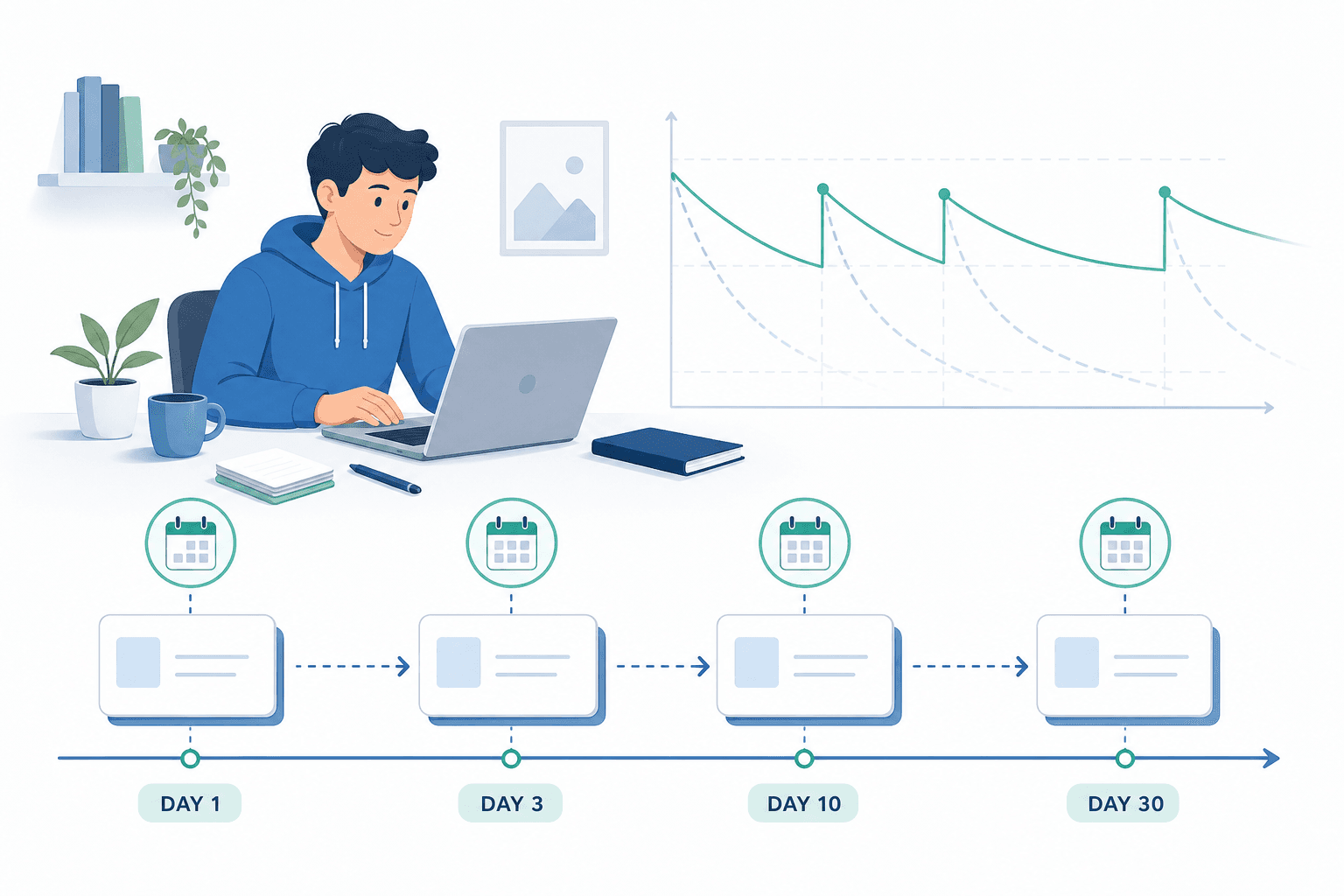
How Anki's Scheduling Works: A Quick Primer
Every card in Anki moves through three phases. Understanding these phases makes the configuration steps below much easier to follow.
- Learning phase: A new card is shown multiple times within the same session, spaced by your learning steps (e.g., 1 minute, then 10 minutes). It stays in the learning phase until you pass all steps.
- Graduation: Once a card passes its final learning step, it graduates to the review queue and is scheduled for its first spaced review — typically in a few days.
- Review phase: Graduated cards reappear at intervals calculated by the scheduling algorithm. Correct answers push the next interval further out; forgetting a card triggers a lapse.
- Lapses: When you press Again on a review card, it's treated as a lapse and re-enters a short relearning sequence before returning to the review queue.
FSRS (Free Spaced Repetition Scheduler) replaces SM-2's ease-factor mechanics with a three-component memory model: Stability (S) measures how long a memory lasts before it starts to fade; Difficulty (D) reflects how hard a card is for you specifically; and Retrievability (R) is the probability you can recall a card right now. Each card carries its own S, D, and R values — so your scheduling is personalized at the card level, not just the deck level.
Before You Start: Update Anki to Version 23.10 or Later
FSRS requires Anki desktop version 23.10 or later. Open Anki and check Help → About to confirm your version. If you're below 23.10, download the latest release from ankiweb.net before proceeding — the settings described in this guide won't be available on older versions.
Step 1: Enable FSRS and Click Optimize
Open Anki and click the gear icon next to any deck, then select Options. This opens the Deck Options panel. Scroll down to the FSRS section — you'll see a toggle to enable it.
- Toggle FSRS on in the FSRS section of Deck Options.
- Once enabled, an Optimize button appears below the FSRS parameters.
- Click Optimize. Anki runs a machine-learning process against your own review history to calibrate the 19 FSRS parameters to your memory patterns.
- When optimization finishes, the parameters update automatically. You don't need to touch them.
The minimum review history needed to run Optimize depends on your Anki version: in 24.06 and later there's no minimum threshold; in 24.04 you need at least 400 reviews; in older versions, around 1,000. If you don't meet the threshold yet, leave the default FSRS parameters in place and click Optimize once you've built up more history.
Step 2: Set Your Desired Retention
Desired retention is the most important FSRS setting. It tells the algorithm what probability of recall to target for each card when it comes up for review. The default is 0.90, meaning a 90% chance you'll remember a card when it's due.
Start at 0.90. Here's why: workload rises sharply as you push retention higher. The relationship isn't linear — going from 0.90 to 0.95 noticeably increases your daily review count, and pushing above 0.97 can make the workload overwhelming. You're essentially asking Anki to show you cards more frequently to keep forgetting to a minimum, and the cost compounds across your entire deck.
Step 3: Configure Learning Steps
Learning steps control how many times you see a new card within a single study session before it graduates to the review queue. Under FSRS, there's a firm rule: all learning and relearning steps must be completable within the same day.
The recommended configuration for most learners is 1m 10m. You see a new card, then see it again 1 minute later, then again 10 minutes later. If you recall it correctly at both steps, it graduates. This is fast, low-overhead, and sufficient for the majority of subjects.
- 1m 10m: Best for most learners and most subjects. Quick same-day repetitions with minimal overhead.
- 1m 10m 1d: Adds a next-day review before graduation. Meaningfully improves early retention for dense, high-volume content — useful if you're working through large factual decks or material where early recall errors are costly. Costs slightly more reviews in your first week.
Step 4: Set a Sustainable New Cards Per Day Limit
This setting has the biggest impact on whether your Anki practice stays sustainable long-term. New cards don't just add one review each — they compound.
Each new card you learn today generates roughly 7 review cards over the following month as it cycles through spaced intervals. At 20 new cards per day, you'll be doing around 140 review cards daily within a month — before you add any more new cards. The official Anki manual puts the figure at approximately 200 reviews per day for 20 new cards, depending on retention settings.
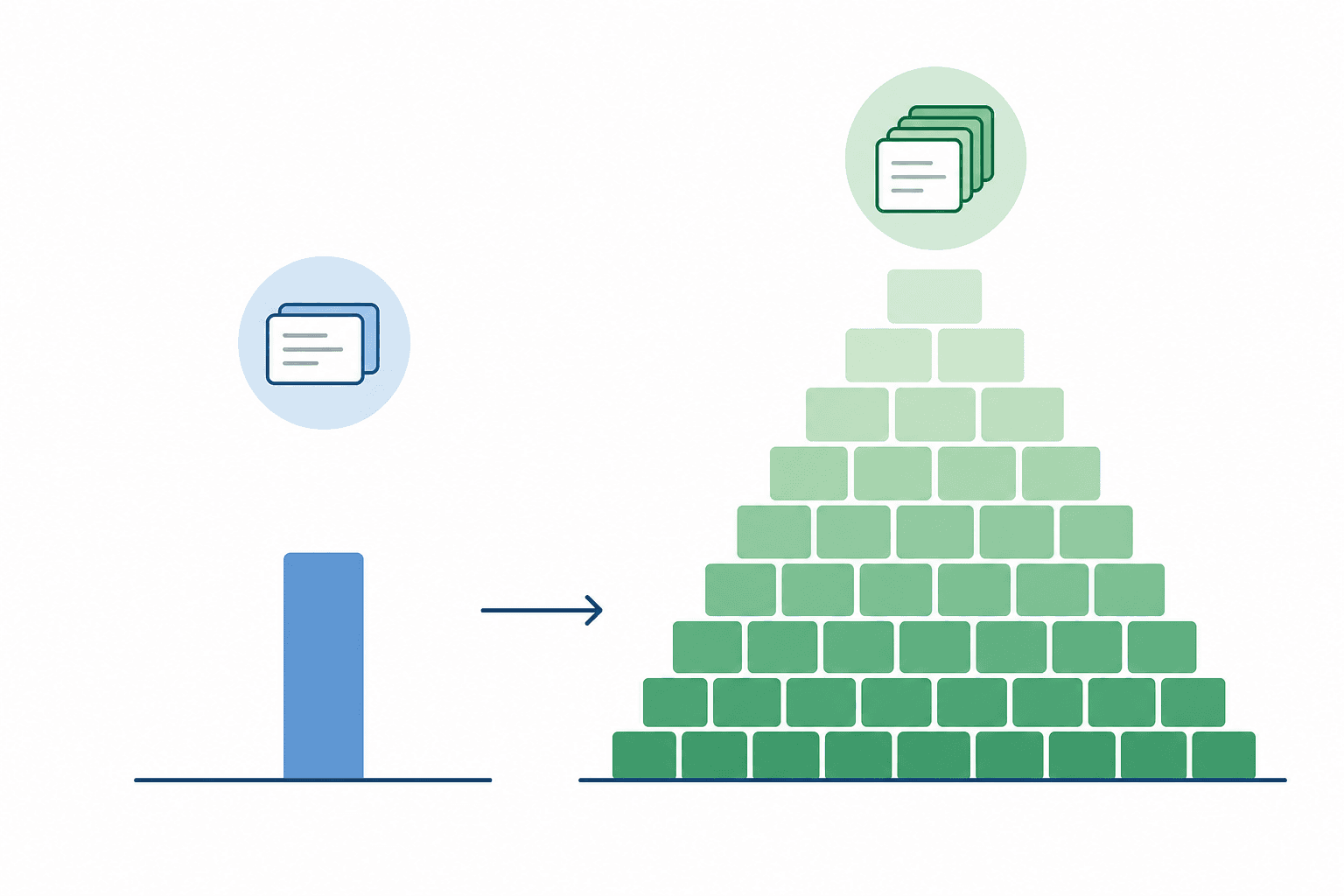
- Beginners: start at 10–20 new cards per day. This produces a manageable review load while you build the habit.
- Once your review queue feels comfortable and consistent, you can slowly increase the limit — but watch your total daily time, not just the number.
- If you're close to an exam and need to learn material faster, increase the limit temporarily with the understanding that your review load will spike within days.
Step 5: Maximum Interval and Relearning Steps
The maximum interval setting caps how far into the future Anki can schedule a review. The default is 36,500 days (roughly 100 years) — which effectively means no cap.
- Leave maximum interval at 36500 days unless you have a fixed exam date in the near future. Capping it at 180 or 365 days forces Anki to schedule mature cards more frequently than your memory requires, increasing workload without improving retention.
- If you have a specific exam in 3–6 months, setting the maximum interval to roughly your exam date makes sense — you don't want a card's next review to fall after the exam.
Relearning steps follow exactly the same rule as learning steps: keep them same-day. A single step of 10m is a sensible default. When you lapse on a review card (press Again), it returns to the relearning queue, you see it once more 10 minutes later, and then it goes back into your review schedule with updated FSRS parameters reflecting the lapse.
Common Mistakes to Avoid
- Worrying about ease hell after enabling FSRS. Ease hell is an SM-2 problem. Under FSRS, the ease factor has no effect on scheduling. The difficulty parameter in FSRS uses mean reversion to prevent runaway difficulty drift, so this concern disappears completely once you switch.
- Setting new cards per day to 9999. Already covered above — this causes an unsustainable review pile and undermines the entire point of spaced repetition.
- Pressing Easy too often. Under SM-2 this inflated intervals dangerously. Under FSRS it misleads the memory model about how well you know a card. Use Easy sparingly — only when a card genuinely feels automatic. For most reviews, Good is the appropriate response.
- Pressing Hard instead of Again when you forgot a card. This is one habit FSRS cannot adapt to. If you press Hard on a card you actually forgot, FSRS will assign an unreasonably long next interval for all response buttons on that card. The rule: press Again if you forgot it, press Hard only if you recalled it after significant effort.
- Copying someone else's FSRS parameters. Parameters are calibrated to your review history. Another student's parameters — even someone studying the same subject — reflect their memory patterns, not yours. Always use the Optimize function with your own data.
Settings Checklist
Use this as a reference when configuring any new deck or verifying your current settings. All values assume Anki 23.10+ with FSRS available.
| Setting | Recommended Value | Notes |
|---|---|---|
| FSRS | Enabled | Toggle on in Deck Options → FSRS section |
| Optimize | Run after enabling | Click Optimize to calibrate to your review history; re-run periodically as your history grows |
| Desired retention | 0.90 | Best starting point for most learners; workload rises sharply above this value |
| Learning steps | 1m 10m | Use 1m 10m 1d for dense or high-volume content; all steps must complete within the same day |
| Relearning steps | 10m | Same same-day rule as learning steps; one short step is sufficient |
| New cards per day | 10–20 (beginners) | Each card adds ~7 review cards over the following month; increase slowly once your queue feels stable |
| Maximum interval | 36500 days | Leave at default unless you have a fixed near-term exam date; shorter caps increase workload without benefit |
| Maximum reviews per day | 9999 (uncapped) | Do not cap reviews — this causes cards to pile up and fall behind schedule |
Next Steps
- How to Import MCAT Decks into Anki (Both Methods, Step by Step) →
A step-by-step tutorial for pre-med students who have chosen an MCAT Anki deck and need to get it working fast — covering the direct .apkg file method for static community decks and the AnkiHub subscription method for the AnKing MCAT deck, plus post-import configuration and fixes for the most common failure states.
- How to Set Up Anki from Scratch: A Complete Beginner's Guide →
A step-by-step tutorial for first-time Anki users — covering installation on every platform, enabling FSRS settings, creating your first deck and cards, syncing across devices with AnkiWeb, and avoiding the six mistakes that cause most beginners to quit within the first week.
- How to Generate Flashcards from a PDF: A Step-by-Step Guide for Students →
A method-layered tutorial for students who want to turn lecture slides, textbook chapters, or study guides into study-ready flashcards — covering AI generator tools, LLM prompt workflows, and the Anki CSV pipeline, with guidance on handling scanned PDFs and checking card quality before you study.
Comments
Join the discussion with an anonymous comment.